

 8 minutes read
Clipto YouTube Downloader is a YouTube to MP3 service that allows you to download videos from YouTube to your computer in any resolution, format, and device. It is simple, fast, easy to use, and works for all devices. This downloader is great for all casual users who need to have their favorite videos in offline mode at their fingertips.
However, Clipto YouTube Downloader also has some limitations. Many users have reported issues with the downloading speed and even limitations on higher-quality formats. The site does not always work properly and needs to be updated. If you are a heavy YouTube downloader, then you should look at Clipto YouTube Downloader alternatives with more features. In this Clipto YouTube Downloader review, we will look at its features, its pros and cons, and the best alternative to it so you can enjoy downloading YouTube videos without any issues at all.

Part 1. What is Clipto YouTube Downloader
Clipto AI YouTube Downloader is an online tool designed to help users quickly download videos from YouTube. It supports multiple formats and resolutions, making it easy to watch content offline on any device. With its simple interface, Clipto AI YouTube Downloader is ideal for anyone who wants a fast and convenient way to save their favorite videos without installing heavy software.
▼ How to Use Clipto.AI YouTube Downloader?
- Step 1: Open YouTube and copy the URL of the video you want to download.
- Step 2: Go to the Clipto.AI YouTube Downloader website.
-
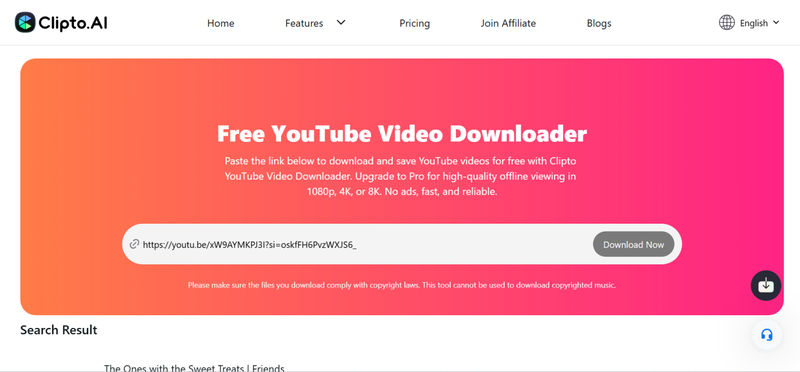
Step 3:
Paste the copied video link into the input field on the site.
-
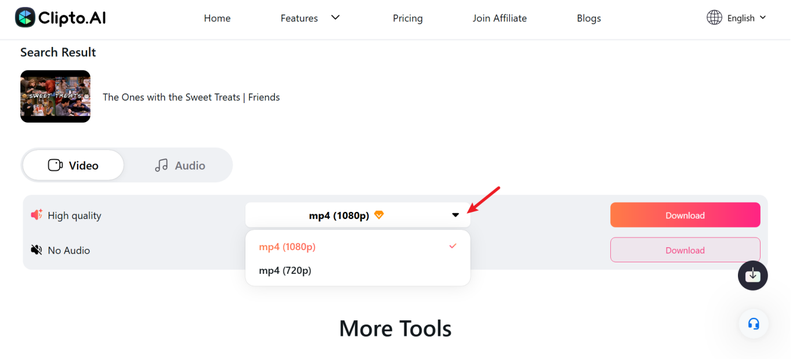
Step 4:
Select your preferred format (MP4, MP3, etc.) and resolution.
-
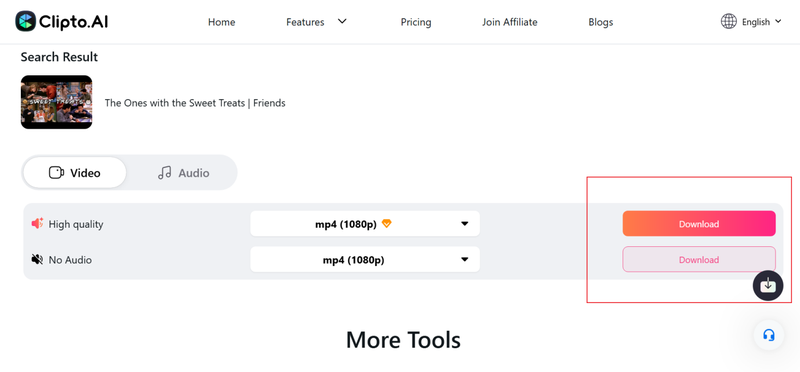
Step 5:
Click the Download button to start processing the video.
- Step 6: Once the download is complete, save the file to your device and enjoy offline viewing.


Part 2. Key Features of Clipto YouTube Downloader
Now, let’s talk about Clipto AI YouTube Video Downloader from a user’s perspective. It’s a handy tool if you just want to grab videos or audio quickly without messing with complicated settings. The interface is clean, the process is straightforward, and it works on pretty much any device. However, like any tool, it has its highs and lows. Let’s look at its features, its pros, and cons all at once.
- Save videos as MP4, MP3, and other formats
- Supports HD and Full HD content
- Quick downloads, even for larger files
- Runs entirely in your browser
- Works on Windows, Mac, Android, and iOS
- Simple layout that’s easy to navigate
▼ What I Like:
- Super easy to use, just paste a link and go
- Options for both video and audio downloads
- Works across devices without extra software
▼ What I Dislike:
- Can’t download multiple videos at once
- Website ads can be a bit distracting
- Lacks advanced features for power users
- Only supports the YouTube download feature
- Few resolutions to choose from, the highest is only 1080P
So, if you’re looking for a quick, no-fuss way to download YouTube content, Clipto AI YouTube Video Downloader gets the job done, especially for casual users who just want simplicity and speed. But if you want to download multiple videos at once in high quality and fast speed, then you should explore some more powerful alternative to Clipto.ai Youtube Downloader
Part 3. What Is the Best Alternative to Clipto.ai YouTube Downloader?
If you’ve tried Clipto AI YouTube Downloader but want something more powerful, FliFlik UltConv Video Downloader is a reliable alternative worth checking out. Unlike Clipto, UltConv Video Downloader isn’t limited to just YouTube. It supports over 10,000 websites, including TikTok, OnlyFans, Netflix, and Instagram. It also handles playlists, channels, and albums in one click, making it perfect for anyone who wants to download multiple videos or music tracks efficiently. The tool preserves top-quality resolutions up to 8K and audio up to 320kbps, so you won’t compromise on quality when saving content offline.
It can convert videos to dozens of formats like MP4, MOV, MP3, and WAV, remove DRM from Spotify or Apple Music, and even download live streams directly from sites like Twitch or YouTube without needing to record them. A built-in browser and private folder add convenience and security, giving you complete control over your downloads. For anyone frustrated by Clipto’s limitations, UltConv Video Downloader feels like a full-featured media hub designed to save time and maintain high-quality content.

- Supports downloads from 10,000+ websites, YouTube, TikTok, OnlyFans, Netflix, and more
- Batch download multiple videos and music files at once
- High-quality video supports up to 8K resolution
- Convert videos to MP4, MOV, MP3, WAV, and 100+ formats
- Remove DRM from Spotify, Apple Music, and YouTube Music
- Save live streams from YouTube, Twitch, and TikTok in real time
▼ How to Download YouTube Video with UltConv Video Downloader?
FliFlik UltConv Video Downloader is a fast and reliable tool for both Mac and Windows users, allowing you to save YouTube videos in high quality. Once you’ve installed the program, follow these simple steps to download a YouTube video:
 Secure Download
Secure Download
Secure Download
-
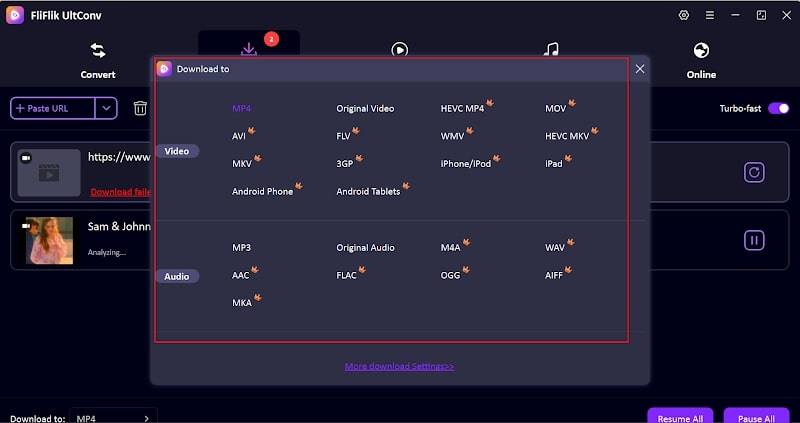
Open UltConv Video Downloader and go to the Download tab. Click the “Download to” button at the bottom to start.

-
Choose your preferred output format. Multiple options for video and audio downloads.
-
Open YouTube in your browser and copy the URL of the video you want to download.

-
Go back to UltConv. If the program detects the link automatically, simply click Download to save the video.

-
If the link isn’t detected automatically, paste it manually into the search box and press Download.



Once the download finishes, your video will be ready to watch offline in the selected format, with no buffering or streaming interruptions.
Part 4. Clipto YouTube Downloader VS. FliFlik UltConv Video Downloader
As we discussed, Clipto YouTube Downloader is straightforward to use, ideal for quick downloads from YouTube. However, it lacks advanced features like batch downloads and multi-site support. FliFlik UltConv Video Downloader, on the other hand, is a powerful all-in-one solution. It supports thousands of websites, multiple output formats, and high-resolution downloads, making it far more versatile for serious users who want more control and flexibility. Here’s a closer look at how they compare across key aspects:
| Feature | FliFlik UltConv Video Downloader | ClipTo YouTube Downloader |
|---|---|---|
| Output Formats | MP4, MOV, MP3, WAV, 100+ formats | Basic common formats (like MP4 or MP3) |
| Video Quality | Supports HD up to 8K/4K/2K/1080p, high quality preserved | Only supports 1080p/720p |
| Batch Download | Yes, you can queue multiple videos or playlists | No |
| Streaming Sites Supported | 10,000+ sites wide support, including many social & streaming platforms | Mostly YouTube |
| Consistent Performance | More stable and versatile, good for heavy use, bulk downloads, and different content sources | Simple and quick for single downloads, but limited features |
Final Words
If you need to grab a quick clip from YouTube, Clipto YouTube Downloader gets the job done simply. But if you’re serious about downloading videos, whether from YouTube or any of thousands of other sites, FliFlik UltConv Video Downloader is clearly a stronger, more flexible choice. It handles bulk downloads, offers more formats and better quality, and works across platforms. Want a smoother, more reliable way to build your offline video library? Give UltConv a try today.
Secure Download
Secure Download
Hey there! I am Maxwell Clark. I'm always looking for new tech tools that make a difference, from making visuals and audio better to making workflows better. I'm going to share tips and tricks for using AI tools for videos, audio, and images. I'm excited to help you navigate the digital world more efficiently and creatively!

