

 5 minutes read


Images make Twitter more engaging. They help share news, express ideas, and capture moments instantly. So when you open X (Twitter), and pictures don’t load, it can be really annoying. Blank spaces instead of images can make scrolling feel incomplete.
Most of the time, Twitter images fail to load due to slow internet, app glitches, cache issues, or settings such as data-saving mode. In this article, we’ll cover simple, practical ways to solve the “Twitter pics not loading” problem. Each solution is easy to follow, whether you’re on a phone or a computer. Keep Reading!

Part 1. How to Fix Twitter Pictures Not Loading?
Solution 1. Check Your Internet Connection
Twitter images need a stable internet connection to load properly. If your WiFi or mobile data is slow, pictures may appear blurry, broken, or won’t load at all. First, check if other apps or websites are working. If not, restart your WiFi router or turn mobile data off and on again. Moving closer to your router can also help improve signal strength. Sometimes, simply switching between WiFi and mobile data can fix the issue quickly.
Solution 2. Clear the X Cache and Data
Cache files help apps load faster, but when they become too old or corrupted, they can cause loading problems. Go to your phone settings, find the X app, and clear cache. If images still don’t load, you can clear app data (just remember you may need to log in again). This step removes temporary junk files and gives the app a fresh start.
Solution 3. Disable Data Saving Mode in Twitter
Another thing is data saving mode reduces data usage by limiting image quality and sometimes stopping images from loading automatically. Open Twitter settings, go to data usage options, and turn off data saver. Once disabled, refresh your feed and check if images appear normally. This is especially useful if you are using mobile data.
Solution 4. Log Out and Log Back in to Twitter
Logging out can reset small account-related glitches. Simply log out from your X account, close the app completely, then log back in after a few seconds. This refreshes your session and often fixes temporary bugs causing photos not to load.
Solution 5. Update, Uninstall, or Reinstall Twitter
Using an outdated app version can cause performance issues. Go to your app store and check for updates. If the problem continues, uninstall and reinstall the app. This removes corrupted app files and installs a fresh, stable version of Twitter, which often solves persistent image loading problems.
Extra Tip. How to Download X (Twitter) Videos and Images?
Sometimes, you might want to save Twitter videos and pictures for later viewing without worrying about network connectivity issues or content disappearing from your feed. The FliFlik UltConv Video Downloader can download videos, music, and pictures from over 10,000 websites while maintaining good image quality and offering flexible format options. You can save videos in 720p to 8K high-definition quality and convert files to formats such as MP4, MP3, WAV, AAC, and FLAC.

- Download videos from 10,000+ websites including Twitter, YouTube, TikTok, and more
- Save videos in HD quality from 720p to 8K resolution
- Convert files to MP3, WAV, AAC, and 100+ formats
- Download playlists, albums, and multiple files at once
- Download live streams directly and save them as MP4 files
- Remove DRM protection from music platforms
- Use built-in browser for easy searching and downloading
▼ Steps to Download a Twitter DM Video with FliFlik UltConv Video Downloader:
-
Open FliFlik UltConv Video Downloader and go to the Download tab. Click “Download To” to choose your preferred output format.
FREE DOWNLOAD![secure download]() Secure Download
FREE DOWNLOAD
Secure Download
FREE DOWNLOAD![secure download]() Secure Download
Secure Download

-
Select the video output format you want. MP4 is the most commonly used format because it works on most devices.

-
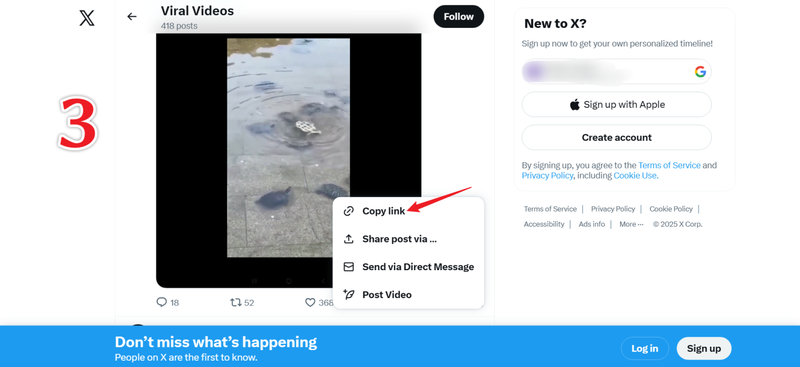
Open Twitter in your browser, find the video you want to save from your DM or feed, then copy the video URL from the address bar or share button.
-
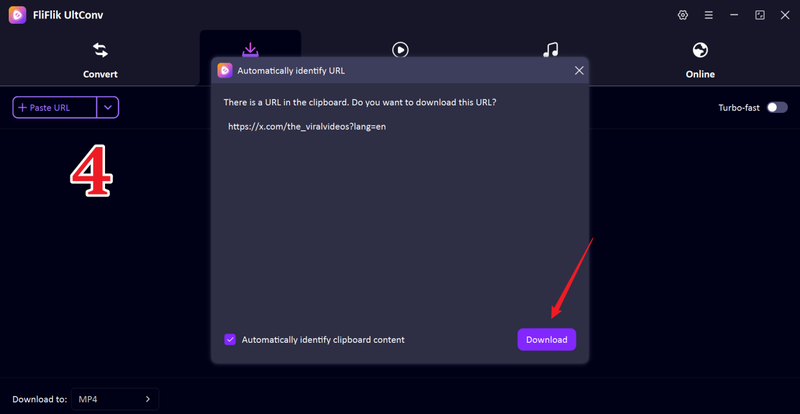
Go back to UltConv. If the software automatically detects the video, simply click Download to start saving the file.
-
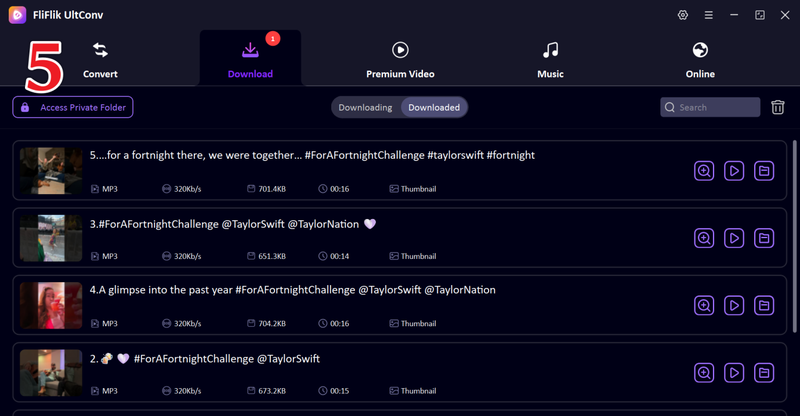
If the video does not appear automatically, paste the copied link into the search box inside the software and click Download to save the video manually.


FAQs
Q1. Why do images on Twitter not load?
Twitter images may not load due to slow internet, app cache problems, outdated app versions, or data saving mode being turned on. Sometimes it is just a temporary server glitch.
Q2. How do I fix the problem of pics not loading on X?
You can fix this by checking your internet connection, clearing app cache, turning off data saver mode, logging out and logging back in, or updating and reinstalling the app.
Q3. How do I refresh the X app on iPhone?
Close the X app completely from the background, reopen it, and pull down the feed to refresh. You can also restart your phone if the problem continues.
Conclusion
Twitter pics not loading is a frustrating and common problem. To completely avoid these loading issues, many users prefer to save their favorite media files directly. FliFlik UltConv Video Downloader helps you download high-quality Twitter videos and images in various formats. By securely storing media files offline, you can enjoy a smooth viewing experience without worrying about application malfunctions or slow network speeds.
 Secure Download
Secure Download
Secure Download
Hello, I research and introduce useful solutions for AI videos, images, and audio tips in our daily life. If you learn these things, you can easily deal with the problems of the new era.

