

 8 minutes read
Grok Spicy Mode is xAI’s unrestricted creative feature in Grok Imagine that allows users to generate bold, explicit NSFW (Not Safe For Work) images and short animated videos, including nudity, erotic scenes, and adult-themed motion content, without the heavy censorship found on most other AI platforms. While many tools block or heavily filter sexual material, Grok offers significantly more freedom for “spicy” outputs, making it popular among creators seeking uncensored adult AI art and animations.
Although full, reliable access to Spicy Mode and video generation typically requires an X Premium+ or SuperGrok subscription, people continue searching for workarounds and free methods to explore this powerful (and controversial) capability. We will look in detail at how you can use Grok Spicy mode to make NSFW videos.

- Part 1. What is Grok Imagine Spicy Mode?
- Part 2. What You Need to Know before Using Grok Spicy Mode
- Part 3. How to Generate NSFW Videos/Images in Grok
- Part 4. Tips of Grok Image NSFW Prompts to Bypass Filters
- Part 5. How to Download NSFW Videos for Offline Watching
- Bonus Tip: How to Download Sora Video without a Watermark
- Final Words
- FAQs about Grok Imagine Spicy Mode
Content Table:
Part 1. What is Grok Imagine Spicy Mode?

Grok Imagine is an AI-powered image and video generation tool developed by xAI (the company behind Grok). It allows users to create images from text prompts and animate them into short videos (typically 6–15 seconds long), often with added motion, styles (like realistic, anime, or illustration), and even synchronized audio or music. Launched around mid-2025, primarily as a mobile app feature (available on iOS and Android for eligible users), it’s integrated into the Grok ecosystem. It emphasizes creative freedom with features such as text-to-image, image editing, style transfer, and image-to-video conversion.
Grok AI Spicy Mode is a specialized, optional setting within Grok Imagine that enables the generation of more bold, provocative, or NSFW content, including partial nudity, suggestive themes, or adult-oriented visuals, which most mainstream AI tools (like those from OpenAI or Google) heavily restrict or block entirely. It’s designed for “unrestricted creativity” in artistic or edgy contexts, but it still includes some moderation (e.g., extreme prompts may get blurred, blocked, or result in a “Content Moderated” message).
- NSFW-enabled generation : Supports partial nudity, suggestive poses, or risqué themes in photorealistic, anime, or illustration styles for images and short animated videos.
- Multiple animation modes : Often one of four options (e.g., Normal, Fun, Custom, Spicy), with Spicy offering the fewest restrictions for bolder outputs, including synced audio for immersive clips.
- Creative flexibility : Higher threshold for adult content, allowing “spicy” or boundary-pushing results that other platforms ban, while still having built-in safeguards against extreme violence, harm, or certain deepfakes.
- Short video output : Turns static images (generated or edited) into 6–15 second looping or animated clips with motion effects.
- Premium access : Typically requires a paid subscription like SuperGrok or X Premium+ to unlock fully, available via the Grok mobile app (with toggles or dropdown selections for the mode after generating an image).
- Moderation balance : Some protective filters remain (e.g., blurring or rejection for overly explicit prompts), and ethical use is emphasized to avoid non-consensual or harmful content.
Part 2. What You Need to Know before Using Grok Spicy Mode
Before diving into Grok Imagine Spicy Mode (also commonly searched as “Spicy Mode Grok”), here are the key things to understand and prepare for. This mode enables more unrestricted, adult-oriented (NSFW) image and video generation, but it comes with important requirements, limitations, and responsibilities.
Paid Subscription Required for Full Access
Spicy Mode is limited in the free version of Grok. You typically need a paid subscription like X Premium+ (around $16/month) or SuperGrok (around $30/month or higher tiers) to unlock it and reliably use it. Free users may access basic image/video features.
Primarily Available on the Mobile App
The feature works best and is most consistently accessible through the official Grok mobile app on iOS and Android. Web/desktop versions of Grok or X may have limited, no, or inconsistent support for Spicy Mode and Imagine tools. Download/update the app from the App Store or Google Play, and ensure it’s the latest version.
Age Restrictions and Content Settings
You must be 18+ (or the legal adult age in your region) to access adult/NSFW features. The app often prompts for your birth year during setup or when enabling sensitive content, and you may need to verify or toggle NSFW/sensitive content preferences in your account settings. There is not always strict formal ID verification, but attempting to use it underage violates terms and can lead to blocks or issues.
Legality, Safety, and Ethical Use
Always prioritize consent, respect, and compliance with laws. Avoid generating non-consensual deepfakes, explicit content involving real people (especially without permission), likenesses of minors, or anything depicting child exploitation. These are illegal in most jurisdictions and can result in serious consequences (bans, investigations, or legal action in places like the US, EU, or others). xAI has safeguards and moderation (e.g., blocking/blurring extreme prompts), but users are responsible for outputs.
Part 3. How to Generate NSFW Videos/Images in Grok
Grok Spicy Mode Images lets you create NSFW (suggestive, partial nudity, or adult-themed) images and short animated videos (6–15 seconds). It’s mainly available in the Grok mobile app (iOS/Android) for paid subscribers (X Premium+ or SuperGrok). Here’s how to turn on Grok spicy mode and generate NSFW videos.
-
Step 1: Download or update the official Grok app (App Store/Google Play). Log in with your X account.
-
Step 2: Tap your profile/avatar → Go to settings/account → Edit birth year to confirm 18+. Then: Settings → Privacy and safety → Content you see → Toggle on ” Display sensitive content ” or similar NSFW options. (This unlocks Spicy mode; restart app if needed.)
-
Step 3: Go to the Imagine or Text-to-Image tab. Enter a detailed prompt (e.g., artistic/suggestive scene, avoid real people or illegal content). Select a style (Realistic, Anime, etc.).
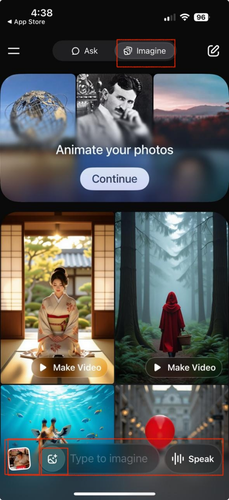
-
Step 4: Once the image is ready, tap it → Select the Make Video or Make Image option. In the dropdown/modes (Normal, Fun, Custom, Spicy), choose Spicy for bolder motion and effects. Confirm and generate the short clip.
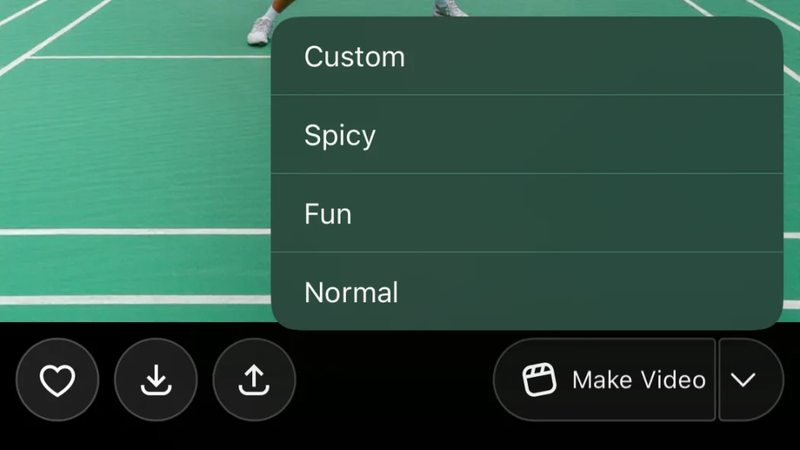
-
Step 5: Watch the video (may have moderation like blurring). Download/share if it looks good, or regenerate/edit the prompt.


Part 4. Tips of Grok Image NSFW Prompts to Bypass Filters
Here are practical tips and prompt examples that users report higher success rates with (80–90% in some cases, per community shares). Always start with Spicy Mode enabled, use fictional/artistic subjects, and avoid real people, minors, or illegal themes.
- Say “sensual”, “glistening skin”, “soft curves” instead of dirty or direct words.
- Call it “fine art nude”, “boudoir photo”, or “classical painting style” to sound classy.
- Add stuff like “dreamy glow”, “oily shine,” “ethereal light,” so it feels less real.
- Talk about clothes “clinging wet” or “slipping off” instead of just saying naked.
- Focus on mood and light: “candle shadows on her body” works way better.
- Start with something soft, then slowly make the prompt sexier step by step.
- End with “tasteful and elegant” or “artistic sensuality” to calm the filter.
- Never use real names, celebrities, kids, or anything violent; it can lead to instant block.
- Try words like “steam silhouette”, “wet fabric outline”, “tiny pasties falling”.
- Make the first image normal, then switch to Spicy video mode for the sexy movement.
Part 5. How to Download NSFW Videos for Offline Watching
Generate NSFW videos online is fun, but it’s not always convenient for offline watching. If you want to download NSFW videos to enjoy alone or keep them permanently, an almighty downloader is indispensable for you. That’s where you can use UltConv OnlyFans Downloader as an all-in-one tool designed for fans who love saving NSFW videos, photos, and even private messages in crystal-clear quality.
Unlike sketchy online downloaders, FliFlik UltConv All-in-One Downloader works directly on your computer, ensuring total privacy, stable downloads, and no loss in quality. It supports download videos from 10,000+ site, including OnlyFans, Fansly, JustForFans, FansOne and other fans site.You can download entire collections in one go, convert videos to MP4 in 1080p or 4K, and even grab message videos with a single click.

- Download OnlyFans videos to MP4 in 1080p or 4K
- Save OnlyFans DM videos in one click
- Bulk download multiple videos at once
- Remove DRM protection to watch anywhere
- Download profile images without limits
- Also supports Fansly, JustforFans, ManyFans, and Patreon
▼ Steps to Download OnlyFans Videos with FliFlik UltConv
-
Download and install FliFlik UltConv Video Downloader from the official website.
FREE DOWNLOAD![secure download]() Secure Download
FREE DOWNLOAD
Secure Download
FREE DOWNLOAD![secure download]() Secure Download
Secure Download
-
Once it’s installed, open the program and head over to the Online section. Paste the link to the OnlyFans website to get started.
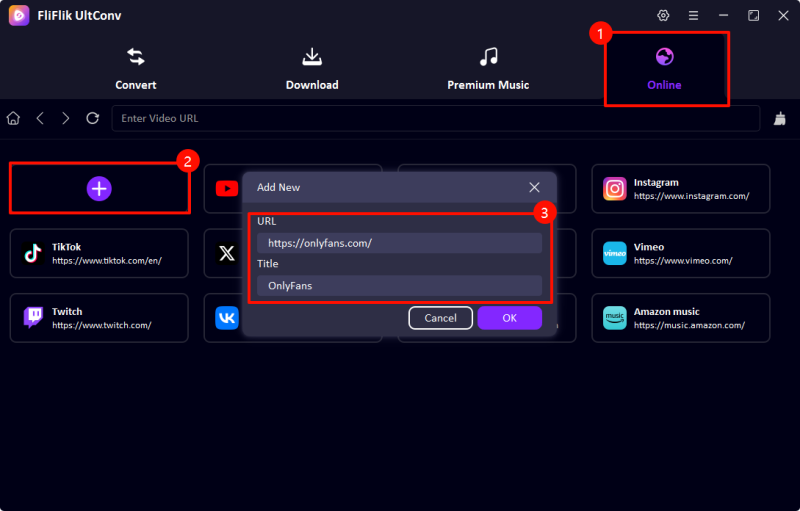
-
Log in to your OnlyFans account directly inside UltConv. After signing in, you’ll be able to view all your purchased or subscribed content within the app.
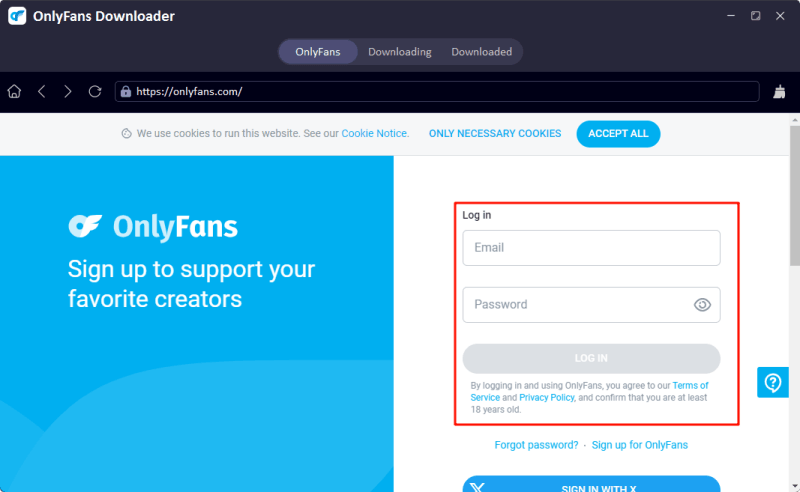
-
Find the video you want to download by browsing or searching through your feed. Once located, click the green Download button to start saving.

-
UltConv will automatically process and download the video in your preferred resolution and format, saving it safely on your computer.
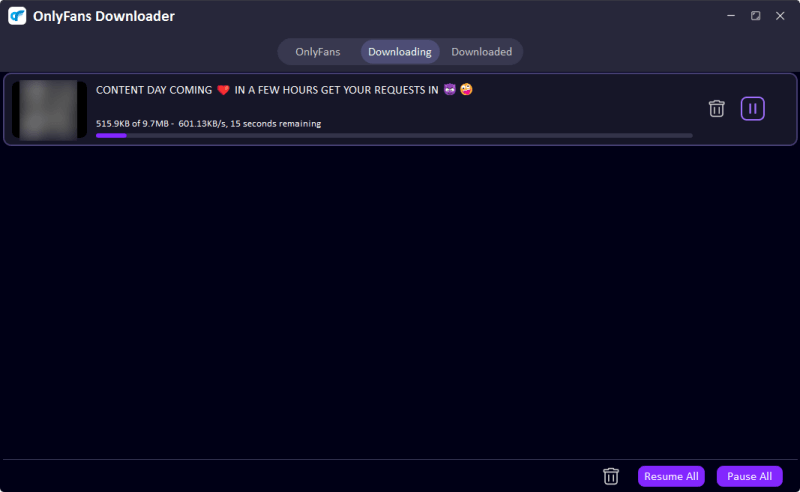


And that’s it! Your favourite NSFW video is now stored securely on your device with no more access limits, no more expiration dates, just your favorite content available anytime, anywhere.
Bonus Tip: How to Download Sora Video without a Watermark
Sora is also a powerful AI video generator, but watermarked videos from Sora are annoying. If you’ve already created and downloaded a Sora 2 video but want a clean version without the watermark, you can use FliFlik Free Sora Watermark Remover. This is an online tool designed to quickly remove watermarks from Sora videos without installing software or creating an account. It works directly in your browser, processes videos fast, and keeps the original quality as much as possible. The tool is especially useful for users who already have their Sora video link and simply want a watermark-free copy for sharing or reuse.
▼ Steps to Remove the Watermark with FliFlik Free Sora Watermark Remover
-
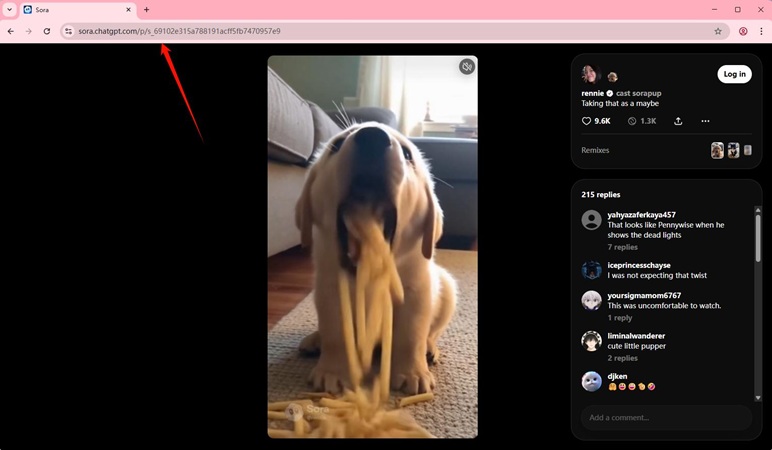
Go to the Sora Explore section. Copy the Link of the Sora video.
FREE DOWNLOAD![secure download]() Secure Download
FREE DOWNLOAD
Secure Download
FREE DOWNLOAD![secure download]() Secure Download
Secure Download
-
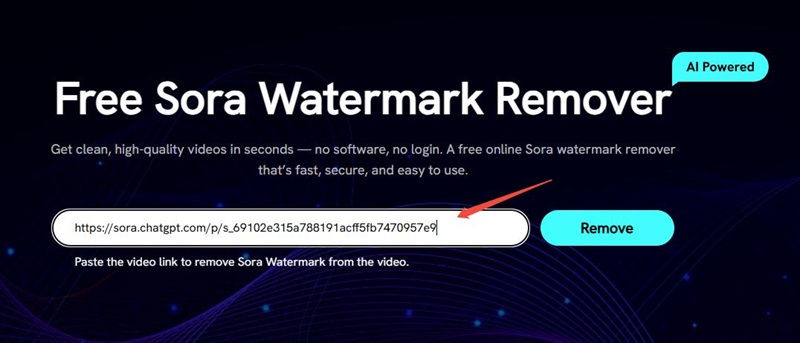
Open the Free Sora Watermark Remover website in your browser. Paste the video link into the input box on the page. Click the Remove button to start processing.
-
After processing is complete, download the watermark-free version of your video.
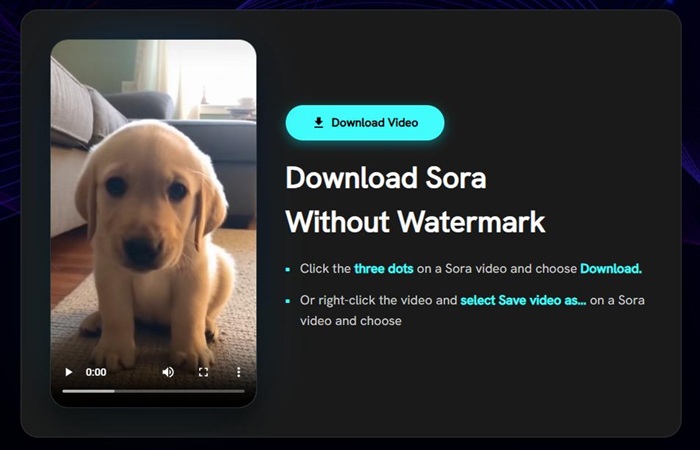


That’s it. Just paste the link, click remove, and save your clean video.
Final Words
Grok Imagine Spicy Mode stands out as one of the most open AI tools for creative, adult-oriented image and video generation in 2026. While it comes with subscription requirements, mobile-first access, and responsible-use guardrails, it gives users real freedom for artistic and suggestive content that many other platforms block outright. Whether you’re experimenting with bold prompts or animating spicy scenes, always prioritize fictional subjects, consent, and local laws to stay safe and ethical. Want to take your AI videos even further? Check out the Fliflik Free Sora Watermark Remover. Simply paste your Sora video link, hit Remove, and download a clean version in seconds. It’s a quick, no-signup fix for watermark-free clips. Happy creating; keep it fun, responsible, and creative!
 Secure Download
Secure Download
Secure Download
FAQs about Grok Imagine Spicy Mode
Q1. Does Grok still have Spicy Mode?
Yes, it’s still available for paid users (X Premium+ or SuperGrok), mainly in the mobile app.
Q2. Does Grok allow NSFW?
Yes, more than most AIs, Spicy Mode supports suggestive and adult-themed content, but with limits on real people, non-consent, and extreme stuff.
Q3. Can Grok generate NSFW images?
Yes, it can create NSFW images and short videos in Spicy Mode, especially fictional/artistic ones, though very explicit prompts may get moderated or blurred.
Hey there! I am Maxwell Clark. I'm always looking for new tech tools that make a difference, from making visuals and audio better to making workflows better. I'm going to share tips and tricks for using AI tools for videos, audio, and images. I'm excited to help you navigate the digital world more efficiently and creatively!
