6 minutes read
If you are looking for a great Sora watermark remover, this article is for you. We’ll look at the 7 best free Sora watermark removers in 2026. We will discuss their features, ease of use, and effectiveness. These tools let you remove Sora 2 watermarks without affecting quality, so you can focus on making polished content without distractions. Let’s find your best options now.

Part 1. Why You Need a Sora Watermark Remover?
As we know, watermarked videos from Sora are annoying. Also, sharing watermarked videos on social media or with others often looks incomplete or messy. A good Sora watermark remover can help you easily and quickly remove watermarks from your videos. Your videos will look clean and high-quality, without distractions or branding. If you’re planning to upload directly to social media or share your videos, watermark removal can help you present your videos in the best possible way. Apart from social media, watermark removal can also be helpful in presentations, educational content, personal projects, and more.
Part 2. 7 Free Sora Watermark Removers For You
With our list of 7 free Sora watermark removers, you can easily and fastly remove Sora watermarks from your video without compromising quality. Our choices below work online or require just a simple setup. Here are some best options for you.
1. FliFlik Sora Watermark Remover

FliFlik Sora Watermark Remover lets you quickly remove watermarks from Sora videos online with a Sora video link. The AI tool automatically parses the video link and gets the watermark-free version of the Sora video. It’s the most recommended option for social media creators who want polished videos without distractions or loss of quality. And FliFlik Sora Watermark Remover is completely free to use.
2. Savesora

I tested Savesora myself and found it pretty easy to use — you just paste a Sora video link and let it remove the watermark online. The free plan has some limitations and can be a bit slow, but it still gets the job done. What stood out to me is its ability to extract the original prompt after watermark removal, which is super useful if you want to recreate or remix similar videos.
3. EZRemove AI

EZRemove AI quickly removes Sora watermarks while keeping your video clear and smooth. It works with popular formats and handles moving or semi-transparent watermarks without losing quality. Just upload your video, let the AI remove the watermark, and download the finished file. The tool preserves textures, edges, and resolution, so your video stays professional-looking. It’s completely online, with no software to install or sign-up needed. EZRemove AI is perfect for content creators who want clean videos fast, whether for social media, presentations, or personal projects.
4. Topyappers Sora Watermark Remover

Topyappers provides a reliable online solution to remove Sora watermarks while keeping video quality intact. It supports MP4, MOV, AVI, and other formats, and can process files up to 500MB. The AI tracks watermarks across frames, including those that move or shift in opacity, and reconstructs the background naturally. Users simply upload their video, let the AI work, and download the clean version. The interface is straightforward, making it suitable for beginners or professionals. Topyappers ensures videos are ready for social media, presentations, or personal use without distracting watermarks.
5. MagicEraser

MagicEraser is an online tool that removes Sora watermarks without affecting video quality. It supports popular formats like MP4 and MOV, keeping motion and textures natural. The AI handles dynamic watermarks that shift position or opacity across frames. Using it is easy: upload your video, let the tool remove the watermark, and download the cleaned version. MagicEraser is perfect for anyone wanting to share videos online or use them in projects without the watermark getting in the way. It’s fast, efficient, and requires no software installation.
6. BasedLabs Sora Watermark Remover

BasedLabs provides an online tool to remove watermarks from Sora videos. It works with common formats like MP4, AVI, and MKV, keeping the resolution and motion intact. The AI can detect watermarks even if they move or change transparency, delivering clean results across all frames. Uploading and downloading videos is simple, making it easy for anyone to get watermark-free content quickly. BasedLabs is great for content creators and casual users alike, letting you share or repurpose videos without watermarks while preserving the original quality and look.
7. Fineshare AI Video Sora Watermark Remover

Fineshare AI removes Sora watermarks while keeping your video’s resolution, motion, and texture intact. It works with formats like MP4, MOV, and AVI, and can track moving watermarks across frames automatically. The tool is completely online, so there’s no need to install anything or sign up. You just upload your video, the AI removes the watermark, and you can download the clean version right away. Fineshare is perfect for social media creators, teachers, or anyone who wants polished videos without distractions. Its focus on simplicity and quality ensures your content looks professional and ready to share.
Part 3. How to Remove Sora Watermark?
Of all Sora watermark removers, FliFlik Sora Watermark Remover is the best option. We recommend it for anyone who wants a simple way to get clean videos. Here’s how you can use it to remove Sora video watermarks.
-
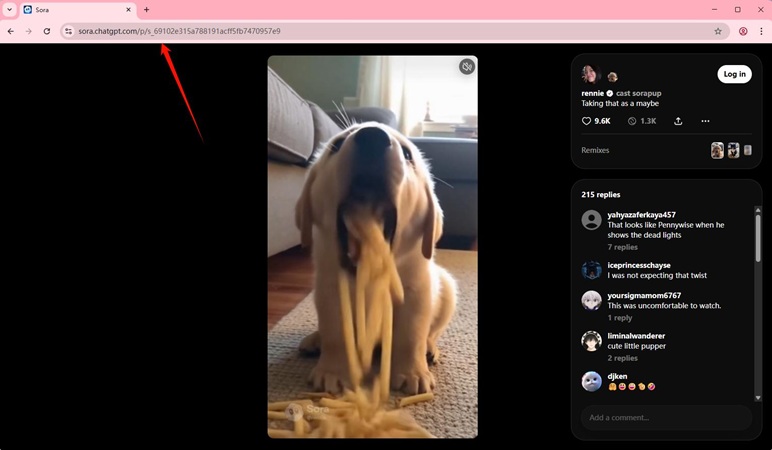
Step 1:
Go to the Sora Explore section. Copy the Link of the Sora video.
-
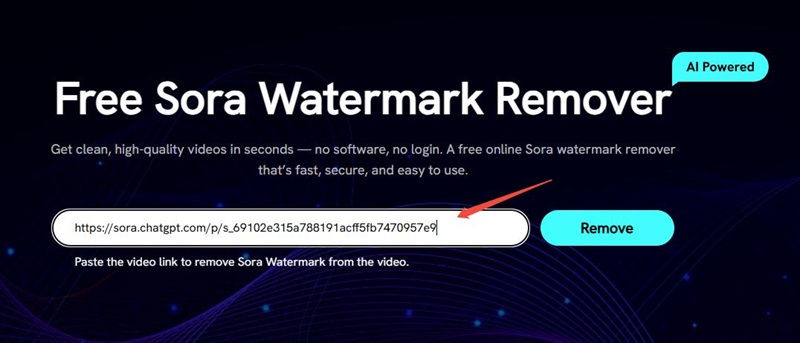
Step 2:
Heading to FliFlik Sora Watermark Remover, and paste the link to the input box. Hit the Remove button to start remove Sora watermark.
-
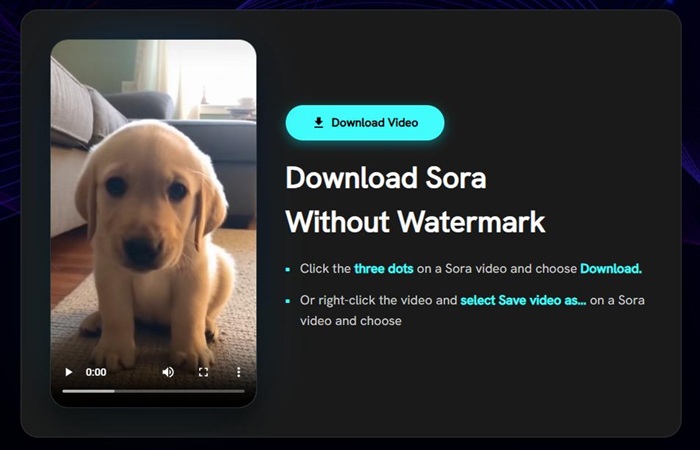
Step 3:
Preview and download your video without the watermark. Your content is now ready to share without distractions.


Final Words
A watermark can distract from the quality and professionalism of your videos. FliFlik Free Sora Watermark Remover makes it easy to remove the watermark from Sora videos. So, if you have some videos for social media, presentations, or personal use, you should know the proper way to remove watermarks to look smooth and professional. We hope the above tools helped you with removing the watermark from your video.
 Secure Download
Secure Download
Secure Download
Hey everyone! I'm Ivan Davis, and I'm passionate about using AI to streamline my workflow in the voice changer industry. So excited to empower users by changing the voice to any voice they want!