7 minutes read
AI music tools are becoming popular. They are a favorite among artists for one reason: it’s easy to make music. You can generate, remix, or create entirely new music with just a few clicks. While Suno AI is one of the most popular options, it is not the only one. There are several Suno AI alternatives, each offering different features, greater control, or an entirely new experience. In this article, we will show you the 10 best Suno AI alternatives. Use these tools to play with new sounds and try your creative ideas.

Part 1. What is Suno AI Music Generator?

Suno AI is an audio platform that lets anyone create music and voice tracks in minutes. Whether you’re an artist, a content creator, or a business owner, you can create professional-sounding audio without hours in a studio. Suno AI offers realistic voice cloning, AI music generation, and support for multiple languages.
Suno AI’s interface is user-friendly. Simply drag and drop, choose a template, and preview your project instantly. If you’re new to audio creation, Suno AI has you covered end-to-end. Create everything from narration and background music to full-fledged audio projects in no time and export them in high quality.
- Voice cloning for creating realistic custom voices
- AI music composition based on genre, mood, or instruments
- Multi-language support for global audio projects
- Drag-and-drop interface for easy audio creation
- Pre-set templates for common use cases
- Real-time previews of generated audio
Part 2. How to Choose Suno AI Alternatives
When evaluating alternatives to Suno AI, keep an eye on these key features:
Audio Quality
The sound quality of the music you make is huge. You want a tool that can make high-quality sound, like 320 kbps, or even those really crisp formats like WAV or FLAC. Better quality means your tracks sound polished and ready for anything, whether it’s music, a podcast, or just narration.
Genre & Style Flexibility
You don’t want the AI to feel limited or repetitive. The best ones let you pick from all kinds of genres, moods, instruments, and musical structures. This flexibility gives you the creative control you need, whether you’re working on lo-fi beats, cinematic scores, or pop jingles.
Voice Cloning / Synthesis
If you need singing, talking, or character voices, look for a tool that can copy or create voices. This feature lets you upload a sample and then exactly replicate that voice. It’s a game-changer for creators, letting you make consistent voiceovers without having to re-record anything.
Ease of Use & Interface
A powerful tool is useless if it’s too hard to figure out. Look for platforms that are friendly for beginners, think drag-and-drop options, pre-made templates, and real-time previews. Less time learning means way more time creating, even if you’re new to producing music.
Export Formats
The ability to save your audio in different file formats matters a lot. MP3 is standard, but you might need WAV, MIDI, or even stems (separate tracks) depending on your final project. If you plan to edit or layer the audio later, having those high-quality or editable files is a massive plus.
Batch Processing / Bulk Rendering
If you plan on doing work at scale (like making lots of tracks for a podcast or playlist), you need the tool to handle bulk rendering. Instead of saving files one by one, you can queue up many projects at once. This saves a ton of time when you need to produce a lot.
Musical Control: Tempo, Melody, Harmony
A good AI music generator should let you adjust the technical music stuff: tempo (BPM), chord progression, melody, and harmony. These controls help you really shape the music exactly how you want it, instead of leaving everything up to chance.
Multi-Language & Multi‑Voice Support
If your content is global, multi-language support is huge. The AI should be able to create voices or songs in different languages or accents. This is invaluable for things like international ads or multilingual songs.
Cloud vs Desktop & Offline Access
You need to decide if you want a tool that runs online (cloud) or a program you install (desktop). Cloud services are easy to access anywhere, but desktop software is usually faster and lets you work offline. Choose based on how and where you like to create.
Collaboration & Sharing
If you work with a team (editors, marketers, other musicians), look for collaboration features. Things like shared project links or version control make it easy to hand off work. This keeps the creative workflow super smooth.
Pricing Structure
Cost is always a big deal. Compare all the options: monthly fees, pay-as-you-go, or what you can do on the free plan. Make sure the price makes sense for how much music or voice content you actually plan to generate.
Licensing & Commercial Rights
Here’s the thing: you need to know who owns the content the AI makes. Check if the platform gives you full commercial rights, or if they put limits on how you can use the audio. If you plan to make money from it, you have to be sure you have the right to distribute it.
Generation Speed & Performance
How fast is the music ready once you click “generate”? Faster tools save you time and make it easier to try new ideas. Also, check how the tool handles long tracks or a big list of files when you need to generate a lot at once.
Integration with Other Tools
Ideally, your AI generator should play nicely with the programs you already use. Think DAWs (like Ableton), video editing software, or publishing platforms. Good integration means less annoying exporting and importing, and a smoother pipeline overall.
Support & Community
When faced with a problem, good support is key. Check if they have tutorials, active forums, or a user community. A strong community or knowledge base makes a big difference when you’re learning to use a new tool.
Part 3. 10 Top Suno.ai Alternatives You Should Know
If you’re looking for a Suno AI alternative, several powerful AI music generators offer unique features and creative flexibility. Here are 10 top options worth exploring:
1. Tracksy AI

Tracksy AI lets you create fully customizable music tracks in minutes. You can choose the genre, mood, tempo, and instruments to fit your project, whether it’s a video, podcast, or short film. Its AI-generated tracks feel natural and professional, saving creators hours compared to traditional composition. Tracksy is especially useful for content creators who need royalty-free music with consistent quality.
2. Magenta Studio

Magenta Studio is Google’s open-source suite for musicians looking to experiment with AI-generated music. It includes tools for melody creation, rhythm patterns, and harmony generation. While it’s slightly more technical, it gives you control over musical structures, making it perfect for blending AI output with your own compositions.
3. Audiocraft

Audiocraft focuses on generating both music and realistic audio content. It supports voiceovers, sound effects, and instrumental tracks, making it versatile for multimedia projects. The platform is designed to be intuitive, allowing even beginners to produce high-quality audio without deep technical knowledge.
4. Riffusion

Riffusion is a creative tool that turns AI-generated images into music loops and soundscapes. It’s ideal for experimental producers seeking inspiration or unique sounds. By converting visual data into audio, Riffusion produces unpredictable and innovative results, which can be layered into songs or used for ambient music.
5. MuseNet

Developed by OpenAI, MuseNet can compose music in multiple styles with complex instrument arrangements. It supports genres from classical to jazz, and you can create long, detailed compositions quickly. MuseNet is especially useful for filmmakers or content creators who need high-quality, multi-instrument tracks for their projects.
6. Jukedeck

Jukedeck focuses on royalty-free music generation, making it a favorite among video creators and game developers. Its AI produces ready-to-use tracks in just a few clicks, with options to adjust tempo, mood, and instrumentation. Jukedeck is simple to use and doesn’t require prior music production experience, making it accessible to everyone.
7. Soundraw

Soundraw emphasizes flexibility and creativity, allowing you to adjust tempo, instruments, and song structure. It’s particularly suited for video producers, streamers, and marketers who need music that matches a specific mood or scene. With its easy-to-use interface and AI-assisted customization, Soundraw helps creators produce professional-grade music efficiently.
8. Beatoven AI

Beatoven AI is a smart music generator that uses AI to create fully customizable tracks for videos, podcasts, games, or social media content. You can control tempo, style, mood, and instrumentation to match your project’s vibe. The platform offers royalty-free outputs that are ready to use, making it ideal for creators who need professional-quality music without spending hours in production software. Beatoven AI also allows layering and fine-tuning of tracks, giving a high level of creative control.
9. Loudly

Loudly is an AI-powered music creation platform designed for creators who want energetic, ready-to-use tracks. You can generate beats, melodies, and harmonies, then tweak instruments, tempo, and style to match your project’s needs. Loudly is great for content creators, streamers, and marketers looking for dynamic tracks for videos, games, or social media campaigns. Its intuitive interface allows beginners and professionals to produce high-quality audio quickly.
10. Boomy

Lastly, Boomy is an AI-driven platform that lets anyone create complete songs in minutes. You can select a genre, customize instruments, add vocals, and adjust the mood to fit your project. Boomy outputs royalty-free tracks that can be used commercially, perfect for video producers, game developers, or social media content creators. The platform also offers options to export in multiple formats, share online, or distribute your music directly to streaming services, making it a versatile tool for both hobbyists and professionals.
Bonus Tips: How to Download AI Music from YouTube
If you want to save AI-generated music or any YouTube audio for offline listening, UltConv Video Downloader is a reliable choice. This all-in-one tool lets you download videos and music from over 10,000 websites, including YouTube, Twitch, TikTok, and more. It preserves high-quality audio, supports multiple formats, and even allows batch downloads so you can save entire playlists or channels in one go.
Beyond basic downloads, UltConv Video Downloader also offers advanced features like DRM removal for Spotify and Apple Music, live stream saving, and a built-in browser for quick content exploration. Whether you’re a casual listener or a creator building a library, UltConv makes the process fast, simple, and convenient.

- Convert YouTube videos to MP3
- Preserve full audio quality up to 320 kbps
- Download entire YouTube playlists, channels, or albums
- Support 10,000 websites, TikTok, YouTube, Instagram etc
▼ How to Convert YouTube to MP3 with FliFlik UltConv Video Downloader?
First, download and install FliFlik UltConv Video Downloader on your computer. Once installed, follow these steps to save any YouTube video as an MP3 file:
 Secure Download
Secure Download
Secure Download
-
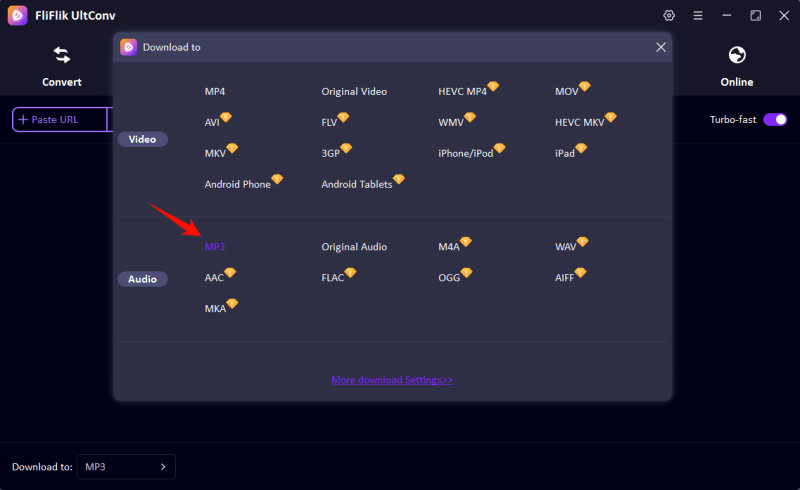
Open UltConv and go to the Download tab. Choose MP3 so the audio can be played on any device, from smartphones to computers.
-
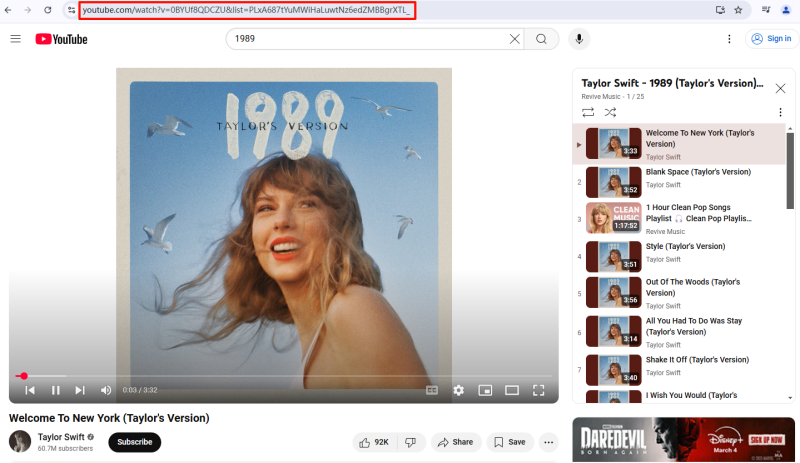
Open YouTube in your browser and copy the link of the video whose audio you want to save.
-
Return to UltConv. If the software automatically recognizes the video link, click Download to start saving the audio as an MP3.

-
Once you clicked the Download button, it will start downloading YouTube to MP3 file.
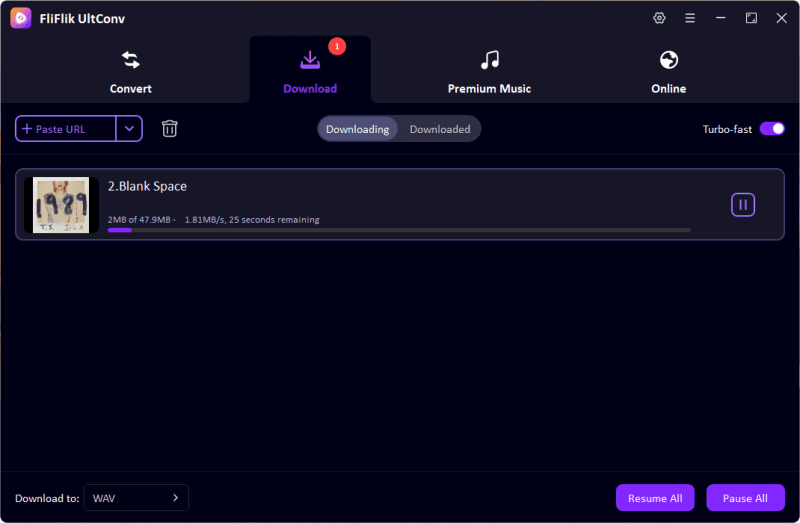


Once the process is finished, your YouTube video will be saved as an MP3 file. You can now listen offline anytime, on any device.
Final Words:
AI music generators open a whole new world of creativity. You can compose songs, create voiceovers, or just produce unique audio projects easily. Suno AI is popular, but there are tons of other tools out there with different features, pricing, and flexibility. Which Suno ai alternative is right for you just depends on what you need: maybe advanced voice cloning, high-quality music, support for other languages, or just something super easy to use. If you find the right tool, anyone can make professional-level audio content quickly.
Secure Download
Secure Download
FAQ
Q1. Is Suno the best AI music generator?
Suno AI is highly capable and popular for its voice cloning and AI music features, but “best” depends on your needs. Some users may prefer alternatives that offer more control, better audio quality, or additional customization options.
Q2. What’s better than Suno AI?
Several Suno AI alternatives stand out depending on your priorities, such as advanced voice synthesis, genre flexibility, or batch downloading features. Tools like Tracksy AI or Soundraw provide different advantages that may suit specific projects better than Suno AI.
Hey everyone! I'm Ivan Davis, and I'm passionate about using AI to streamline my workflow in the voice changer industry. So excited to empower users by changing the voice to any voice they want!