

Amazon Prime Downloader
- Download Amazon Prime video to MP4/MKV in 4K/2K/1080P.
- Bulk download Amazon Prime series at 10x super-speed.
- Stream and Download Prime Video in UltConv inbuilt browser.
- Remove DRM from Amazon Prime videos for permanent archive.
- Also support Netflix, HBO, Hulu, Disney Plus, U-Next, and more.

Why You Might Need UltConv Amazon Prime Downloader

Official Prime Video Download Features are full of restrictions
- The official Prime Video offers a download feature, but that doesn't mean you can download Prime videos at will: Not all titles are downloadable. Additionally, your saved videos are locked within the app, so you can't transfer or play them on other devices.
- Even worse, these downloads are temporary: you only have 30 days to start watching it, and once you hit play, the video expires in just 48 hours. Plus, if a movie removed the Prime library due to licensing agreements or expiration, it disappears from your device instantly—even if you haven't finished watching it.
- To truly own your favorite movies, UltConv Amazon Prime Downloader can help you bypass all the Prime Video download limits mentioned above, and to build a permanent media library on any device.
Unlock Amazing Download Experience with UltConv Prime Downloader
Download Any Videos from Any Amazon Regional Websites
Prime Video content would change based on your location. But UltConv Amazon Prime Downloader features a built-in browser; it allows you to download any videos from any Amazon regional websites. Whether it is your purchased content or rented movies, Prime Video anime or series, you can easily save them for offline viewing permanently. This tool ensures that your favorite videos are always accessible, providing a seamless way to download any title across all Amazon regions without complicated steps.

Easily Convert Prime to MP4/MKV for Permanent Archive
Prime Video use DRM to lock files within its app, so you can't transfer or play it on other device. UltConv Amazon Prime Downloader can eliminate these restrictions by downloading Prime videos directly to your device as standard MP4 or MKV files. With DRM removed, and no more 48-hours or 30 days expirations, you can keep your favourite movies permanently. Transfer and enjoy your collections acros your PC, TV, tablet, or phone, even Switch!

Batch Download Prime Series at 10X Super Speed
Don't let your excitement wait on a loading bar! Whether it’s a gripping new season or an all-time classic, UltConv Amazon Prime Downloader lets you grab entire Prime Video series in one go. Powered by our advanced hardware acceleration, you'll experience a blazing 10X super speed that turns hours of waiting into mere minutes.

Save Audio Tracks and Subtitles in Multilingual
To cater to diverse viewing needs, UltConv Amazon Prime Downloader preserves original multilingual audio and subtitles for a personalized experience. You can customize language preferences and choose between internal VTT or external, editable SRT subtitle files. It supports premium EAC3 5.1 surround sound and Audio Description (AD) tracks, ensuring high-quality audio are never compromised during the download.


Remove Prime Ads Fully
With UltConv, all ads will be removed from downloaded Prime video to ensure a seamless offline viewing

10x Speedy Download
UltConv delivers 10X faster downloads for a quick, efficient access to Prime movies and series.

Save Original Metadata Info
Preserve metadata such as title, cover art, release year, and more from Amazon Prime videos.

Select Output Video Quality
Save Prime videos in your preferred quality: Low (480P), Medium (720P), High (1080P), or UltraHigh(2160p)
Support 10,000+ Video Streaming Website


Download Amazon Prime Video with 4 Easy Steps
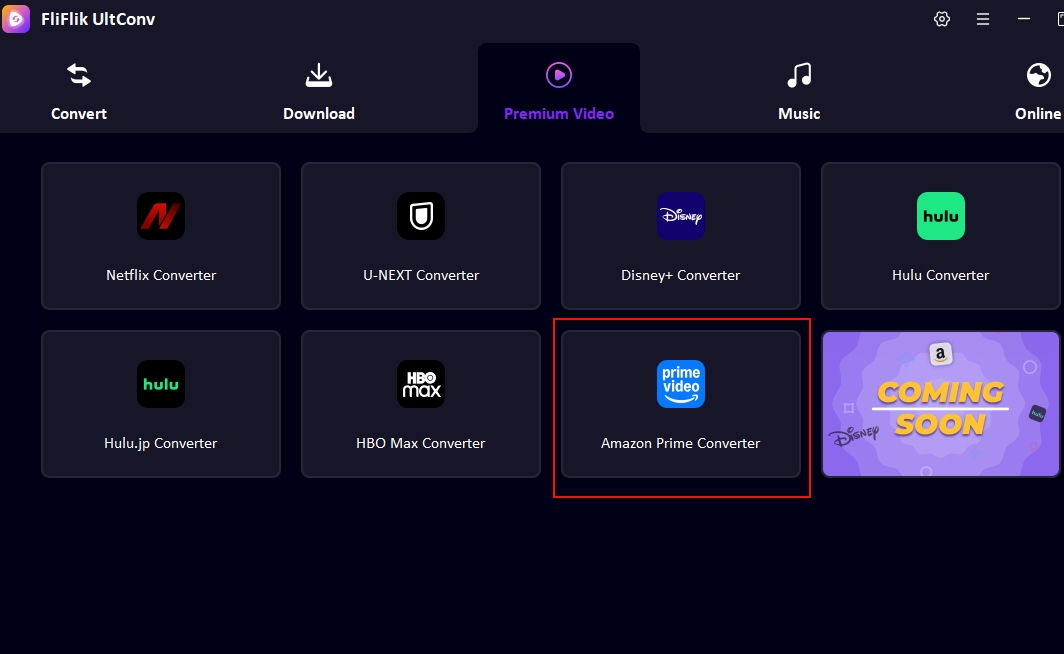
Step 1 Open Amazon Prime Downloader
Open FliFlik UltConv, click Amazon Prime Converter in Premium Video section, and login to your active Amazon Prime account.
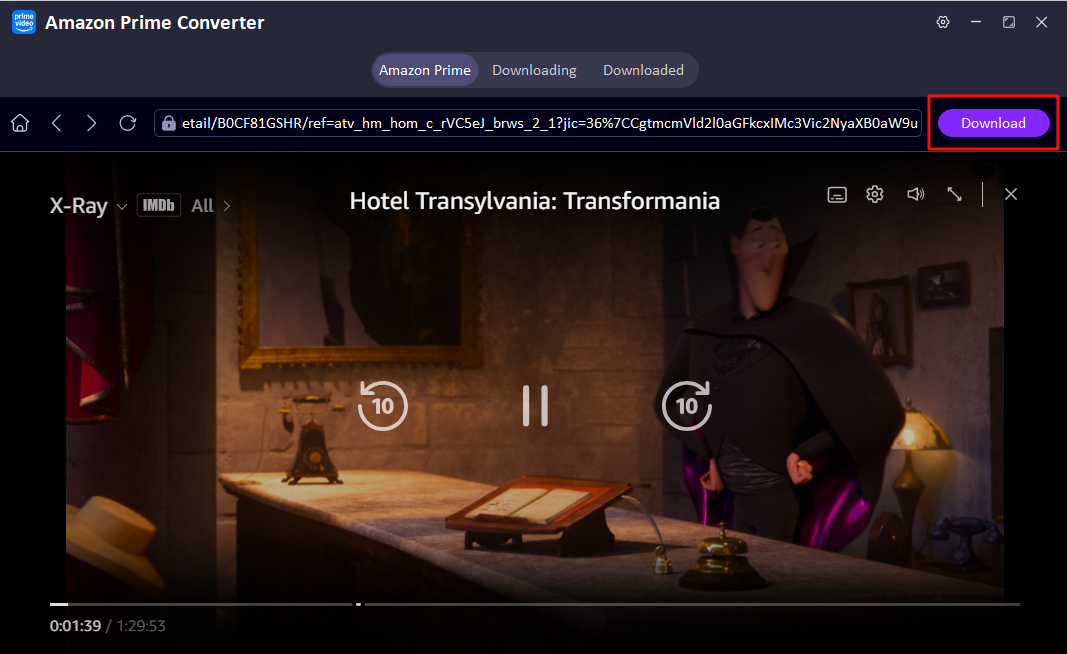
Step 2 Pick and Play Prime Movie in UltConv
Find the film or shows you want to download, play it and click "Download" button in upper-right corner.
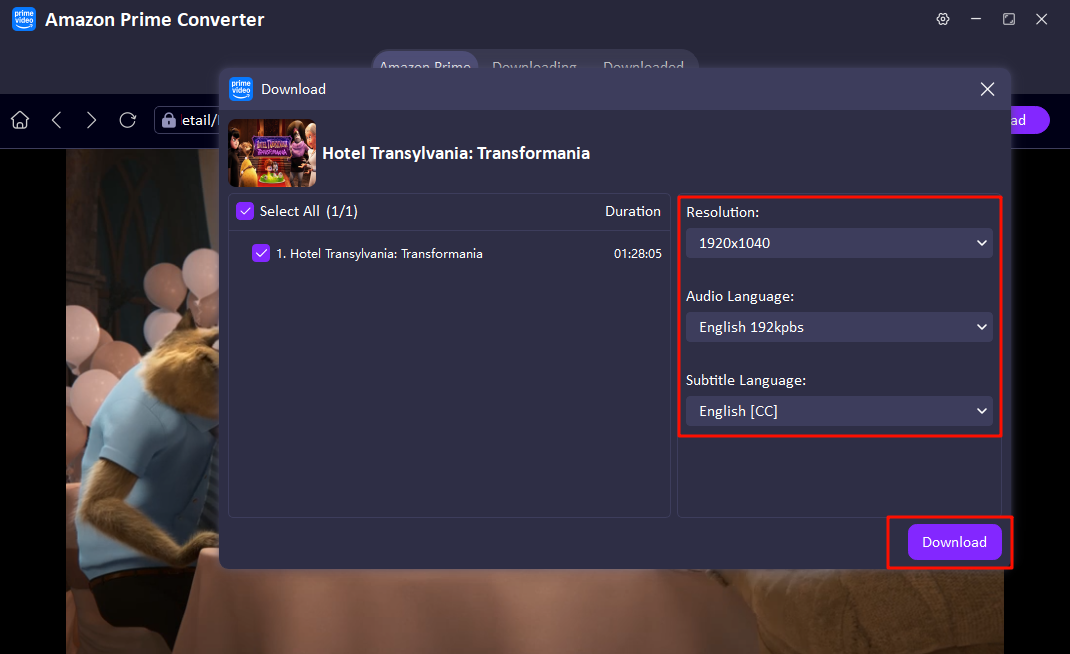
Step 3 Set Output Parameter
Set the output parameter, such as resolution, audio and subtitle language, then click the "Download“ button again .
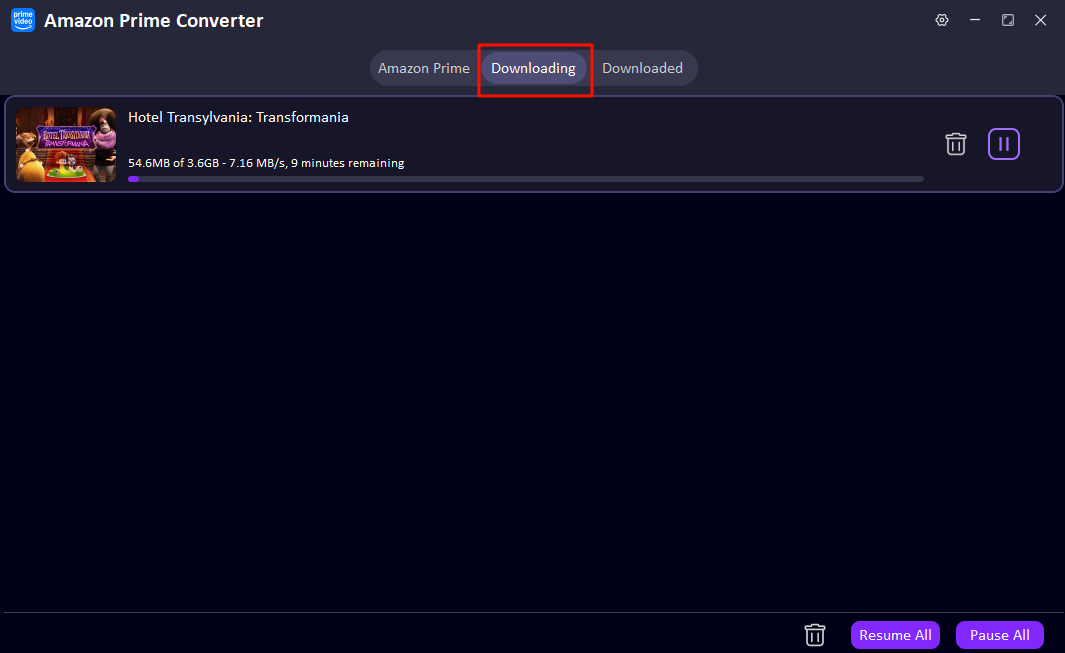
Step 4 Track Download Process
Now you can check the download process of the Amazon Prime movie you choose, this program will finish downloading within few minutes.
What Our Users Review about UltConv

I travel a lot for work and the Wi-Fi on planes is usually terrible. I used to rely on the Prime Video app, but the downloads would always expire right when I needed them. With UltConv, I can just download videos from prime to my local files directly. No more 'expired' messages or device limits. It’s super straightforward and works every time.

Isabella Rossi

Works well as announced, I was just tried it out and found UltConv Amazon Video Downloader really works well, so I ordered one-month plan first. But now I plan to upgrade my plan to lifetime—its batch download feature saves me so much time when grabbing entire Prime TV seasons, it's perfect for a heavy-duty TV show addict like me!

Jonathan Blackwell
Simple, clean UI. It actually delivers the high bitrate video it promises. I've tried free tools before, but they usually fail or lag. UltConv Amazon Prime Downloader is consistently smooth and efficient; it supports plenty of streaming websites and meets all my download needs. Now I can enjoy my favorite Prime Video anime anytime, anywhere!

Oliver
UltConv helps me a lot. As a professional video editor, I often need high-quality reference footage. "How to extract Amazon Prime videos in HD quality" was a problem that bothered me a lot. Now UltConv is helping me to solve this problem: this tool can give me a high-quality MP4 file without any sync issues between audio and video. It's a permanent part of my toolkit.

Marcus Thorne
FAQs about Amazon Prime Downloader

Get the Power of FliFlik UltConv Video Converter
Explore the potential of Amazon Prime video downloading!