

Disney Plus Downloader
- Batch downloads Disney Plus series and movie collection in one go.
- Download Disney Plus movie in 4K, 2K, 1080P, and audio in 320kbps.
- 10x super-speed minimizes download time for your favorite shows.
- Built-in browser for searching and selecting videos directly in UltConv.
- Remove DRM protection from Disney+ Videos and Convert to MP4/MKV.

Why We Choose UltConv for Best Disney Plus Downloader

Save Disney Plus Movies,TV Series, Anime permanently
Official Disney Plus downloads are frustrating because they vanish due to expired subscriptions or automatically expire after 30 days. No worries – UltConv Disney Plus Downloader is here to help. It converts any Disney Plus content into permanent files, ensuring true file ownership. You can download movies, TV series, anime or any Disney+ content, to build your personal media library to watch forever.

Easily Convert Disney+ to MP4/MKV with 1080p and 4K
Disney Plus app restricts downloads to mobile, and uses DRM to lock files. UltConv Disney Plus Downloader can solve these problems with clicks to guarantee true compatibility. It downloads your entire collection in pristine 4K/1080p resolution and converts it to universal DRM-free MP4/MKV formats. That means you can play these crystal-clear videos on your PC, TV, or phone, even Nintendo Switch!

Save Multi-language Audio Tracks and Subtitles You Preferred
UltConv Disney Plus Downloader automatically preserves Disney Plus captions and original audio tracks. It offers versatile subtitle options: choose internal (togglable) or external (editable files). Easily select and embed your preferred language, including crucial EAC3 5.1 surround sound and Audio Description (AD) tracks. This guarantees a fully customized, accessible, and high-quality viewing experience.

Batch Download Disney Plus Videos at Lightning-fast Speed
Stop wasting time waiting for slow downloads! UltConv Disney Plus Downloader leverages accelerated technology to achieve up to 10X faster download speeds, significantly cutting down your waiting time. Moreover, its powerful batch download feature saves you valuable time: add multiple movies or an entire TV series to the queue with a single click. UltConv helps you swiftly build your ultimate collection without delay.

Watch Disney+ with Ads-Free
All ad will be removed from downloaded Dsiney+ videos with UltConv Disney Plus Downloader.

10x Faster Download Speed
Download videos from Disney+ at lightning-fast speeds—10x faster than other Disney Plus downloaders.

Save Original Metadata Info
Preserve metadata such as title, cover art, release year, and more from Disney Plus videos.

Select Output Video Quality
Save Disney+ videos in your preferred quality: Low (480P), Medium (720P), High (1080P), or UltraHigh(2160p)
Enjoy Your Disney+ Journey with UltConv Disney Plus Downloader
Watch Disney+ on Any Devices, Any Time
In the official Disney+ app, downloads are strictly limited to mobile devices; PC download functionality is simply unavailable. Files are locked to the app and will expire after 30 days—or instantly vanish once your subscription lapses. UltConv Disney Plus Downloader lets you download Disney+ videos to PC with universal MP4 or MKV formats. MP4 and MKV offer broad compatibility, so you can enjoy your favorite Disney+ videos on any device and player offline, with absolutely no expiration dates!


Download Disney+ Videos without Geo-Blocking
Don't let geo-blocking interrupt your trip! Official Disney+ downloads often become inaccessible when you travel abroad due to region locks. UltConv Disney Plus Downloader offers complete regional compatibility. It supports libraries across North America, Europe, Asia and other regions, ensuring you can download content from your home region and guarantee seamless, uninterrupted entertainment wherever you are in the world.
4 Easy Steps to Download Disney Plus Video

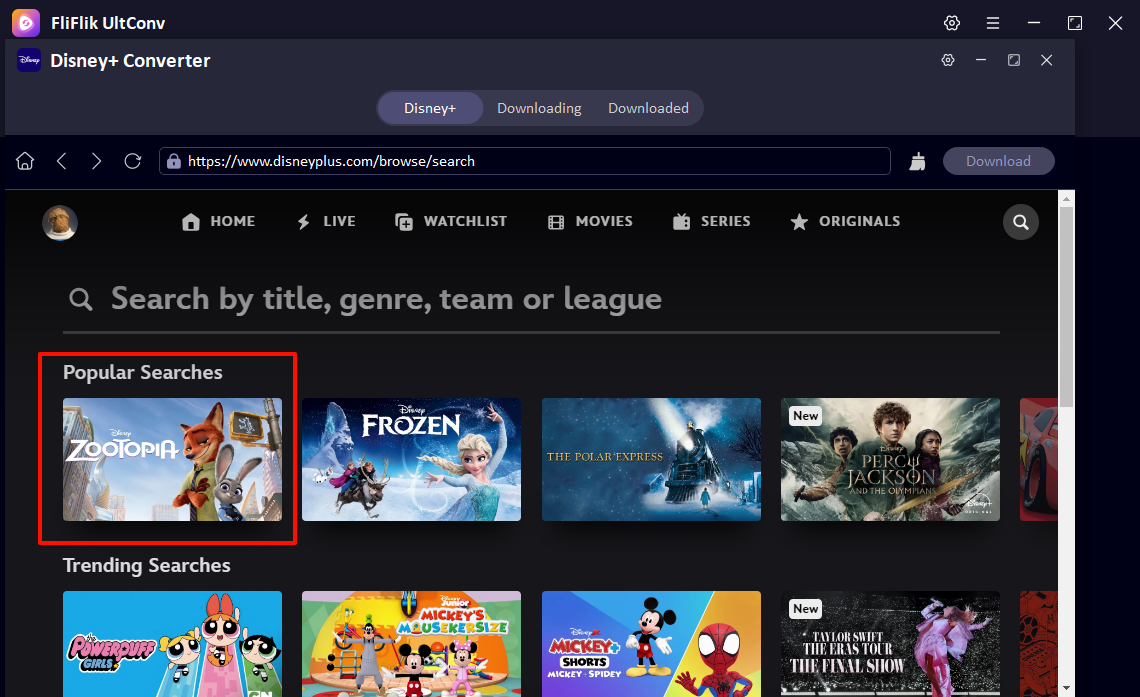
Open Disnye Plus Downloader
Launch FliFlik UltConv, open Disney+ Converter in Premium Video section, then log in your active Disney+ account.
Choose Disney+ Movie in UltConv
Find the film or TV series you want to download, play it and click "Download" button in upper right corner.
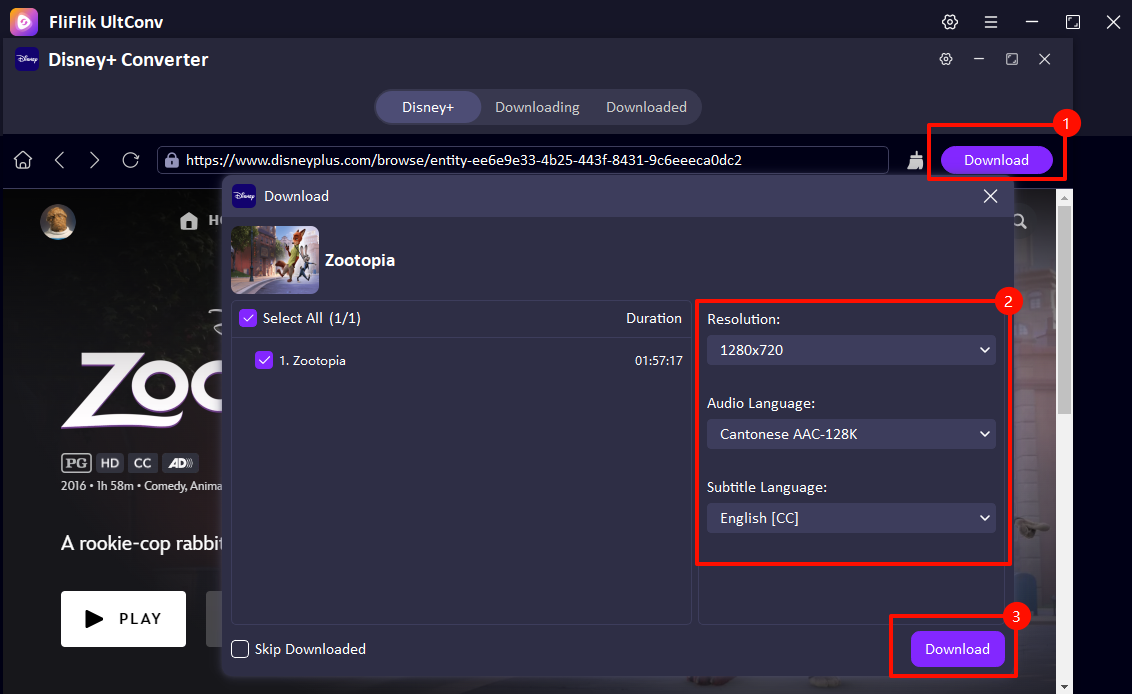
Select Download Options and Setting
Set the output parameter, such as resolution, audio and subtitle language, then click the "Download“ button again.
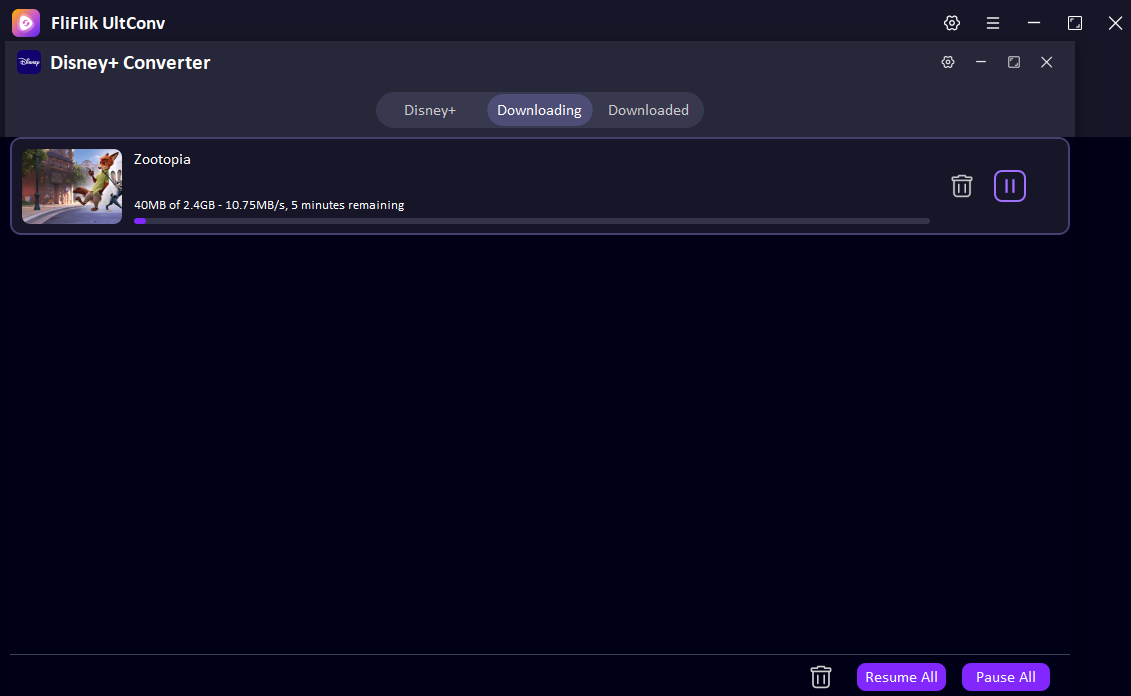
Start to download Disney Plus Movie
Now you can check the download process of the Disney Plus movie you choose, this program will start analyzing and downloading.
FAQ about Disney Plus Downloader

Get the Power of FliFlik UltConv Video Converter
Explore the potential of Disney+ video downloading!