

 By
By  8 minutes read
UltConv OnlyFans Downloader for Android is a dedicated app for users who want to save content directly on their phone—no browser tricks, no unstable online tools. It supports fast, high-quality downloads from OnlyFans and similar platforms, so your favorite content is always available offline whenever you need it. With a built-in browser, background downloading, and DRM video support, it’s one of the most complete mobile downloading options available for Android users.
- Download OnlyFans videos in MP4 up to 4K/1080p quality
- Save DRM-protected videos directly on Android devices
- Batch download multiple videos from creator profiles at once
- Built-in browser for easier access and direct downloading
This guide will explain how to set up the tool, activate it, and start using it.
Part 1. How to Download and Install UltConv OnlyFans Downloader for Android
Installing UltConv on Android is simple and only takes a few minutes. Follow these steps to safely download and set up the app on your device.
-
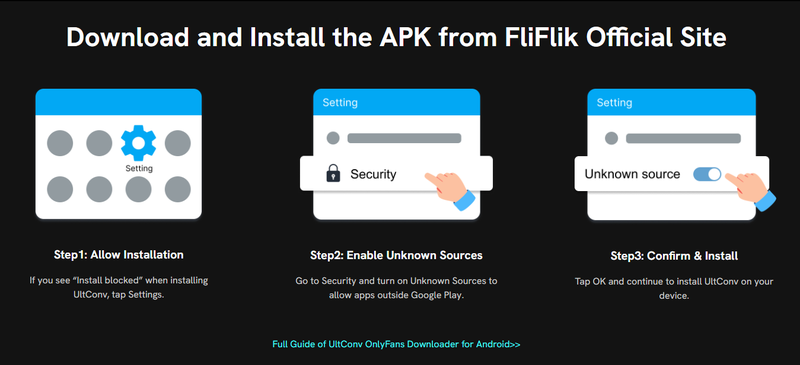
Step 1: Visit the official FliFlik website and download the latest UltConv APK file for Android to ensure security and stability.
-
Step 2: Once the APK finishes downloading, tap the file to begin installation. After installation is complete, tap Open to launch the app.
-
Step 3: If Android blocks the installation, go to Settings → Security and enable Install Unknown Apps or Allow Unknown Sources for your browser or file manager.

Part 2. How to Register and Activate UltConv?
UltConv offers a free trial with limited features. To unlock unlimited access and premium functions, you need to activate the app with a license key.
-
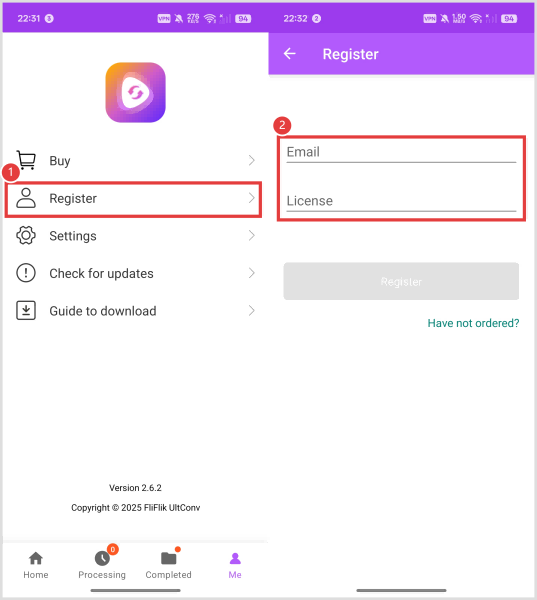
Step 1: Launch UltConv and go to Me → Register from the app menu.
-
Step 2: Type in the email address and license key you received after purchasing the software.
-
Step 3: Tap the Register button to activate the premium version and unlock all features.
-
Step 4: If you do not already have a license key, tap the Buy option inside the app to buy one.

Tips to Fix Registration or Activation Issues
If the registration is not working properly, here are some common things you should check first:
- Incorrect Email or Code: Double-check that your registered email address and activation code are entered correctly. Even a small typo or extra space can prevent activation.
- No Internet Connection: Make sure your device is connected to the internet during activation because UltConv needs online verification.
- Firewall or Antivirus Blocking: In some cases, security software may block activation requests. Temporarily disable your firewall or antivirus and try again.
- Expired or Already Used Code: Verify that your license key is still valid and has not exceeded the allowed number of device activations.
Part 3. How to Save OnlyFans Videos on Android?
If you are looking for the best onlyfans downloader Android users can use easily, UltConv provides a simple built-in browser system that allows you to log in, browse content, and save videos directly on your Android device without switching between multiple apps.
-
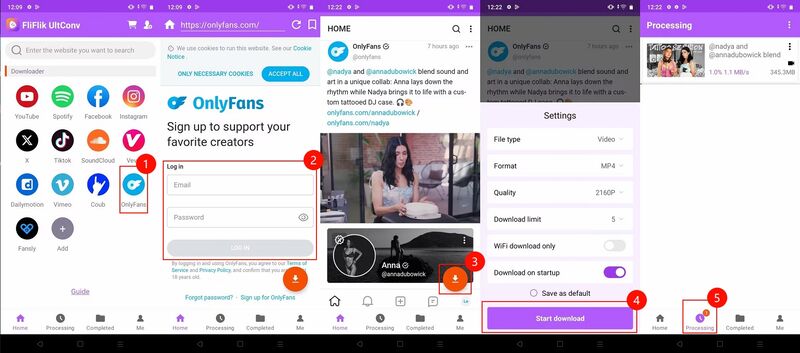
Download and install FliFlik UltConv OnlyFans Downloader from the official website. Once installation is complete, open the app to get started.
-
Inside the app, switch to the Home section, click the OnlyFans icon, and open it within the UltConv built-in browser.
-
Log in to your OnlyFans account using the browser inside the app. After signing in, your subscribed and purchased content will become accessible inside UltConv.
-
Browse through the page normally and open the video you want to save. Tap the Download button, then choose your preferred format and resolution before starting the download.
-
UltConv will process and save the video directly to your device. Once completed, go to the Completed section to find and watch your saved videos offline anytime.

Tips to Avoid OnlyFans Login Issues
- Make sure your OnlyFans username and password are entered correctly without typing mistakes.
- Use a stable internet connection while logging into the built-in browser.
- Disable VPN or proxy services temporarily if the login page is not loading properly.
- Keep UltConv updated to the latest version for better compatibility with OnlyFans.
- Clear cached browser data inside the app if you experience repeated login failures.
- Restart the app and try again if the built-in browser becomes unresponsive.
FAQs
Q1. Can I use the UltConv OnlyFans Downloader app for free?
Yes, UltConv provides a free trial version that lets users test the app and its main downloading features before purchasing the full version.
Q2. Can I save an OnlyFans video to the gallery of my phone?
Yes, you can choose the folder or storage location in the settings, allowing downloaded videos to appear directly in your phone’s gallery.
Q3. How to download DRM-protected OnlyFans videos on Android?
UltConv supports downloading DRM-protected OnlyFans videos through its built-in browser system. Simply log in to your account, open the video, and start the download process inside the app.
Q4. What is the best OnlyFans downloader app?
The best downloader depends on your needs, but UltConv OnlyFans Downloader is a popular choice because it supports high-quality downloads, built-in browsing, batch downloading, and Android compatibility.
Q5. Can I download videos I purchased on OnlyFans?
Yes, after logging into your account inside UltConv, you can access and download videos you have purchased or subscribed to.
Q6. Do I need an active OnlyFans account to download content?
Yes, you need an active OnlyFans account to access subscribed or purchased content before downloading it through the app.