

 By
By  9 minutes read


StreamRIP downloader is a scriptable stream downloader for Qobuz, Tidal, Deezer, and SoundCloud. It is a lightweight music utility designed to fetch and save tracks, albums, and playlists from various online sources in high quality. Many users prefer it because it is flexible, script-based, and supports multiple music services through different configurations. In this article, we will help you understand how StreamRIP works, what features it offers, and what StreamRIP alternatives might be easier for everyday users who don’t want to deal with technical setup.
Note: However, before going further, it’s important to clarify that this guide is focused on the Streamrip music utility (Python-based tool) and not the SteamRIP game website, which is a completely different platform.

Part 1. What is StreamRIP?

Streamrip is a Python-based music downloading utility that allows users to fetch songs, albums, and playlists from different streaming platforms. It is mainly used by people who prefer a command-line tool instead of a traditional app interface. Since it is open-source, it is widely discussed and improved by developers on platforms like StreamRIP GitHub, where users can access updates, documentation, and configuration guides. Unlike simple downloaders, StreamRIP is built for flexibility and customization. It lets users control how and where music is downloaded, making it more powerful for advanced users who are comfortable with technical setups.
- Supports downloading tracks, albums, and full playlists
- Works with multiple streaming sources (Qobuz, Tidal, Deezer, and SoundCloud)
- Allows high-quality audio downloads (lossless options in some setups)
- Fully customizable through config files
- Lightweight command-line interface (no heavy UI)
- Open-source and regularly updated by the community
- Supports metadata and tag preservation for music files
Part 2. How to Use StreamRIP to Download Music?
Using StreamRIP is mostly about setting up your system once and then running simple commands to download music. Since it is a command-line tool, everything works through instructions instead of a graphical interface. Below is a clear step-by-step guide from installation to downloading songs.
-
Step 1: First, install the latest version of Python from GitHub. During installation on Windows, make sure to check “Add Python to PATH” or the commands will not work later.
-
Step 2: FFmpeg is required to process and convert audio files. Download the “essentials” build, extract it, and add the bin folder to your system’s Environment Variables (Windows) or install it via Homebrew on macOS.
-
Step 3: Open Command Prompt (Windows) or Terminal (macOS) and run the following:
{pip3 install git+https://github.com/nathom/streamrip.git@dev}
Once installed, StreamRIP works using simple commands. It automatically detects whether you are downloading a song, album, or playlist based on the link.
-
Step 4: You can download music by pasting the URL:
rip url https://www.qobuz.com/us-en/album/rumours-fleetwood-mac/0603497941032
This command will download the best available quality for that track.
If you intends to download multiple albums from Qobuz:
rip url https://www.qobuz.com/us-en/album/back-in-black-ac-dc/0886444889841
If you want to convert music into MP3 while downloading, you can use:
rip –codec mp3 url https://open.qobuz.com/album/0060253780968
To set your preferred quality, using the quality option to 0, 1, 2, 3, 4:
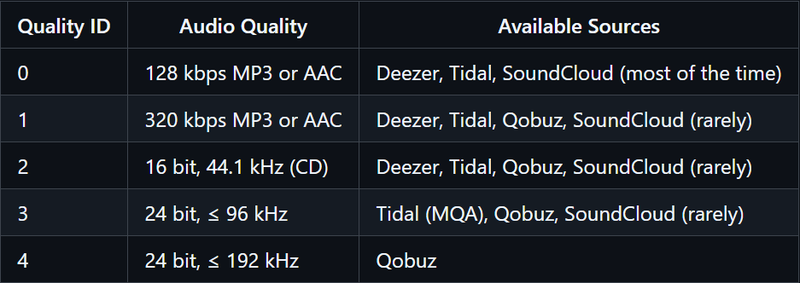
For example: rip –quality 3 url
Also, many users often search for “what files to download on streamrip”, because the tool supports multiple formats depending on your setup, including MP3 and lossless audio formats. Streamrip can download different types of audio files depending on the source and configuration. Most commonly, users download:
- MP3 (For universal compatibility)
- FLAC (For lossless quality)
- AAC (Advanced Audio Coding)
- Original source quality (If available)
The output format depends on your command and FFmpeg setup, making it flexible for both casual listeners and audiophiles.

Part 3. Best StreamRIP Alternative to Download Music from More Sites
If you want a quick and simple way to download music without coding or setup, a ready-made tool is much easier. Streamrip is powerful but mainly suited for advanced users who are comfortable with Python and command-line use, while beginners may find it a bit complex. One of the most practical alternatives is FliFlik UltConv Music Downloader. It is built for users who want a smooth, all-in-one experience for downloading and converting music from multiple platforms, like Spotify, Apple Music, SoundCloud, Tidal, etc.
It also stands out because of its wide website support and format flexibility. On the output side, it supports multiple audio formats, including MP3, FLAC, WAV, AAC, and M4A, so you can choose based on your device or quality preference. It also supports high-quality downloads up to 320 kbps, ensuring clear sound and stable performance. With batch downloading, playlist support, and broad platform compatibility, it offers a complete solution for building an offline music library easily.

- Download Spotify songs, albums, artists, and playlists easily
- Convert music to MP3, AAC, WAV, FLAC, and M4A formats
- Supports up to 320 Kbps high-quality audio output
- Keeps all ID3 tags and metadata automatically
- Supports batch downloads for playlists and albums
- Compatible with 10,000+ streaming platforms
▼ Steps to Download Spotify Songs with UltConv Music Downloader
-
Download and install FliFlik UltConv Music Downloader on your computer. Open the program after installation is complete.
-
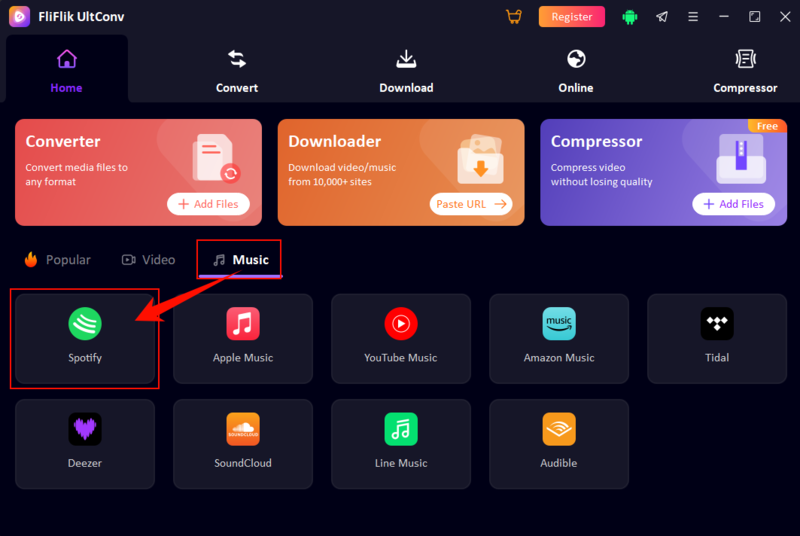
In the main interface, go to the Music tab under the Home section and click the Spotify icon.
-
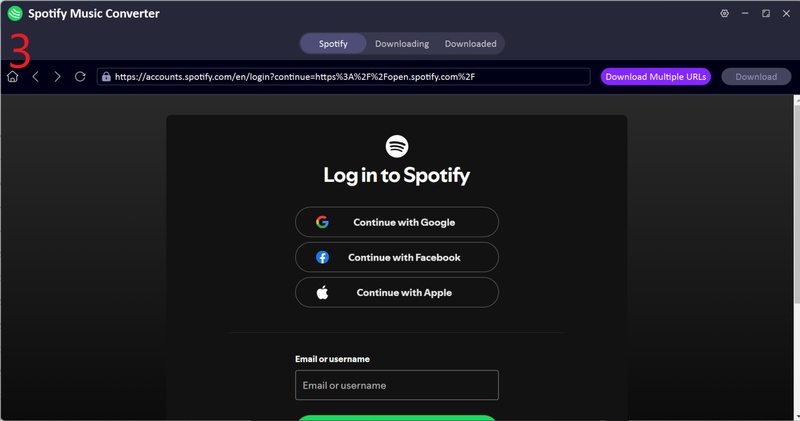
Log in to your Spotify account using the built-in web player. It supports both free and premium accounts.
-
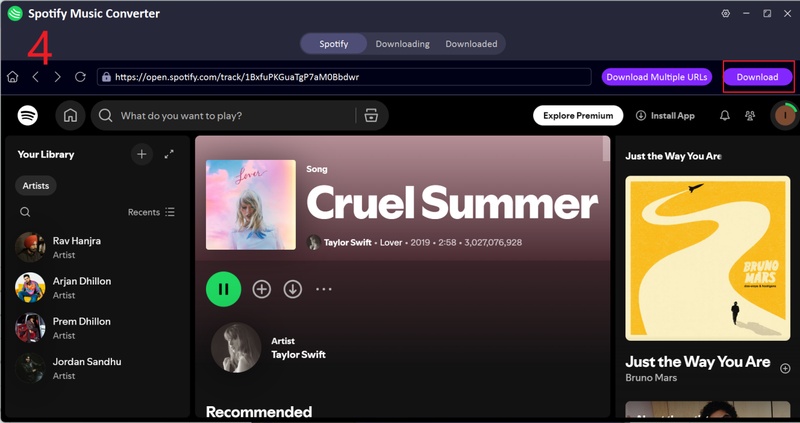
Browse your library and open the song, album, or playlist you want to save, then start the download process.
-
Wait for the conversion to finish, then go to the Downloaded section to find your saved files with full ID3 tags and artwork.
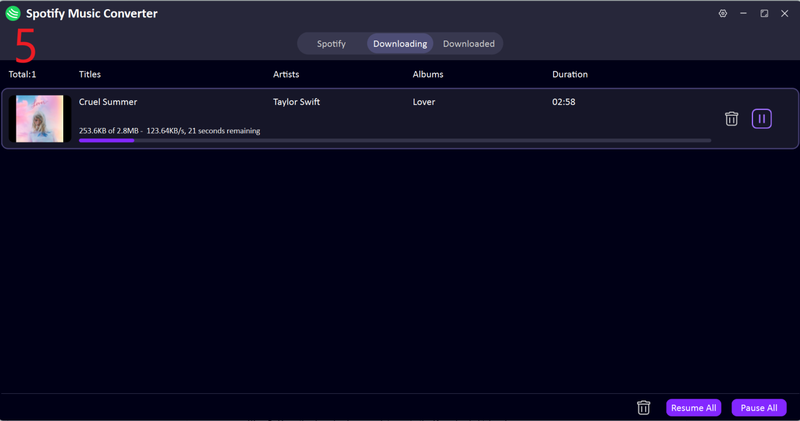


Your Spotify music is now ready for offline listening without ads or restrictions.
Part 4. StreamRIP vs. FliFlik UltConv: Which is Suitable for You?
When comparing Streamrip with FliFlik UltConv Music Downloader, the main difference comes down to complexity vs. convenience. StreamRIP is built for advanced users who are comfortable with Python, terminal commands, and manual configuration, while UltConv Music Downloader is designed for beginners who want a simple, one-click music downloading experience.
| Feature | StreamRIP | FliFlik UltConv |
|---|---|---|
| Type | Command-line tool | Desktop software |
| Supported Sites | Tidal, Qobuz, Deezer, SounCloud | 10,000+ streaming platforms |
| Max Quality | High/lossless (source dependent) | Up to 320 Kbps + lossless options |
| Supported Formats | 100+ formats, including MP3, FLAC, WAV, M4A, AAC | FLAC, MP3, AAC (config-based) |
| Metadata Info | Yes (manual setup required) | Yes (auto ID3 tagging) |
| Ease of Use | Difficult for beginners | Very easy, beginner-friendly |
Final Words
To sum it up, StreamRIP is a solid option for users who like technical tools and don’t mind setup steps or command-line usage. However, for most people who just want a quick, simple, and reliable way to download music, it can feel complicated and time-consuming. That’s where FliFlik UltConv Music Downloader stands out. It offers an easier experience with wide platform support, multiple formats, and fast one-click downloads. If you want a smooth way to build your offline music library without hassle, FliFlik UltConv Music Downloader is definitely worth trying.
 Secure Download
Secure Download
Secure Download
FAQs about StreamRIP
Q1. Can I use StreamRIP to download Tidal/Qobuz without a premium?
No, StreamRIP typically requires a valid premium subscription for services like Tidal or Qobuz to access and download high-quality music. Without a premium account, most downloads will not work properly or may be limited in quality and availability.
Q2. Is StreamRIP safe to use?
Yes, StreamRIP is generally safe if you download it from its official GitHub repository. Since it is an open-source tool, its code is publicly available, but users should still be careful during installation and only use trusted sources to avoid modified versions.
Q3. Is Streamrip legit?
Yes, Streamrip is a legitimate open-source project used by many developers and audio enthusiasts. However, it is mainly designed for advanced users, so beginners may find it difficult to set up and use compared to simple downloader applications.