

Free Video Compressor
- 100% free & unlimited compression for any video or audio file.
- 10x faster batch processing built for your high-volume demands.
- Compress 100+ media formats with comprehensive compatibility.
- Compress at precise percentages to balance file size and best quality.
- Support previewing the compressed video quality before compression.

Why Compress Video & Audio with UltConv Compressor
 ?
?

Universal Support for 100+ Formats
Say goodbye to "Unsupported Format" errors forever. FliFlik UltConv seamlessly handles over 100+ video and audio formats, including high-res MP4, MOV, MKV, and professional audio codecs like MP3, FLAC or M4A. Whether sharing via WhatsApp or uploading to YouTube, UltConv handles the complex encoding so you get a perfectly compatible file every time.

Batch Compress Multiple Files at Once
Tired of one-by-one processing? FliFlik UltConv’s powerful batch engine allows you to upload entire folders and compress dozens of files simultaneously at 10x super-fast speed. Even with mixed formats, our intelligent processing ensures high-efficiency output, letting you complete hours of work in just a few minutes.

Shrink 8K/4K Video with Less Quality Loss
Demand 8K clarity but struggling with storage? First get your stunning 8K/4K footage via FliFlik UltConv Video Downloader. Then, let UltConv's advanced encoding shrink your files by 90% while keeping every detail pixel-perfect. UltConv bridges the gap for creators: giving you the high-fidelity content you need without the storage headaches.

Flexible Sliding Scale to Size and Quality
Stop guessing your output results. With UltConv flexible sliding scale, you can compress files to the exact file size needed for Email, Discord, or Instagram limits. Use the built-in Instant Preview to check visual quality before you commit, ensuring the perfect balance between compression ratio and clarity every single time.

100% Free to Use
UltConv delivers high-efficiency compression that remains 100% free, helping you optimize your media library without spending a dime.

Ulimited Compression
With UltConv, enjoy the freedom to compress as many files as you need; there are no limitations on how many files you can compress.

10x Faster Speed
Boost your productivity with 10x faster speed. UltConv hardware acceleration handles massive large videos in seconds.

No Watermark Added
UltConv guarantees 100% watermark-free results, making your media files ready for instant professional sharing.
Online Compressor vs. UltConv Compressor
: Which is the Best?
Online Compressor
- Daily compression limits
- Slow compression speed
- Forced watermarks on clips
- Only free in limited features
- Only supports normal MP4 & MP3
- Compress in fixed percentage
- No preview before compression


UltConv Video Compressor
- Unlimited file compression
- 10x faster compress speed
- 100% watermark-free exports
- 100% free in all compression features
- Support 100+ Video and Audio formats
- Adjust precise file size with flexible scale
- Preview video quality before compression
What Issues Can UltConv Video Compressor Fix?

Reclaim Valuable Storage Space
Multimedia files, especially 4K videos and raw footage, are massive space hogs. UltConv Video Compressor leverages advanced encoding to slash file sizes by up to 90% while maintaining flawless visual clarity. Easily free up gigabytes on your PC or mobile device to store thousands of more memories or projects without needing external hard drives.
Solve Social Upload Failures
Stop waiting hours for massive 4K TikTok or YouTube uploads to finish. Don't let file size limits ruin your content schedule. By optimizing your videos with UltConv, you can significantly reduce upload times and data usage while maintaining the vibrant clarity your followers expect. Meet every platform's strict standards flawlessly with optimized files.


Bypass Email Attachment Limits
Frustrated by "File too large" errors from Gmail or Outlook when sending high-quality demo reels? Explore how to compress a video file for Email? UltConv effortlessly shrinks your videos to under the standard 25MB limit without sacrificing essential visual detail. Then you can send professional video pitches and drafts directly within your email flow, eliminating expiring cloud links and download barriers for clients.
Speed Up Large Transfers
Transfer massive raw videos to the cloud is slow and kills productivity. UltConv shrinks your video into lightweight files while keeping high-quality. This ensures your clients or remote teams can download and review your work instantly. Meet every deadline by sending optimized videos that upload in seconds, not hours.

How to Compress a Video File with UltConv
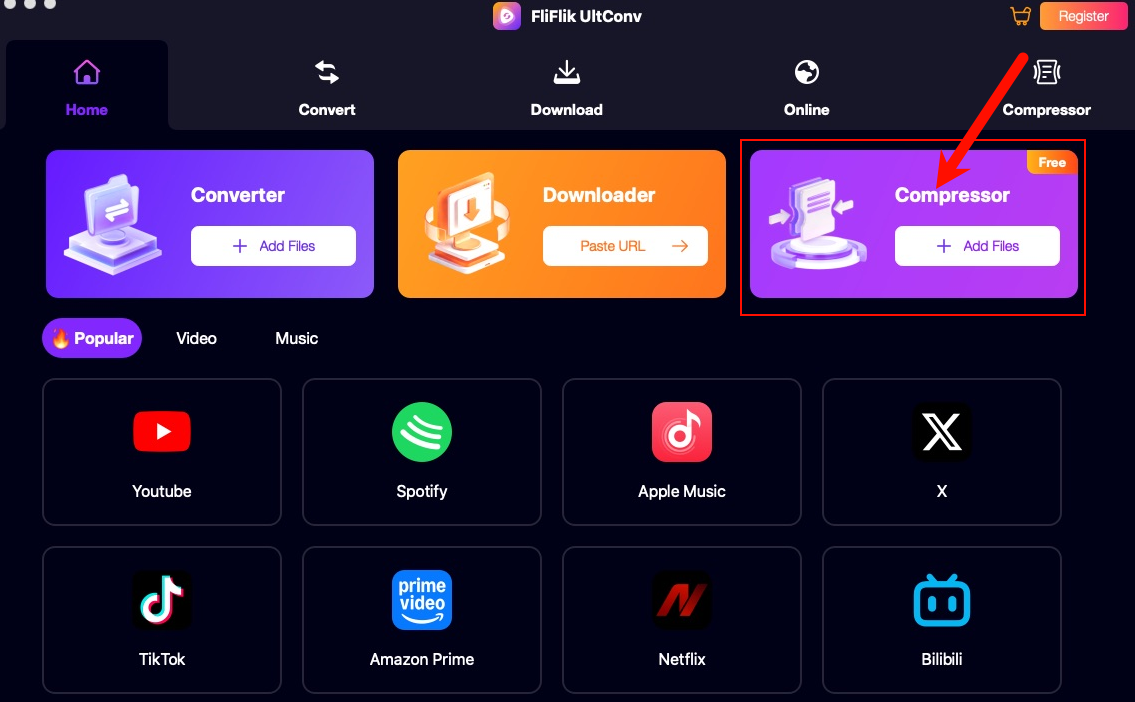
Upload Your Media File
Launch FliFlik UltConv, enter the Compressor module, and simply drag your files into the interface or click the input box.
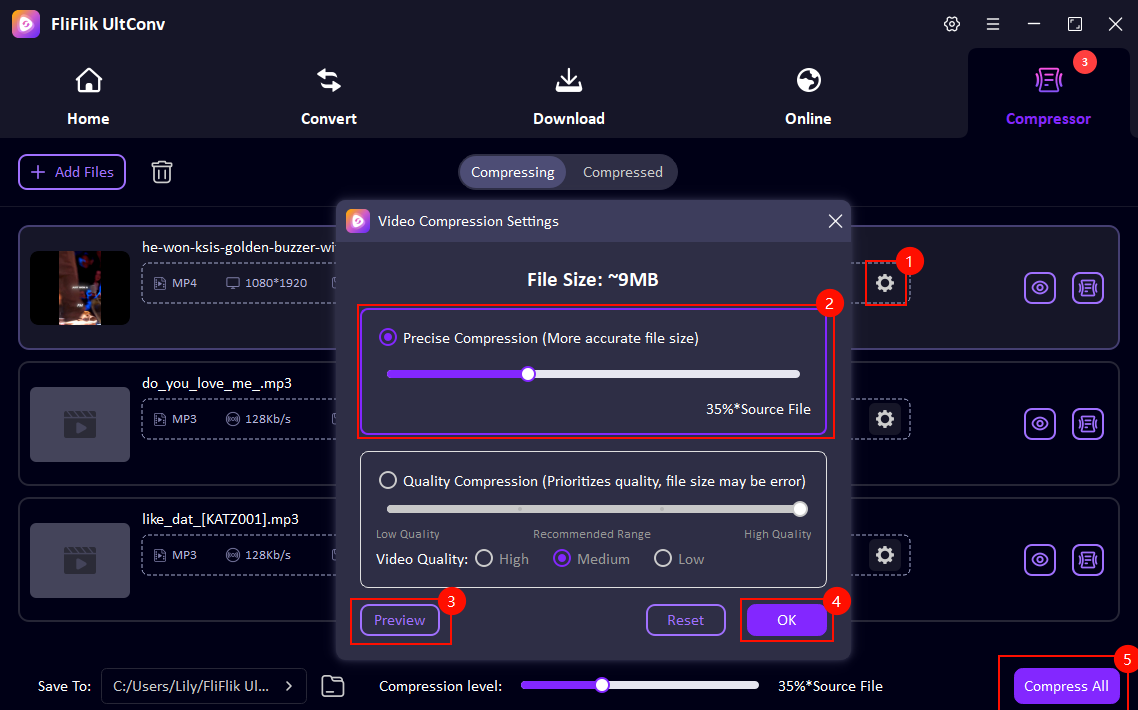
Customize Compression Settings
Click the Settings icon to adjust the compression rate to your needs. Use the Preview button to check the visual quality before compression. After customization, click Compress All to start the process.
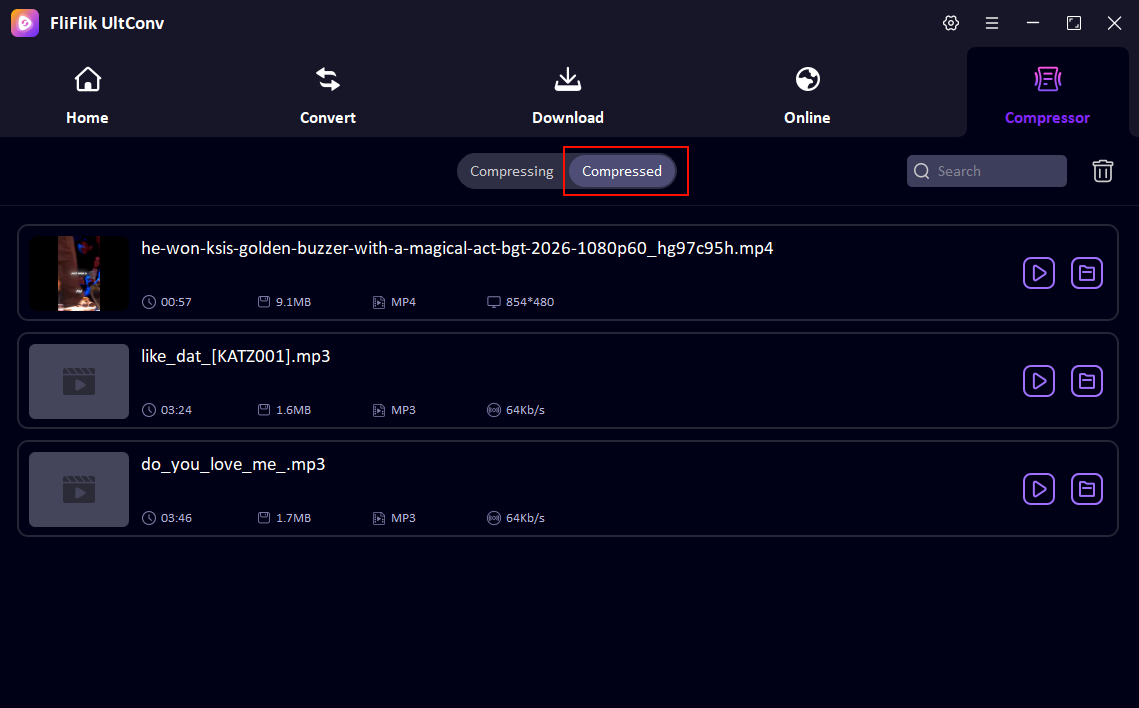
Access the Compressed Video
Your compressed files will be saved directly to your pre-selected output folder. You can also check the compressed video by going to the Compressed tab.
FAQ about UltConv Video Compressor

Get the Power of FliFlik UltConv Video Compressor
Explore the potential of video and audio compression!