

 By
By  9 minutes read
In 2026, while 4K and 8K recording is standard, massive file sizes continue to overwhelm storage and bandwidth. These high-resolution clips frequently trigger “file too large” errors on messaging and cloud platforms, making efficient compression a necessity.
Modern video compressors now shrink large files without losing quality. They keep your videos sharp and clear while making them small enough to share easily. In this article, we will discuss the 7 best Desktop, Online and Android video compressors.

2026 Tech Trend: AV1 vs. HEVC

By 2026, as high-definition video becomes widespread, efficient compression will be critical, and industry attention will shift to the competition between AV1 and HEVC (H.265). Although both are superior to the outdated H.264, AV1 offers better compression performance for streaming, while HEVC has the edge in terms of universal hardware compatibility.
AV1 vs. HEVC Comparison Table
| Feature | AV1 | HEVC (H.265) |
|---|---|---|
| Compression Efficiency | Higher | Very good |
| File Size Reduction | Smaller files | Slightly larger |
| Video Quality | Excellent | Excellent |
| Encoding Speed | Slower | Faster |
| Device Compatibility | Growing support | Very wide support |
| Streaming Performance | Excellent for streaming | Very good |
| Hardware Support | Limited on older devices | Strong support |
| Best For | Modern streaming & web sharing | General playback & editing |
| Licensing | Royalty-free | Licensing fees apply |
| Popular Platforms | YouTube, Netflix | Smartphones, TVs, editing apps |
Part 1. Best Free Video Compressor Software for PC/Mac
FliFlik UltConv Video Compressor is a powerful tool for PC and Mac that can significantly reduce the size of 4K and 8K video files while maintaining clarity. It is specifically designed to bypass file size limits on platforms like Discord, WhatsApp, Instagram, YouTube, email attachments, and cloud transfers, ensuring that videos remain clear and smooth even after being significantly compressed.
The software offers flexible control options for adjusting settings to specific file sizes and supports batch processing of multiple videos. Compatible with over 100 formats and featuring a built-in preview mode, it enables both casual users and content creators to efficiently and precisely optimize large media libraries.

- Compress videos and audio files 100% free with no watermark
- Supports 100+ formats including MP4, MOV, MKV, MP3, FLAC, and M4A
- Batch compress multiple videos at 10X faster speed
- Reduce 4K and 8K video size with minimal quality loss
- Preview compressed video quality before exporting
- Unlimited compression with no daily restrictions
▼ How to Compress a Video with FliFlik UltConv
-
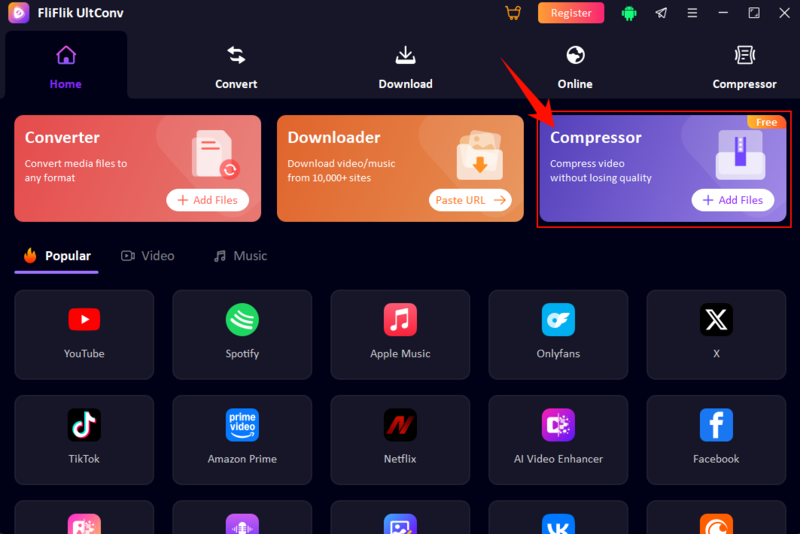
Install & Launch: Get FliFlik UltConv on your Mac or Windows PC. Open the software and head to the Compressor module, or simply hit Add Files to begin.
FREE DOWNLOAD![secure download]() Secure Download
FREE DOWNLOAD
Secure Download
FREE DOWNLOAD![secure download]() Secure Download
Secure Download
-
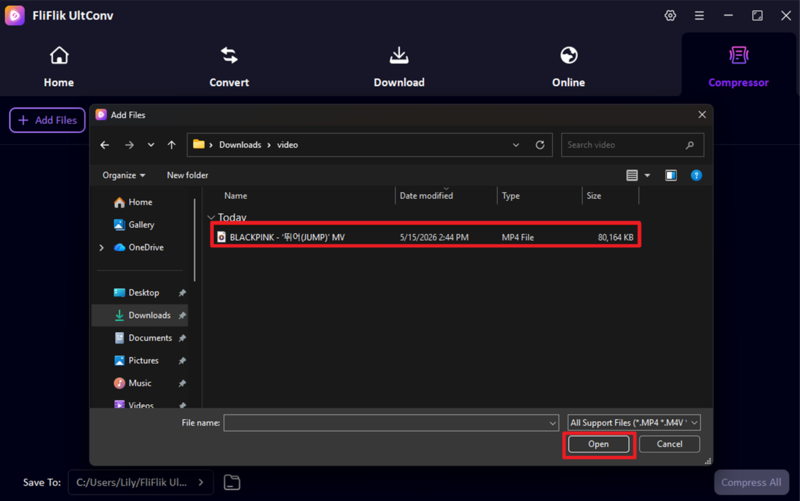
Import Media: Select the videos you want to shrink from your computer. Whether it’s MP4, AVI, or WMV, UltConv handles almost any format you throw at it.
-
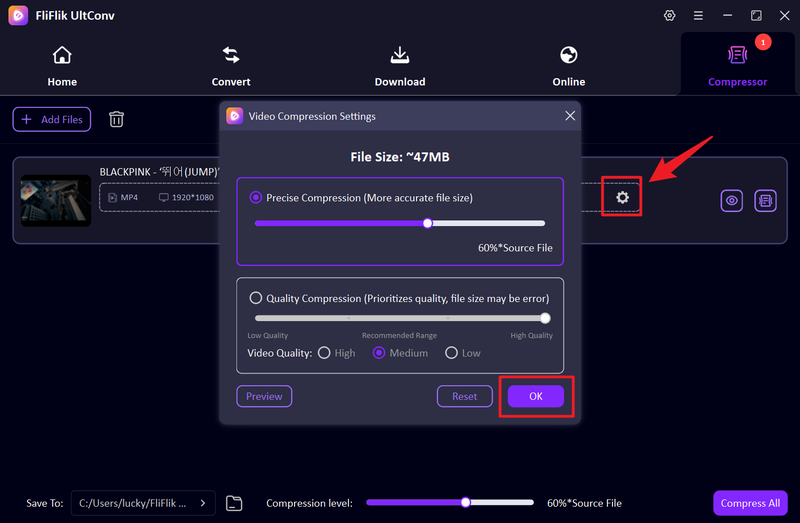
Fine-tune Settings: Tap the gear icon to open the customization menu. Here, you can adjust the compression parameters to fit your specific needs.
-
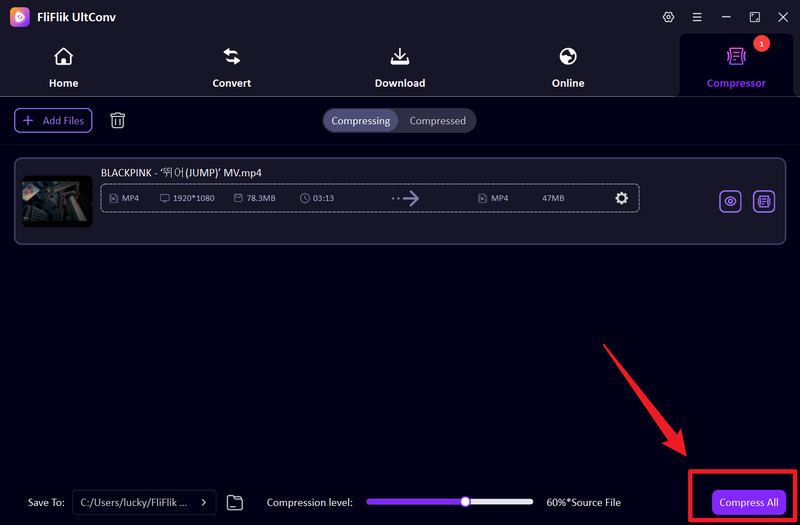
Batch Process: Once your queue is ready, click Compress All to start shrinking all your files simultaneously.
-
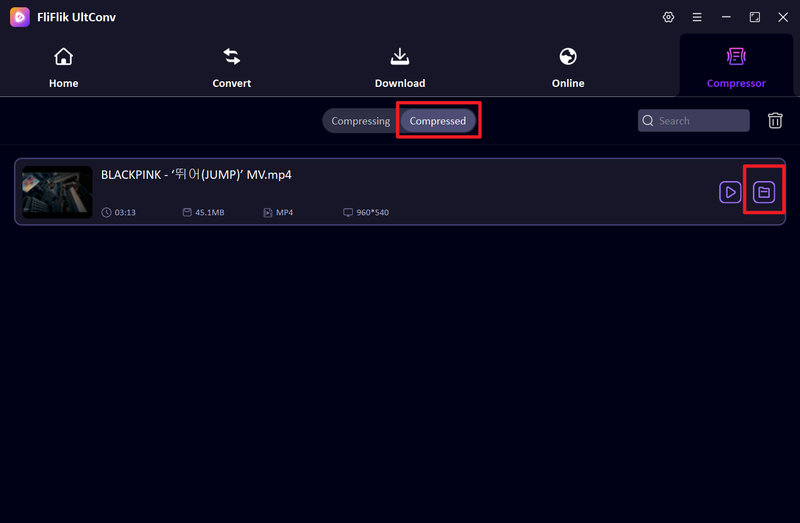
Review & Play: After a quick wait, switch to the Compressed tab. You can find your finished files there and use the Play button for instant local viewing.


Part 2. 3 Best Free Online Video Compressors (No Install)
Contents
Online video compressors are useful for users who want to reduce video size quickly without downloading software. Below are three of the best free online video compressors you can try in 2026.
1. Clideo

Clideo is a simple online video compressor designed for users who want a fast way to reduce video size without installing software. It works entirely in the browser and supports common video formats, making it useful for compressing videos before sending them through email, Discord, WhatsApp, or social media. The interface is beginner-friendly, so even first-time users can quickly upload, compress, and download videos in just a few clicks.
- Very easy to use for beginners
- Works on browser without installation
- Supports common video formats
- Free version has upload size limitations
- Compression speed depends on internet connection
2. FreeConvert

FreeConvert is a more flexible online compressor that offers better customization compared to many basic web tools. Users can adjust compression level, codec, resolution, and target file size directly from the browser. It supports a wide range of formats and works well for reducing large videos while trying to maintain decent visual quality.
- Supports many video formats
- Advanced customization settings
- Works on desktop and mobile browsers
- Free version has limited file size support
- Large videos can take longer to upload and process
3. VEED.IO

VEED.IO is another online video platform that combines video compression with lightweight editing features. Besides shrinking file size, users can also trim videos, add subtitles, or optimize clips for social media platforms before exporting. Its clean design and easy workflow make it good option for users who want quick online compression without learning complicated editing software.
- Clean and modern interface
- Includes basic editing tools
- Good for social media video optimization
- Some features require a paid plan
- Free exports may include limitations or branding
Part 3. 3 Best Video Compressor Apps for Android
For mobile users, Android video compressor apps offer a quick way to shrink files without a PC. Here are three top beginner-friendly options that are both simple and fast:
Contents
1. Compress Video Size Compressor

Compress Video Size Compressor is a lightweight Android app designed for users who want to quickly reduce video size directly on their phones. It is commonly used for shrinking videos before sending them through WhatsApp, Discord, Telegram, or email. The app focuses on simplicity, allowing users to compress videos in just a few taps without needing advanced editing knowledge.
- Simple and beginner-friendly interface
- Quick compression for mobile videos
- Useful for social media and messaging apps
- Free version include ads
- Limited advanced compression controls
2. Panda Video Compress & Convert

Panda Video Compress & Convert is one of the most popular Android video compressor apps for reducing large video files while keeping acceptable quality. Besides compression, it also supports format conversion and resizing, making it helpful for users who regularly upload videos to social media or save phone storage space.
- Supports video compression and conversion
- Easy sharing to social media apps
- Good balance between quality and file size
- Some features are locked behind premium version
- Compression speed depends on device performance
3. Video Compressor – ShrinkVid

Video Compressor – ShrinkVid is an Android app focused on fast video shrinking for mobile users who frequently deal with storage issues or upload limits. It supports reducing file size for HD videos while offering simple presets for quick compression without complicated settings.
- Fast compression process
- Simple preset-based controls
- Helpful for freeing phone storage space
- Limited advanced editing features
- Free version contain advertisements
FAQs
Q1. Is there a free video compressor without a watermark?
Yes, some tools like UltConv Video Compressor and a few online compressors offer free compression without adding watermarks, but many free online tools may include branding on exported videos.
Q2. How can I compress a video without losing quality?
You can reduce video size by using smart compression tools that adjust bitrate, resolution, and codec settings while keeping visual quality intact, instead of simply lowering resolution.
Q3. What is the best free video compressor for large files?
For large files, desktop tools like FliFlik UltConv Video Compressor are best because they support batch compression, faster processing, and better quality control compared to most online tools.
Conclusion
As 4K and 8K become the new standard, file sizes have far exceeded our storage and bandwidth capacities. Using the right compression tool is the only way to keep your media library manageable and ensure fast sharing without compromising the viewing experience.
FliFlik UltConv Video Compressor is the most reliable all-in-one solution, delivering high-quality compression results. Capable of handling everything from batch processing to precise resizing, it is the ideal choice for any user who needs to reduce the size of large files while maintaining clarity.
 Secure Download
Secure Download
Secure Download