

 By
By  7 minutes read


TikTok has become one of the biggest sources of music discovery, viral sounds, and audio clips and it’s frustrating that the app gives you no straightforward way to save any of it as an MP3. Whether it’s a song you keep replaying, a podcast clip, or a sound you want for a ringtone, you’re basically on your own when it comes to extracting audio.
That’s why so many people search for a TikTok to MP3 converter that actually works without too much hassle. In this guide, we will cover how to convert TikTok videos and sounds to MP3 on Windows, Mac, Android, and directly in your browser.

Part 1. How to Convert TikTok Video to MP3 on Windows & Mac
FliFlik UltConv Video Downloader is a powerful desktop tool for Windows and Mac that makes converting TikTok videos into high-quality MP3s effortless. Whether you’re saving trending sounds, music clips, or podcast snippets for offline listening, it offers a level of reliability and stability that temporary browser-based tools simply cannot match.
More than just a TikTok downloader, UltConv supports over 10,000 websites, including YouTube, Instagram, Facebook, and Twitch. It allows you to save audio in formats like MP3, WAV, and FLAC at 320kbps, or download stunning video in resolutions up to 8K. With features like 10x faster batch downloading, a built-in browser, and live stream support, it serves as a robust, professional solution for all your media needs..

- Download videos and audio from 10,000+ websites, YouTube, TikTok, Vimeo, etc
- Convert TikTok videos to MP3 in up to 320kbps quality
- Support MP3, WAV, AAC, FLAC, MP4, and 100+ formats
- Batch download multiple videos and playlists simultaneously
- Download HD videos in 1080p, 2K, 4K, and 8K quality
- Built-in browser for direct downloading inside the software
▼ Steps to Download TikTok Videos to MP3 with FliFlik UltConv
Before you start, download and install FliFlik UltConv Video Downloader on your Mac computer. After installation, open the software to begin converting YouTube videos into MP3 audio files.
 Secure Download
Secure Download
Secure Download
-
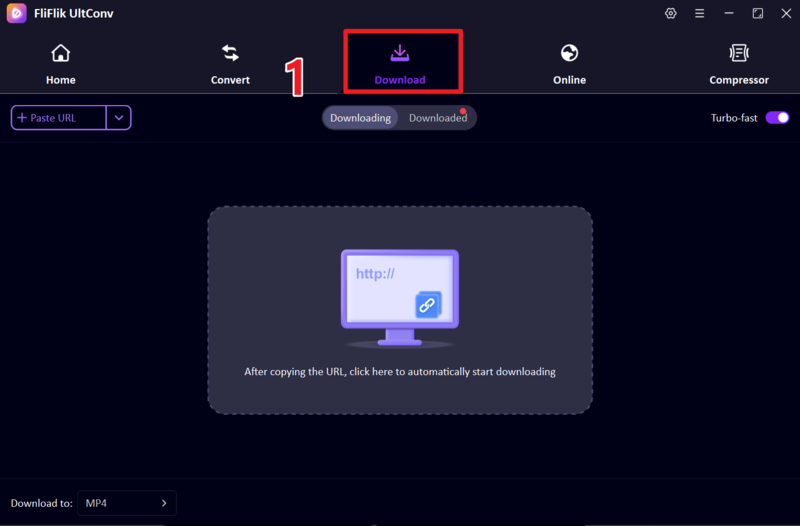
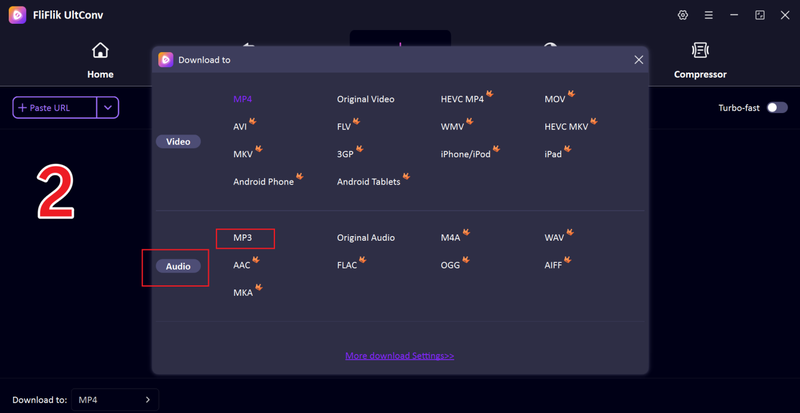
Open UltConv and go to the Download section. Click on the “Download To” option to set your preferred output settings.
-
Choose MP3 as your output format so the YouTube video will be converted into audio instead of a video file.
-
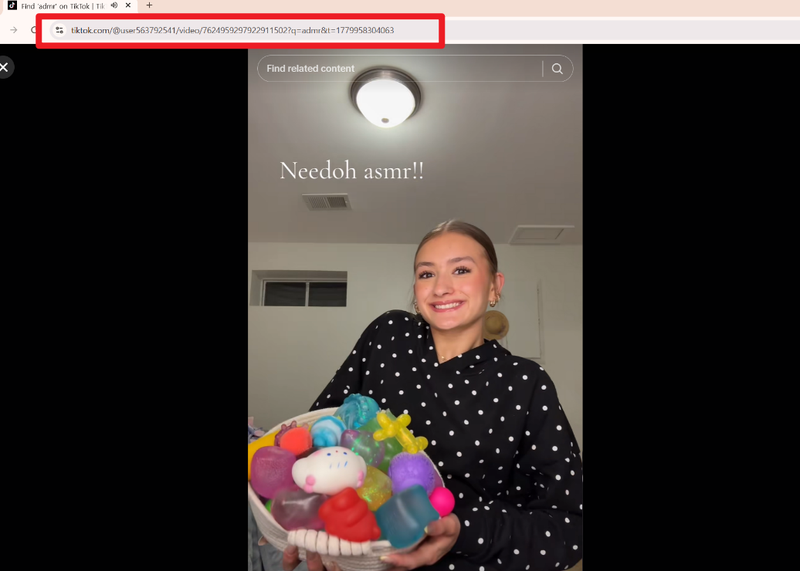
Open TikTok in your browser, find the video you want, and copy the video URL from the address bar.
-
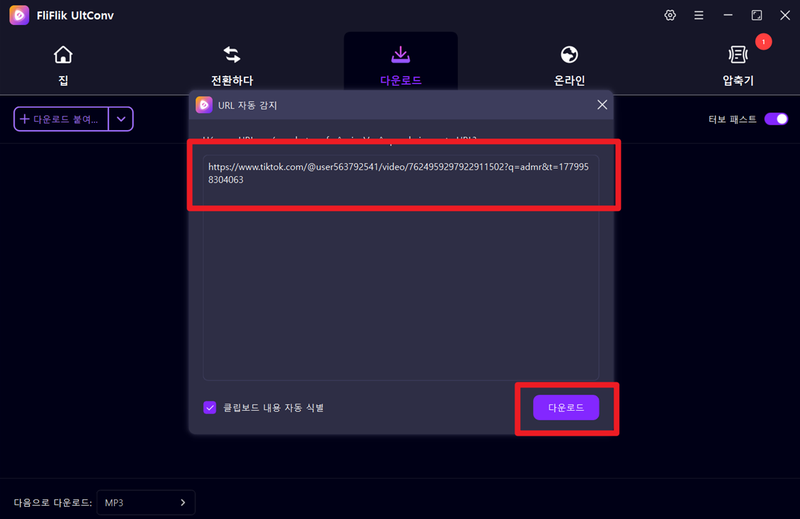
Go back to UltConv and paste the copied link into the downloader. The tool may also detect the link automatically. Click the Download button to continue.
-
The download process will start, and UltConv will extract the audio and convert it into MP3 format. Wait for it to complete.
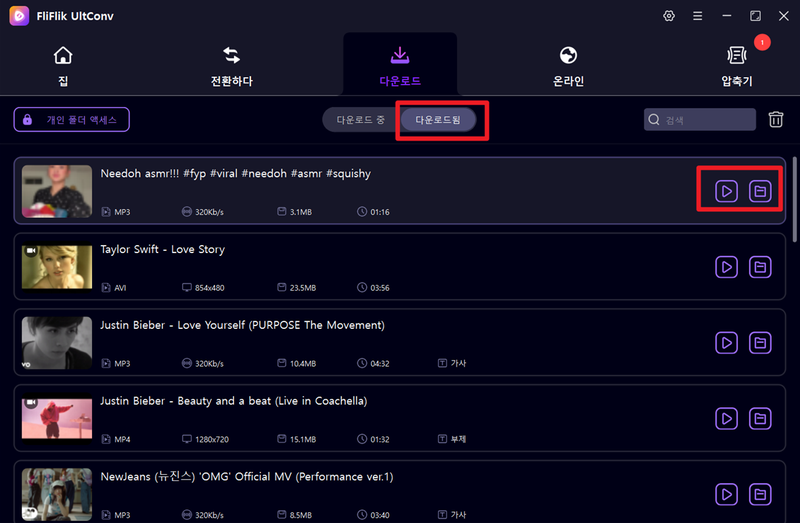


After completion, open the output folder to find your MP3 file and enjoy offline listening anytime.
Part 2. How to Convert TikTok Link to MP3 Online Free
This method is useful for users who want a quick and simple way to extract audio from TikTok videos without installing any software. Online tools like SSSTik make the process fast and accessible on any device.
SSSTik TikTok Downloader

SSSTik TikTok MP3 Downloader is a simple online tool that allows users to convert TikTok videos into MP3 files without installing any software. It works directly in your web browser, making it useful for quick downloads on Windows, Mac, or mobile devices. You only need a TikTok link to extract audio in a few seconds.
- No installation required, works directly in the browser
- Fast and simple TikTok to MP3 conversion
- Free to use on any device
- Depends on the internet connection
- Show ads during usage
▼ Steps to Convert TikTok Link to MP3 Online
- Step 1: Open the SSSTik TikTok MP3 downloader in your browser.
- Step 2: Copy the TikTok video link and paste it into the input box on the website.
- Step 3: Click the Download button to process the video.
- Step 4: Wait for the tool to generate the audio file, then choose the MP3 download option.
- Step 5: Save the MP3 file to your device and enjoy offline listening anytime.
Part 3. How to Convert TikTok Sounds to MP3 on Android
This method is helpful for Android users who want to download TikTok audio directly on their phones. Apps like SnapTube make it easy to convert and save MP3 files for offline use.
SnapTube

SnapTube Video Downloader is a popular Android app that allows users to download videos and convert TikTok sounds into MP3 format. It supports multiple platforms and provides fast downloading options directly on mobile devices, making it a convenient choice for Android users who want offline audio access.
- Supports multiple websites, including TikTok and YouTube
- Fast downloading and MP3 conversion
- Built-in media player for preview
- Not available on Google Play Store
- Requires APK installation
▼ Steps to Convert TikTok Sounds to MP3 on Android
- Step 1: Download and install the SnapTube APK on your Android device and open the app.
- Step 2: Use the built-in browser to open TikTok or paste the video link inside SnapTube.
- Step 3: Select the TikTok video you want and tap the download icon.
- Step 4: Choose MP3 audio format from the available download options.
- Step 5: Start the download and wait for the audio file to be saved to your device.
FAQs
Q1. Is it legal to download TikTok to MP3?
Personal offline use is generally fine, but redistributing copyrighted content without permission violates copyright laws. Always respect ownership and platform rules.
Q2. Why can’t some TikTok links be converted?
Some TikTok links may fail to convert due to privacy settings, deleted videos, regional restrictions, or platform limitations. If a video is private or removed, online tools cannot access or extract its audio.
Q3. Are these TikTok online converters safe?
Most converters are safe on trusted sites, but others may contain risky ads or redirects. To stay safe, stick to reputable tools like FliFlik UltConv and avoid clicking suspicious links or unknown downloads..
Conclusion
You can convert TikTok to MP3 via online tools, mobile apps, or desktop software, depending on your device and frequency of use. While online converters are fine for one-time saves, desktop tools provide superior control over quality and file formats.
For a more reliable, long-term solution, FliFlik UltConv Video Downloader is a top choice. It supports 10,000+ websites and offers high-quality MP3 conversion with 10x faster batch processing. With its built-in browser and wide format support, UltConv makes it easy to save TikTok audio permanently for offline listening without limitations.
Secure Download
Secure Download
