

 By
By  6 minutes read
Many users are concerned: Does Google Drive compress video files? It is a common frustration—you upload a crisp, high-quality 4K video, only to see a blurry, low-resolution version when you hit play. At first glance, it looks as though your original quality has been compromised.
The good news is that Google Drive does not degrade your original file. The “soft” look you see is simply a low-resolution preview generated by Google to ensure smooth online playback without buffering. While your original data remains untouched, knowing how to properly compress your videos before uploading is still a vital skill.
In this guide, we will break down Google Drive’s processing secrets and show you how to compress your videos for the best cloud storage experience.

Part 1. Does Google Drive Compress Videos for Storage?
Google Drive does not compress or reduce the quality of the original video file you upload. The uploaded file is stored in its original format, resolution, and file size, so when you download it later, it remains the same as the source file. This means if you upload a 4K or high-bitrate video, Google Drive keeps the original quality instead of permanently lowering it.
Part 2. Why Does My Video Look Low Quality on Google Drive?

The blurriness you see online is merely a separate, low-quality preview generated by Google for faster streaming. This preview is often capped at 1080p and may appear in even lower resolution (like 360p) immediately after uploading while processing occurs. This temporary compression only affects in-browser playback and never alters the quality of your actual stored file.
1. Google Drive Uses a Compressed Preview Version
Google Drive automatically creates a lower-quality streaming preview so videos can load faster online. This preview is often compressed and may not reflect the original 4K or high-bitrate quality of your uploaded file.
2. Video Processing Is Still Incomplete
Right after uploading, Google Drive may still be processing the video. During this stage, the preview can temporarily appear in 360p or 720p until higher-quality playback versions are generated.
3. Internet Speed Affects Playback Quality
If your internet connection is unstable or slow, Google Drive may lower the streaming quality automatically to avoid buffering. This can make videos appear blurry even when the original file is high quality.
4. Browser Preview Has Resolution Limits
Google Drive’s web player is mainly designed for quick viewing, not professional-quality playback. In many cases, browser previews are capped at around 1080p, so ultra-high-resolution videos may not look as sharp during streaming.
Part 3. Best Google Drive Video Compressor Without Losing Quality
FliFlik UltConv Video Compressor provides a reliable way to shrink large 4K and HD videos for Google Drive without sacrificing visual clarity. Unlike standard compressors that often cause blurriness, it uses smart technology to balance file size reduction with high-quality output, helping you save storage space and avoid upload errors.
The tool supports a wide range of formats (MP4, MOV, MKV) and features batch processing to handle multiple files at once. With adjustable compression levels, fast processing speeds, and a built-in preview function, UltConv makes it easy to optimize your videos for the cloud while maintaining professional results.
▼ System Support
- macOS
- Windows 10 (64-bit) / Windows 11

- Compress videos for Google Drive without noticeable quality loss
- Supports 100+ video and audio formats including MP4, MOV, and MKV
- Batch compress multiple large videos at once
- Adjustable compression settings for precise file size control
- Fast hardware-accelerated compression for large files
- Reduce 4K and 8K video size while maintaining clarity
- No watermark added to exported videos
▼ Steps to Compress a Video with FliFlik UltConv
-
Download and install FliFlik UltConv Video Compressor on your Mac or Windows computer. After the installation is complete, open the software.
FREE DOWNLOAD![secure download]() Secure Download
FREE DOWNLOAD
Secure Download
FREE DOWNLOAD![secure download]() Secure Download
Secure Download
-
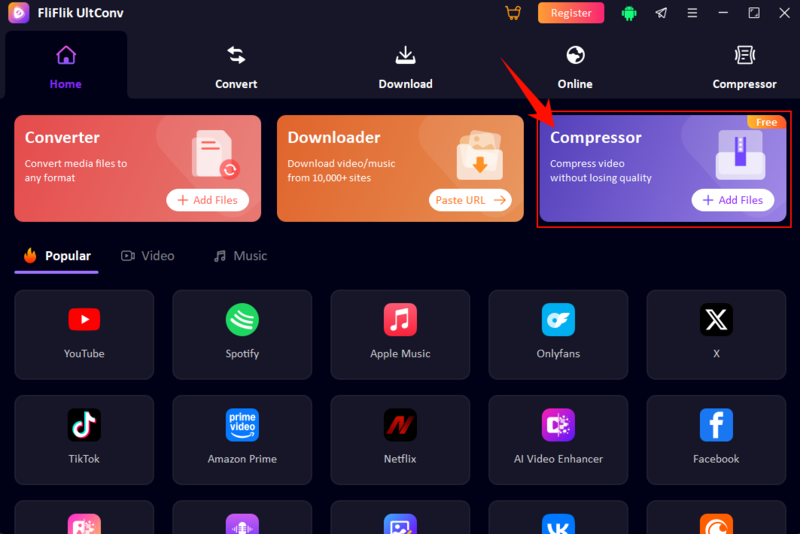
Launch the UltConv app and select the Compressor tab on the Home page. You can also click Add Files directly in this section to start uploading your videos.
-
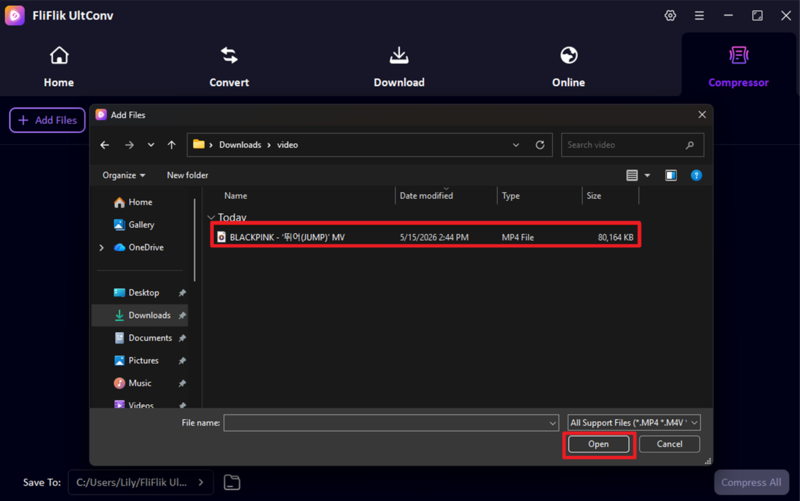
Choose your videos from your local storage. UltConv is compatible with a vast array of video formats, including MP4, AVI, and WMV.
-
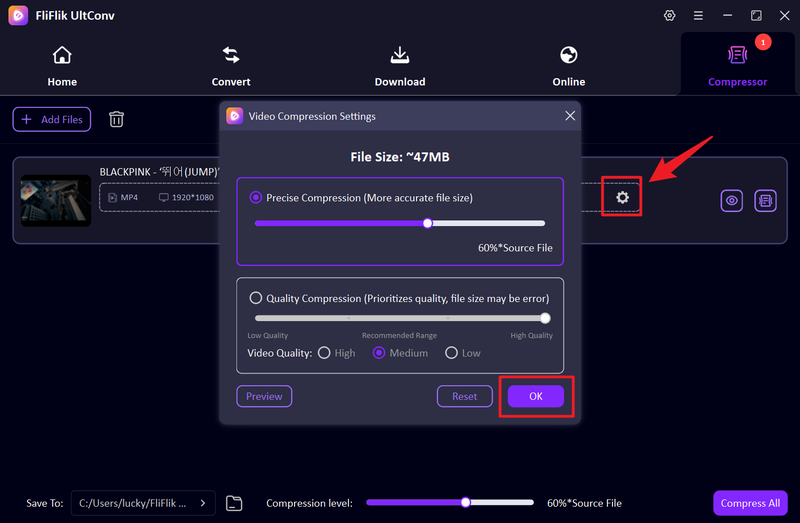
Click on the settings gear icon. A pop-up menu will appear with custom compression options that you can toggle based on your preferences.
-
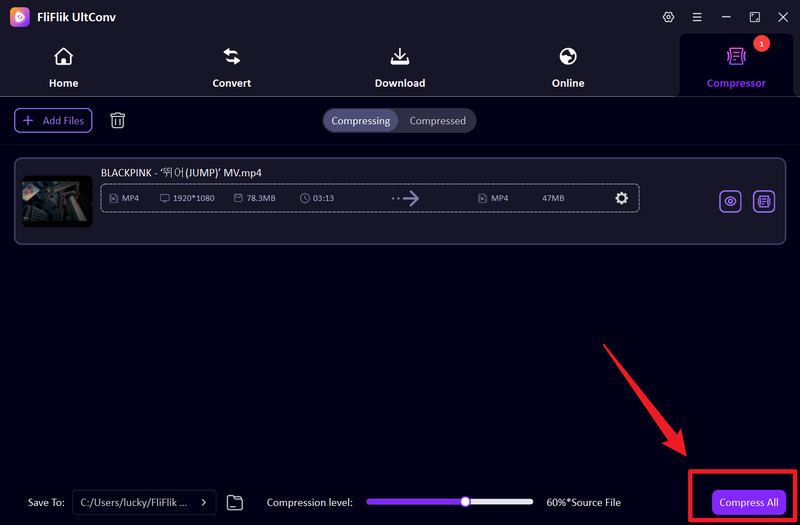
After your files have been added, simply click Compress All to process your videos in bulk.
-
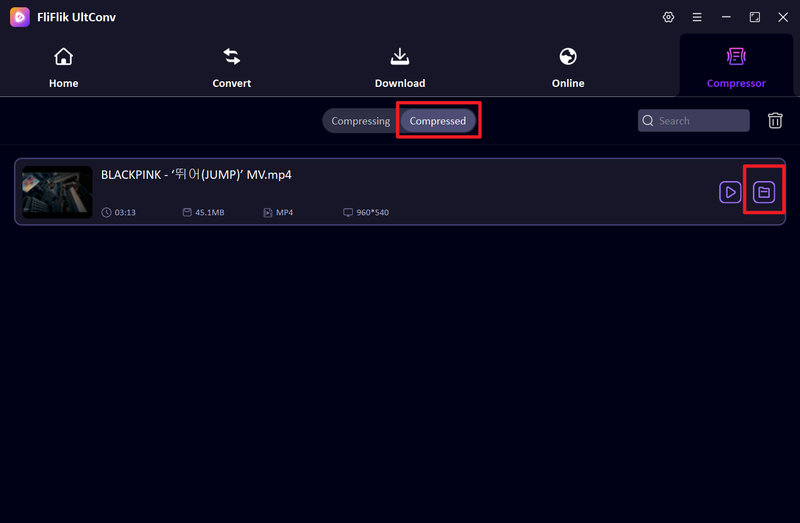
Wait for the process to finish, then click the Compressed section to see your files. You can click the Play icon to watch the compressed video on your device.


FAQs
Q1. Does Google Drive lose quality when downloading?
No, Google Drive does not reduce the quality of the original uploaded video. Only the browser preview may appear compressed during streaming.
Q2. Is there a file size limit for Google Drive videos?
Yes, Google Drive has strict storage limits, and because it stores original files without compression, large videos will consume your available space quickly.
Q3. Why Does Video Quality Look Worse on Google Drive?
Google Drive’s blurry previews are temporary streaming versions caused by background processing or slow internet. They do not affect your original file’s quality .
Conclusion
Google Drive stores your original files without any quality loss, though online previews are often compressed to a lower resolution for streaming. Despite this, pre-compressing large 4K or HD videos is recommended to save storage space and significantly speed up your upload process.
FliFlik UltConv Video Compressor is an efficient tool for shrinking video files while preserving visual clarity. With support for batch processing and various formats, it simplifies the task of optimizing your videos for Google Drive without hitting storage limits or compromising quality.
 Secure Download
Secure Download
Secure Download