6 minutes read


Many people ask how to download Suno songs fast and safely. The answer is if you are the creator of the song on Suno, then downloading it is very simple. You can find it in your Library and just download the music, no need to use any third-party tools or other tricks. In this article, we will show you the easiest official methods to download your songs from Suno in 2026. We will also talk about which file formats you can use and how to save your favorite songs in a few clicks.

Part 1. Can I Download Suno AI Songs to MP3?
Yes, Music from Suno can be downloaded, but only the music that you make. Saved tracks can be downloaded as an MP3 file. If you’re a premium user, WAV files can be downloaded as well.
Here’s how it works: once your track is finished, a download button appears on the song page. Click it, and the file will save directly to your device. Keep in mind, Suno doesn’t allow downloading other users’ music to avoid legal issues. So, you can easily build a personal library of your own AI-generated tracks, but anything beyond that requires a license or alternative solution.
Part 2. How to Download Suno Songs in Your Library [Official]
Downloading your own tracks on Suno AI is easy. All your tracks are in your library. The platform provides different formats according to your plan. Here’s the clean, official way to save your songs.
▼ From Your Library:
- Step 1: Open your Library and find the song you want to download.
- Step 2: Tap the triple-dot icon next to the track.
- Step 3: Check your available formats.
-
Step 4: Tap the format you want and save the file to your device.
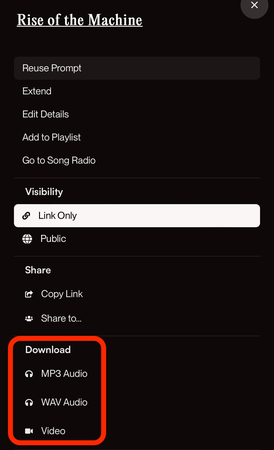

▼ From the Music Player:
- Step 1: Open the track in the Music Player.
- Step 2: Tap the triple-dot icon.
- Step 3: Tap Download to see the available options.
-
Step 4: Choose your preferred format and save it.
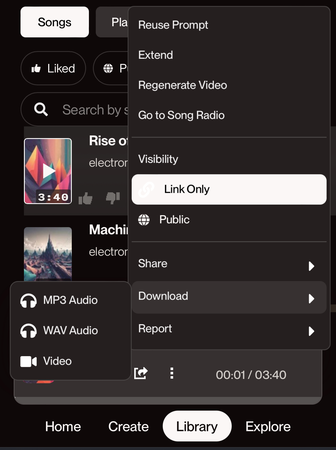

That’s all it takes. The official method is quick, reliable, and gives you the best audio quality Suno offers.
Part 3. How to Download Songs from Suno to MP3
If you want MP3 versions of Suno songs that aren’t directly downloadable inside your account, there are two practical workarounds. The first is grabbing tracks uploaded by creators on YouTube. The second is using a reliable online downloader.
1. Download Suno AI Songs from YouTube
Many creators upload their Suno tracks to YouTube, making it one of the easiest places to save the audio. Once the song is online, you can use a YouTube-to-MP3 tool to convert it into a proper file for offline listening. UltConv YouTube Video Downloader is a fast, all-in-one video converter that converts YouTube to MP3 without any quality loss. It’s more than a basic downloader; it’s a full media solution that lets you save content from over 10,000 sites, like YouTube, TikTok, and Spotify.
If you want reliable downloads without sacrificing quality, UltConv YouTube Video Downloader makes the whole process simple. It pulls high-resolution video, crisp audio, and even full playlists without compression issues. It also works around DRM on platforms like Spotify and Apple Music, which gives you far more freedom with your files. The built-in browser and private folder keep everything organized and protected. And if you’re looking to save your favorite Suno AI tracks as MP3 or WAV for offline listening, UltConv handles that easily.

- Converts YouTube videos to MP3 in high quality
- Extracts audio cleanly without losing detail
- Save YouTube playlists, channels, and albums
- Download audio up to 320kbps
- Remove DRM from Spotify and Apple Music
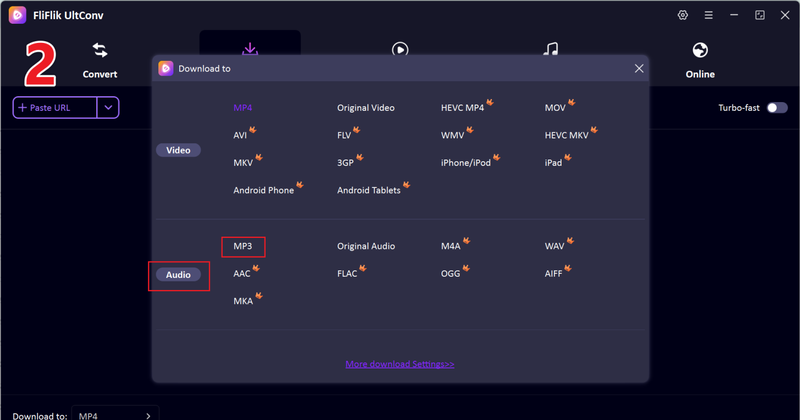
▼ How to Convert YouTube to MP3 with UltConv?
To save YouTube videos as MP3 files, first download and install UltConv Video Downloader on your computer. Once ready, follow these steps:
-
Open UltConv Video Downloader and go to the Download tab. Click the Download to button at the bottom. Choose MP3 as the output format so your audio can play on any device.
FREE DOWNLOAD![secure download]() Secure Download
FREE DOWNLOAD
Secure Download
FREE DOWNLOAD![secure download]() Secure Download
Secure Download
-
Open YouTube in your browser and copy the link of the song you want to download.

-
Switch back to UltConv. If the tool detects the link automatically, click Download to start saving your MP3 file. You can also paste the link manually to UltConv.
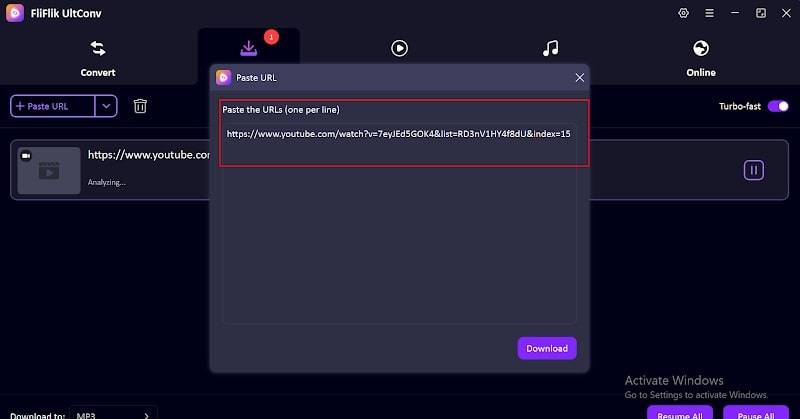
-
Once pressed the Download button, the music will start downloading.
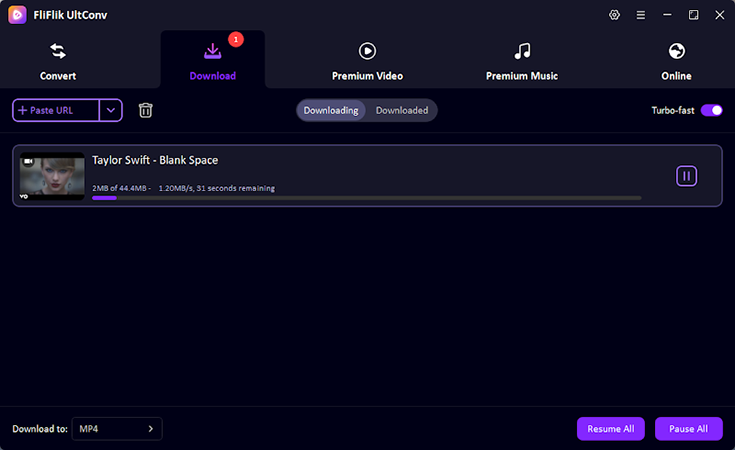


Once the download finishes, your video will be saved as an MP3 file. You can now enjoy your music offline anytime without buffering or interruptions.
2. Use Online Suno Downloader
If you prefer a quick, web-based solution, Online Suno Downloader lets you save your Suno AI songs without installing any software. Just paste the song link, choose the format, and download it directly to your device. Follow these steps:
-
Step 1: Open your web browser and go to Online Suno Downloader.

- Step 2: Copy the link of the Suno song you want to download from your Suno AI library.
-
Step 3: Paste the copied link into the input box on the Suno Downloader website. Click download.


Once done, your Suno song will be available offline in MP3 format, ready to enjoy anytime.
Final Words
Downloading Suno songs is easier than ever. You can use the official library, an external tool for YouTube conversions, or even browser extensions. All these methods let you keep your own AI creations to listen to offline, so you can enjoy the music whenever. With these tools, you can reliably download Suno songs and save them in the right format for your device and preferences.
 Secure Download
Secure Download
Secure Download
FAQ:
Q1. Can I download Suno Songs?
Yes, you can download your own creations directly from Suno AI, or use supported tools to save them for offline listening.
Q2. Is it legal to download other creators’ songs on Suno?
Downloading songs made by other creators should only be done for personal use. Sharing or distributing them without permission may violate copyright rules.
Hey everyone! I'm Ivan Davis, and I'm passionate about using AI to streamline my workflow in the voice changer industry. So excited to empower users by changing the voice to any voice they want!