

 By
By  6 minutes read


If you’re an active patron on OnlyFans subscribing to exclusive content, you may occasionally receive videos through DMs (direct messages). But here’s the catch: while OnlyFans supports viewing message videos, it does not provide a built-in option to save them directly to your device. Users who want to watch their favorites offline, keep personal backups, or reduce repeated streaming may wonder how to download OnlyFans videos from messages easily.
Fortunately, several practical methods can help. With the right tools, you can save accessible OnlyFans message videos in just a few steps. This guide explains several easy ways to download OnlyFans DM videos, including dedicated downloaders, screen recording, browser extensions, and mobile apps—no advanced technical skills required.
Part 1. Best OnlyFans Video Downloader for PC, Mac and Android
For Windows and Mac users who want a reliable way to save high-quality video from OnlyFans DMs, FliFlik UltConv OnlyFans Downloader provides a practical all-in-one solution. It can download OnlyFans message videos in available resolutions up to 1080p, handle DRM-protected content, preserve the original video quality, and batch-save multiple videos at once. Beyond OnlyFans, it also supports content downloads from 10,000+ platforms, including Fansly, JustForFans, ManyFans, and Patreon, making offline viewing easier across different creator sites.

- Easy to Download OnlyFans videos to MP4 in up to 1080p quality
- Remove DRM from Onlyfans videos to play anywhere, anytime.
- One-click to save multiple OnlyFans videos at the same time.
- Save all videos in private folder with 100% security.
- Download OnlyFans profile images without limits
- Download videos from OnlyFans messages/chats
▼ Steps to Download OnlyFans Message Videos with FliFlik UltConv:
Step 1: First, head over to the official FliFlik UltConv website and download the software. Install it on your Windows or Mac computer.
-
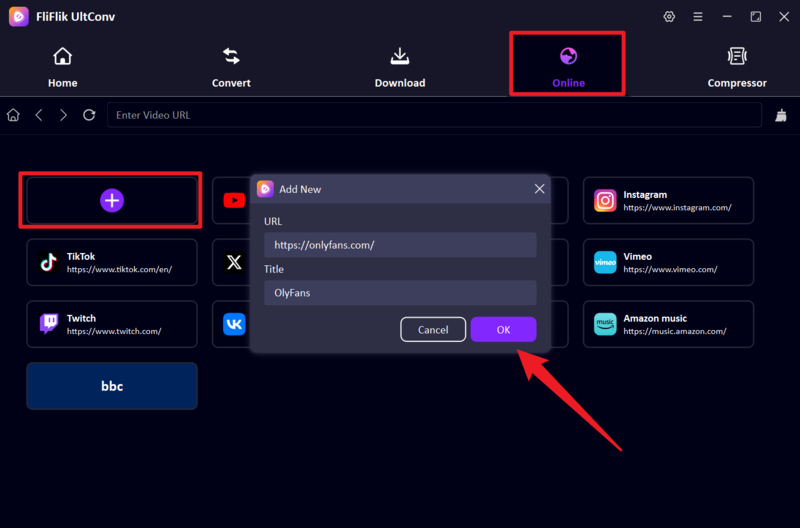
Step 2: Open the program and use the built-in secure browser to log in to your OnlyFans account. This ensures your session stays private and encrypted.
![ultconv onlyfans login]()
Step 3: Once logged in, navigate to your Messages (DMs) and locate the video you’d like to save. Click to open the video. The software will instantly detect the video stream and prepare it for download.
![ultconv download onlyfans]()
Step 4: Click the Download button to begin the process. The program will handle everything automatically. After the download is complete, find your saved video in the designated output folder and enjoy offline viewing anytime—no internet or app required.
![ultconv downloading onlyfans]()


Part 2. How to Record OnlyFans Message Videos Online and on Mobile
If an OnlyFans message video cannot be detected by a regular downloader, screen recording can be used as a backup method. You can record the video with an online screen recorder on a computer or use the built-in recording feature on an Android phone or iPhone.
2-1. Record OnlyFans Message Videos Online

FliFlik Online Screen Recorder lets you capture an OnlyFans message video directly from your browser without installing desktop software. You can record a browser tab together with system audio and save the result for offline viewing.
▼ Record OnlyFans Message Videos with FliFlik Online Screen Recorder:
-
Step 1: Open FliFlik Online Screen Recorder, click Start Recording, and select the OnlyFans browser tab. Enable system audio to capture the video sound.
![select onlyfans tab for screen recording]()
-
Step 2: Sign in to OnlyFans, open the Messages section, and play the message video while the recorder captures it in real time.
![record onlyfans message video online]()
-
Step 3: When the video finishes, click Stop Recording. Preview the result and download the recorded video to your device.
![download recorded onlyfans message video]()


2-2. Record OnlyFans Message Videos on Android
Most Android phones include a built-in screen recorder, allowing you to save an OnlyFans message video without installing another app. The location and name of this feature may vary by phone brand.
▼ How to Record OnlyFans Message Videos on Android:
-
Step 1: Swipe down to open Quick Settings, tap Screen Recorder, and select Media sounds or Device audio.
-
Step 2: Start recording, open OnlyFans, go to your messages, and play the video in full-screen mode.
-
Step 3: Stop the recording when the video ends. The recorded file will usually appear in your Gallery or Screen Recordings folder.

2-3. Record OnlyFans Message Videos on iPhone
iPhone users can record OnlyFans message videos with the built-in Screen Recording feature in Control Center, so no additional recording app is required.
▼ How to Record OnlyFans Message Videos on iPhone:
-
Step 1: Open the OnlyFans message video, then swipe down from the upper-right corner to open Control Center.
-
Step 2: Tap the Screen Recording icon, wait for the countdown, and play the video in full-screen mode.
-
Step 3: Tap the red recording indicator when finished and select Stop. The recorded video will be saved in the Photos app.
![record onlyfans message video on iphone]()

 Note:
Note:
Some protected videos may appear as a black screen or may not include audio when recorded. Only record content that you have purchased, subscribed to, own, or have permission to save.
Part 3. Download OnlyFans Video from Chat with Chrome Extension

Another popular option is to use a browser extension like Streamfork to download OnlyFans videos from messages directly while browsing. This lightweight tool integrates into Chrome and works in the background.
▼ Download OnlyFans Message Videos Using Streamfork:
Step 1: Open Google Chrome and visit the official Streamfork website to access the extension.
Step 2: Follow the on-screen instructions to install the Streamfork extension in your browser. It only takes a minute.
Step 3: Once installed, open a new tab and log in to your OnlyFans account using Chrome.
Step 4: Head to your Messages and locate the video you’d like to download.
Step 5: Click to play the video. As it starts, Streamfork’s overlay will detect the stream and automatically display a download icon or link near the video.
Step 6: Simply click the download option, and the video will be saved directly to your downloads folder in MP4 format.

Part 4. Download Message Video from OnlyFans on Android
Android users can download OnlyFans message videos directly to their phones with a dedicated downloader app. FliFlik UltConv provides a built-in browser for accessing OnlyFans messages, while AhaSave offers another mobile option for videos that can be detected from the page.
4-1. UltConv OnlyFans Downloader for Android
UltConv OnlyFans Downloader for Android is a dedicated app that lets you access OnlyFans through its built-in browser and save accessible message videos directly to your phone. You do not need to copy links or switch between multiple apps during the download process.
The app supports MP4 downloads, multiple video quality options, background downloading, and a completed-download section for managing saved files. It is more suitable for users who frequently download OnlyFans videos on Android or need a more stable option than a general mobile downloader.
▼ Download OnlyFans Message Videos with UltConv on Android:
-
Step 1: Download the latest UltConv APK from the official FliFlik website. Once the file has finished downloading, open it and follow the on-screen instructions to install the app.
![install ultconv onlyfans downloader on android]()
-
Step 2: Launch UltConv and open the Home section. Tap the OnlyFans icon to open the platform in the app’s built-in browser.
-
Step 3: Sign in to your OnlyFans account, then open the Messages section and find the conversation containing the video you want to save.
-
Step 4: Open and play the message video. When UltConv detects the video, tap the Download button and choose an available format and resolution.
-
Step 5: Wait for the download to finish, then open the Completed section to find the saved OnlyFans message video and play it offline.
![download onlyfans message video with ultconv on android]()

 Note:
Note:
If Android blocks the APK installation, open your phone’s settings and allow app installation from the browser or file manager you used to download UltConv. Only install the APK from the official FliFlik website.
4-2. AhaSave Video Downloader

AhaSave Video Downloader is another Android app that can detect and save videos from supported social and video websites. It may provide a convenient option when an accessible OnlyFans message video can be loaded through its built-in browser.
However, AhaSave is a general-purpose downloader rather than a dedicated OnlyFans tool. Purchased, subscriber-only, or protected message videos may not always be detected, and its availability or supported features may vary by app version.
▼ Download OnlyFans Message Videos Using AhaSave:
Step 1: Open the Play Store on your Android device and search for AhaSave Video Downloader. Download and install the application.
Step 2: Launch the AhaSave app and log into your OnlyFans account securely through the built-in browser.
Step 3: Go to your DMs (Messages) and search for the video you want to download.
Step 4: With the app playing the video, it will detect the stream in real time.
Step 5: A Download button will pop up on the screen. Hit the button.
Step 6: Next, choose your download video quality and format, usually standard definition or high-definition MP4.
Step 7: Once downloaded, you will access and play the video at your convenience.


Final Words
Although OnlyFans does not provide a built-in way to download videos from messages, the methods above offer several practical alternatives. You can use FliFlik UltConv, record a video online or with your phone’s built-in recorder, try the Streamfork Chrome extension, or save accessible content with an Android downloader app.
For a more reliable option with high-quality downloads, DRM video support, batch saving, and dedicated Windows, Mac, and Android versions, FliFlik UltConv OnlyFans Downloader is the most complete choice in this guide. Whichever method you use, only save OnlyFans message videos that you have purchased, subscribed to, own, or have permission to download.
 Secure Download
Secure Download
Secure Download