

 8 minutes read


If you care about sound quality, MP3 just doesn’t cut it. FLAC keeps every detail of your music intact, which is why more listeners are switching to lossless formats. But finding reliable tools to grab high-quality tracks isn’t always easy. That’s where a good flac downloader comes in.
Whether you’re building an offline library, archiving rare albums, or simply want studio-level audio on your own device, the right downloader makes all the difference. In this guide, we’ll cover the top 8 FLAC downloaders for 2026, breaking down their features, strengths, and ideal use cases, so you can pick the one that fits your listening habits and storage setup.

Part 1. Best Recommended FLAC Music Downloader on Desktop
If you want true lossless audio without jumping through hoops, FliFlik UltConv FLAC Downloader is an easy place to start. It’s a desktop tool built for both music and video lovers, letting you download tracks directly from major platforms and save them in FLAC with original quality preserved. FliFlik UltConv FLAC Downloader supports music sites like Spotify, Apple Music, TIDAL, Deezer, SoundCloud, Amazon Music, and Bandcamp, along with 10,000+ video platforms. You can grab single songs, full albums, or entire playlists in one click, then convert everything to FLAC, MP3, WAV, AAC, or AIFF without quality loss. It also removes DRM from supported music services, so your files stay playable offline anytime. Speed is another plus. Batch downloads, 10x acceleration, and a built-in browser makes large libraries quick to collect, while metadata stays intact for clean organization.

- Download music in FLAC with original lossless quality
- Supports Spotify, Apple Music, TIDAL, Deezer, SoundCloud, and more
- One-click download for playlists, albums, and channels
- Converts audio to FLAC, MP3, WAV, AAC, and AIFF
- Removes DRM for unrestricted offline playback
- Batch downloads with up to 10x faster speed
▼ How to Download FLAC Music from Spotify with UltConv?
-
Download and install UltConv on your Windows or Mac computer, then launch the app.
FREE DOWNLOAD![secure download]() Secure Download
FREE DOWNLOAD
Secure Download
FREE DOWNLOAD![secure download]() Secure Download
Secure Download
-
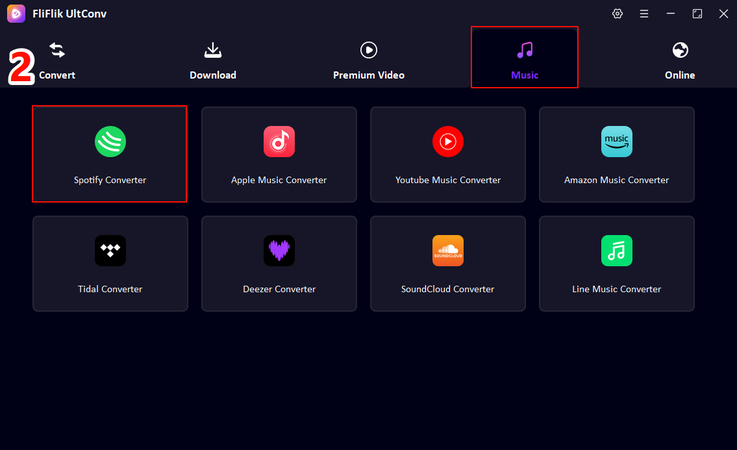
From the main dashboard, open Premium Music and choose Spotify Music Converter.
-
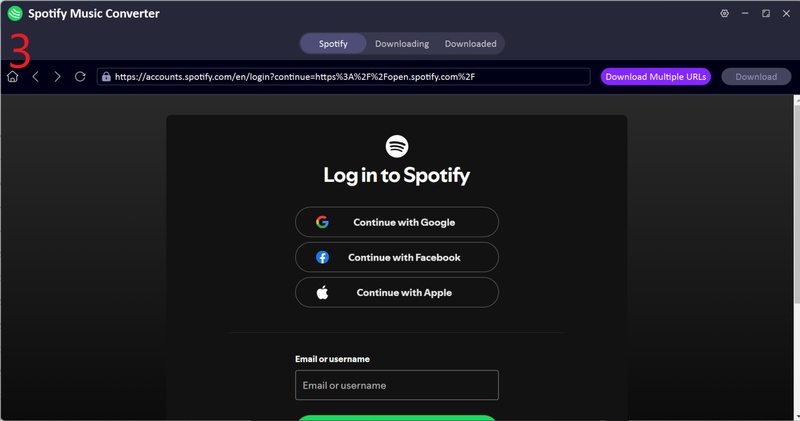
Sign in to your Spotify account inside UltConv. You don’t need Premium for this to work.
-
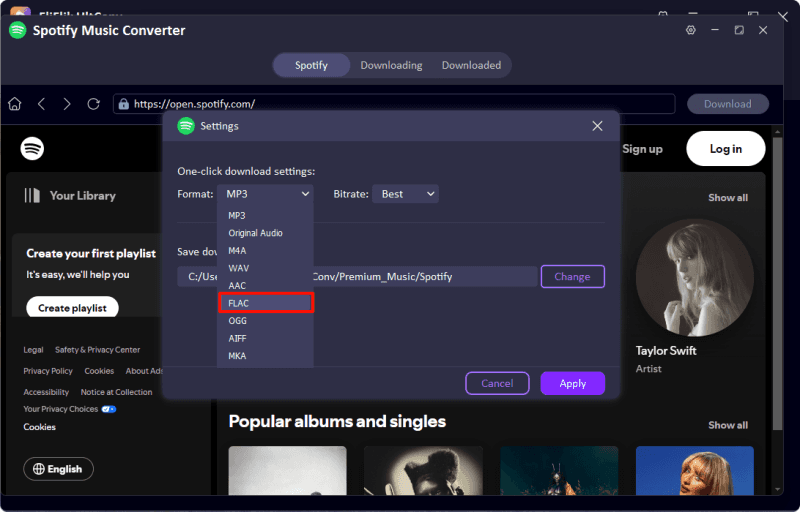
Open the Spotify Music Converter settings, set the output format to FLAC
-
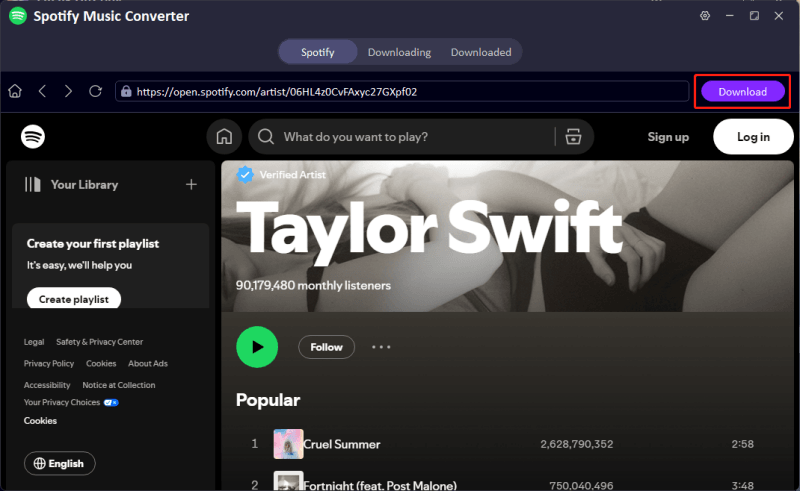
Browse your Spotify library, then select the tracks, albums, or playlists you’d like to save, then click the Download button in the upper-right corner
-
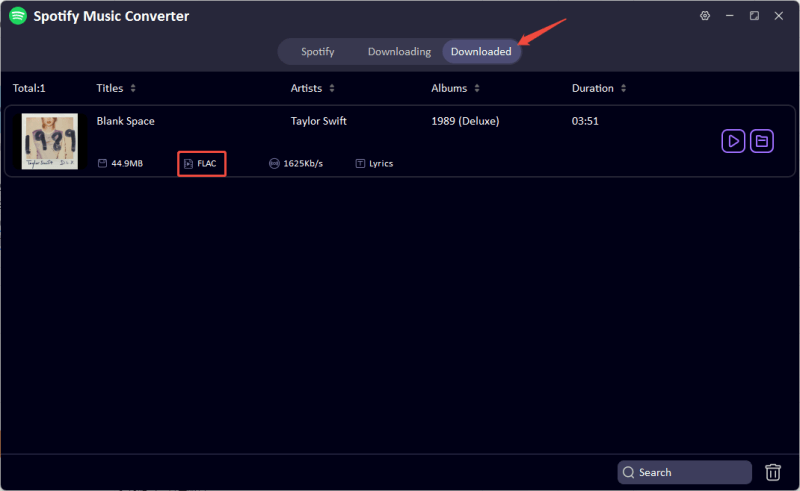
After the process completes, open the Downloaded section to access your lossless music in FLAC format.


Part 2. 3 Best FLAC Downloaders on Android
Android users aren’t left out when it comes to lossless music. While mobile tools can’t match desktop downloaders in speed or flexibility, there are still a few solid FLAC downloader apps that let you grab high-quality tracks directly on your phone. Below are three of the best options worth trying in 2026.
1. UltConv Spotify Converter for Android
UltConv for Android is a lightweight yet powerful downloader built for users who want high‑quality music and videos directly on their phones. It supports thousands of streaming platforms, making it a flexible option for anyone building an offline library. You can save videos in HD up to 4K, extract audio in high bitrate, and batch download playlists in just a few taps. For Android users looking for a simple FLAC-friendly workflow (via desktop sync or high-quality MP3 fallback), UltConv keeps everything fast, organized, and easy to manage.
- Download videos in 1080p and 4K, audio up to 320kbps
- Supports 10,000+ sites, including YouTube, SoundCloud, Bandcamp, etc.
- One-tap playlist and channel downloads
- Batch download multiple files at once
- Works in the background with auto-resume support
- Built-in file manager for easy media organization
▼ Steps to Download FLAC Lossless Music with UltConv on Android
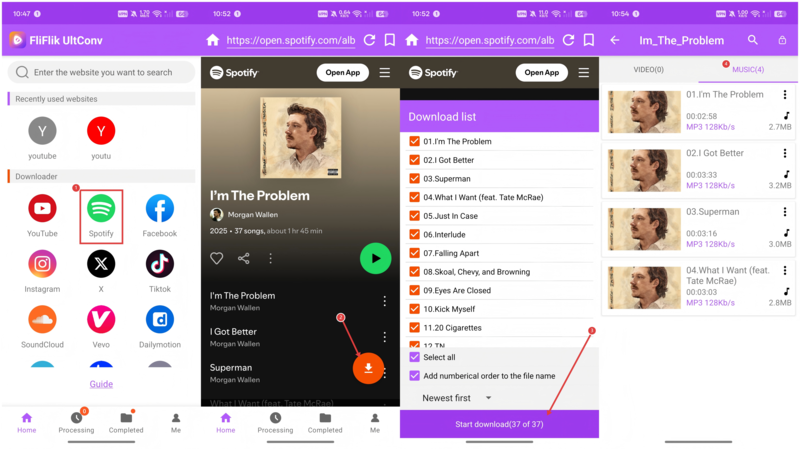
- Step 1: Install UltConv on your Android device, then open the app after installation.
- Step 2: Use the built-in browser to access Spotify and find the track, album, or playlist you want to save.
- Step 3: Tap the Download button, choose audio format, then select the highest available quality (such as FLAC or high‑bitrate audio).
-
Step 4:
Tap
Start download, and UltConv will save the music directly to your phone for offline listening.

2. Fildo for Android

Fildo is an Android app that gives you access to a massive library of music by pulling results from multiple third‑party sources. It doesn’t host tracks itself, but it lets you search and stream or download songs in high quality, including FLAC when available. This makes it a go‑to choice for people who want to build a FLAC music collection without a subscription.
- Lets you search a wide range of music from many sources in one place.
- Supports high‑quality audio downloads like FLAC when available.
- Built‑in playlist creation and local playback features.
- Not on Google Play, so you have to install the APK manually.
- Audio sources and quality depend on external sites and can vary.
- Ads and inconsistent search results are common.
3. NewPipe

NewPipe is a lightweight, open‑source Android app originally built for YouTube but also useful for music lovers. It lets you play content without ads, download audio or video for offline use, and run audio in the background without needing official accounts or services. While it doesn’t directly target FLAC downloads, it’s a solid choice if you want to download FLAC music quality audio (via external tools or conversions) alongside video.
- No ads, no accounts, and strong privacy protections.
- Built‑in download options for audio and video files.
- Background and pop‑up playback make it versatile for music listening.
- Doesn’t officially support FLAC downloads out of the box.
- You must install it from outside the Play Store.
- Downloading can sometimes fail or produce incomplete files depending on the source and app updates.
Part 3. 4 Best FLAC Downloader Online
Here are some easy web‑based tools you can use to download FLAC music free without installing software. They work right in your browser and are handy when you just need a quick lossless audio file from a link.
1. Flacdownloader.com

flacdownloader.com that lets you grab high-quality audio files directly from links you provide. It’s designed to make getting FLAC files quick and straightforward, with no accounts or apps needed.
- Works in any browser without installing software
- Simple input-and-download workflow
- No sign-up or login required
- Quality and availability can vary depending on the source
- Limited conversion options beyond FLAC
- Occasional slowdowns or site uptime issues
- Full of intrusive pop-up ads
2. CutYT

CutYT is a free online converter that lets you paste a video or audio URL and convert it to FLAC format without extra steps. It supports links from YouTube and other platforms, and you can usually grab a lossless file in seconds, making it a decent choice for FLAC music download free online.
- 100% free and works in any browser
- Supports YouTube, Facebook, TikTok, and more
- Fast processing and no account needed
- Output quality depends on the original source
- Ads and conversion prompts on the site
- No playlist handling or batch options
3. 4kdownload.to

4kdownload.to is a well‑known online converter that can take a YouTube link and turn it into a FLAC audio file. The interface is straightforward, and you don’t need to install anything to start a download. It’s a good choice if you want a FLAC music download free tool with basic output options.
- No software installation required
- Supports multiple output formats including FLAC
- Works on desktop and mobile browsers
- Ads and redirects can be distracting
- Quality and metadata support are basic
- Not ideal for batch downloads
4. DAB Music Player

DAB Music Player is a browser-based music search and download site that focuses on simplicity. You type in a song or artist, browse the results, and grab audio files directly without installing anything. It’s often used for quick FLAC music downloads when available, especially for single tracks rather than full albums.
- Clean interface with fast search
- No software installation required
- Supports high-quality audio when available
- Works on both desktop and mobile browsers
- FLAC availability depends on the source
- No batch or playlist downloads
- Limited tracks and metadata support
- Occasional broken links
Final Words
Finding a reliable FLAC downloader doesn’t have to be complicated. Online tools are fine for quick grabs, and Android apps work for casual listening, but they often fall short on quality control, batch downloads, and stability. If you’re serious about lossless audio, FliFlik UltConv Flac Downloader gives you the most control. It supports FLAC, handles full playlists and albums, preserves metadata, and works with major music platforms, all from one desktop app. Want clean sound, offline access, and zero guessing games? Try FliFlik UltConv FLAC Downloader and start building your FLAC library the right way.
 Secure Download
Secure Download
Secure Download
Hey there! I am Maxwell Clark. I'm always looking for new tech tools that make a difference, from making visuals and audio better to making workflows better. I'm going to share tips and tricks for using AI tools for videos, audio, and images. I'm excited to help you navigate the digital world more efficiently and creatively!

