

 7 minutes read


If you’ve ever found a Twitch clip you loved and wanted to save only the audio, you’re definitely not alone. People often look for quick ways to turn a Twitch clip to MP3 because sometimes the sound is all they need, whether it’s a funny moment, a great reaction, or audio they want to use in another project. The good thing is that converting a clip is actually very simple once you know your options.
There are plenty of tools that do it fast without any tricky settings. This article will share 10 best options to convert Twitch Clip to MP3, explain how each one works, and help you choose the method that fits your needs. If your goal is to grab the audio and move on, you’ll find your best option here.

Part 1. Why You Might Need to Convert a Twitch Clip to MP3?
Sometimes, we don’t always want the whole Twitch clip. Sometimes the audio is the real gem. Maybe it’s a streamer’s funny reaction that would make a perfect notification on your phone. Maybe it’s a sound you want to use as a ringtone because it just fits your vibe. Converting a Twitch clip to MP3 makes that easy.
There’s also the practical side. Some viewers like to save moments from streams for personal archives so they can listen later without opening Twitch or dealing with buffering. Others repurpose audio for podcasts or short videos when they need a quick reaction sound or a clean voice clip. If you edit content, you already know how helpful it is to have audio in a simple format instead of scrubbing through video files. What this really comes down to is convenience. Turning a Twitch clip into an MP3 gives you a small, flexible audio file you can use almost anywhere. It’s fast, it’s useful, and it fits a lot of creative needs.
Part 2. 10 Best Ways to Convert Twitch Clip to MP3
There are plenty of tools that can turn a Twitch clip into an MP3 easily. Some work online, some need a quick install, and each one has its own strengths. The list below walks you through the best options so you can pick whatever fits your needs.
1. FliFlik UltConv Twitch Converter
The first tool we recommend for turning a Twitch clip to MP3 is FliFlik UltConv Twitch Converter. It’s designed for people who just want the audio without fighting with complicated settings. You drop your clip in, pick MP3, and it converts fast. No lag. No weird quality issues. The interface is simple, and everything you need is right in front of you, which makes it great even if you’ve never used a converter before.
What makes UltConv Twitch Converter stand out is how well it handles streaming clips. Twitch videos can be heavy, but this tool processes them quickly while keeping the sound clear. It doesn’t matter if the clip is short or a few minutes long; the audio still comes out clean. And if you have several clips to convert, you can process them all at once with a batch downloading feature. For anyone who edits content, saves sound bites, or just wants their favorite Twitch moments in MP3, this tool makes the whole job smooth.

- Converts Twitch clips into MP3, AAC, FLAC, and more
- Handles large 4K and 8K videos without slowing down
- Batch converts multiple Twitch clips at the same time
- Supports almost every video format you’ll ever need
- Optimized for phones, tablets, and desktops
- Produces high-quality audio up to lossless formats
▼ How to Download Twitch Clips to MP3 with UltConv Twitch Converter?
-
Get FliFlik UltConv Video Downloader for your computer and install it.
FREE DOWNLOAD![secure download]() Secure Download
FREE DOWNLOAD
Secure Download
FREE DOWNLOAD![secure download]() Secure Download
Secure Download
-
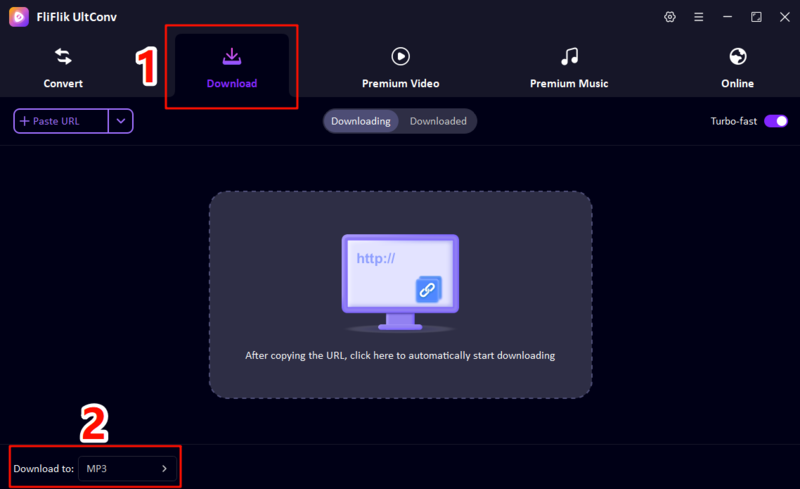
To choose the output format as MP3, open the program, go to the Download tab, and click the “Download to” button, select MP3 from the output format list
-
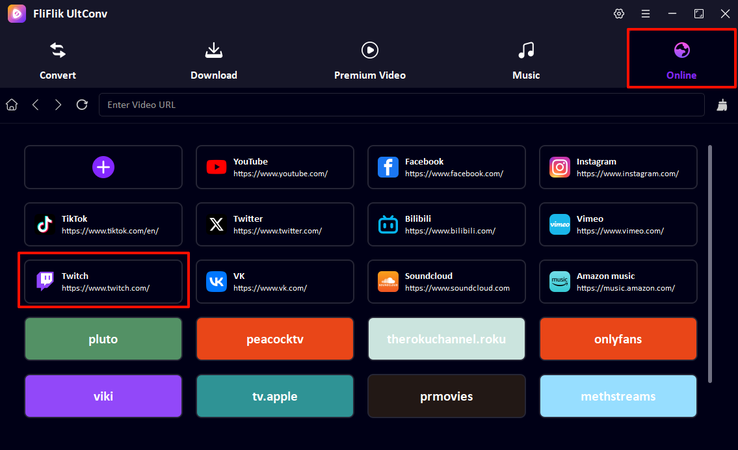
Launch ‘Online’ section in UltConv, and choose Twitch from the supported platforms list
-
Choose the Twitch clip you want to download as MP3, and click the ‘Download’ button at the bottom.

-
Then the Twitch clip would finish downloading immediately. You can check the downloaded Twitch clip in MP3 now.


2. TunesKit Twitch Audio Downloader

If you want a straightforward way to pull audio from Twitch clips, TunesKit is a solid backup option. It focuses on clean audio extraction, so you get an MP3 file without extra noise or glitches. The layout is simple, the processing is quick, and it works well for anyone who only needs a tool to download Twitch clip to MP3 without dealing with heavy software.
- Clean and simple interface
- Good audio quality
- Supports multiple audio formats
- Works with most standard video clips
- Limited advanced features
- Doesn’t handle large files very well
- Not the best choice for batch conversions
3. 4K Video Downloader Plus

This 4k Video Downloader Plus tool is helpful if you want something that can handle both high-resolution videos and quick MP3 extractions. It’s mainly built for video downloads, but it does a nice job converting Twitch clips to audio when you need it. The speed is steady, and the program feels lightweight, which makes it a good all-purpose tool if you jump between video and audio downloads often.
- Reliable for large video and audio downloads
- Supports many platforms outside Twitch
- Good MP3 output quality
- Easy-to-use layout
- Some features sit behind paid upgrades
- Occasional slowdowns with very long clips
- Not designed specifically for Twitch
4. VideoProc Converter AI

VideoProc is a stronger option if you want more control over how your audio turns out. It can download Twitch clips to MP3 with stable quality, but it also gives you editing tools, trimming options, and format presets. This is helpful if you’re mixing streaming clips into bigger projects. Its speed is good, the interface looks clean, and the AI features help with improving video and audio clarity during conversion.
- Stable conversions with good audio clarity
- Includes trimming and editing tools
- Handles large files easily
- Works across many formats and devices
- More features than casual users need
- Takes time to learn everything
- Some tools require paid access
5. ViWizard Audio Capture

ViWizard works differently from the others. Instead of converting a downloaded file, it captures audio playing on your computer. So if a Twitch clip won’t download properly, you can just play it and let ViWizard record the sound in real time. It’s handy for creators who want specific moments or background audio. It also supports multi-track recording, so you can grab multiple sounds at once.
- Works even when downloads fail
- Good for grabbing specific moments
- Supports multiple audio sources
- Simple export options
- Real-time recording takes longer
- Anything in the background can be captured
- Not ideal for batch conversions
▼ Steps to download Twitch clips to MP3 with ViWizard:
- Step 1: Open ViWizard and select the browser or app that will play your Twitch clip.
- Step 2: Play the clip and let the software capture the audio.
- Step 3: Save the recording in MP3 or another format you need.
6. Amoyshare

Amoyshare is a reliable online tool that makes it easy to download Twitch clips and convert them to MP3. Its interface is clean and beginner-friendly, letting you grab audio quickly without extra software. It supports high-quality output, so your sound stays clear, and it works on both desktops and mobile devices. If you want a quick way to turn a Twitch clip into MP3 without fuss, this is a solid choice.
- Simple and intuitive interface
- High-quality MP3 output
- Works on desktop and mobile
- Free to use for basic conversions
- Advanced features require a subscription
- Playlist or batch downloads are limited
- Occasional slow processing with large clips
7. Clip Ninja

Clip Ninja is a lightweight and easy-to-use tool for downloading audio from Twitch clips. It focuses on simplicity, making it a good option for anyone who just wants a fast conversion without dealing with too many settings. Its strength is speed, and it delivers reliable MP3 output from individual clips.
- Fast and simple to use
- High-quality MP3 output
- No installation required
- Works on multiple devices
- Limited features for advanced users
- Doesn’t support batch downloads
- Only single-clip conversion
8. Untwitch

Untwitch is an online Twitch clip to MP3 converter that lets you quickly extract audio from any clip. Its clean, minimal interface focuses on the core task, making it perfect for users who want a no-frills solution. You just paste the clip link, hit convert, and get your MP3 quickly.
- Simple, no-frills design
- Quick MP3 conversion
- Works on desktop and mobile
- Free to use
- Limited to single clip downloads
- No extra audio editing features
- Quality depends on the original clip
9. Clipsey

Clipsey is another solid option if you want a fast and reliable Twitch clip to MP3 converter. It works entirely in your browser and doesn’t require downloads. The tool is handy for anyone who wants audio from Twitch clips for personal use, content creation, or editing projects.
- Browser-based and free
- Quick and reliable conversion
- High-quality MP3 output
- Simple interface
- Only supports one clip at a time
- Ads can be distracting
- No batch download feature
10. Clipr

Clipr is an easy-to-use tool for turning Twitch clips into MP3 files. It works online and allows you to select output quality before downloading. This makes it great if you want high-quality audio or just a small file for quick use. Clipr is ideal for casual users and content creators alike.
- Fast and simple to use
- Supports MP3 and other formats
- Works in the browser without installation
- Single-clip conversion only
- Ads on the site
- No batch download
Part 2. Comparison of 10 Twitch Clip to MP3 Converter
Now that we’ve looked at the 10 best tools to turn a Twitch clip to MP3, it’s helpful to see how they stack up at a glance. Each tool has its strengths and weaknesses, from output quality and format options to speed and batch download support. Some are completely ad-free, while others might struggle with very large files. This table will give you a quick overview of key features so you can pick the best Twitch clip to MP3 converter for your needs.
| Tool | Max Output Quality | Output Formats | Batch Download | Conversion Speed | Ads-Free | Stability |
|---|---|---|---|---|---|---|
| FliFlik UltConv | 320kbps / Lossless | 100+ formats MP3, AAC, FLAC, WAV, MP4, MKV, MOV | Yes | Ultra-fast | ||
| (10X) | Yes | High | ||||
| TunesKit | 320kbps | MP3, WAV, AAC | Yes | Medium | No | Medium |
| 4K Video Downloader Plus | 320kbps | MP3, MP4, MKV, AVI | Yes | Medium | Yes | High |
| VideoProc Converter AI | 320kbps | MP3, AAC, FLAC, WAV, MP4, MOV | Yes | Medium | Yes | High |
| ViWizard Audio Capture | 320kbps | MP3, WAV, AAC | No | Real-time | No | High |
| Amoyshare | 320kbps | MP3, AAC | No | Medium | No | Medium |
| Clip Ninja | 320kbps | MP3 | No | Medium | No | Medium |
| Untwitch | 320kbps | MP3 | No | Medium | No | Medium |
| Clipsey | 320kbps | MP3 | No | Medium | No | Medium |
| Clipr | 320kbps | MP3, WAV | No | Medium | No | Medium |
Final Thoughts
Converting Twitch clips to audio has never been easier, and there are plenty of tools out there to help you grab your favorite moments. Whether it’s for personal use, content creation, or just saving a funny reaction, having the right tool makes all the difference. Among all the options, FliFlik UltConv Twitch Converter stands out as the best Twitch clip to MP3 converter. It’s fast, simple, keeps the audio quality high, and even lets you batch download multiple clips at once. If you want a smooth and reliable way to turn Twitch clips into MP3 files, this is the tool to go with.
 Secure Download
Secure Download
Secure Download
FAQs
Q1. Can you download clips from Twitch?
Yes, you can download clips directly from Twitch or use third-party tools like FliFlik UltConv Twitch Converter to extract the video or audio. FliFlik UltConv Twitch Converter allows you to save clips as MP3 files for offline use.
Q2. How do I export a clip from Twitch?
To export a clip, open the clip on Twitch, copy its URL, and paste it into FliFlik UltConv Twitch Converter. From there, you can download it as MP3 or other formats, depending on the tool.
Secure Download
Secure Download
Hey there! I am Maxwell Clark. I'm always looking for new tech tools that make a difference, from making visuals and audio better to making workflows better. I'm going to share tips and tricks for using AI tools for videos, audio, and images. I'm excited to help you navigate the digital world more efficiently and creatively!

