

 7 minutes read


If you want to keep a Twitter sound, song, or interview for offline playback, you only need to download Twitter to MP3 file. The process is simple, and you can download Twitter videos to an MP3 file on a desktop computer, Android phone, or iPhone. After the file is saved, you hear it whenever you wish, with no need for the Twitter app or for a live connection. Here, in this article, we’ll show you simple and reliable steps to extract the audio and save it as an MP3 without any confusion.

Part 1. Best Way to Download Twitter to MP3 on PC & Mac
The first and most recommended way to convert Twitter videos to audio is FliFlik UltConv Twitter Converter. If you’ve been struggling with slow or unreliable converters, this tool makes the process effortless. It’s designed to handle videos from Twitter and many other platforms, letting you extract audio in high-quality MP3 without any hassle. From music clips to interviews and podcast snippets on Twitter, UltConv keeps the audio clean and easy to play anywhere.
Beyond just being a Twitter to MP3 converter, UltConv Twitter Converter offers flexibility. You can convert multiple videos at once, choose from a wide range of audio and video formats, and enjoy ultra-fast conversion speeds even for large 4K or 8K files. It’s compatible with Windows and Mac, and it ensures that your media is fully optimized for playback on phones, tablets, or computers. In short, it’s a complete, reliable solution for anyone looking to save Twitter content offline.

- Convert Twitter videos to MP3, FLAC, WAV, and other popular audio formats
- Supports video formats like MP4, MOV, MKV, AVI, etc
- Ultra-fast conversion speed, even for 4K and 8K files
- Batch conversion to save time on multiple files
- Compatible with all devices, including iPhone, iPad, and Android
- Preserves original quality for video and audio files.
▼ How to Download Twitter to MP3 Using UltConv Video Converter?
-
Go to the official FliFlik website and click the Download button to install UltConv on your PC.
FREE DOWNLOAD![secure download]() Secure Download
FREE DOWNLOAD
Secure Download
FREE DOWNLOAD![secure download]() Secure Download
Secure Download
-
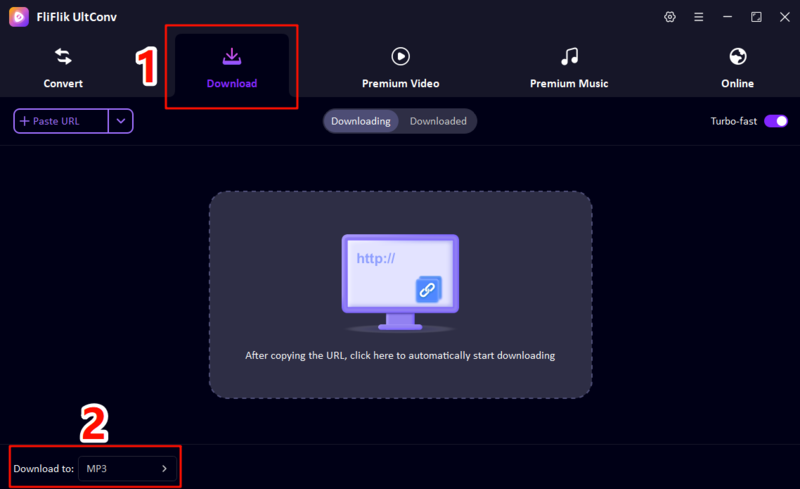
Open UltConv and go to the Download section. Select MP3 (or your preferred audio format) as the output. This ensures the downloaded Twitter content will be saved in the right format.
-
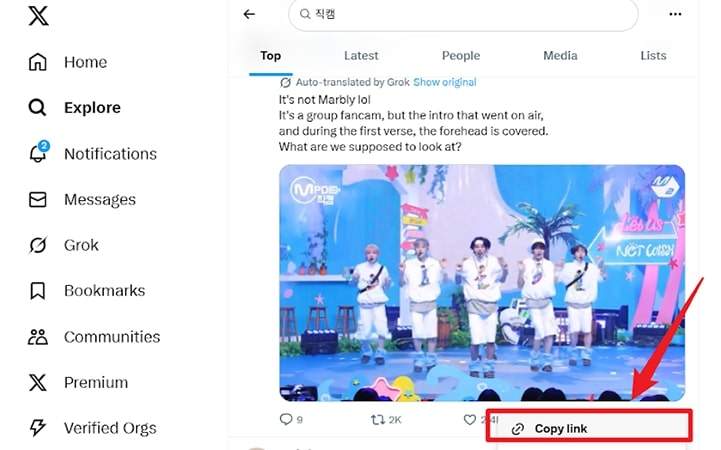
Copy the URL of the Twitter video you want to download.
-
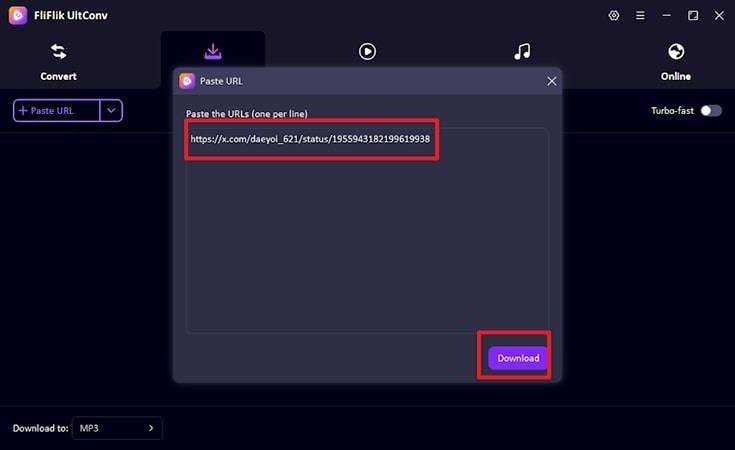
Go back to UltConv’s Download section and paste the link. UltConv will automatically detect the media and prepare it for conversion.
-
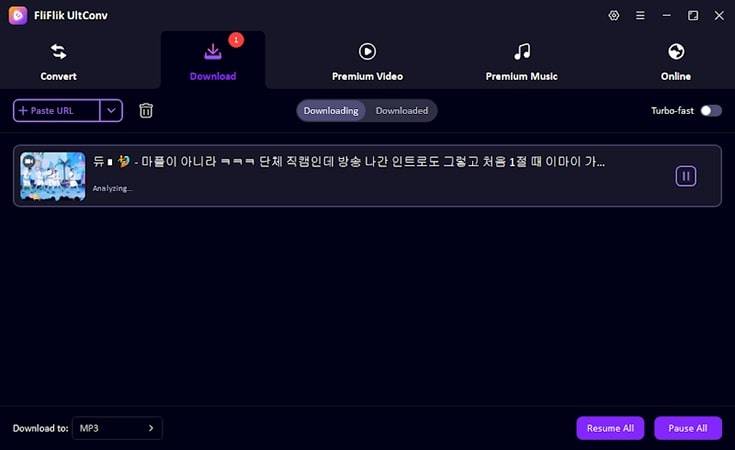
Download to start. Once the process finishes, your MP3 file will be saved to your chosen folder, ready to play on any device.


Part 2. How to Download Twitter to MP3 on Android?
If you want a simple and reliable way to convert Twitter videos on your phone, FliFlik UltConv for Android is the best solution. This app works smoothly on Android 7.0 or later and allows you to download Twitter videos to MP3 quickly without losing quality. Beyond Twitter, it supports thousands of other sites, including Facebook, Instagram, and TikTok. With just a few taps, you can save audio and video files directly to your device for offline playback.
- Convert Twitter videos to MP3 and save high-quality audio
- Download videos in 1080p or 4K resolution
- One-click download for playlists and multiple videos
- Built-in browser to access supported sites directly
- Background download and auto-resume unfinished tasks
- Organize downloads in a secure private folder
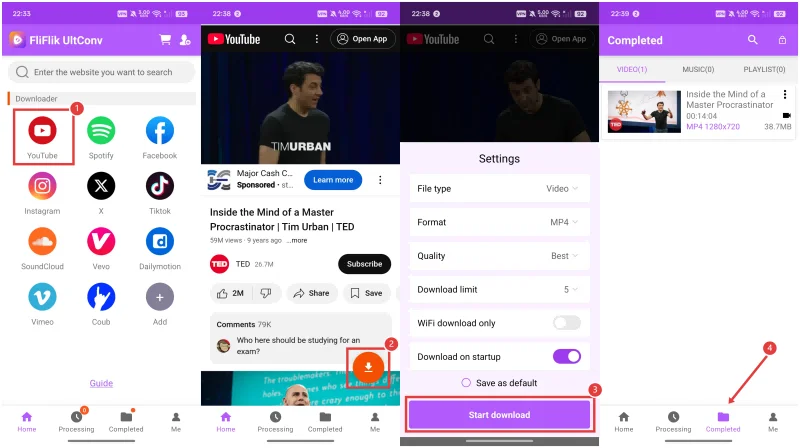
▼ How to Download Twitter Video to MP3 with FliFlik UltConv for Android?
-
Step 1: Open UltConv on your Android device and go to the built-in browser.
-
Step 2: Open UltConv on your Android device and go to the built-in browser.
-
Step 3: Tap the Download button, choose MP3 as the format, select your preferred quality, and confirm.
-
Step 4: Once the download completes, your MP3 file will be saved on your device, ready to play offline anytime.

Part 3. How to Download Twitter Video to MP3 on iPhone
Downloading Twitter videos on an iPhone can be difficult due to app restrictions, but web-based tools make it easy. Here are two reliable options.
1. TwitterDown

TwitterDown is a simple, browser-based tool that lets you convert Twitter videos to audio on any iPhone without installing an app. All you need is the video link, and it can quickly generate an MP3 file for offline listening.
- Works on any iPhone using Safari or another browser
- No installation required
- Converts Twitter videos to MP3 quickly
- Free to use
- Limited to single downloads (no batch support)
- Ads on the website can be distracting
- Some longer videos may fail occasionally
▼ Steps to Download Twitter Link to MP3 Using TwitterDown:
- Step 1: Open Twitter and copy the URL of the video you want to download.
- Step 2: Go to TwitterDown in your iPhone browser.
- Step 3: Paste the Twitter video URL into the input field.
- Step 4: Tap Download and select MP3 as the format.
- Step 5: The MP3 file will be generated, and you can save it directly to your device for offline listening.
2. SaveTwitter

SaveTwitter is another web-based option for downloading Twitter videos to MP3 on iPhone. Its method is very similar to TwitterDown; you just paste the video link and choose the audio format. While it doesn’t have a dedicated app, it works well for quick downloads and supports most Twitter video links. Open the site, paste the Twitter video link, select MP3, and download. The download process is nearly identical to TwitterDown, making it easy to save your favorite content quickly.
- Works entirely in a browser on iPhone
- No installation or account required
- Converts Twitter videos to MP3 efficiently
- Limited advanced features like batch downloads or playlist support
- Ads can appear on the page
- Some videos with copyright restrictions may not download
Part 4. How to Download Twitter Video to MP3 with Chrome Extension
If you prefer using your browser instead of switching between tools and apps, Chrome extensions can help you grab Twitter videos quickly. Here are two options that work well for converting Twitter video to MP3.
1. Twitter Downloader HD

Twitter Downloader HD is a lightweight Chrome extension that adds a small download button directly under Twitter videos. It’s simple, fast, and doesn’t force you through extra pages or ads. You can save videos in different qualities and formats.
- Works directly on the Twitter page
- Detects videos automatically
- Simple and beginner-friendly
- Supports multiple video qualities
- Won’t work in Incognito unless enabled
- Sometimes fails on longer clips
- Sometimes it would fail to download
▼ Steps to Use Twitter Downloader HD to Download Twitter to MP3:
- Step 1: Install the extension from the Chrome Web Store.
- Step 2: Open Twitter and play the video you want.
- Step 3: A small Download button will appear near the video.
- Step 4: Click it, choose your preferred quality, and save the video.
2. Media Harvest

Media Harvest is another Chrome-based downloader that works like Twitter Downloader HD. It scans pages for media files and adds an instant download option. The extension grabs videos quickly, and once the file is saved, you can use it anywhere. The workflow is the same as the above tool. Open Twitter, let the extension detect the video, click Download, and save the file.
- Detects Twitter videos without extra steps
- Good for quick, one-click downloads
- Saves videos in clean, standard formats
- Doesn’t support batch downloads
- Occasional detection delays
Final Thoughts
So that’s the whole picture. You’ve got desktop tools, mobile apps, web-based shortcuts, and even Chrome extensions to help you turn any Twitter video into audio. The main thing is choosing a method that actually fits how you use your devices. Some people want a quick web tool. Others prefer an app they can rely on daily. Either way, you now have everything you need to handle any Twitter to mp3 download without guesswork.
If you want the smoothest experience, FliFlik UltConv Twitter Converter stands out. It works on both Windows and Mac, handles long clips without crashing, and gives you clean, high-quality MP3 files in seconds. And if you’re on Android, UltConv for Android is the perfect tool. No need to wait. Give UltConv a try and always have your favorite audio on hand.
 Secure Download
Secure Download
Secure Download
Hey there! I am Maxwell Clark. I'm always looking for new tech tools that make a difference, from making visuals and audio better to making workflows better. I'm going to share tips and tricks for using AI tools for videos, audio, and images. I'm excited to help you navigate the digital world more efficiently and creatively!

