

 7 minutes read


Sometimes you just want the sound, not the video. Maybe it’s a lecture, music performance, podcast, or presentation you want to listen to on the go. That’s when people start searching for ways to convert Vimeo to MP3.
Vimeo doesn’t offer a built-in MP3 download option, so users often look for safe third-party tools or online converters. The goal is simple: extract high-quality audio without losing clarity or spending too much time on complicated steps. In 2026, there are still reliable methods that help you save Vimeo audio for offline listening on your phone, laptop, or music player. In this article, we’ll walk through five practical ways to convert Vimeo videos to MP3 with easy, beginner-friendly steps.

Part 1. Quick Overview of 5 Vimeo to MP3 Converters
Before jumping into the details, here’s a quick comparison of the best tools for Vimeo to MP3 conversion. This overview helps you quickly see which tool offers better quality, safety, and format support so you can choose the right option.
| Converter | Type | Supports Sites | Output Formats | Audio Quality | Video Quality | Safety |
|---|---|---|---|---|---|---|
| FliFlik UltConv | Desktop app + built-in browser | 10,000+ sites (Vimeo, YouTube, TikTok, etc.) | 100+ formats (MP3, MP4, MKV, WAV, etc.) | Up to 320 kbps | Up to 4K/8K | High (no malware, built-in features) |
| FliFlik Online Screen Recorder | Browser recorder | Any site | Recorded MP3 | Depends on recording quality | Depends on screen resolution | High (no downloads) |
| Vimeo Downloader | Online converter | Vimeo only | MP3, MP4 | Standard | Standard | Medium (ads/redirects) |
| Loader.to | Online converter | Multi-site (Vimeo, YouTube, etc.) | MP3, MP4, others | Standard | Standard | Medium (redirects/unknown downloads) |
| TTOK | Online converter | Vimeo & basic sites | MP3, MP4 | Standard | Standard | Medium (limited support) |
Part 2. Best Recommended Way to Convert Vimeo to MP3
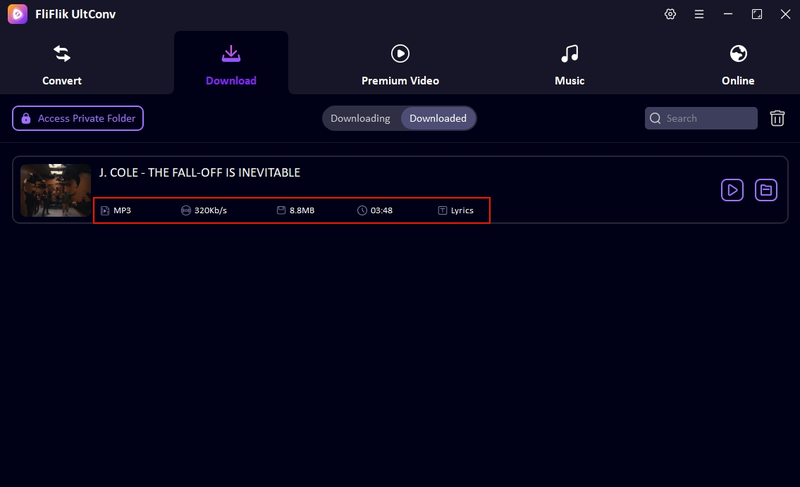
If you want the easiest and most reliable way to Vimeo download to MP3, the FliFlik UltConv Vimeo Converter is a strong choice. Just open the built-in browser inside FliFlik UltConv Vimeo Converter, search for or open Vimeo directly, and start watching and downloading at the same time. When you find the video you want, you can download it in up to 320kbps quality while keeping ID3 tags like title, artist name, and artwork intact. It’s designed to keep the music file organized and clean, just like a real music track.
The tool also supports more than 100 file formats, so you’re not limited to audio only. You can download videos in MP4 or MKV formats and save them in HD quality, like 720p or 1080p. It also works across 10,000+ websites, which means Vimeo isn’t the only platform you can use. Everything stays inside one program, which makes downloading and converting feel much faster and more natural.

- Download videos and music from 10,000+ websites, YouTube, TikTok, Instagram, etc.
- Convert Vimeo video to MP3, MP4, and 100+ formats
- Download audio up to 320kbps high quality
- Batch download videos and music at once
- Download HD videos up to 4K and 8K resolutions
- Built-in browser for direct searching and downloading
- Remove DRM protection from some music platforms
▼ Steps to Convert Vimeo to MP3 with UltConv Vimeo Converter
First, download and install FliFlik UltConv Video Downloader, then follow the steps below to convert Vimeo videos to MP3.
 Secure Download
Secure Download
Secure Download
-
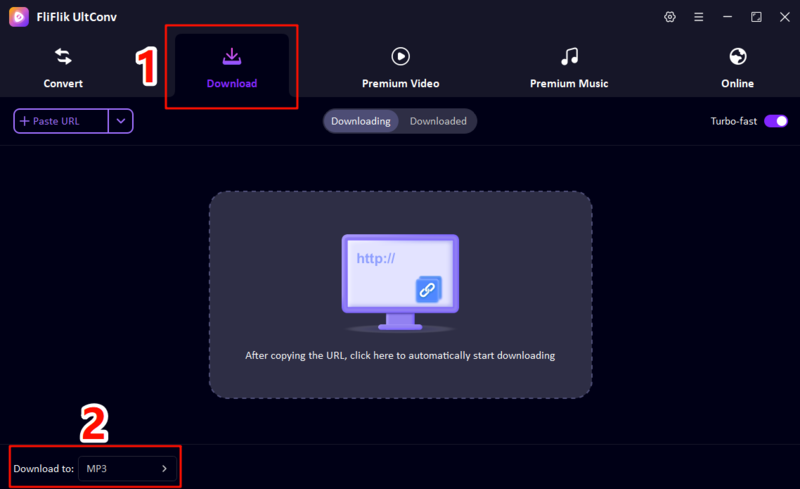
Open UltConv and go to the Download to button at the bottom. Choose MP3 as your output format so the tool knows you want audio only.
-
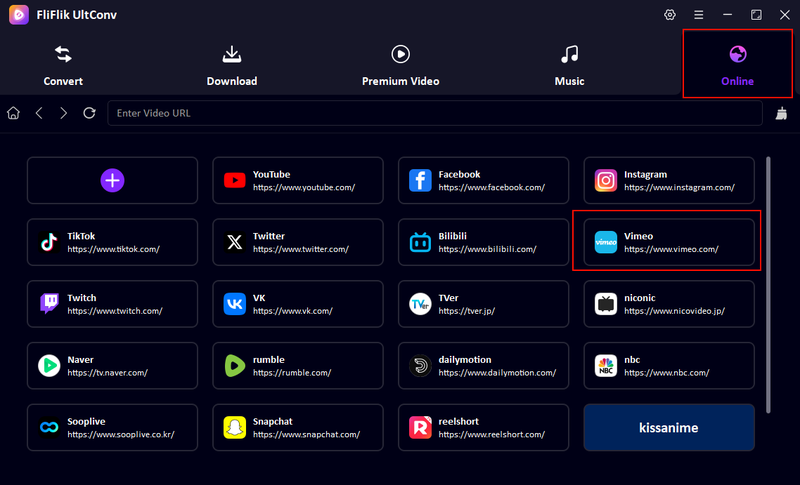
Click on the Online tab and select Vimeo inside the built-in browser. You can browse Vimeo directly within the software without using any external site.
-
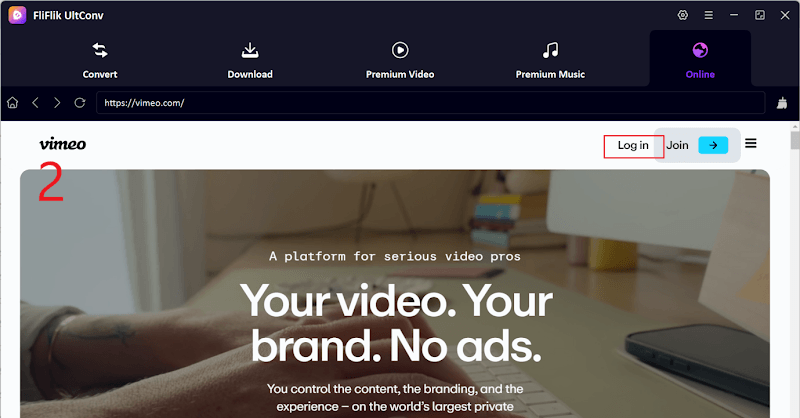
Log in to your Vimeo account if the video is private or restricted. This allows the tool to access and download that content.
-
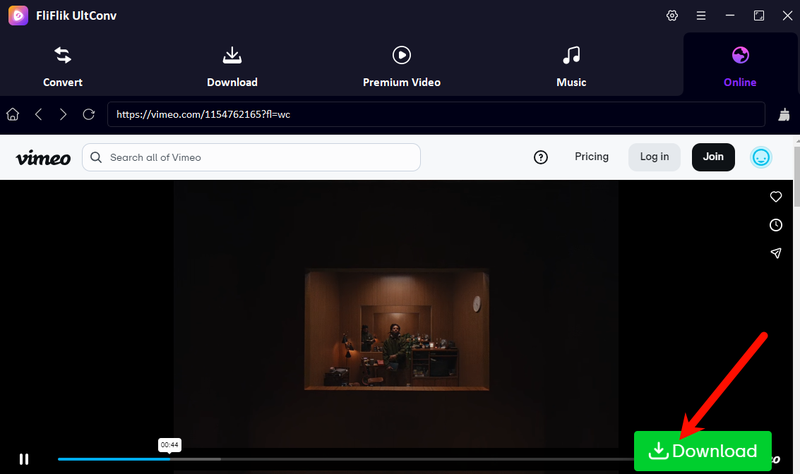
Find the video you want, then click the Download button. The tool will begin converting and saving the file as MP3 automatically.
-
Your video will start downloading immediately. Once downloaded, you can find it on your device for offline watching.


Part 3. Easiest Way to Record Vimeo to MP3
If you can’t download a Vimeo video directly, recording is the next simplest option to get Vimeo MP3 audio. Screen recording doesn’t rely on download links or restricted buttons. Instead, it captures everything playing on your screen in real time, including system audio. The FliFlik Online Screen Recorder is a good free choice because it works directly in your browser, requires no installation, and doesn’t add watermarks. You can record Vimeo videos, capture audio, and save the final recording in HD quality on your computer in just a few steps.
-
Step 1:
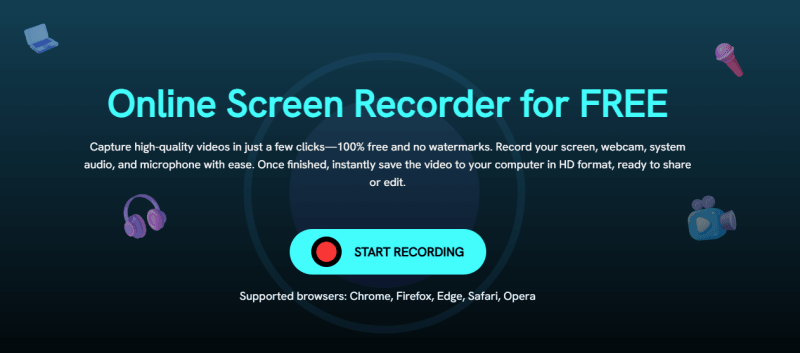
Go to the FliFlik Online Screen Recorder homepage and click the
“Start Recording”
button. This will open the recording tool inside your browser.
-
Step 2:
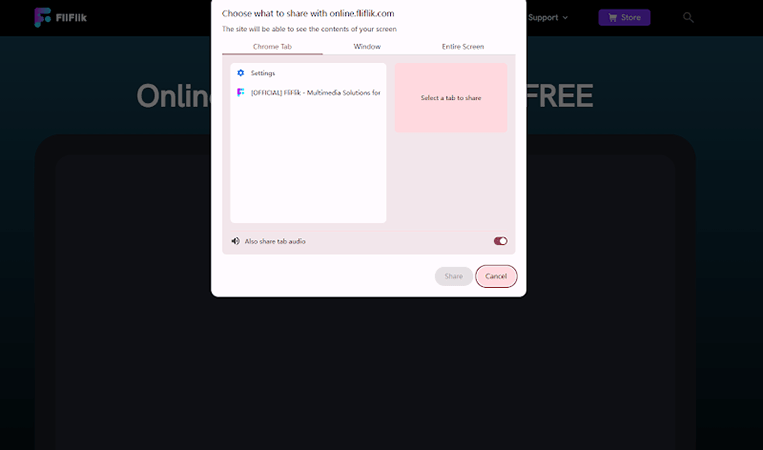
A pop-up will appear asking you to select what to record. Choose the browser window where the Vimeo video is playing. Turn on
System Audio
so the video sound is captured. After the 3-second countdown, the recording will start.
-
Step 3:
Play the Vimeo video completely. Let the video run without interruptions since everything visible and audible on the screen will be recorded in real time.
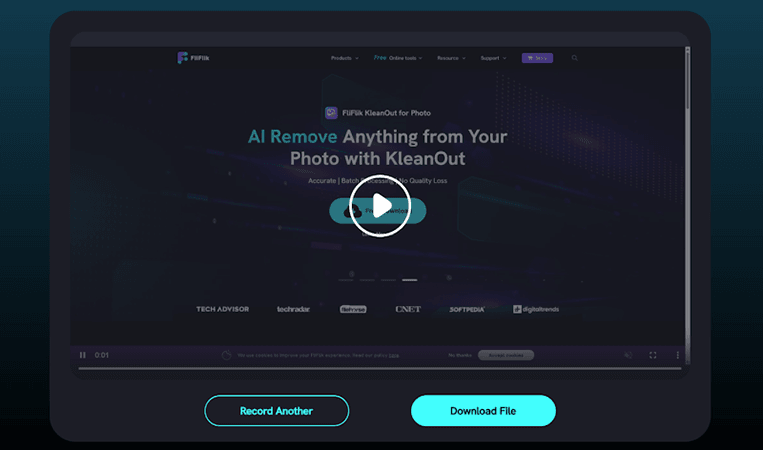
- Step 4: When the video ends, return to the recorder tab and click the Stop button. You can preview the recording before saving it. Click Save to download the recorded MP3 file to your device. If the recording is not good, you can click Record Again to repeat the process.


This method is simple, especially if you just want to capture audio quickly without technical steps.
Part 4. Top 3 Ways to Convert Vimeo to MP3 with Online
If you don’t want to install software, online converters are the fastest way to convert Vimeo to MP3. They work directly in your browser and usually only require a video link to start the conversion. The downside is that some free tools may show ads, have slower speeds, or have limited format options. Still, they are popular because of their simplicity.
1. Vimeo Downloader
Vimeo Downloader is a simple web-based tool that helps you quickly convert Vimeo videos into MP3 or video formats. It is commonly used when you want to quickly convert Vimeo to MP3 without downloading extra apps.
- Simple and easy-to-use interface
- No software installation required
- Supports basic video and audio downloads
- Contains advertisements
- May redirect to other pages before download
- Download quality depends on the source video
▼ Steps to Convert Vimeo to MP3 Using Vimeo Downloader
-
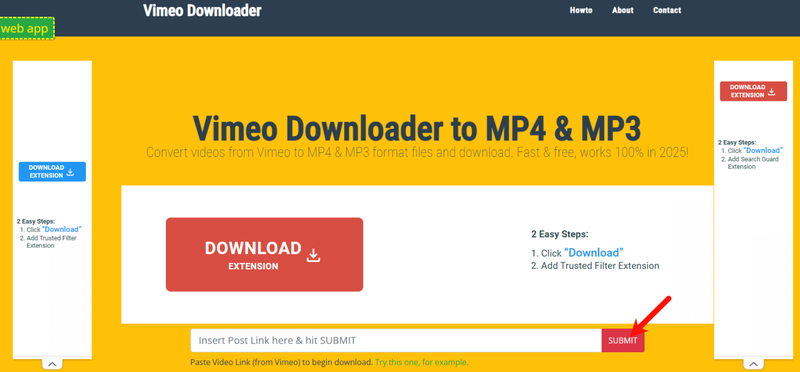
Step 1: Open Vimeo Downloader, paste the link, and click submit.
-
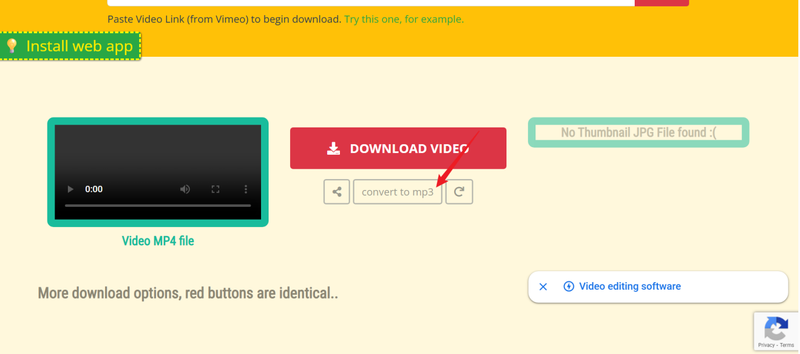
Step 2: Next, click to Convert to MP3.
-
Step 3: Click download and save the audio file.


2. Loader.to
Loader.to is another popular online platform used for Vimeo downloader to mp3 conversions. It supports multiple streaming platforms, not just Vimeo, which makes it useful if you download media from different websites. The tool works by allowing you to paste the video URL and choose your preferred output format. However, since it is a free online service, the conversion process can sometimes take longer, especially during peak usage times.
- Supports multiple websites
- Simple conversion process
- No software installation needed
- Download speed can be slow
- Sometimes uses redirect pages
- May start downloading files automatically if settings are not checked
▼ Steps to Convert Vimeo to MP3 Loader.to
-
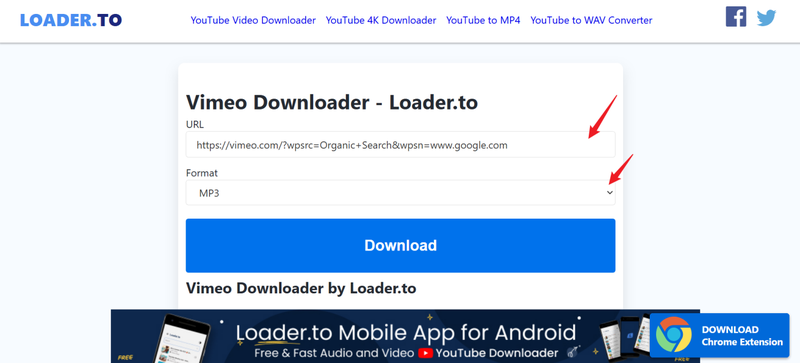
Step 1: Visit the Loader.to website, paste the Vimeo link, and make sure the format is MP3. Once done, click the Download button.
-
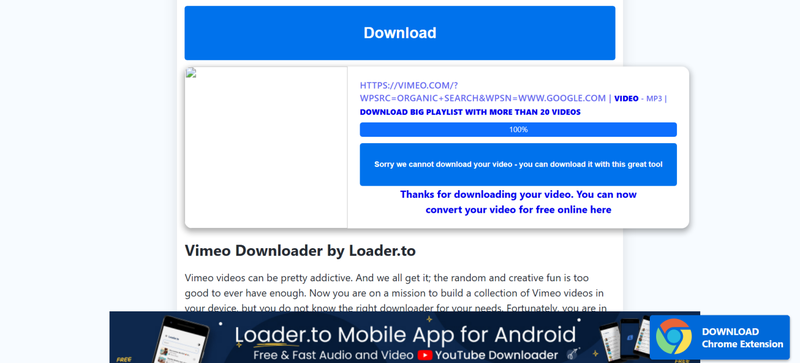
Step 2: Your video will start downloading immediately.


3. TTOK
TTOK is a lightweight and simple Vimeo to mp3 converter designed for users who want quick conversions without complicated options. It focuses on fast processing and basic downloading functionality. The tool is suitable for users who only need MP3 or MP4 formats without worrying about advanced audio settings. Its minimalist design makes it easy to understand even for beginners who are new to online converters.
- Supports MP3 and MP4 formats
- Clean and simple interface
- Fast conversion for short videos
- Limited format choices
- Basic quality settings only
- Fewer advanced download features
▼ Steps to Convert Vimeo to MP3 with TTOK
-
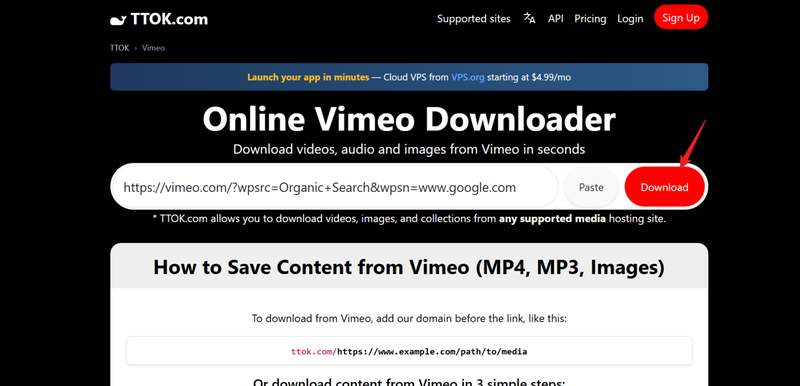
Step 1: Go to the TTOK official website. Next, paste the Vimeo video link and click the Download button.
-
Step 2: Click convert and download the file.

Final Words
That’s pretty much it. Converting Vimeo to MP3 doesn’t have to be complicated. You can use online tools for quick downloads, screen recording when downloads are restricted, or dedicated downloaders for better quality and more format options. The method you choose really depends on how fast you want the file and how much quality you want to keep. If you want the best overall experience, FliFlik UltConv Vimeo Downloader is highly recommended. It offers high-quality MP3 downloads, supports multiple formats, and provides stable downloading from thousands of websites. It’s one of the easiest and most reliable tools for saving Vimeo audio.
Secure Download
Secure Download
Hey there! I am Maxwell Clark. I'm always looking for new tech tools that make a difference, from making visuals and audio better to making workflows better. I'm going to share tips and tricks for using AI tools for videos, audio, and images. I'm excited to help you navigate the digital world more efficiently and creatively!

