

 8 minutes read


Listening to music offline is still something many people like. Sometimes you want better audio quality or a smaller file size for your device. That’s where YouTube to AAC conversion comes in. AAC is a good choice because it keeps sound quality high while keeping files compact, which is perfect for phones and music players.
In 2026, many tools make it easy to convert YouTube to AAC format with just a few clicks. You don’t need technical skills. Just copy a link, paste it into a converter, choose AAC as the output format, and download. In this article, we’ll look at the best 7 tools that help you save YouTube as AAC quickly, safely, and with good quality.

Part 1. What is AAC & Why Convert YouTube to AAC?
AAC stands for Advanced Audio Coding, a modern audio format designed to give better sound quality while keeping file sizes small. Think of it as a smarter way to store music. It compresses audio without making it sound flat or dull, which is why many music apps and devices use it today. When people convert YouTube to AAC, they usually want cleaner audio playback for offline listening.
There are several good reasons to choose the AAC format. First, it delivers better audio quality at lower file sizes, so you can save storage space on your phone or computer. Second, it offers better compatibility with modern devices like smartphones, tablets, and media players. Third, AAC works well for streaming and offline music playback, giving smoother listening without heavy buffering. Finally, it helps preserve details in vocals and instruments, making music sound closer to the original recording.
Part 2. Best YouTube to AAC Audio Converter [Editor’s Choice]
Our first recommendation to download YouTube to AAC audio is FliFlik UltConv YouTube Converter. This tool is built for people who want fast, high-quality audio downloads without complicated settings. It supports downloading and converting content from YouTube and 10,000+ websites, which means you can save music, videos, and streaming content from many popular platforms in one place. The converter keeps audio quality clean and natural while exporting files to AAC, MP3, and other 100+ formats.
FliFlik UltConv YouTube Converter offers high-quality audio conversion up to 320kbps, plus HD video downloads in 720p, 1080p, 2K, and 4K. Users can also download playlists, albums, and multiple files at once using batch download mode. The built-in browser and fast conversion speed make the process simple and quick.

- Download videos and audio from 10,000+ websites, YouTube, TikTok, Instagram, etc.
- Convert video to AAC, MP3, M4A, WAV, MKV and 100+ formats
- Preserve original audio quality during conversion
- Download 4K, 2K, and 1080p HD videos
- Download playlists, channels, and albums in one click
- 10x faster download speed with batch downloading
▼ Steps to Download YouTube Videos to AAC with UltConv YouTube Converter
To download YouTube videos and convert them to AAC format with FliFlik UltConv, first visit the official website, download the software, and install it on your computer. Once the installation is complete, follow these simple steps:
 Secure Download
Secure Download
Secure Download
-
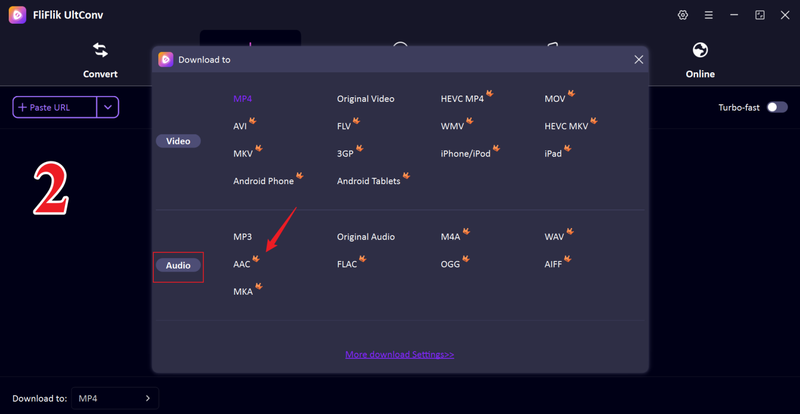
Launch UltConv and click the “Download to” option to select your format.

-
Choose AAC as your preferred output audio format from the format list.
-
Open the YouTube video you want to download, then copy the video URL from the browser address bar.

-
Return to UltConv and paste the video link into the input box. The tool will analyze the video automatically. Click Download to start converting YouTube videos to AAC.

-
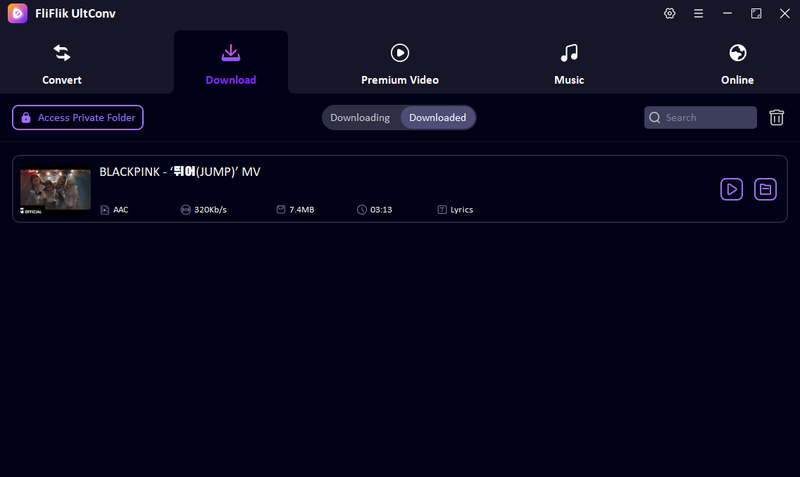
You will see your video downloading. After the download finishes, open your default download folder to access the saved AAC audio file for offline listening.


Part 3. 6 YouTube to AAC Online Tools
Here are six web-based tools you can use to convert YouTube videos to AAC audio without installing software. Each one has its strengths and limitations, so choose based on what matters most to you: speed, simplicity, or features.
1. 4kdownload.to

4kdownload.to is a popular web-based YouTube to AAC converter that focuses on simplicity and fast conversions. It allows users to download and convert YouTube videos into audio formats directly from the browser without installing software. The platform is designed for users who want quick results with minimal setup steps.
- Very simple interface that is easy for beginners
- Supports AAC and other common audio formats
- No account registration required
- Works on both mobile and desktop browsers
- Ads may appear on the website
- Conversion speed may depend on file size and internet speed
- Limited advanced features like batch processing
2. CutYT

CutYT is a lightweight online converter designed for fast YouTube to AAC audio extraction. It focuses on providing quick conversions with minimal clicks. Users can simply paste a YouTube link and get audio files ready for download in seconds. It is often used when people want speed over advanced features.
- Fast conversion process
- Very simple step-by-step workflow
- No signup required
- Works smoothly on most devices
- Contains pop-up ads
- No playlist or batch download support
- Audio quality options are limited
3. y2down.cc

y2down.cc is a widely used online tool for converting YouTube videos into AAC audio and other formats. It provides multiple quality options and is popular because it supports both audio and video downloads on one platform. Users often choose this tool when they want flexibility in format selection.
- Supports multiple audio and video formats
- Easy copy-and-paste download process
- Good download speed for small files
- Works without software installation
- Website contains many advertisements
- Some links may redirect to other pages
- No advanced editing or trimming tools
4. Ddownr

ddownr is a simple online YouTube downloader that focuses on clean design and quick audio extraction. It works well on both mobile phones and computers. The platform is best for users who want a no-frills solution to convert YouTube to AAC audio quickly.
- Very easy to use
- No account login required
- Works on multiple devices
- Fast for short videos
- Limited format selection
- No playlist or batch download support
- Fewer quality customization options
5. Loader.to

Loader.to is a powerful online downloader that supports YouTube to AAC conversion, along with playlist and bulk downloads. It is designed for users who want more control over their downloads without installing desktop software.
- Supports playlist and multiple link downloads
- Allows quality selection before downloading
- Works on most browsers
- Supports many streaming platforms
- Contains advertisements
- Conversion may slow down when downloading large files
- No built-in audio editing features
6. YT5S

YT5S is a well-known YouTube converter that supports YouTube to AAC audio extraction with high compatibility across devices. It is often used because it provides multiple quality options and works directly from the browser.
- Simple and beginner-friendly
- Supports multiple formats
- No registration required
- Good compatibility with mobile browsers
- Advertisements may affect user experience
- Sometimes slower during high-traffic periods
- No advanced download management
Part 4. Quick Comparison: Choose the Best YouTube to AAC Converter
Here’s a clear side-by-side look at FliFlik UltConv YouTube Downloader versus typical online YouTube to AAC converters. This helps you decide which one fits your needs, whether you want fast batch downloads, high-quality audio, or just a quick one-off conversion.
| Feature | FliFlik UltConv YouTube Downloader | Online YouTube to AAC Converters |
|---|---|---|
| Platform Support | Supports downloads from 10,000+ sites | Most of only support YouTube download |
| Conversion Speed | Very fast, optimized for batch jobs | Varies by site and file size |
| Audio Quality | High quality up to 320kbps AAC | Unstable, 128kbps usually |
| Batch Download | Yes, playlists, channels, multi-links | Rarely, usually one video at a time |
| Ads Experience | Clean interface, no web ads | Most sites are ad-supported |
| Extra Features | Built-in browser, multi-site support | Basic conversion only |
| Stability | Very stable and reliable | Can be slow during traffic spikes |
Final Words
In the end, YouTube to AAC conversion is a simple way to enjoy high-quality music while saving storage space on your devices. Whether you choose online tools for quick, occasional downloads or prefer powerful software for better quality and batch processing, the right converter makes a big difference in your listening experience. For the best balance of speed, quality, and features, FliFlik UltConv YouTube Downloader is a reliable choice that supports high-resolution audio, fast downloads, and multi-platform support. If you want a smooth and hassle-free way to convert and download your favorite music, try FliFlik UltConv YouTube Downloader today and start saving high-quality AAC audio from YouTube with just a few clicks.
Secure Download
Secure Download
Hey there! I am Maxwell Clark. I'm always looking for new tech tools that make a difference, from making visuals and audio better to making workflows better. I'm going to share tips and tricks for using AI tools for videos, audio, and images. I'm excited to help you navigate the digital world more efficiently and creatively!

