

 7 minutes read


Many people search for an easy tool to download videos from different websites, and the CleverGet video downloader is one option they often come across. It supports many sites and common formats, which makes it useful for basic downloading needs. However, user opinions about the tool are mixed. Some users say it works well, while others face issues like slow speed, errors, or websites not loading correctly. In this cleverget video downloader review, we explain what the tool can do, its key features, real user feedback, pricing plans, and the best alternative you can use if you want a more stable downloader.
- Part 1: What is CleverGet Video Downloader?
- Part 2: Real User Review of CleverGet Video Downloader
- Part 3: Subscription Plans of CleverGet Video Downloader
- Part 4: Best Alternative to CleverGet Video Downloader
- Part 5: CleverGet Video Downloader VS. FliFlik UltConv Video Downloader
- Final Words
Content Table:
Part 1: What is CleverGet Video Downloader?
The CleverGet video downloader is a desktop software tool made for saving online videos from many well-known websites. Users can download streaming videos and watch them later without an internet connection. The program comes with a simple and easy-to-understand layout, which makes it suitable for beginners. Its main purpose is basic video downloading, offering features like multiple format support, subtitle downloads, and different resolution options. While it is useful for simple tasks, some users feel it lacks advanced functions found in stronger alternatives.

- Save videos from different video platforms
- Support for common video formats
- Download subtitles
- Simple interface
- Pause and resume downloads
- Easy to install
- Supports many websites
- Can download in different resolutions
- Allows subtitle download
- Some users report slow speed
- Performance may change from site to site
- Limited support for certain websites
- Occasional crashes and error messages
Part 2: Real User Review of CleverGet Video Downloader
In this section, we summarize real user feedback. Many users leave detailed comments online, which helps us understand what works well and what needs improvement.
1. Great Customer Service
Some users praise the customer service team for being quick and helpful. One user mentioned they love using the app for YouTube downloads, saying it works well and downloads everything without issues. The support staff responds fast and provides guidance for any problems, like installation or download questions. Feedback like this shows that when users encounter technical issues, the team tries to resolve them promptly. Positive experiences like these are why many people search for CleverGet video Downloader review to see real user opinions.

2. Inconsistent Performance
Many users say the program works well on some websites but fails on others. They report that video links sometimes do not load or show error messages. Some videos stop halfway, while others download in lower quality even when the source is high quality. This inconsistency is one of the most common complaints. Because of this, users often look for a CleverGet video downloader full or alternative tools.

3. Limited Support Platform
Several users say the tool supports many websites but still misses some popular platforms. When a website updates its layout, the program may fail until the developer updates the software. This delay affects those who download videos daily. One user says he purchased a lifetime license of CleverGet, but it only allows 3 downloads. This is because it has designed many products that only support the download function of one or a few platforms. For example, its Netflix downloader can only be used to download Netflix videos. So if you want to buy CleverGet products, you need to see clearly the functions it supports and consider whether it meets all your needs.

4. Compression Issues
Some users report that downloaded files look slightly compressed. Even when choosing higher quality options, the final video sometimes shows lower bitrate. This problem appears most often on longer videos. Some users also mention audio quality drops after download. This is why many users search for alternatives of CleverGet video downloader review.

Part 3: Subscription Plans of CleverGet Video Downloader
Below is a simple table covering the pricing plans and features of CleverGet Video Downloader,.
CleverGet Video Downloader Subscription Plans
CleverGet Video Downloader only supports downloading videos from websites that adopt no DRM encryption technologies, which means it doesn’t support some DRM encryption platforms like Netflix, Hulu, Amazon Prime Video, etc.
| Plan | Price | Features |
|---|---|---|
| Yearly | Around $34.96 | All Features for 1 Year, downloading videos from streaming websites like YouTube, TikTok, etc. |
| Lifetime | Around $99.95 | All Features for lifetime, downloading videos from streaming websites like YouTube, TikTok, etc. |
Supported platforms of CleverGet Video Downloader:

CleverGet All-In-One Subscription Plans
If you want to download videos and music from more platforms with DRM encryption, you can choose another subscription of CleverGet: CleverGet All-In-One. If you choose this plan, you can enjoy downloading features of 50+ platforms, not only including YouTube and TikTok, but you can also download videos from platforms like Netflix and HBO. But the price also rose; let’s look at the details from the table below.
| Plan | Price | Features |
|---|---|---|
| Yearly | Around $179.95 | Support downloading videos from 50+ platforms for 1Year |
| Lifetime | Around $259.95 | Support downloading videos from 50+ platforms for Lifetime |
Supported platforms of CleverGet All-In-One:

It is not difficult to find that there is a lot of price difference between the two because of the different number of supported platforms. The price of CleverGet All-In-One is also a lot higher. If you are looking for a download tool with a more affordable price and more functions. Here is the best choice below.
Part 4: Best Alternative to CleverGet Video Downloader
FliFlik UltConv All-In-One is a desktop program that you download and install on your computer. It is not an online converter, and it does not depend on a browser to work. The tool gives you a simple way to download and convert videos from many websites. It supports over 10,000 platforms, including YouTube, Facebook, Instagram, TikTok, and even platforms with DRM like Netflix, HBO, and more. FliFlik UltConv also offers batch downloading, helps you save playlists and albums, and lets you convert videos into formats like MP4, MKV, MP3, WAV, and OGG. This makes it a strong alternative to CleverGet Video Downloader.

- Download videos from 10,000+ sites, such as YouTube, Facebook, Instagram, TikTok, Vimeo, Dailymotion, SoundCloud, and more
- Batch download videos and music in MP4, MOV, MKV, AVI, MP3, WAV, OGG, and over 100 formats
- Download playlists, channels, and albums in one click from supported platforms
- Convert video to audio without quality loss (keep 320 kbps audio)
- Save videos in 4K, 2K, 1080p, and download audio in 320 kbps
- Remove DRM from platforms like Spotify and Apple Music and save as MP3
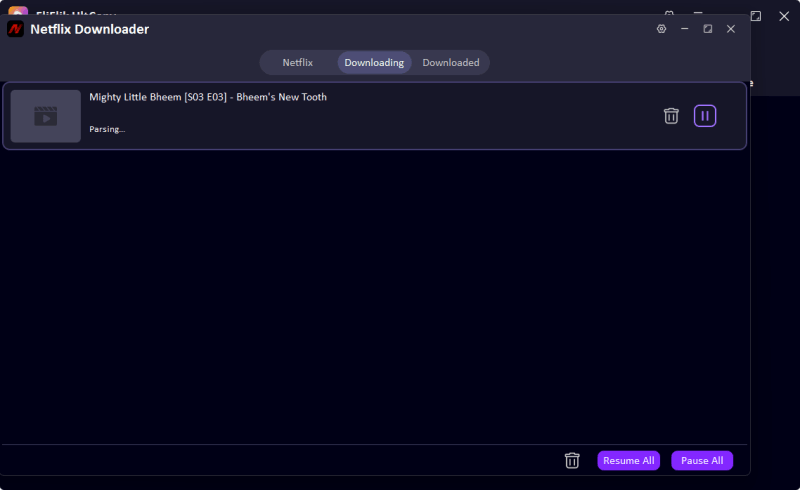
▼ Steps to Download Netflix Videos with UltConv Video Downloader:
Go to the official FliFlik website and click the Download button to install FliFlik UltConv Video Downloader. Once downloaded, install it and then follow the simple steps below.
 Secure Download
Secure Download
Secure Download
-
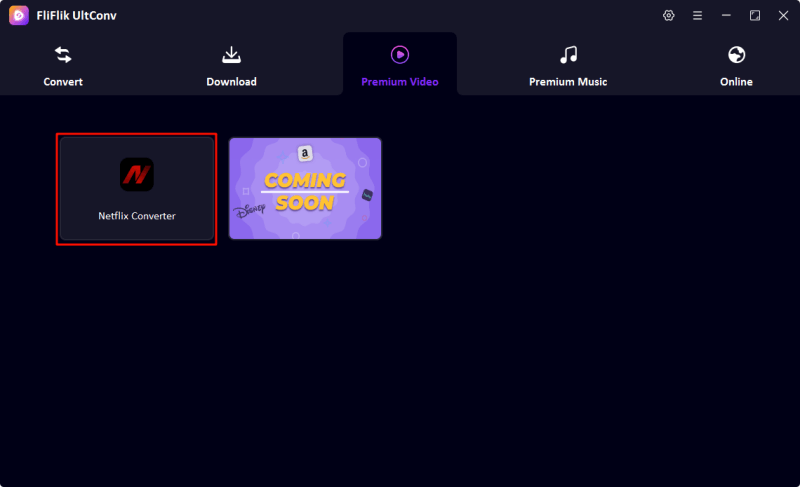
Open UltConv, navigate to “Premium Video”, and select Netflix Converter from the available options.
-
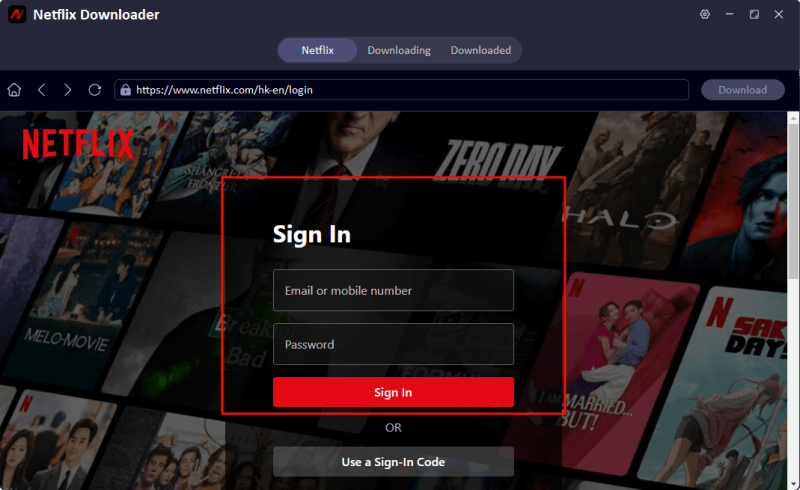
Log in to your Netflix account directly within UltConv using your email and password.
-
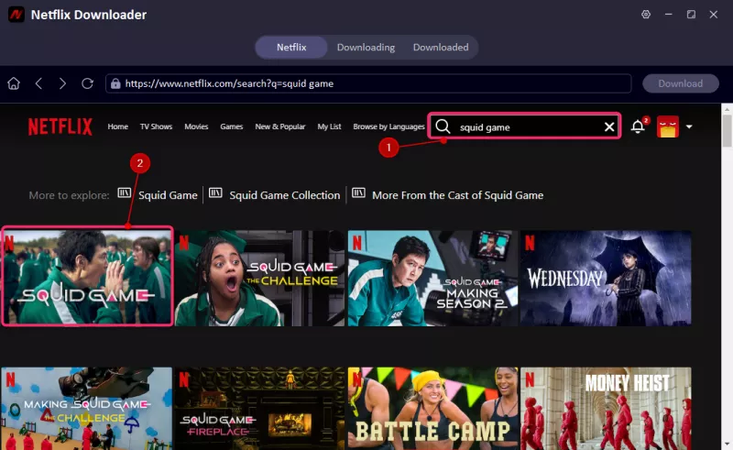
Browse the Netflix interface inside UltConv and select the movie or TV show you want to download.
-
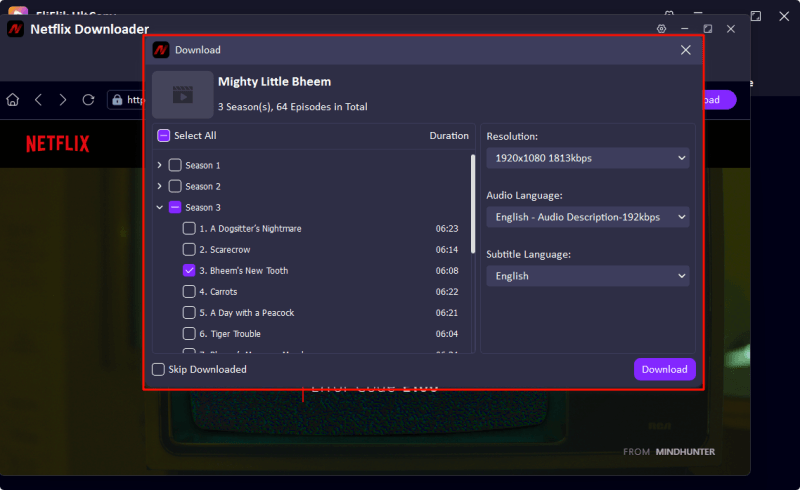
In the pop-up window, choose your desired video resolution, audio track, and subtitle preferences. Then click the Download button.
-
Click the Download button to start saving your video. You can monitor the progress in the download queue. Once finished, your movie or show will be ready for offline viewing or can be transferred to other devices.


Part 5: CleverGet Video Downloader VS. FliFlik UltConv Video Downloader
Comparing both tools helps users understand which downloader offers better value. This section outlines the key differences between CleverGet Video Downloader and FliFlik UltConv, including supported sites, formats, speed, performance, and overall ease of use.
| Feature | CleverGet Video Downloader | FliFlik UltConv |
|---|---|---|
| Support Platforms | Only support streaming platforms without DRM encryption, like YouTube | 10,000+ sites: YouTube, Facebook, TikTok, Instagram, Vimeo, SoundCloud, and more |
| Output Formats | Limited common formats | MP4, MKV, MOV, AVI, MP3, WAV, OGG, etc. |
| Max Quality | Up to HD, depending on site | 4K, 2K, 1080p, and 320 kbps audio |
| Batch Download | Support but limited | Full batch download for videos, playlists, albums |
| Download Speed | May slow down on some sites | 10 x speed |
| Consistent Performance | Mixed results based on user reports | Stable across most supported platforms |
| Price |
CleverGet Video Downloader: No monthly choice $34.96/Year $55.96/Lifetime CleverGet All-In-One: $179.95/Year $259.95/Lifetime |
FliFlik UltConv All-In-One: $9.95/Month $25.95/Year $39.95/Lifetime |
You must have a choice in your heart after looking at the comparison table; it depends on which one can meet your needs fully.
Final Words
The bolded CleverGet video downloader is suitable for basic video saving tasks, but many users have reported mixed experiences. Some websites do not load correctly, while a few downloads fail or result in lower-quality videos than expected. Its performance can vary depending on the platform, and batch downloading or advanced format options are limited. For users who want more reliable performance, broader platform support, and flexible output formats, FliFlik UltConv All-In-One is the best alternative. It allows downloading from over 10,000 websites and supports MP4, MKV, MOV, MP3, WAV, OGG, and more. Videos can be saved in 4K, and audio maintains 320 kbps quality. Try FliFlik UltConv for a smoother and more consistent downloading experience.
Secure Download
Secure Download
Hey there! I am Maxwell Clark. I'm always looking for new tech tools that make a difference, from making visuals and audio better to making workflows better. I'm going to share tips and tricks for using AI tools for videos, audio, and images. I'm excited to help you navigate the digital world more efficiently and creatively!

