

 8 minutes read


Trying to use Flixmate and hitting roadblocks? You’re definitely not the only one. Plenty of people deal with crashes, interrupted downloads, or videos that just refuse to play. Honestly, it’s annoying. Sometimes it’s a server issue. Other times, your browser just doesn’t want to cooperate, or maybe you’re stuck with an outdated app. Some devices even throw up their own barriers. Still, there’s some good news here: most Flixmate errors don’t take much to fix. This article walks you through the most common problems and shows you how to get things working again, whether you’re on a PC, Mac, or using your phone.

Part 1. What is Flixmate?

Flixmate is a tool designed to help users save online videos directly to their devices. It works both as a desktop application and as a Chrome browser extension, supporting popular platforms such as YouTube, Facebook, Vimeo, and many others. With Flixmate, videos can be downloaded in different file types and quality levels, making offline playback easy and flexible.
How to Use Flixmate?
Using Flixmate is straightforward. Here’s a simple guide:
▼ Using Flixmate Desktop Software
- Step 1: Open the official Flixmate website and download the Windows version. Currently, there is no macOS version available. Install and open the software.
- Step 2: Copy the video URL you want to download and paste it into Flixmate’s input box.
- Step 3: Select the output format, video quality, and the folder where you want the file saved.
- Step 4: Click the download button. The video will be processed and saved to your computer.
- Step 5: If the download doesn’t start, check your internet connection or try refreshing the page to avoid a Flixmate download error.
▼ Using the Flixmate Chrome Extension
- Step 1: Go to the Addoncrop website, choose the Flixmate extension, and add it to your Chrome browser.
- Step 2: Open a video on a supported website such as YouTube, Facebook, or Vimeo.
-
Step 3:
Play the video and click the Flixmate icon. The extension will automatically find the available download options.
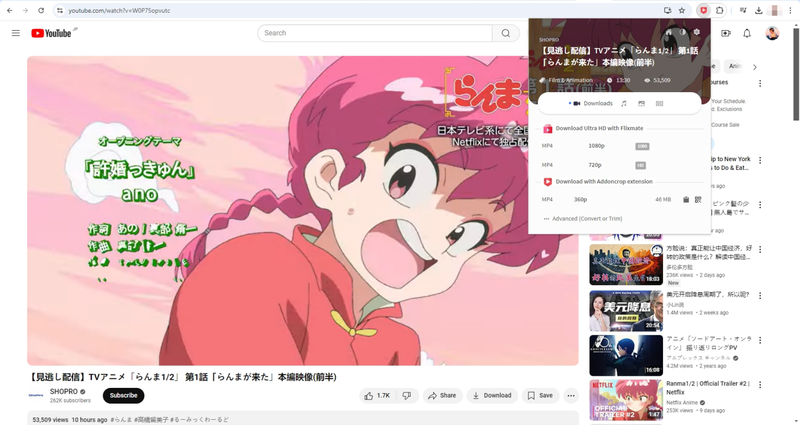
- Step 4: Choose your preferred quality and format. Once the download is complete, the video will be saved to your default download folder.

Part 2. Common Flixmate Errors and Solutions
Even though Flixmate makes downloading videos simple, users often run into issues where the extension stops working or shows errors. If Flixmate is not connected or isn’t performing properly, understanding the common problems can save you time and frustration.
Extension Not Detecting Videos
Sometimes Flixmate fails to detect videos on a page. This usually happens because the site you are trying to download from isn’t supported by the extension. Additionally, if the video hasn’t fully loaded, Flixmate may not recognize it. Make sure the video is completely loaded and that the platform is compatible with Flixmate. This often resolves the detection problem.
Flixmate Icon Missing from Toolbar
Occasionally, the Flixmate icon disappears from the browser toolbar. This typically occurs if the extension was disabled or removed accidentally. To fix this, go to your Chrome extensions page (chrome://extensions) and ensure Flixmate is enabled. If the icon is still missing, reinstalling the extension from the Chrome Web Store usually restores it.
Downloads Failing or Incomplete
If your downloads are failing or only partially completing, it may be due to a slow or unstable internet connection. Browser cache and cookies can also interfere with Flixmate’s functionality. Clearing these and ensuring your connection is stable usually solves the problem, allowing downloads to finish correctly.
Flixmate Not Working After Chrome Update
Chrome updates can occasionally break extension functionality. If Flixmate stops working after an update, try toggling it off and back on in your extensions settings. Also, check for a newer version of Flixmate, as developers frequently release patches to maintain compatibility with the latest browser versions.
Flixmate Not Responding
Sometimes Flixmate becomes unresponsive or freezes. This is often caused by browser memory overload or other processes running in the background. Restarting Chrome or rebooting your computer usually restores the extension’s functionality.
Flixmate Not Supporting Specific Video Platforms
Flixmate may stop supporting certain platforms you use frequently. When this happens, the extension simply won’t detect or download videos from that site. In such cases, using a reliable alternative downloader is the best solution for continuing to save your favorite content.
Part 3. Still Not Working? More Reliable Alternative
If the Flixmate extension keeps giving you trouble, a much more reliable solution is FliFlik UltConv Video Downloader. This isn’t just another basic video downloader; it’s a full-featured tool designed to make saving videos and music from hundreds of websites easy and hassle-free. Unlike Flixmate, which can be inconsistent or fail to detect certain videos, UltConv Video Downloader works reliably across multiple platforms, including YouTube, Dailymotion, TikTok, Vimeo, and more. You can download single videos, entire playlists, albums, or even channels in one go, thanks to its batch download feature. It also lets you convert videos directly to audio without losing quality and supports high-resolution downloads up to 8K and audio in 320 kbps. With UltConv Video Downloader, you don’t have to worry about failed downloads, slow speeds, or unsupported sites. It’s built to handle everything smoothly and securely.

- Download videos from 10,000+ websites with a single click
- Convert videos to audio without losing quality
- Save videos in HD resolutions up to 8K and audio in 320 kbps.
- Batch download playlists, channels, and albums to MP4, MP3, and 100+ formats
- Remove DRM from Spotify and Apple Music while keeping metadata intact
- Download live streams in real time from platforms like YouTube, Twitch, and TikTok
▼ How to Convert YouTube to MP4 with FliFlik UltConv Video Downloader?
FliFlik UltConv Video Downloader is a fast and dependable tool for both Mac and Windows that lets you save YouTube videos in high quality. Once the program is installed on your device, you can quickly convert any YouTube video to MP4 by following these steps:
 Secure Download
Secure Download
Secure Download
-
Open UltConv Video Downloader and go to the Download tab. Click the “Download to” button at the bottom to begin.

-
Choose the output format you want, such as MP4, for your video.

-
Open YouTube in your browser, find the video you wish to save, and copy its URL.

-
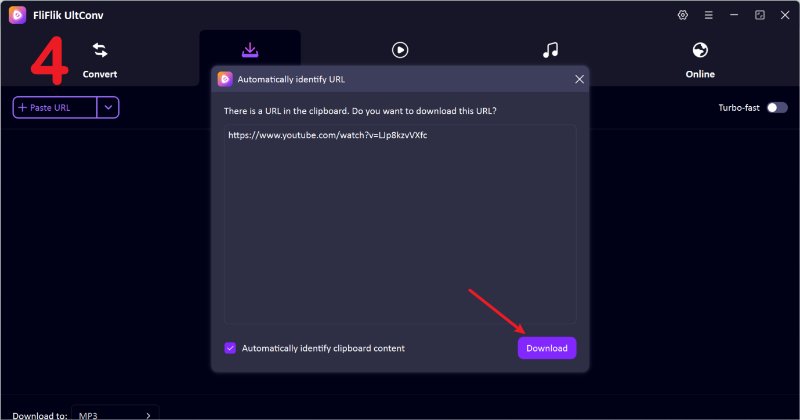
Go back to UltConv. If the program automatically recognizes the link, simply click Download to start saving the video.
-
If the link isn’t detected, paste it manually into the search box and press Download to save the video to your device.


Part 4. FliFlik UltConv VS. Flixnate
To see which tool truly delivers the best performance, let’s compare FliFlik UltConv and Flixmate side by side. The table below highlights key features like output quality, download speed, batch downloads, supported platforms, and DRM removal, so you can easily spot the differences.
| Feature | FliFlik UltConv | Flixmate |
|---|---|---|
| Max Output Quality | Supports up to 8K video and high‑quality audio up to 320 kbps | Typically limited to lower HD quality (often 1080p or below) |
| Output Formats | Wide range: MP4, MP3, WAV, FLAC, AAC, AIFF, M4A, and 100+ more | Mostly common video formats like MP4, with limited audio options like MP3 |
| Download Speed | 10X Fast downloads with batch processing and accelerated modes | Standard speeds are often slower, especially with large files |
| Batch Download | Yes, playlists, channels, albums all at once | Not support |
| Supported Platforms | Works with 10,000+ sites (YouTube, TikTok, Dailymotion, SoundCloud, Netflix, Twitch, etc.) | Supports fewer platforms, mainly streaming sites such as YouTube |
| DRM Removal | Can remove DRM from music services like Spotify and Apple Music when saving audio | No DRM removal features |
Final Words
If you’ve been struggling with Flixmate error issues, you’re not alone. Many users run into download failures, unresponsive extensions, or unsupported sites. While Flixmate can be convenient, its limitations and glitches can make video downloading frustrating. That’s why switching to FliFlik UltConv Video Downloader is a smart choice. This all-in-one tool reliably downloads videos and music from thousands of platforms, supports batch downloads, has high-quality output up to 8K, and even removes DRM from audio files. With UltConv Video Downloader, you can save time, enjoy offline content without interruptions, and have full control over formats and quality. Stop wasting time troubleshooting errors and start downloading your favorite content seamlessly.
Secure Download
Secure Download
Hey there! I am Maxwell Clark. I'm always looking for new tech tools that make a difference, from making visuals and audio better to making workflows better. I'm going to share tips and tricks for using AI tools for videos, audio, and images. I'm excited to help you navigate the digital world more efficiently and creatively!

