

 7 minutes read


Downloading videos or music online sounds easy enough, but let’s be real, safety is always at the back of your mind. Take Pastedownload, for example. Lots of people use it to grab stuff from YouTube, TikTok, or Instagram. It claims to make downloads fast and simple, but there are always questions: Is it actually safe? Can you trust it not to mess with your files or your privacy?
So, let’s dig into Pastedownload for a minute. I’ll walk you through how it works, what’s good, what’s not so great, and whether you should trust it or keep looking. I’ll also point you to three Pastedownload alternatives that do basically the same thing, but with fewer headaches and more peace of mind.

Part 1. What is Pastedownload?

Pastedownload.com is an online tool that lets users download videos and music from popular platforms like YouTube, TikTok, Instagram, and more. It’s web-based, so there’s no need to install software, making it quick and accessible from any device. Users can simply paste the link of the content they want to save, choose the format, and download it.
- Free to use with no registration required
- Supports multiple platforms like YouTube, TikTok, and Instagram
- Offers different formats such as MP4 and MP3
- Works directly in a web browser
 Limits:
- Limited to standard-quality downloads; high-quality options are rare
- No batch download support for playlists or multiple files
- Ads and pop-ups can be distracting
- May fail to download sometimes
- Security and privacy concerns, as it’s a free online service
Part 2. Is Pastedownload Safe to Use?
When you search for “Is Pastedownload safe?” You’ll find mixed signals. The official site claims it’s secure because it works in your browser and doesn’t store your data or require software installs. That sounds reassuring at first glance.
But independent safety checks paint a different picture. Some security tools give pastedownload.com a very low trust score and warn that the site may be unsafe or suspicious. Anonymous ownership and hidden WHOIS details are big red flags for many security analysts.

User reviews are also mixed. Some people say the tool worked for them in the past, but more recent feedback shows complaints about ads, pop‑ups, failed downloads, and suspicious behavior. Several reviewers even called it a scam.
Because of these conflicting signals, it’s hard to call Pastedownload safe with confidence. If you do choose to use it, proceed carefully: avoid entering personal data, block ads, and run antivirus protection on your device.
Part 3. 3 Best Pastedownload Alternatives [Safer Options]
If you’re worried about using Pastedownload, there are safer and more reliable ways to download videos and music online. These tools offer better quality, faster downloads, and more control over formats and playlists, making offline media easier and safer to enjoy.
Top 1: FliFlik UltConv Video Downloader
If you’re looking for a reliable alternative to Pastedownload, FliFlik UltConv Video Downloader is one of the best options available. Unlike web-based tools, UltConv is a desktop application that offers stability, speed, and versatility. It lets you download videos, music, and live streams from over 10,000 websites, including YouTube, TikTok, Twitch, Vimeo, Spotify, Apple Music, and more. You can choose the quality and format of your downloads from 1080p up to 8K for videos or 320 Kbps for audio, ensuring you never compromise on clarity or sound.
Beyond simple downloads, UltConv Video Downloader can remove DRM protection from streaming platforms, convert video to audio without losing quality, and handle entire playlists or albums with batch download. The built-in browser makes it easy to explore platforms without switching tabs, and the private folder keeps your content secure.

- Download videos from over 10,000 websites in HD and 4K/8K
- Convert videos to audio in MP3, WAV, AAC, FLAC, and 100+ formats
- Batch download playlists, albums, or multiple videos at once
- Remove DRM from Spotify, Apple Music, and YouTube Music
- Save live streams directly to MP4 in real time
- Built-in browser and private folder for secure downloads
▼ How to Convert YouTube to MP4 with FliFlik UltConv Video Downloader?
FliFlik UltConv Video Downloader is a quick and reliable tool for Windows and Mac that helps you save YouTube videos in high quality. After installing the program, follow these steps to convert any video to MP4 and watch it offline anytime:
 Secure Download
Secure Download
Secure Download
-
Open UltConv Video Downloader and go to the Download tab. Click the “Download to” button to start.

-
Pick the format you want, such as MP4.

-
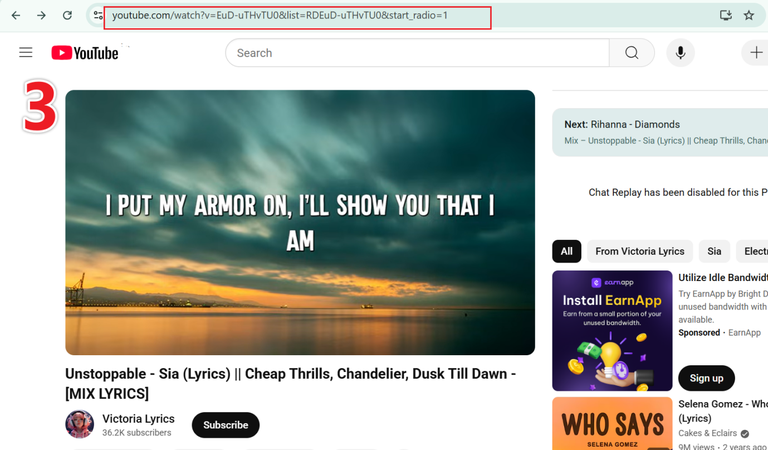
Go to YouTube, find the video you want, and copy its URL.
-
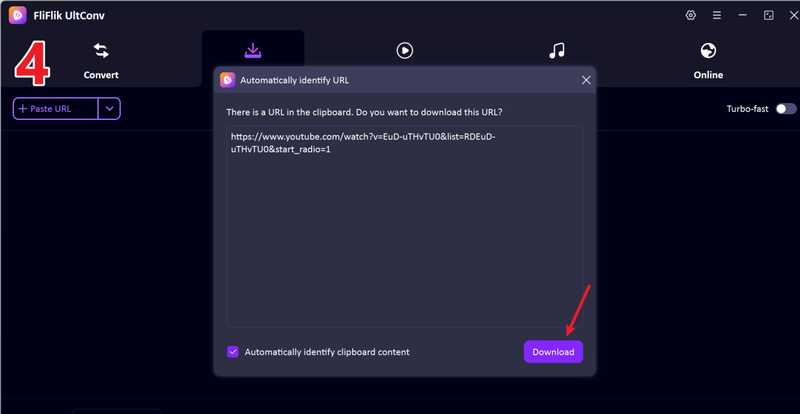
Return to UltConv. If the program recognizes the link automatically, click Download to save the video.
-
If it doesn’t detect the link, paste it into the search box and press Download to start downloading.
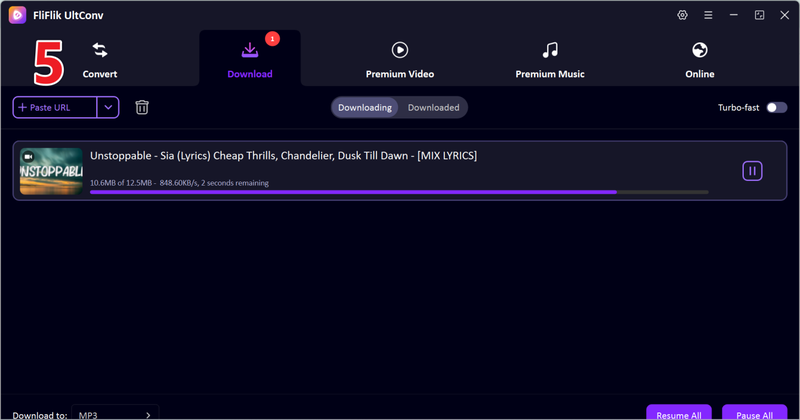


After a few moments, your video will be saved in the selected format. You can now watch it offline anytime, without buffering or interruptions.
Top 2: ddownr

Ddownr is a simple online tool that allows users to download videos from YouTube, Facebook, and other popular platforms without installing any software. It’s lightweight, browser-based, and perfect for quick downloads when you don’t need advanced features.
- Works directly in the browser; no installation required
- Supports multiple platforms beyond YouTube
- Fast and easy for single video downloads
- Limited to individual video downloads, no batch option
- Fewer format choices (mostly MP4)
- Quality options are limited to standard resolutions
Top 3: Y2Mate

Y2Mate is a popular web-based video downloader that supports YouTube and other streaming sites. It allows quick conversions to MP4 or MP3 and is widely used for its simplicity and speed.
- Free and easy to use
- Supports both video and audio downloads
- Fast conversion for single videos
- Ads and pop-ups can be distracting
- No support for playlists or batch downloads
- High-resolution options may be limited for some videos
Final Words
While Pastedownload can be convenient for quick downloads, it comes with risks like ads, pop-ups, and low trust scores. For a safer, more reliable experience, FliFlik UltConv Video Downloader is a much better choice. It lets you download videos and music from over 10,000 websites, including YouTube, TikTok, and Spotify, in high quality and multiple formats. You can save entire playlists, convert videos to audio, and remove DRM, all with batch downloads and full metadata support.
Secure Download
Secure Download
FAQs
Q1. Which is the safest video downloader?
FliFlik UltConv Video Downloader is the safest option because it’s a trusted desktop tool with secure downloads, DRM removal, and built-in privacy features.
Q2. What is better than Pastedownload?
FliFlik UltConv Video Downloader outperforms Pastedownload with faster downloads, batch support, high-quality formats, and stable, reliable performance.
Hey there! I am Maxwell Clark. I'm always looking for new tech tools that make a difference, from making visuals and audio better to making workflows better. I'm going to share tips and tricks for using AI tools for videos, audio, and images. I'm excited to help you navigate the digital world more efficiently and creatively!

