

 8 minutes read


Saving content from creator platforms isn’t always straightforward. That’s why tools like StreamFork have started getting attention. Designed mainly for platforms such as OnlyFans and Fansly, StreamFork claims to make downloading videos and images much easier through a browser extension.
In this Streamfork review, we’ll take a closer look at StreamFork, how it works, and what kind of experience users can expect. We’ll also break down its strengths, its weak spots, and whether there’s a better Sreamfork alternative if you want faster downloads, higher video quality, and a smoother overall process. Let’s begin.

Part 1. What is StreamFork?

StreamFork is a downloader designed for creator platforms like OnlyFans and Fansly. It works on both mobile as an app and Chrome, Edge, Brave browsers as an extension. In simple terms, you browse the platform normally, and when a video or image appears, StreamFork detects it and lets you save it to your device. As a downloader app on mobile, StreamFork provides a feasible solution to meet mobile users’ needs. Many Streamfork reviews mention that the tool is convenient because it runs inside the browser instead of requiring a separate desktop program.
- Works as a browser extension, so setup is simple
- Supports video and image downloads
- Compatible with multiple browsers
- Can download media from posts and messages
- Available on desktop and mobile
- Manual installation may confuse beginners
- Not support DRM content download with Basic subscription
- Limited control over advanced download settings
- Some users report inconsistent performance after updates
Is StreamFork Legit?
Yes, StreamFork is a legitimate downloader tool used by people who want to save content they already have access to. It doesn’t unlock private content or bypass subscriptions. Instead, it simply detects media that loads in the browser and allows users to download it. However, it is illegal for users to download content for business purposes.
Is StreamFork Safe?
Generally, StreamFork itself isn’t considered malicious software. However, since it’s usually installed as an extension outside official browser stores, users should be cautious. The safest approach is to download it only from the official website and avoid third-party sources. This helps reduce the risk of installing modified or unsafe files.
Part 2. Real Customer Reviews: Does StreamFork Really Work?
So, does StreamFork actually work in real use? Looking at public feedback helps answer that question. On Trustpilot, StreamFork currently holds an average rating of about 4.0 out of 5, based on a small number of user reviews. Most reviewers say the tool works as expected and mention responsive customer support. Some users also report that it works well on both desktop browsers and mobile devices. However, not every experience is perfect. One three-star review highlights a common concern about stability. The user wrote:
 “Haven’t been able to use the service… Paid for the membership, getting error messages when downloading.”

What this really suggests is that the tool can sometimes run into technical issues during downloads, even for paid users. In other words, while many people say it works, the experience may not always be consistent. Another independent review also notes that the extension can feel unstable at times, with limitations on resolution and occasional performance problems depending on the setup.
Bottom line: StreamFork does work for many users, but reviews indicate that stability can be hit-or-miss, especially when downloading certain videos or when the platform updates.
Part 3. StreamFork Not Working? Best StreamFork Alternative to Download OnlyFans
If StreamFork isn’t working properly, you’re not alone. As mentioned in many user reviews, browser extensions can sometimes break after platform updates or show errors during downloads. That’s the downside of tools that rely entirely on the browser environment. A more stable option is FliFlik UltConv OnlyFans Downloader. Unlike extensions, UltConv OnlyFans Downloader is a dedicated downloader designed for creator platforms. It works on Windows, Mac, and Android, giving users more flexibility across devices while keeping downloads fast and reliable.
With UltConv, you can easily download videos from OnlyFans and save them as MP4 files in 720p, 1080p, or even 4K resolution. Exclusive content on OnlyFans also often appears inside direct messages. UltConv OnlyFans Downloader detects these message videos automatically and allows you to download them in one click, preserving the original quality while delivering download speeds up to 10× faster.

- Download OnlyFans videos to MP4 in 1080p or higher quality
- Save OnlyFans DM videos in one click
- Bulk download multiple OnlyFans videos at once
- Remove DRM protection for flexible playback
- Download creator profile images without limits
- Supports 10,000+ platforms like Fansly, JustForFans, MyFans, and Patreon
▼ Steps to Download OnlyFans Videos with UltConv OnlyFans Downloader
Saving videos from OnlyFans using FliFlik UltConv OnlyFans Downloader is straightforward. Just follow these steps.
-
Download and install FliFlik UltConv OnlyFans Downloader from the official website. Once installation finishes, open the software.
FREE DOWNLOAD![secure download]() Secure Download
FREE DOWNLOAD
Secure Download
FREE DOWNLOAD![secure download]() Secure Download
Secure Download
-
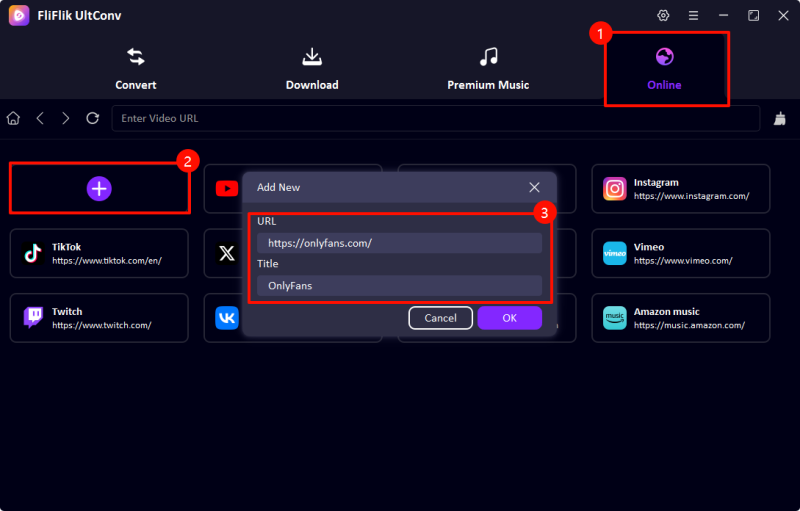
Launch the program and go to the Online section. In the Add New pop-up, paste the OnlyFans website URL to open it inside UltConv’s built-in browser.
-
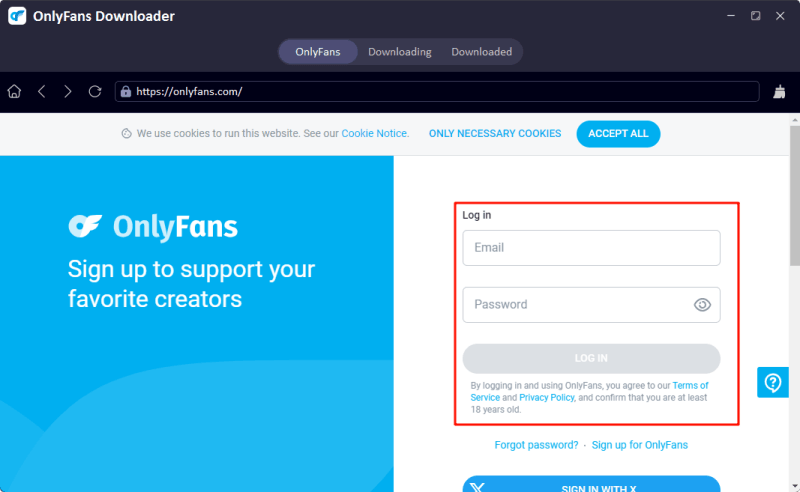
Sign in to your OnlyFans account directly within the built-in browser. This allows the software to access videos from creators you’re subscribed to or content you’ve purchased.
-
Browse your feed or search for the video you want to save. Click the Download button and choose your preferred format and resolution before starting.

-
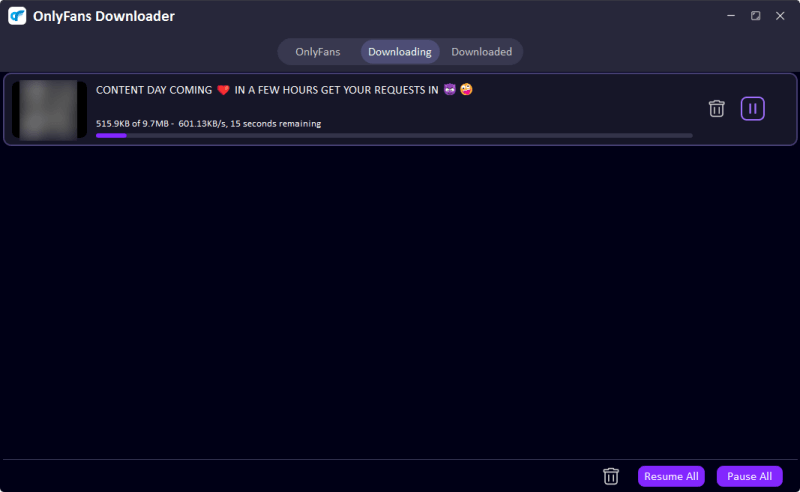
UltConv will process the video and save it to your computer. Once the download finishes, you can find the file in the Downloaded section and watch it offline anytime.


Part 4. StreamFork vs. FliFlik UltConv
If you’re deciding between StreamFork and FliFlik UltConv OnlyFans Downloader, the biggest difference comes down to how they work. StreamFork is mainly a browser extension, while UltConv is a full downloader designed specifically for stable, high‑quality downloads. Here’s a quick side‑by‑side comparison.
| Feature | FliFlik UltConv | StreamFork |
|---|---|---|
| Type | Professional software on Windows & Mac + Android app | Chrome extension, Android & iPhone app |
| Supported Sites | OnlyFans, Fansly, JustForFans, MyFans, Patreon, and over 10,000 sites | Only support OnlyFans, Fansly download |
| Output Formats | MP4, MKV, MP3, and multiple formats | Mainly original web format |
| Quality | Up to 1080p or even higher | Up to around 720p in free version |
| Speed | Up to 10× faster download speed | Slow/Unstable |
| Batch Download | Yes, built‑in bulk download | Limited |
| Success Rate | Higher success rate due to dedicated software | Can fail after site updates |
Conclusion
No doubt, StreamFork can be a convenient option if you prefer a lightweight browser extension for downloading videos from creator platforms. It integrates directly into your browser and adds download buttons to supported pages. However, as many StreamFork users mention, the experience can sometimes feel inconsistent. StreamFork may run into stability issues, especially when platforms update their systems. If you want a more reliable solution with better speed, quality options, and batch downloading, FliFlik UltConv OnlyFans Downloader is a strong alternative. It works on Windows, Mac, and Android, supports multiple creator platforms, and allows you to download videos in high resolution for offline viewing. For users who regularly save content and want a smoother downloading experience, trying UltConv OnlyFans Downloader could make the process much faster and easier.
 Secure Download
Secure Download
Secure Download
Hey there! I am Maxwell Clark. I'm always looking for new tech tools that make a difference, from making visuals and audio better to making workflows better. I'm going to share tips and tricks for using AI tools for videos, audio, and images. I'm excited to help you navigate the digital world more efficiently and creatively!

