

 8 minutes read


TubeRipper pops up a lot when people talk about saving online videos for offline use. It promises a simple way to grab content from sites like YouTube, TikTok, and more, but there’s a gap between hype and reality. In this TubeRipper review, we break down whether TubeRipper really works as advertised, what it gets right, and where it falls short. We’ll also explore better alternatives if you want reliable downloads without hassles. If you’re curious whether TubeRipper is worth your time or just another overhyped tool, keep reading.

Part 1. What is TubeRipper

TubeRipper is an online tool that lets you paste a video link and pull media files off platforms like YouTube and other sites without installing software. It aims to convert and deliver audio and video downloads in formats such as MP3, MP4, FLAC, and WAV. The original site tuberipper.com doesn’t seem to be active anymore, but similar domains like tuberipper.net still offer free online conversions. Because it works in your browser and doesn’t require installs, it attracts casual users who want a simple way to grab clips or tracks quickly.
- No software download needed; everything runs in your browser
- Supports multiple output formats, including audio (MP3, FLAC) and video
- Free to use with unlimited conversions
- The original tuberipper.com domain isn’t working, and mirror sites can vary in reliability and safety
- Pop‑ups, ads, and redirects are common, which can be annoying or risky
- Conversions may lack advanced features like batch downloads or metadata tagging
Part 2. Does Tuberipper Really Work Now?
I tried this tool myself to see what actually happens. I pasted a YouTube link into TubeRipper’s input box and clicked the download arrow. At first, nothing useful happened. Instead, I kept getting redirected to random pages and pop‑up sites. Every click sent me somewhere else, which immediately raised the question: Is TubeRipper safe? Honestly, it didn’t feel great. I had to close those tabs and jump back to the main TubeRipper page several times. After multiple attempts and a lot of back-and-forth, the download finally started. And yes, the video did download in the end.

Then I paste another YouTube short into the box, but it fails to download the short and pops up an error note : “Unable extract files. Error getting video info. Resubmit your URL, or try another video.” I tried pasting and starting the download again, but it failed every time.

But here’s the real takeaway: it works sometimes but is unreliable. Too many redirects. Too many ads. Too much clicking just to save one file. If you’re only downloading something once, you might tolerate it. For regular use, it quickly becomes frustrating and feels risky.
Part 3. 3 Best Tuberipper Alternatives that Actually Work
If TubeRipper feels clunky, unsafe, or just too frustrating, you’re not out of options. There are better tools out there that download media cleanly, with fewer redirects and more reliable results. Below are three alternatives worth trying.
1. FliFlik UltConv Video Downloader
If you’re tired of TubeRipper-style websites that flood you with redirects, pop-ups, and questionable download buttons, FliFlik UltConv Video Downloader is a very reliable and powerful option to use. It’s a desktop-based video and music downloader designed for people who actually want control over their files. Instead of relying on unstable browser tools, UltConv runs directly on your computer, which means faster downloads, better quality options, and zero surprise tabs opening in the background.
UltConv Video Downloader supports over 10,000 streaming platforms, including YouTube, TikTok, Instagram, Facebook, Vimeo, and major music services like Spotify and Apple Music. You can download single videos, full playlists, channels, or albums in one click, choose resolutions up to 4K, and convert everything to MP4, MP3, FLAC, WAV, AAC, or AIFF without quality loss. It even handles DRM removal for supported music platforms, making offline playback simple and unrestricted. For anyone who wants a real TubeRipper alternative that actually works consistently, UltConv Video Downloader is built for everyday use, not just one-off downloads.

- Downloads videos from 10,000+ websites, YouTube, TikTok, Instagram, etc.
- Saves files in MP4, MP3, FLAC, WAV, AAC, and 100+ formats
- Supports 1080p, 2K, and 4K video quality
- One-click playlist and channel downloads
- Converts video to audio without quality loss
- Batch downloads with up to 10x faster speed
▼ Steps to Download YouTube to MP4 with UltConv Video Downloader
-
Download and install FliFlik UltConv Video Downloader from the official website.
FREE DOWNLOAD![secure download]() Secure Download
FREE DOWNLOAD
Secure Download
FREE DOWNLOAD![secure download]() Secure Download
Secure Download
-
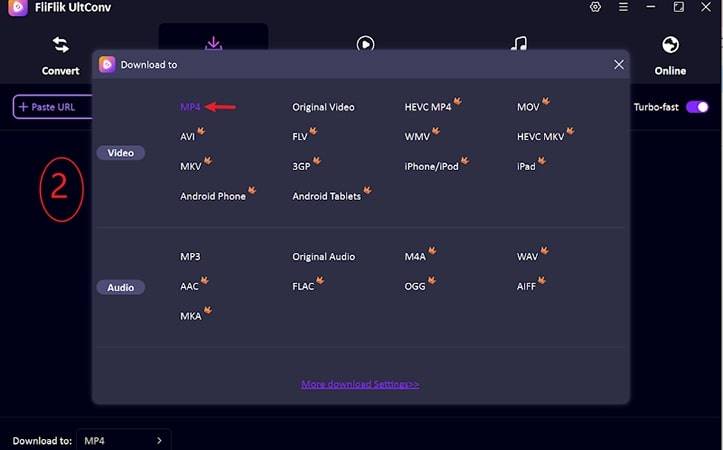
Go to the Download tab and click Download to set your output format.

-
Select MP4 for video or MP3 if you only want audio.
-
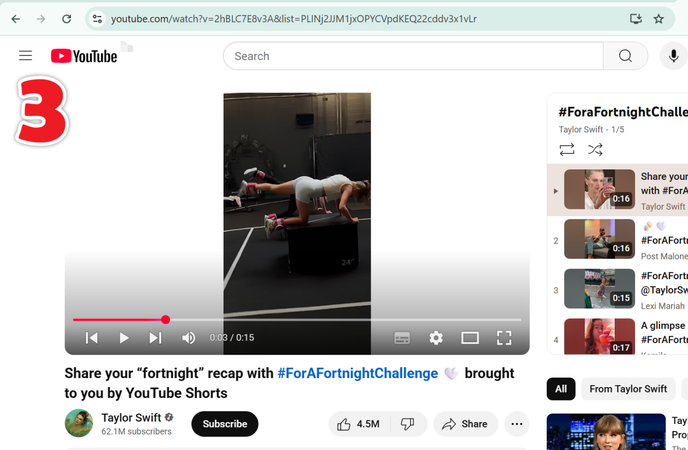
Open YouTube, copy the link of the video you want, then return to UltConv.
-
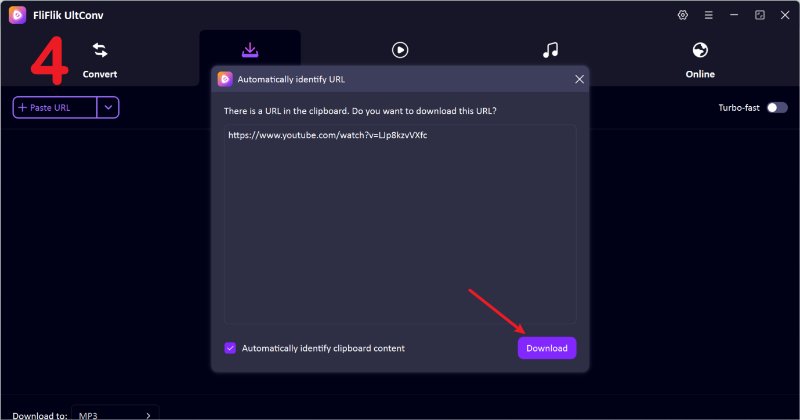
UltConv usually detects the URL automatically. When it appears, click Download to begin.
-
If auto-detection doesn’t trigger, paste the link manually into the URL box and press Download. Then wait for the process to finish. Once complete, your video is saved locally and ready to watch offline.
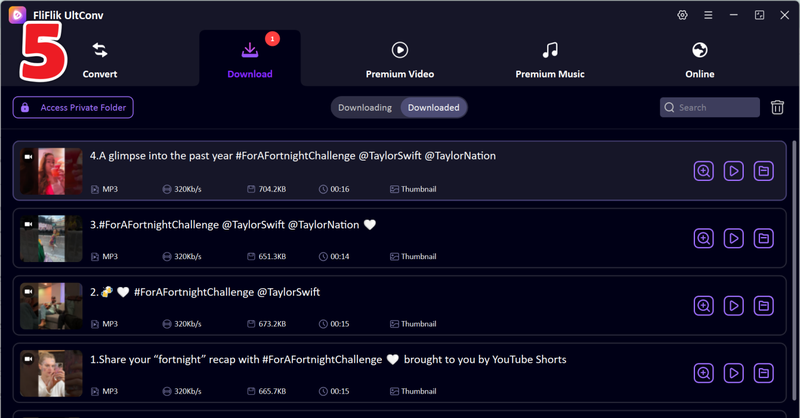
With UltConv, you can download movies, playlists, or favorite videos ahead of time and enjoy them anywhere, no internet required.


2. Cobalt Tool

Cobalt Tool is a browser‑based downloader that lets you paste a link and grab video or audio from dozens of social and streaming platforms. It works without apps, keeps things simple, and can pull content from places like YouTube, TikTok, Instagram, Reddit, and more, making it a basic option if you just want a quick tuberipper mp3 style download without software.
- Works straight in your browser with no installation required
- Supports many sites including YouTube, TikTok, Instagram, Facebook, and Reddit
- Let’s you choose download quality when available
- No login or subscription needed
- Downloads must usually be done one at a time (no batch mode)
- Can break or stop working when source sites change their security
- Trust and safety scores are mixed, so caution is wise
- High‑quality audio extraction isn’t always available on every platform
3. CNVMP3

CNVMP3 is a free online converter that focuses on turning YouTube links into audio or video downloads. You paste a video URL, pick MP3 or MP4, and download no apps or accounts required. While it’s not a full multimedia suite, it’s straightforward for quick, free FLAC music download jobs from YouTube or similar sites.
- Free and works in any browser without installation
- No sign-ups or logins needed
- Simple and fast process for basic downloads
- Often ad‑light compared to other free converters
- Limited to MP3 and MP4 formats, no true lossless like FLAC
- Doesn’t support playlists or batch downloads
- Some videos may fail to convert or download
- Depends on the availability of source content and regional blocks
Part 4. TubeRipper vs. 3 TubeRipper Alternatives
Tools like TubeRipper might kind of work for quick downloads, but they fall short when you compare them to more reliable options. The table below breaks down how TubeRipper stacks up against better alternatives in real use, what sites they support, what formats they offer, download speed, batch capabilities, and how consistently they actually deliver the files you want.
| Tool | Supported Sites | Output Formats | Speed | Batch Download | Success Rate |
|---|---|---|---|---|---|
| TubeRipper | Only YouTube | MP3, MP4 (varies) | Slow (redirects/ads) | No | Low–Medium |
| FliFlik UltConv | 10,000+ platforms | MP4, MP3, FLAC, WAV, AAC, AIFF, and 100 more formats | Fast (10x acceleration) | Yes | High |
| Cobalt Tool | YouTube, TikTok ,etc. | MP3, MP4 | Medium | No | Medium |
| CNVMP3 | YouTube / similar streaming sites | MP3, MP4 | Fast for single files | No | Medium |
Final Words
So, does Tuberipper still work? Technically, yes, but only after fighting pop-ups, redirects, and repeated clicks. It’s fine for a quick, one-off download, but it’s far from reliable. If you care about speed, quality, or downloading more than one file at a time, TubeRipper quickly feels limited. That’s where FliFlik UltConv Video Downloader stands out. It supports thousands of sites, offers MP4, MP3, FLAC, and more, handles batch downloads, and actually delivers consistent results without the sketchy browsing experience. Whether you’re saving videos, playlists, or music, it simply gets the job done. If you’re tired of unstable web tools, give FliFlik UltConv a try and upgrade your downloading experience today.
 Secure Download
Secure Download
Secure Download
Hey there! I am Maxwell Clark. I'm always looking for new tech tools that make a difference, from making visuals and audio better to making workflows better. I'm going to share tips and tricks for using AI tools for videos, audio, and images. I'm excited to help you navigate the digital world more efficiently and creatively!

