

 8 minutes read


Dailymotion’s got a ton of solid videos, but those ads? They are annoying. Pre-rolls, random pop-ups, banners that just sit there and mess with your attention. It ruins the vibe and eats up your time. No wonder people start searching for an ad blocker that actually works on Dailymotion. The right one scrubs away the clutter, speeds things up, and lets you watch without constant breaks. So, let’s dig into the best adblock for Dailymotion that still works well with Dailymotion in 2026. We’ll focus on which ones perform the best, are easiest to use, and play nicely with different browsers and devices. All you want is fewer ads and more control, right? Let’s get to it.

Part 1. Why Does Dailymotion Have So Many Ads?
Dailymotion isn’t just a free video site. Like other online video platforms, it uses advertising as a core part of its business model. Every time you play a video, the platform serves ads before, during, or after the content. These in-stream ads help Dailymotion earn money and, when creators enable monetization, share a portion of that revenue with them. The more ads that run, the more revenue the platform generates for both itself and its creators.
There’s a reason users look for an adblock Dailymotion solution. Ads are placed in multiple formats, pre-roll, mid-roll, and post-roll, and their frequency is tied directly to how Dailymotion makes money. Without advertising, the site would struggle to pay for hosting, development, and revenue-sharing programs with uploaders.
In short, ads aren’t just interruptions. They’re part of how the platform keeps the service free to access while still supporting creators and covering operational costs.
Part 2. 5 Best Recommended AdBlocks for Dailymotion
Let’s slow this down and actually look at what each ad blocker does, how it behaves on Dailymotion, and why people use it. If your goal is fewer interruptions, fewer popups, and a cleaner player, these tools are the usual go-to options for adblock dailymotion users.
1. uBlock Origin

uBlock Origin is the gold standard for ad blocking. It’s open-source, lightweight, and extremely efficient. Unlike flashy ad blockers that eat up memory, uBlock focuses on powerful filter lists that block video ads, banners, trackers, and popups without slowing your browser.
On Dailymotion, uBlock Origin does a strong job of blocking pre-roll ads, mid-roll ads, and overlay banners that appear during playback. It also reduces tracking scripts that load in the background, which can improve page speed.
- Step 1: Install uBlock Origin from your browser’s extension store.
- Step 2: Once installed, it starts working automatically.
- Step 3: Click the extension icon if you want to enable or disable it for Dailymotion, or adjust filter lists for stronger blocking.
2. Stands AdBlocker

Stands AdBlocker is a modern ad blocker that focuses on both ads and privacy protection. It blocks video ads, banners, and tracking scripts, making it a decent choice for Dailymotion users who want fewer distractions and less data tracking.
It’s slightly more user-friendly than uBlock, with simple toggles instead of deep technical settings. Performance on Dailymotion is solid, especially for standard video ads and overlays. The setup method is the same as uBlock Origin. Install the extension, keep it enabled, and it will block ads automatically while you browse Dailymotion.
3. Poper Blocker

Poper Blocker specializes in stopping pop-ups, pop-unders, overlays, and new tab redirects. While it’s not a full ad blocker on its own, it works very well alongside other blockers. If your main issue on Dailymotion is sudden pop-up windows, floating banners, or forced redirects, Poper Blocker helps clean that up fast. The method is the same as uBlock Origin. Install it as a browser extension and let it run in the background while watching Dailymotion videos.
4. AdLock

AdLock goes beyond browser-only blocking. It can work at the system level, blocking ads across browsers and even some apps. For Dailymotion, it effectively blocks video ads, banners, and tracking scripts. Because it’s more comprehensive, AdLock can be a good option if you watch Dailymotion on multiple browsers and want consistent ad blocking everywhere. Just like uBlock Origin, install AdLock, keep it enabled, and it will start filtering ads automatically. Advanced users can customize rules if needed.
5. Ad Skipy

Ad Skipy is focused on skipping ads rather than deep filtering. It’s lightweight and mainly targets pre-roll and mid-roll ads on video platforms like Dailymotion. It’s easy to use and works best if you want a simple tool without complex settings. The setup is the same as uBlock Origin. Install the extension, enable it, and it handles ad skipping in the background while videos play.
Part 3. How to Download Dailymotion Video for Ad-Free Viewing
Even the best AdBlock for Dailymotion doesn’t guarantee a clean viewing experience. Ads reload, players, glitch, and videos still buffer when your connection dips. Downloading the video removes all of that. Once the file is on your device, there are no ads, no pop-ups, and no loading screens. You choose when and how to watch, whether that’s offline, on a plane, or inside your own video editor.
This is where FliFlik UltConv Video Downloader really stands out. It doesn’t just save Dailymotion videos; it gives you full control over them. You can download videos in MP4 at 720p, 1080p, 2K, or 4K, extract audio in high-quality MP3, and batch-download entire playlists or channels in one go. It supports M3U8 streams, handles live video downloads in real time, and avoids screen recording completely, so quality stays intact. Add fast download speeds, format flexibility, and a built-in browser for easy access, and you get a tool designed for real, uninterrupted viewing.

- One-click video downloads from Dailymotion and 10,000+ sites
- MP4, MP3, and 100+ output formats
- Playlist and channel downloads in one click
- Support for HD, Full HD, 2K, 4K, and 8K
- Batch downloads with accelerated speed
- Direct live stream saving without recording
FliFlik UltConv Video Downloader works on both Windows and Mac and makes saving Dailymotion videos straightforward. After installing the software, follow these steps to download any Dailymotion video as an MP4 file.
 Secure Download
Secure Download
Secure Download
-
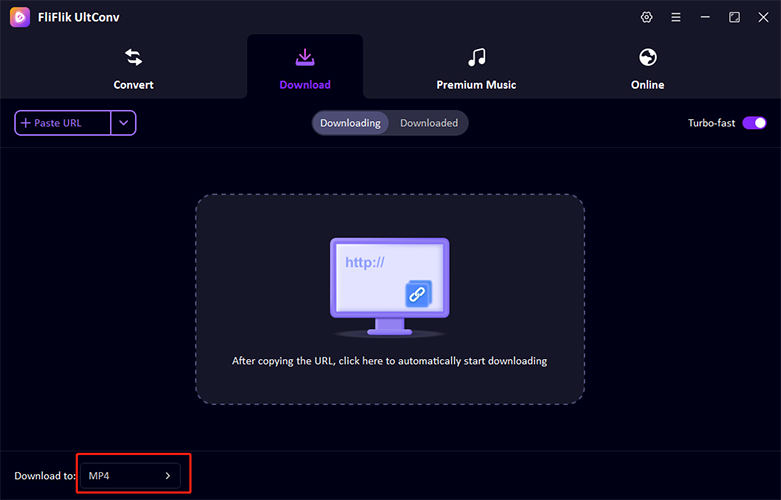
Open UltConv Video Downloader and switch to the Download tab. Click the Download to button at the bottom to set things up.
-
Select your output format. You can choose MP4 for video or pick an audio format if you only need the sound.

-
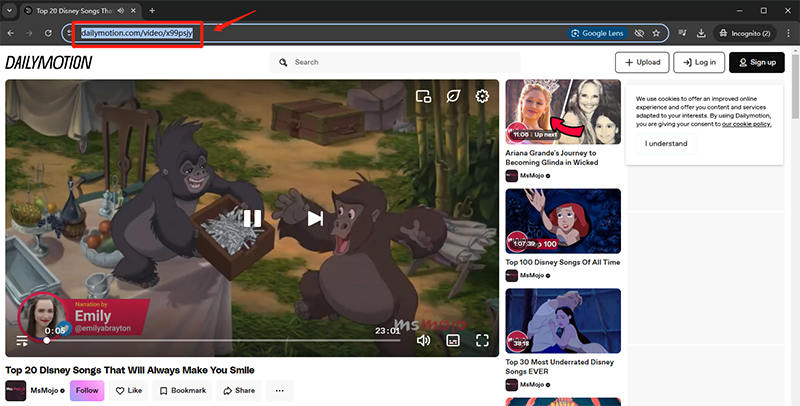
Open Dailymotion in your browser and copy the link of the video you want to save.
-
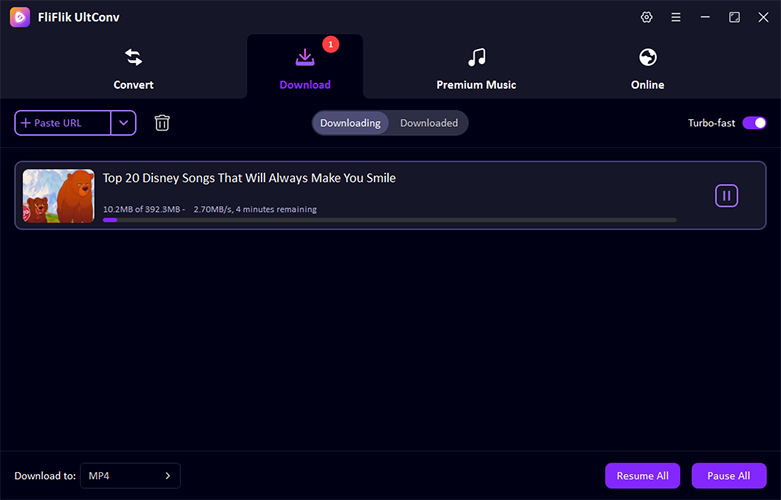
Paste the copied URL into UltConv’s search bar. The program will detect the video and begin downloading automatically.
-
When the download is complete, the video will be saved on your computer and ready to watch offline, completely ad-free and without buffering.


Conclusion
Ads are part of how Dailymotion keeps the lights on, but that doesn’t mean you have to sit through them every time. Using an adblock for Dailymotion can help, though results vary as the platform updates its ad system constantly. If you want a cleaner, more reliable solution, downloading videos for offline viewing makes a lot more sense. That’s where FliFlik UltConv Video Downloader comes in. It lets you save Dailymotion videos in high quality, watch them ad-free anytime, and skip buffering altogether. If uninterrupted viewing matters to you, this is the simplest way to do it. Give FliFlik UltConv a try and take control of how you watch.
Secure Download
Secure Download
FAQs
Q1. Is there a way to watch Dailymotion without ads?
Yes, there are a couple of practical options. Ad blockers can reduce or remove ads while streaming, although results vary depending on the tool and browser you use. Or you can download videos for offline viewing, with FliFlik UltConv Video Downloader, which removes ads entirely and lets you watch without buffering or interruptions.
Q2. Why does Adblock not work on Dailymotion?
Dailymotion updates its ad system regularly. These changes are designed to detect and bypass popular ad blockers, which is why an ad-free setup may work one day and stop the next, even with the same extension enabled.
Q3. Is there a 100% free ad blocker app?
There are free ad blockers available, but none can guarantee complete ad removal all the time. Most free tools have limitations, rely on filter updates, or struggle with newer ad formats used by streaming platforms.
Hey there! I am Maxwell Clark. I'm always looking for new tech tools that make a difference, from making visuals and audio better to making workflows better. I'm going to share tips and tricks for using AI tools for videos, audio, and images. I'm excited to help you navigate the digital world more efficiently and creatively!

