

 8 minutes read


The tool known as ByClick Downloader is widely used for saving videos and music from popular platforms. Many users enjoy its simple layout, quick setup, and link-auto-detect function. However, a large number of people also raise concerns about safety warnings, unstable downloads, slow updates, and limited customer support. These mixed opinions make it important to look deeper into how the tool actually performs. In this article, we will explain what the program offers, summarize real user feedback from Trustpilot, highlight common problems reported by users, and introduce a more stable alternative of ByClick Downloader for those who want fewer issues and better long-term performance.

Part 1. What is ByClick Downloader?
The ByClick Downloader is a desktop software tool designed to help users save videos and audio from popular websites such as YouTube, Facebook, Vimeo, and several others. It offers a simple interface, automatic link detection, and quick downloads, making it easy for beginners to use. However, many users report that the tool often struggles with unstable performance, failed downloads, and occasional errors. Because of these issues, people feel the program needs stronger updates and better long-term stability.

- Download videos in different formats
- Save full playlists and channels
- Auto-detect copied links
- Download audio-only files
- Simple interface
- Some users report malware warnings
- Download errors and unstable speed
- Limited format choices compared to modern tools
- Customer service is often slow
- Many “ByClick downloader crack” versions online increase safety risks
- Some features require ByClick downloader premium
Part 2. ByClick Downloader Full User Feedback [Positive & Negative]
Trustpilot reviews about ByClick downloader show a mix of both happy and upset users. Around 55–60% give positive feedback, while 40–45% report issues. Below is a summary of both sides.

Positive Reviews
Many Trustpilot users share good experiences with ByClick Downloader. These reviews highlight simple use, quick setup, and decent download speed. Below are the main positive points that appear often in real user feedback.
1. User-Friendly Function
Some users say the tool is easy to use and simple to understand. The Trustpilot page shows a few 5-star and 4-star ratings, which reflects satisfaction with basic features such as quick setup, direct downloads, and a clean interface. These users feel the tool works fine for simple video saving tasks.

2. Lightning-Fast Download Speed
A few reviewers mention that when the tool works, the download speed is decent. The positive ratings (though very few) suggest that some users get acceptable performance for common websites like YouTube and Facebook. However, these reviews are clearly in the minority.

Negative Reviews
Not all users have a smooth experience with the tool. Many Trustpilot reviews point out common problems, ranging from security risks to unstable performance and slow support. Below are the most repeated issues shared by real users.
1. Malware Security Problem
A large number of users report security warnings and suspicious behavior during installation. Many 1-star reviews point to pop-ups, antivirus alerts, or unwanted files. This leads many users to ask “is ByClick Downloader safe”. Based on the Trustpilot score distribution, this issue is one of the main reasons for the low rating.

2. Chronic Service Instability
Many reviews mention failed downloads, sudden crashes, and incorrect file output. These problems appear frequently in 1-star and 2-star feedback. Users also note that the tool stops working after updates or does not support certain links anymore. These complaints often lead users to search for “ByClick Downloader crack”, hoping to fix the instability, but cracked versions usually create even more risks.

3. Unresponsive Customer Service
Several ByClick users complain that emails and support tickets remain unanswered. Refund requests are often ignored, and help is rarely provided. Many users who purchased ByClick Downloader premium say they did not receive proper service or any real assistance after payment. This is another common reason for the large number of negative reviews.

Part 3. Try the Best Alternative to ByClick Downloader — FliFlik UltConv
If you want a more stable and dependable option, FliFlik UltConv Video Downloader is one of the best replacements for users who are not satisfied with ByClick tools. Unlike online converters that often crash or limit file size, FliFlik UltConv Video Downloader works as a full desktop program. You need to download and install it on your Windows or Mac computer. Once installed, it provides a smooth experience, steady performance, and a wide choice of file formats. It also supports batch downloads, high-quality video and audio options, and saves content from thousands of popular websites.

- Save videos from 10,000+ sites: YouTube, Facebook, TikTok, Instagram, Vimeo, Dailymotion, etc
- Batch download videos and audio in one go
- Convert files to MP4, MP3, WAV, OGG, and over 100+ formats
- Download playlists, channels, and albums with one click
- Convert video to audio with no quality loss, including 320 kbps sound
- Download 4K, 2K, and 1080p videos
- Remove DRM from Spotify and Apple Music to MP3 format
▼ Steps to Download Videos with UltConv Video Downloader:
Using FliFlik UltConv is simple and quick. First go to the official FliFlik website and click the Download button to install FliFlik UltConv. Make sure to select the version that matches your operating system, whether Windows or Mac.
 Secure Download
Secure Download
Secure Download
-
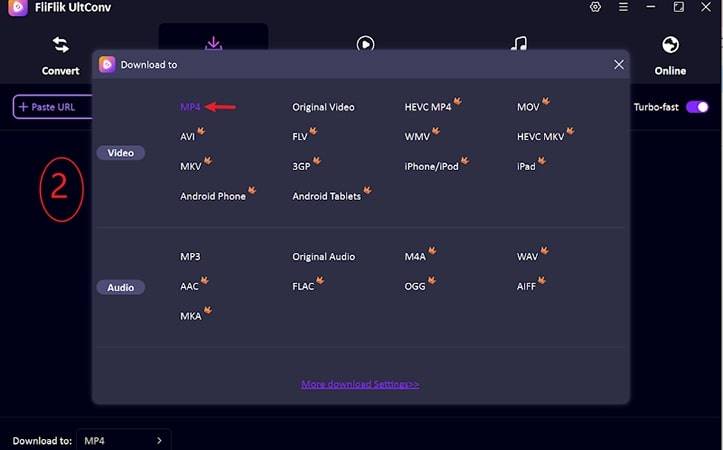
Open FliFlik UltConv and click Download, then select Download To at the bottom to choose your desired format.

-
Next, choose your desired format. You have available options for both video and audio.
-
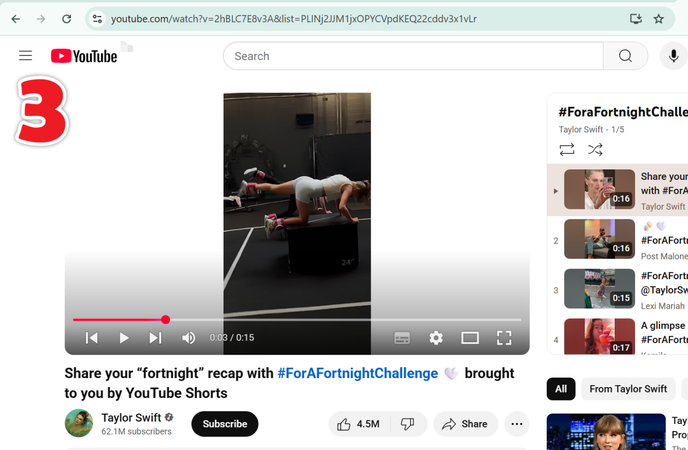
Now, go to YouTube and copy the link of video you want to download.
-
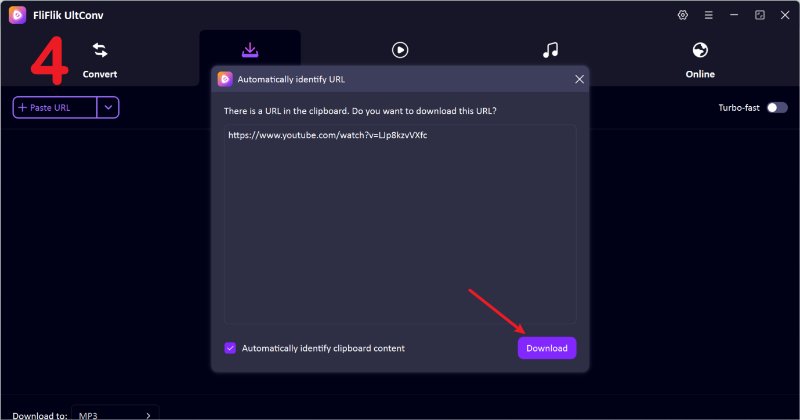
Once copied, the tool will automatically detect it and you will see a pop up window with the download button. Just click it, and your video will start downloading.
-
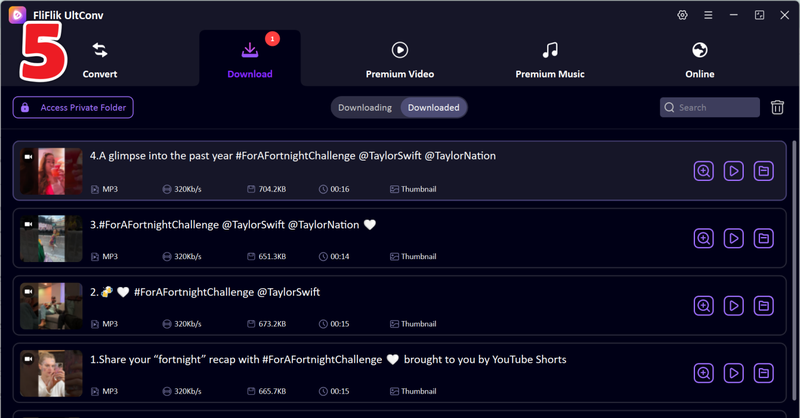
If the link is not detected, just paste the link manually and download your video; then you can check the downloading process and the downloaded video.


Part 4. ByClick Downloader VS. FliFlik UltConv Video Downloader
Choosing the right downloader depends on stability, supported sites, and format options. This comparison shows how ByClick Downloader performs against FliFlik UltConv Video Downloader, so you can see which tool offers better speed, quality, and long-term reliability.
| Feature | ByClick Downloader | FliFlik UltConv |
|---|---|---|
| Supported Sites | Limited sites | 10,000+ sites: YouTube, Facebook, TikTok, Instagram, Vimeo |
| Max Video Quality | Up to 1080p | 4K, 2K, 1080p |
| Batch Download | Limited | Full batch processing for playlists and channels |
| Download Speed | Often unstable | Steady and fast speed |
| Consistent Performance | Many reports of errors | Stable and reliable across major sites |
| Formats | Fewer format options | MP4, MP3, WAV, OGG, AAC, and 100+ other formats |
| Safety | Mostly safe | Clean installation, no malware warnings |
Final Words
The ByClick downloader has both good and bad points. Many people enjoy its simple layout, but others face issues with safety warnings, unstable downloads, and slow support. This is why many users look for options like ByClick downloader full, ByClick downloader premium, or even ByClick downloader crack, but these choices can increase risks. If you want a stable desktop program that supports more sites, more formats, and batch downloads, FliFlik UltConv Video Downloader is a steady choice. It also works better than common tools like Clipto YouTube downloader. Try FliFlik UltConv today to save videos and audio in the formats you need.
Secure Download
Secure Download
Hey there! I am Maxwell Clark. I'm always looking for new tech tools that make a difference, from making visuals and audio better to making workflows better. I'm going to share tips and tricks for using AI tools for videos, audio, and images. I'm excited to help you navigate the digital world more efficiently and creatively!

