

 7 minutes read


Cyberflix used to be a popular choice for free movie and TV streaming, but many users are now asking: is Cyberflix dead? The app has faced stability issues, broken links, and frequent server changes, which make streaming less reliable than before. Some users can still access Cyberflix TV, while others struggle with loading errors or missing content.
In this article, we will look at why Cyberflix may not be working properly, explore the best working alternatives for movie watching, and also introduce a powerful MP4 downloading tool for offline entertainment. If you want smooth streaming without interruptions, this guide will help you find better options.

Part 1. Is Cyberflix Not Working?
Many users have started asking is Cyberflix dead because the app sometimes fails to load content or stops working completely. The main reason is that Cyberflix depends on third-party streaming sources. When those sources change or shut down, the app can’t find working links, which leads to blank screens, buffering, or playback errors. This is pretty common with free streaming apps because they don’t host content themselves. They just act like a search tool for other servers.
Another reason Cyberflix may not work is server instability. The app developers may stop updating it regularly, which causes compatibility problems with newer Android or Firestick versions. Network issues can also play a role. Slow internet speeds often make streaming impossible or extremely slow.
Part 2. Top 8 Cyberflix Alternatives Still Working for 2026
Here are some of the best streaming apps and services you can use if Cyberflix isn’t working anymore.
1. BeeTV

BeeTV is one of the most widely used free streaming alternatives to Cyberflix because of its large content database and reliable streaming link sources. The app works by collecting streaming links from multiple third-party servers, which helps users find working playback options more easily. Many users prefer BeeTV because it feels similar to premium streaming platforms but does not require subscriptions. It works well on Android phones, Firestick devices, and TV streaming boxes.
- Large library of movies and TV shows
- Real-Debrid premium streaming support
- Subtitle support in multiple languages
- External media player compatibility
- Frequent link updates for better playback
2. FilmPlus

FilmPlus is another lightweight and easy-to-use streaming app designed for users who want fast access to movies and TV shows. The app has gained popularity because of its simple interface and efficient link-finding technology. FilmPlus focuses on providing high-quality streaming links while keeping navigation easy for beginners. Many users choose FilmPlus as a replacement for Cyberflix because it offers smoother performance on low-spec devices.
- Clean and beginner-friendly interface
- Fast link searching and loading speed
- Supports HD and 4K streaming quality
- Subtitle download options
- Works on Android and TV streaming devices
3. GoMovies

GoMovies is a browser-based streaming platform that allows users to watch movies and TV shows without downloading any applications. The platform has become popular because it provides quick access to entertainment content directly from web browsers. Users can simply visit the website, search for their favorite movies, and start watching instantly. GoMovies organizes content by genre, popularity, and release year, making it easy to discover new movies.
- No software installation required
- Works on smartphones, tablets, and computers
- Movies organized by genre and release year
- Fast search and navigation tools
- Regularly updated movie catalog
4. Tubi TV

Tubi TV is a legal free streaming service that provides licensed movies and TV shows supported by advertisements. Unlike many unofficial streaming apps, Tubi TV operates legally through partnerships with content providers. This makes it safer and more stable than many free streaming APK apps. Users who want a safe and reliable streaming experience often choose Tubi TV because it does not rely on third-party link scraping.
- Completely legal streaming platform
- Large collection of movies and TV series
- Works on smart TVs, browsers, and mobile devices
- Personalized recommendation system
- High-quality official streaming sources
5. Popcornflix

Popcornflix is another legal, free streaming service that primarily offers movies rather than TV series. The platform monetizes through advertising, providing free entertainment for users seeking a safe, legal, and copyright-free experience. It’s easy to use, and basic content can be viewed without even requiring registration.
- Free legal movie streaming
- Simple browsing and search system
- No subscription required
- Multiple device compatibility
- Category-based movie browsing
6. Cinema HD

Cinema HD is a powerful free streaming application known for its huge content database and high-quality streaming options. The app uses advanced link scraping technology to find working video sources from different servers. Many users prefer Cinema HD because it supports premium streaming services that improve playback quality and reduce buffering. The app works well on Android devices, Firestick, and streaming TV boxes.
- Massive movie and TV show database
- Real-Debrid premium link integration
- Subtitle support
- External video player compatibility
- HD streaming quality options
7. Nova TV

Nova TV is a lightweight streaming application designed for fast and smooth playback performance. The app focuses on providing quick access to entertainment content without heavy system requirements. Nova TV is especially useful for users with slow internet connections or older devices. The app regularly updates its link database to maintain stable streaming performance.
- Fast link scraping technology
- Lightweight and smooth performance
- Subtitle support
- Simple user interface
- Regular content updates
8. TeaTV

TeaTV is a popular streaming application that offers movies and TV shows with smooth playback support. The app is known for its large content catalog and regular updates. TeaTV also allows users to download subtitles and connect external video players for better viewing control. Many users like TeaTV because it provides similar functionality to premium streaming platforms but remains free to use.
- Large movie and TV show library
- Subtitle download support
- External player compatibility
- HD streaming support
- Frequent database updates
Part 3. All-in-One Movies to MP4 Downloader: FliFlik UltConv
While many Cyberflix alternatives rely on online streaming, they often suffer from buffering, broken links, or sudden server outages. A simple way to avoid these problems is to download content for offline viewing.
FliFlik UltConv Video Downloader is designed for this purpose. It’s a full-featured tool that allows users to save videos and music from over 10,000 websites. No more enduring unstable streaming; you can directly download movies, TV series, or short films to your computer in formats including MP4 and MP3, maintaining the original quality up to 8K resolution.

- Download videos from 10,000+ websites including YouTube, Netflix, Twitter, TikTok, and more
- Save videos in multiple formats such as MP4, MP3, WAV, AAC, FLAC, and 100+ others
- Support high‑quality downloads up to 8K video and 320 kbps audio
- Batch download playlists, albums, and channels with a single click
- Built‑in browser that allows direct searching and downloading inside the software
▼ Steps to Download Netflix Movies with FliFlik UltConv Netflix Converter
-
Go to the official FliFlik UltConv website, download the software, and install it on your computer. Open the program after installation and complete the basic setup following the on-screen instructions.
FREE DOWNLOAD![secure download]() Secure Download
FREE DOWNLOAD
Secure Download
FREE DOWNLOAD![secure download]() Secure Download
Secure Download
-
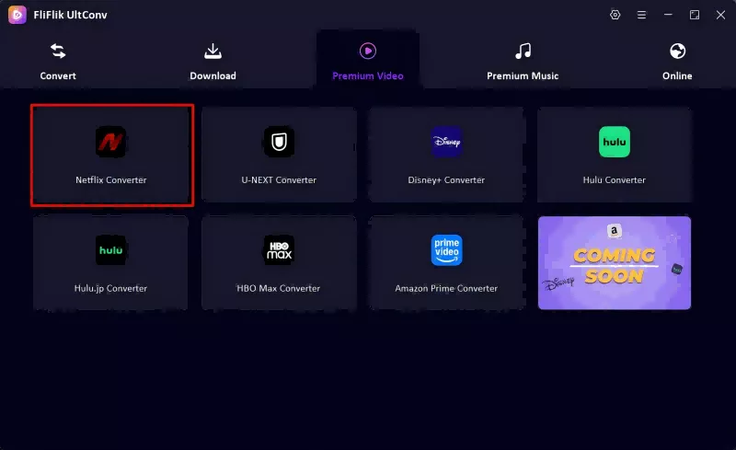
Launch UltConv and click the Premium Video section. From the available options, choose Netflix Converter to open the built-in Netflix downloading interface.
-
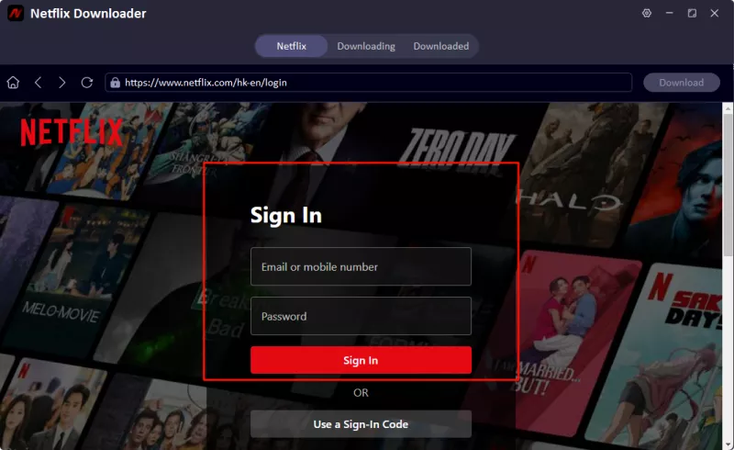
Sign in to your Netflix account directly inside UltConv by entering your registered email and password. This allows the software to access content available in your Netflix library.
-
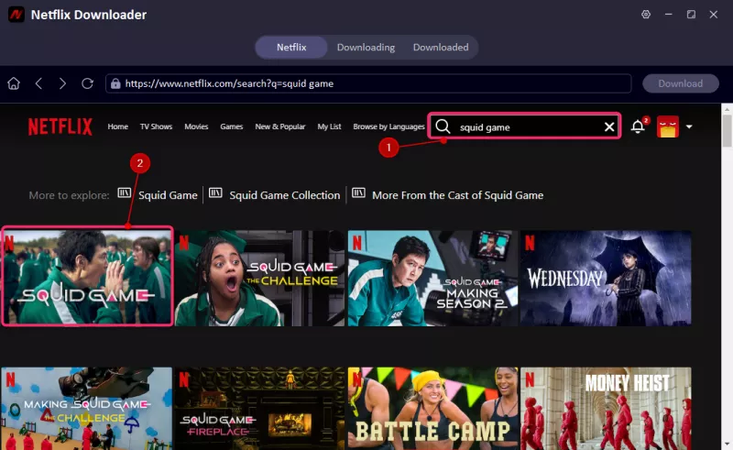
Browse through Netflix content inside the software and select the movie or TV show you want to download for offline viewing.
-
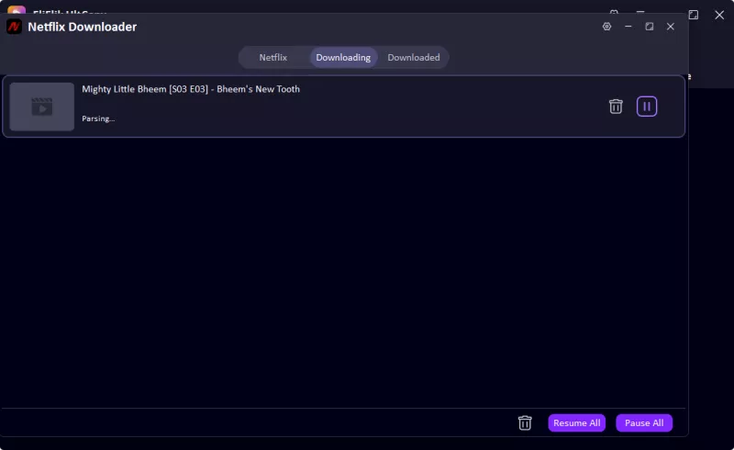
Click the Download button to start saving the video. You can check download progress in the queue section. Once completed, your movie will be ready for offline watching or transferring to other devices.


FAQs
Q1. What is Cyberflix?
Cyberflix was a free streaming app that allowed users to watch movies and TV shows by collecting streaming links from third-party servers.
Q2. How to Install TeaTV on Firestick?
First, go to Firestick settings and turn on Apps from Unknown Sources. Then install a downloader app, visit the TeaTV APK download link, install the APK file, and open TeaTV to start streaming movies and shows.
Q3. How can I get started with Cinema HD APK?
Download the Cinema HD APK from a trusted source, install it on your Android device or Firestick, open the app, and start browsing movies and TV shows. For better streaming quality, you can also connect premium link services like Real-Debrid.
Conclusion
Cyberflix’s stability is projected to decline significantly in 2026. While alternatives like BeeTV, FilmPlus, Tubi TV, and Cinema HD offer a smooth streaming experience, FliFlik UltConv Video Downloader is an essential offline viewing tool for completely eliminating the instability of live streaming.
 Secure Download
Secure Download
Secure Download
Hello, I research and introduce useful solutions for AI videos, images, and audio tips in our daily life. If you learn these things, you can easily deal with the problems of the new era.

