

 8 minutes read


It can be a real struggle to find a great way to download Dailymotion videos. Especially if you want something free to use. There are not so many good Dailymotion downloaders that actually work as claimed. But in this article, we shared a list of 15 best Dailymotion downloaders that are actually working when it comes to downloading videos from Dailymotion. We tested each one, and we compiled this list for desktop users, mobile users, and if you want an online solution, the list has all the answers. Before any further delay, let’s explore your options.

Part 1. Top 4 Dailymotion Video Downloaders on Deskpot
If you are a desktop user, then you should try these 4 Dailymotion downloaders;
1. FliFlik UltConv Dailymotion Downloader
If you’re looking for a desktop downloader for Dailymotion that actually makes downloading videos easy, FliFlik UltConv Dailymotion Downloader is a solid pick. With support for over 10,000 websites, it doesn’t just grab single videos; you can download full playlists, channels, and albums in one go. It keeps the original quality intact, whether you’re saving videos in 720p, 1080p, 2K, 4K, or even 8K.
You can also convert videos to audio in multiple formats like MP4, MKV, MP3, WAV, AAC, and FLAC without losing quality. The batch downloading feature lets you save several files at once, saving time, and live streams can be downloaded directly without recording. The built-in browser makes it easy to find content, and private folders keep your downloads secure.

- Supports 10,000+ websites, including Dailymotion, Vimeo, YouTube, TikTok
- Download videos in 720p, 1080p, 2K, 4K, even 8K
- Convert videos to 100+ formats like MP4, MKV, MP3, WAV, AAC, FLAC, AIFF
- Batch download multiple videos or audio at once
- Save playlists, channels, and albums in one click
- Download live streams directly to MP4
- Remove DRM from Spotify and Apple Music
▼ Steps to Download Dailymotion Videos with UltConv Dailymotion Downloader
FliFlik UltConv Video Downloader is a fast and reliable tool for both Mac and Windows users, letting you save Dailymotion videos in high quality. Once you’ve installed the program, follow these simple steps to convert any Dailymotion video to MP4:
 Secure Download
Secure Download
Secure Download
-
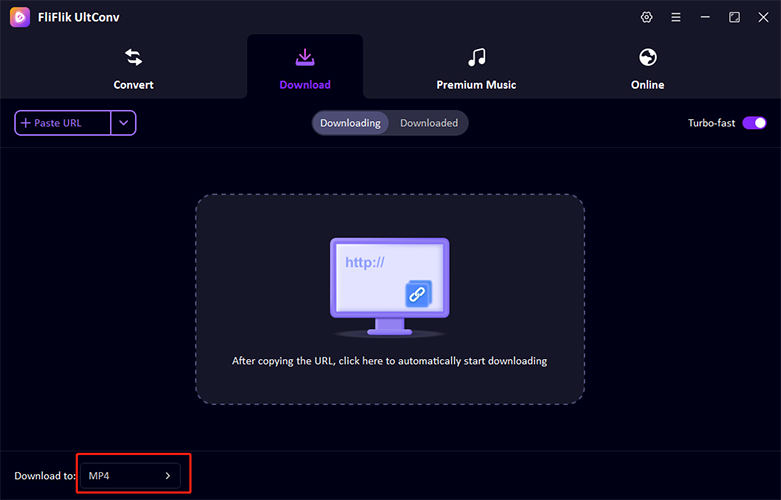
Open UltConv Video Downloader and go to the Download tab. Click the “Download to” button at the bottom to start.
-
Choose your preferred output format. Multiple options are available for video and audio downloads.

-
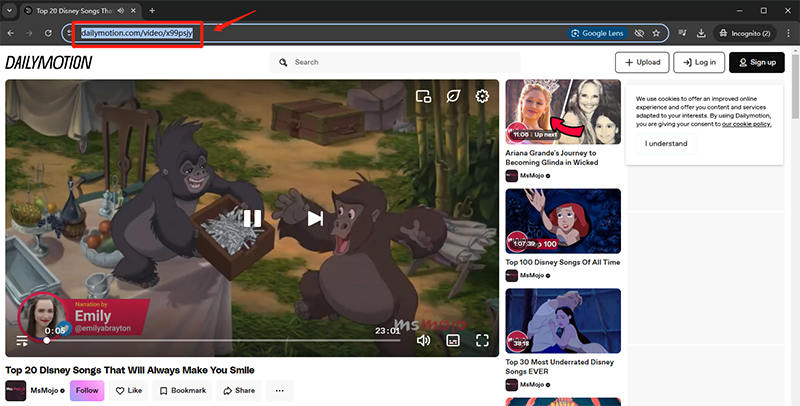
Open Dailymotion in your browser and copy the URL of the video you want to download.
-
Paste the URL of the desired video into the search box, and UltConv will start the download process automatically.
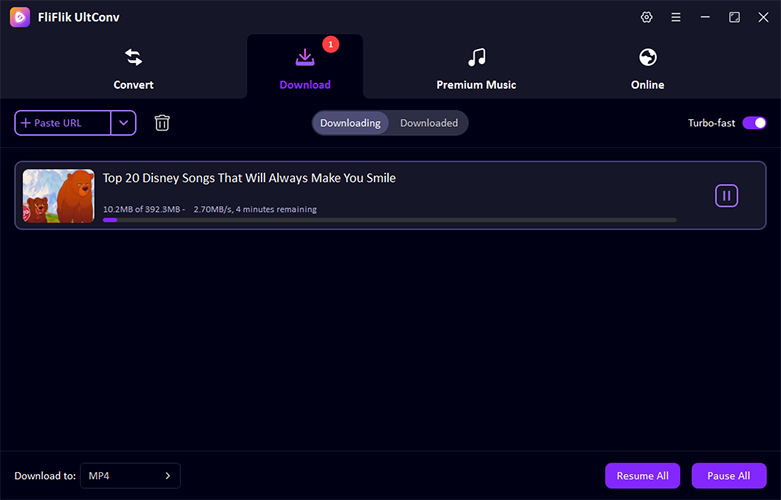


Once the download finishes, your video will be ready to watch offline in the selected format, with no buffering or streaming interruptions.
2. iTubeGo Video Downloader

iTubeGo Video Downloader is another tool that lets you download videos from Dailymotion, YouTube, Vimeo, and many other sites. You can save videos in 720p, 1080p, or 4K quality and convert them to MP4, MP3, or other common formats. It supports batch downloads, so multiple videos or playlists can be saved at the same time. The interface is straightforward, making it easy to start downloads quickly, though some advanced options require the paid version.
- Supports 10,000+ websites including Dailymotion, YouTube, Vimeo
- Download videos in 720p, 1080p, 4K, and audio in 320kbps
- Batch download multiple files at once
- Free version limits daily downloads and features
- Some interface elements feel basic
- Advanced options require a paid upgrade
3. VideoHunter

VideoHunter can help you download online videos from sites like Dailymotion, YouTube, Instagram, and TikTok. It preserves high-quality video and audio, including HD and 4K content, and retains subtitles when available. Batch downloading is supported, running faster than most basic tools, which helps when saving multiple files or playlists. VideoHunter also offers multiple export formats such as MP4, MKV, MOV, and WEBM. While the interface can seem a bit technical at first, it provides reliable performance.
- Multiple platforms support, including Dailymotion, YouTube, and TikTok
- Preserve HD/4K video and original audio/subtitles
- Export in MP4, MKV, MOV, WEBM formats
- Batch downloads at faster speeds
- Free version limits daily downloads
- Subtitle features can be tricky for beginners
- Slightly technical interface
4. VideoProc

VideoProc is another reliable Dailymotion downloader for downloading videos, converting formats, and basic editing. It supports Dailymotion and other major streaming sites. Also, it allows high-quality downloads up to 4K or 8K. Level-3 GPU acceleration ensures faster downloads and processing without losing quality. In addition to downloading, it includes tools for recording screens, compressing files, or converting formats. However, its interface is quite complicated for beginners.
- Supports Dailymotion and other major streaming sites
- High-quality video downloads up to 4K/8K
- GPU acceleration for faster processing
- Includes video/audio conversion and recording tools
- Free version limits downloads and conversions
- Interface can be heavy for simple downloads
- Uses more system resources than lighter tools
Part 2. Top 3 Dailymotion Downloader on Mobile
Downloading Dailymotion videos on your mobile can be just as simple as on a desktop if you have the right app. Here are four options that you should try.
1. FliFlik UltConv for Android

For mobile users to download Dailymotion videos, the top tool you can use is FliFlik UltConv for Android. It lets you save videos from Dailymotion, YouTube, Facebook, Instagram, and over 10,000 other sites directly to your phone in just a few taps. You can choose the resolution that suits your needs from 360p all the way up to 4K, so your videos stay sharp and clear. The app also supports converting videos to high-quality audio, batch downloading playlists, and managing files easily, making it convenient to build your offline collection without interrupting your daily use.
- Download YouTube/Dailymotion/Facebook/Instagram videos in HD/4K
- Supports over 10,000 streaming sites, including TikTok, Vimeo, SoundCloud, and MixCloud
- Convert videos to MP3 at 320kbps
- Batch download multiple videos or playlists at once
- Supports MP4, MP3, AAC, and M4A formats
- Background mode for smooth multitasking
▼ Steps to Download Dailymotion Videos with UltConv for Android
-
Step 1: Open UltConv on your Android device and go to the built-in browser.
-
Step 2: Go to Dailymotion in the browser and find the video you want to download.
-
Step 3: Play the video. Once UltConv detects it, a Download button will appear.
-
Step 4: Tap the Download button, choose your preferred format (MP4 for video, MP3 for audio) and quality, then confirm to start downloading.
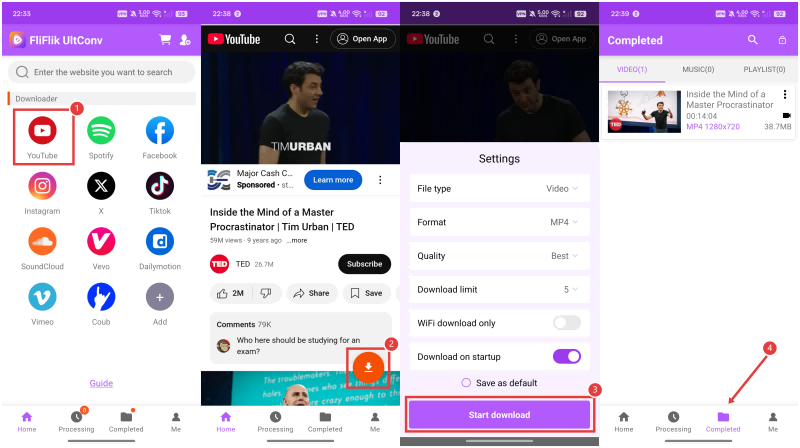

After the download finishes, access your video in the built-in file manager or your phone’s gallery for offline viewing.
2. Downloader for Dailymotion

Downloader for Dailymotion is a lightweight Android app focused only on saving Dailymotion videos. It keeps things simple by letting you paste a video link or browse Dailymotion inside the app and download videos directly to your phone. You can usually choose between different video qualities, depending on what the source provides. There are no advanced tools like batch downloads or format conversion, but for basic offline viewing, it does the job without much setup.
- Made specifically for Dailymotion downloads
- Simple interface, easy to use
- Saves videos directly to local storage
- Limited to Dailymotion only
- Ads in the free version
- Fewer format and quality options
3. Video Downloader

Video Downloader is a general-purpose Android app that supports downloads from many websites, including Dailymotion. Instead of focusing on one platform, it uses a built-in browser to detect downloadable videos across different sites. Once a video is detected, you can choose the available resolution and save it to your device. It’s useful if you want one app for multiple platforms, though the experience can vary depending on the website and video source.
- Supports multiple platforms, including Dailymotion
- Built-in browser for easy detection
- Simple download process
- Download detection isn’t always consistent
- Ads can interrupt usage
- Limited control over formats and advanced settings
Part 3. Top 4 Dailymotion Video Downloaders Online
If you don’t want to install software, online Dailymotion downloaders are the easiest option. Here
1. SnapAny

SnapAny is a browser-based downloader that supports Dailymotion and several other video platforms. You simply paste the Dailymotion video link, and the site generates downloadable options within seconds. It usually offers multiple resolutions depending on the original video quality. Since everything runs online, there’s no setup involved, which makes it suitable for quick downloads on any device.
- No installation required
- Supports multiple video resolutions
- Works on desktop and mobile browsers
- Ads can be distracting
- No batch download support
- Dependent on browser and site availability
2. SaveTheVideo

SaveTheVideo is an online downloader focused on simplicity. It supports Dailymotion links and lets users download videos by pasting the URL into the input box. In many cases, it also provides format and quality choices before downloading. The tool is useful for one-off downloads when you don’t need advanced controls or extra features.
- Easy copy-and-paste workflow
- Supports Dailymotion and other platforms
- No account or installation needed
- Limited control over formats
- Ads and pop-ups may appear
- Not suitable for large or repeated downloads
3. VidSave

VidSave is another web-based tool that allows downloading videos from Dailymotion without installing software. After pasting the video link, it processes the file and shows available download options. It’s designed for quick access and works well for standard-quality downloads, though advanced features are minimal.
- Simple interface
- Works directly in the browser
- Supports basic video quality options
- Limited format support
- Slower processing at peak times
- No playlist or batch download option
4. All Downloader

All Downloader offers an online solution for downloading Dailymotion videos by generating direct download links. It supports common video resolutions and works across most modern browsers. The tool is best suited for casual users who want a fast way to save a single video without installing apps or desktop software.
- No software installation required
- Works on multiple devices
- Straightforward download process
- Ads can interrupt the experience
- Fewer quality and format choices
- Not reliable for long or high-resolution videos
Part 4. Top 4 Dailymotion Downloader Extensions
Browser extensions are useful when you want quick access without opening a separate app or website. However, extensions tend to be simpler and more limited than desktop tools, so they’re best for casual downloads.
1. Dmsave

Dmsave is a Chrome extension built specifically for downloading Dailymotion videos. Once installed, it adds a download option directly below the video player, allowing you to save videos without copying links or opening new tabs. It supports common video qualities based on the original upload and keeps the process straightforward for everyday use.
- Built specifically for Dailymotion
- One-click download from the video page
- Simple and lightweight extension
- Limited to Dailymotion only
- Fewer quality and format options
- May stop working if Dailymotion changes its layout
2. Video Downloader Plus

Video Downloader Plus is a browser extension that lets you download videos from video streaming sites like Dailymotion, TikTok, etc. However, it does not support downloading YouTube videos due to Google’s web store policy and developer program policy restrictions.
- Convenient and fast download method
- Without any App installation
- Works with multiple extensions
- Can’t download YouTube or copyrighted content
- The video resolution choice is limited
- May be unstable frequently
3. Download Dailymotion Videos (Firefox Add-on)

The Firefox add-on Download Dailymotion videos is designed specifically to download videos from Dailymotion. After installation, it detects videos on the page and offers download options directly within the browser. It’s a simple solution for Firefox users who want basic downloading without switching to desktop software or online tools.
- Made specifically for Firefox
- Easy to use on Dailymotion pages
- No need for external software
- Limited format and quality options
- Firefox-only
- Updates may lag behind site changes
4. GitHub Dailymotion Downloader

This is an open-source Dailymotion downloader hosted on GitHub. It’s more technical than browser extensions or apps and is usually run via command line or scripts. It’s best suited for developers or advanced users who want more control and transparency over how downloads work.
- Open-source and transparent
- No ads or tracking
- Greater control for technical users
- Not beginner-friendly
- Requires technical setup
- No graphical interface
Part 5. Comparison of 15 Best Dailymotion Downloaders
Now, below is a clear side-by-side comparison of all 15 tools covered above in this article. The goal here is not to rank them again, but to help you quickly see what type of tool each one is, where it works, and what kind of downloading experience you can expect.
| Tool Name | Type | Supported Platform | Max Quality | Download Format | Download Speed | Batch Download | Rating |
|---|---|---|---|---|---|---|---|
| FliFlik UltConv | Desktop Software | 10, 000+ streaming Platforms | 8K, 4k, 1080P | MP4, MKV, MP3, WAV, FLAC, 100+ formats | Very Fast (10X) | Yes | 4.8/5 |
| iTubeGo | Desktop Software | 10,000+ Platforms | 8K | MP4, MP3 | Fast | Yes | 4.5/5 |
| VideoHunter | Desktop Software | 1000+ Platforms | 4K | MP4, MKV, MOV, WEBM | Fast | Yes | 4.5/5 |
| VideoProc | Desktop Software | 1000+ Platforms | 8K | MP4, MP3, MOV | Fast | Yes | 4.4/5 |
| FliFlik UltConv Android | Mobile App | 10,000+ Platform | 8K | MP4, MP3, AAC, M4A | Fast | Yes | 4.5/5 |
| Downloader for Dailymotion | Mobile App | Dailymotion only | 1080p | MP4 | Medium | No | 3.8/5 |
| Video Downloader | Mobile App | Limited | 1080p | MP4 | Medium | No | 4.0/5 |
| SnapAny | Online Tool | Only video streaming sites | 1080p | MP4 | Medium | No | 4.0/5 |
| SaveTheVideo | Online Tool | Only video streaming sites | 1080p | MP4 | Medium | No | 4.1/5 |
| VidSave | Online Tool | Only video streaming sites | 720p–1080p | MP4 | Medium | No | 3.9/5 |
| All Downloader | Online Tool | Only video streaming sites | 1080p | MP4 | Medium | No | 4.0/5 |
| Dmsave | Browser Extension | Dailymotion only | 1080p | MP4 | Fast | No | 4.2/5 |
| Video Downloader Plus | Browser Extension | Only video streaming sites | Depends on extension | Depends on extension | Depends | No | 4.0/5 |
| Download Dailymotion Videos | Browser Extension | Dailymotion only | 1080p | MP4 | Fast | No | 4.1/5 |
| GitHub Dailymotion Downloader | Open-source Tool | Dailymotion only | 1080p+ | MP4 | Fast | Yes | 4.3/5 |
Final Words
Choosing the right Dailymotion downloader really comes down to how often you download and how much control you want. Online tools work for quick saves, extensions are handy for casual use, but desktop software gives you the best mix of quality, speed, and stability. If you want full control over formats, resolution, playlists, and batch downloads, FliFlik UltConv Dailymotion Downloader stands out as the most complete option. It handles Dailymotion and thousands of other sites, supports high resolutions up to 4K and beyond, and keeps the process simple from start to finish. If you’re serious about offline viewing without limits, FliFlik UltConv Dailymotion Downloader is the tool worth using.
Secure Download
Secure Download
FAQs
Q1. What’s the best Dailymotion video downloader?
FliFlik UltConv Dailymotion Downloader is the best Dailymotion video downloader. It supports high-quality downloads, batch processing, and works across many platforms, not just Dailymotion.
Q2. How to download non-downloadable videos from Dailymotion?
You can use a desktop tool like FliFlik UltConv Dailymotion Downloader that detects video streams directly and saves them in your preferred format and quality.
Hey there! I am Maxwell Clark. I'm always looking for new tech tools that make a difference, from making visuals and audio better to making workflows better. I'm going to share tips and tricks for using AI tools for videos, audio, and images. I'm excited to help you navigate the digital world more efficiently and creatively!

