

 8 minutes read


If ddownr keeps letting you down, you’re definitely not alone. Maybe the links refuse to load, the downloads freeze, or the whole site just crashes. Super frustrating. But don’t worry, there’s a way out. You can actually fix some of these issues yourself, and you don’t have to stick with ddownr if ddownr is not working. In this article, we will show you a few quick fixes, and then I’ll show you five free ddownr alternatives that get the job done. That way, you can grab your favorite YouTube videos hassle-free.

Part 1. Why ddownr.com Broken Frequently?
If you’ve tried using ddownr.com recently, you might have noticed it doesn’t always work as expected. Sometimes, links don’t load, videos fail to play, or the site won’t open at all. This can be really frustrating, especially if you’re in a hurry to save videos for offline viewing. The truth is, online downloaders like ddownr rely on stable servers, up-to-date scripts, and smooth compatibility with YouTube’s frequent updates. When any of these factors are off, the tool can stop working properly. Here are the main reasons ddownr.com breaks frequently:
- High traffic overloads the website, causing slowdowns or downtime
- Server issues or scheduled maintenance interrupt service
- Browser or device compatibility problems
- Geo-restrictions block access in certain countries
- YouTube updates can temporarily break the download functionality
- Ads and pop-ups interfere with the download process
Part 2. How to Fix When ddownr Not Working?
When ddownr.com stops working, it can be really frustrating. Sometimes the site won’t load, other times the video link isn’t detected, or downloads fail midway. The good news is that most of these problems have simple fixes if you know what to try.
- Site won’t load → Often caused by a slow or unstable internet connection. Try refreshing the page, restarting your browser, or switching to a different browser.
- Video link not detected → Double-check the URL you copied from YouTube. Sometimes extra characters or incomplete links prevent ddownr from recognizing the video.
- Downloads fail midway → Clear your browser cache and cookies to remove any temporary glitches, then retry the download.
- Slow performance or lag → Closing unused tabs or using a faster device can improve download speed.
- Geo-restriction errors → If the site is blocked in your country, using a VPN to change your location usually resolves the issue.
- Pop-ups or ads interfering → Enable an ad-blocker or switch to incognito/private browsing mode to prevent interruptions.
Part 3. Still Not Working? Try 5 ddownr Alternatives
If Ddownr still isn’t doing the job, don’t worry. There are plenty of free ddownr alternatives that work reliably and let you download YouTube videos without hassle. These tools are easy to use, support multiple formats, and often offer higher quality and faster downloads than ddownr.
1. FliFlik UltConv Video Downloader
The first alternative we recommend is FliFlik UltConv Video Downloader, a reliable tool for anyone who wants a smooth way to save videos and music. It works on both desktop and mobile devices, so whether you’re on Windows, Mac, or Android, you can grab videos easily. What makes it really handy is that it supports thousands of sites, not just YouTube, so you can download content from social media, streaming platforms, and more. You can pick the quality you want, from 360p all the way up to 4K for videos, or save audio in 320kbps MP3 without losing quality. It also lets you download entire playlists or channels at once, which is great if you want to save multiple videos without repeating the process. With batch downloads, a built-in browser, and a private folder to keep files safe, it’s one of the most reliable ddownr alternatives out there.

- Download videos from 10,000+ sites, YouTube, TikTok, Instagram, Netflix, etc.
- Save videos in HD, 1080p, 2K, 4K, and audio in 320kbps
- Batch download multiple videos or entire playlists
- Convert videos to MP3, WAV, AAC, and other formats
- Remove DRM from Spotify and Apple Music
- Built-in browser and private folder for secure downloads
▼ How to Download YouTube Video with UltConv Video Downloader?
FliFlik UltConv Video Downloader makes it easy to save YouTube videos in high quality on your computer. Once you’ve downloaded and installed the program, follow these simple steps to convert any YouTube video to MP4.
 Secure Download
Secure Download
Secure Download
-
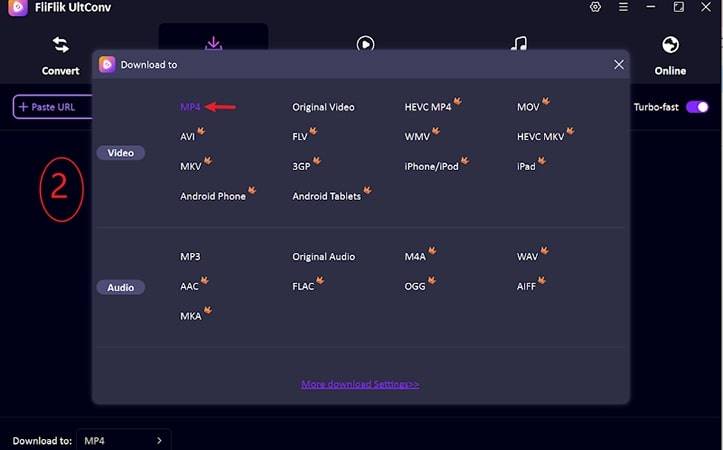
Open FliFlik UltConv and go to the Download tab. Click the ” Download to ” button to get started.

-
Select the output format you want, such as MP4 for video or MP3 for audio.
-
Open YouTube, find the video you want, and copy its URL.

-
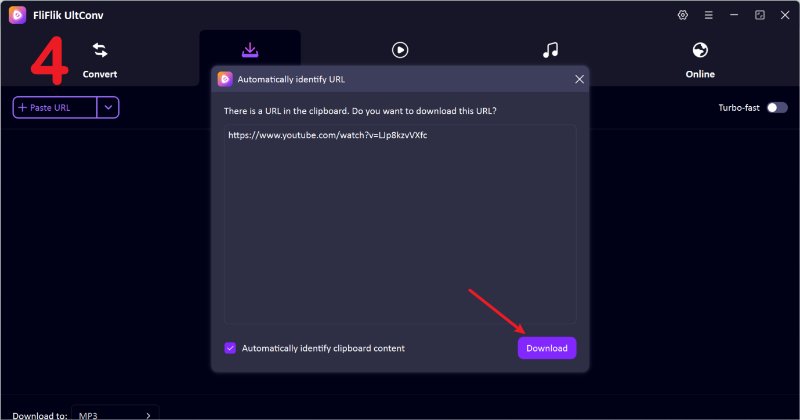
Go back to UltConv. If the program automatically recognizes the link, simply click the Download button to save the video.
-
If the link isn’t detected, paste it manually into the search box and click Download.


Once the download is complete, your video will be saved in the format you chose. You can now enjoy it offline anytime, without buffering or interruptions.
2. Ummy

If you’ve been struggling with ddownr.com, Ummy is another option to consider. It’s a simple desktop tool for Windows and Mac that allows you to download YouTube videos and convert them to MP4 or MP3. The interface is straightforward, so even beginners can use it without confusion. You can choose video quality, from standard to HD, and it handles downloads quickly without much setup.
- Download videos in MP4 or audio in MP3
- Supports HD video quality
- Simple and clean interface
- Unstable to download
- Limited support for playlists
3. Loader.to

Another convenient online tool is Loader.to. It works in your browser and doesn’t require installation, making it a handy alternative if ddownr.com isn’t functioning. You can download single videos or entire playlists, and it supports multiple formats, including MP4 and MP3. The interface is minimal, allowing quick access to downloads without unnecessary clutter.
- Works directly in the browser
- Supports MP4 and MP3 downloads
- Download playlists and multiple videos at once
- Simple, user-friendly interface
- Free version has some limitations
- Ads can be distracting
- Batch downloads may be slower on large playlists
4. YouTubePlaylist.cc

For those looking to save multiple videos at once, YouTubePlaylist.cc is a practical online tool. If you’re having trouble with ddownr download, this tool allows you to download entire playlists or channels directly in your browser. You can choose video or audio formats and pick the quality before downloading, making it easy to organize offline content.
- Download entire playlists or channels
- Supports MP4 and MP3 formats
- Choose video quality before downloading
- No software installation required
- Ads can be intrusive
- Some very long playlists may fail
- Limited advanced settings
5. KeepVid

Finally, KeepVid is a browser-based solution for downloading YouTube videos when ddownr.com isn’t working. It allows you to save single videos in multiple formats and resolutions. The interface is simple, letting users paste a link and download quickly. KeepVid works on both mobile and desktop browsers, which makes it convenient if you switch devices often.
- Works on mobile and desktop browsers
- Supports MP4 and MP3 downloads
- Quick and easy to use
- Ads can disrupt the experience
- Batch downloads are limited
- Some videos may fail depending on source
Part 4. ddownr VS. 5 ddownr Alternatives
It’s important to see how these tools stack up against each other. Some are simple browser-based solutions, while others, like FliFlik UltConv Video Downloader, offer more advanced features for desktop and mobile users. To make it easier to compare, we’ve broken down the key aspects such as supported formats, platform compatibility, video quality, batch download ability, DRM support, and ad presence. This way, you can quickly spot which tool fits your needs best.
| Feature | FliFlik UltConv | ddownr | Ummy | Loader.to | YouTubePlaylist.cc | Keepvid |
|---|---|---|---|---|---|---|
| Support Formats | MP4, MP3, WAV, AAC, 100+ format support | MP4, MP3 | MP4, MP3 | MP4, MP3 | MP4, MP3 | MP4, MP3 |
| Support Platforms | Windows, Mac | Browser only | Browser only | Browser only | Browser only | Browser only |
| Max Quality | Up to 8K (video), 320kbps (audio) | Up to 1080p | Up to HD | Up to 1080p | Up to 1080p | Up to 1080p |
| Batch Download | Yes (playlists, channels) | Limited | Limited | Yes (playlists) | Yes | Limited |
| DRM Content | Yes (removes DRM for supported services) | No | No | No | No | No |
| Ads | No ads | Ads on site | Pops up sometimes | Ads on site | Ads on site | Ads on site |
Final Words
If you’ve been struggling with Ddownr not working or facing slow downloads, you’re not alone. Online downloaders can be convenient, but they often run into errors, ads, or restrictions that make them unreliable. That’s why having a dependable Ddownr alternative matters. Among all the options, FliFlik UltConv Video Downloader stands out. It works on desktop and mobile, supports thousands of sites, allows batch downloads, and lets you save videos and audio in high quality without interruptions. If you want a smooth, reliable way to download YouTube videos, playlists, or audio tracks, FliFlik UltConv is the tool to try today.
Secure Download
Secure Download
FAQs
Q1. Is Ddownr.com safe?
Yes, Ddownr.com is generally safe to use, but always avoid downloading copyrighted content without permission.
Q2. Are there any Ddownr alternatives?
Yes, the most reliable alternative is FliFlik UltConv Video Downloader, which works across platforms, supports multiple formats, and handles batch downloads efficiently.
Hey there! I am Maxwell Clark. I'm always looking for new tech tools that make a difference, from making visuals and audio better to making workflows better. I'm going to share tips and tricks for using AI tools for videos, audio, and images. I'm excited to help you navigate the digital world more efficiently and creatively!

