6 minutes read


If you’re into anime, you know the struggle: endless buffering, laggy streams, or hunting down that one missing episode. Slow internet and sketchy websites can ruin your plans before you even hit play. That’s why so many people just want to download anime from Aniwave and watch it offline, on their own terms.
In this article, we’ll walk through simple and practical options to save anime episodes and movies to your device. We’ll cover what Aniwave is, how direct downloads work, and which methods give better quality and reliability. By the end, you’ll have a clear idea of how to download from Aniwave safely and choose the option that fits your setup best.
What is Aniwave?

Aniwave is a popular website for streaming anime online. It offers a wide range of anime shows and movies, from classics to the latest releases. Users can watch content directly on the site without needing an account. The platform is especially popular among anime fans who want free access to a variety of series. However, since it’s ad-supported, you may encounter pop-ups or occasional interruptions while streaming.
- Access thousands of anime titles, including both old favorites and new episodes.
- Simple and user-friendly interface, making it easy to find shows.
- No subscription required to watch content.
- Helps prevent downtime or slow loading issues.
- Many anime come with English subtitles.
- Frequently adds new episodes and series.
Is Aniwave Safe?
Aniwave is generally safe to use for streaming, but there are a few things to be aware of. The main concern comes from ads and pop-ups, which can sometimes be misleading or even malicious. These ads may try to trick you into clicking on them, so it’s important to be careful. Using a reliable ad blocker can help reduce these risks and make your viewing experience smoother and more enjoyable. Also, always avoid clicking on suspicious links or download prompts from the site. With a bit of caution, you can enjoy your favorite anime without running into major issues.
Is Aniwave Legal?
Aniwave streams anime without proper licensing, which means it operates in a legal gray area. This can be risky depending on the country you’re in. Downloading or streaming anime from Aniwave may not be fully legal everywhere, and it’s possible to run into copyright issues. To stay on the safe side, consider using a VPN to protect your privacy or stick to official streaming platforms whenever possible. While it’s convenient to watch for free, being mindful of the legal risks ensures you don’t get into trouble while enjoying your favorite shows.
How to Download from Aniwave Directly?
If you want to watch anime offline quickly, direct downloading from Aniwave is a great option. This method fetches the video straight from the site or its mirrors, so you can save episodes or movies to your device. While it’s simple, there are some limitations like slower speeds, lower video quality, and no batch download support compared to advanced tools like UltConv Video Converter.
▼ Steps to Download from Aniwave Directly
-
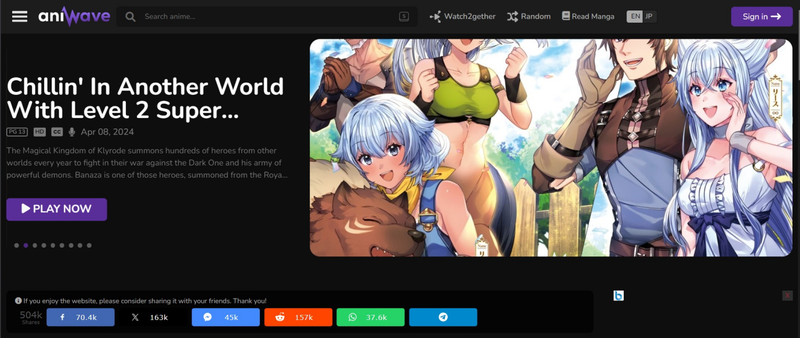
Step 1: Open the AniWave official website and find the series or movie you want to watch.
-
Step 2: Go to the viewing page and scroll down to find the MP4upload button. Click it, and a Download button will appear in the player’s lower-right corner.
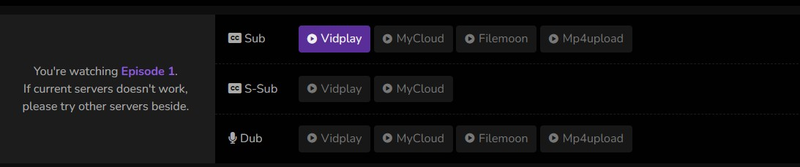
- Step 3: Tap the Download button, then click Go to Download Page. You’ll be redirected to the MP4 upload’s download page, where you can see your selected episode ready to download.
- Step 4: Choose your download option. You can select Free Download or another available package, then press the icon to start downloading the anime episode or movie. Once downloaded, you can watch it offline anytime.


- Free and quick to use
- No software installation needed
- Works on desktop and mobile
- Ads and pop-ups can be annoying
- Quality and download speed may be limited
Best Way to Download Aniwave Videos with High Quality
If you’re tired of buffering, ads, and interrupted streams while watching anime, the best way to enjoy your favorite shows is with a reliable video converter. FliFlik UltConv Video Converter makes it easy to download and save anime from Aniwave in high quality. It’s fast, smooth, and keeps the original HD visuals intact.
Unlike simple downloaders, UltConv Video Converter avoids annoying pop-ups and gives you full control over the format and resolution of your videos, like HD or 4K videos. You can save single episodes or even entire series, and watch them anytime. Sessions are available on your computer, tablet, or phone. For anime lovers who want a permanent, safe, and high-quality offline library, UltConv Video Converter is the perfect solution. It’s a simple way to make sure your anime is uninterrupted and completely under your control.

- Easily extract audio from videos in formats like MP3, FLAC, or AAC
- Convert large 4K or 8K videos quickly without waiting
- Save time by converting multiple files at once
- Works with iPhone, iPad, Android, and other devices
- Convert videos to MP4, MOV, MKV, AVI, and audio to MP3, WAV, FLAC, AAC
- Preserves HD and HiFi audio quality for movies, music, and more
▼ Steps to Download Aniwave Videos with FliFlik UltConv
-
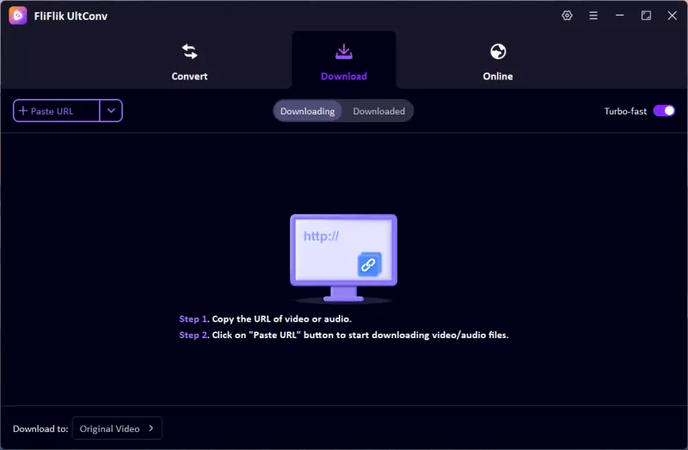
First, open the Download section in UltConv and choose the format you want for your video or audio. Picking the right format ensures your downloaded anime will play smoothly on your device.
-
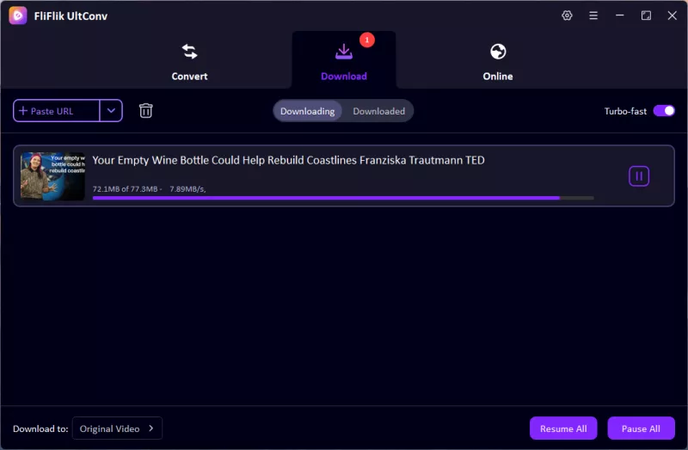
Copy the URL of the AniWave video you want to save. Return to UltConv, paste the link into the Download section, and the software will start processing the video.
-
After the download is complete, navigate to the Download tab to locate your saved files. Your AniWave videos are now ready to watch offline anytime, without ads or interruptions.


- Fast and reliable downloads
- High-quality video and audio
- Batch conversion for multiple videos
- Paid software is required for full functionality
Final Words
Downloading your favorite anime is now easier than ever. While direct downloaders are okay for casual viewing, UltConv Video Converter gives the best experience for anime lovers. You can download Aniwave videos in high quality, convert to any format, and watch offline without interruptions or ads. Create your personal anime library and enjoy episodes anytime on any device. UltConv makes binge-watching smooth, safe, and stress-free.
 Secure Download
Secure Download
Secure Download
Hey there! I'm Clara Knight, and I'm passionate about using AI to streamline my workflow in the image watermark removal industry. So excited to empower users with clear guides and insights to conquer those pesky watermarks. Let's unleash the power of AI for watermark-free visuals!