

 7 minutes read


Keep2Share is a popular file hosting and sharing service, but let’s be honest, downloading from it is not always a pleasant experience. Are you tired of slow speed, waiting timers, and daily limits? Many people want to download from Keep2Share without dealing with endless limitations. The good news is, there are a few practical ways to get your files, whether you’re sticking to free options or looking for faster access. In this article, we’ll walk through how Keep2Share downloads work, what slows them down, and which methods actually save time. No confusion. No tech overload. Just clear, useful steps to help you download smarter.

Part 1. Why Not Download Videos from Keep2Share Directly?

Keep2Share is known for being a secure and user-friendly file-sharing platform. It’s easy to upload files, organize them into folders, set access options, and share links. The interface is clean, data stays protected, and the experience is ad-free. For people who upload and manage files, it’s a solid choice.
But when it comes to downloading videos directly from Keep2Share, you’ll quickly hit limits that make the process slow and frustrating.
- Non-members: Can only download one file per hour, and speeds are capped at around 25 KB/s. That means even a small video can take ages to finish.
- Free registered users: Get slightly better access than non-members, but you’re still limited by speed caps and a daily download quota. Even with these, large files take a long time.
- Daily download quota: Free members usually face a cap of around 10 GB per day per IP address, which isn’t much if you’re downloading high-quality videos.
- Slow speeds: Unless you upgrade, your download rate stays throttled, making multi-GB files a test of patience.
- One-by-one downloads: Free plans normally don’t allow simultaneous downloads, so you can’t queue up multiple files.
Premium accounts remove these limits. Premium users enjoy full download speed, multiple downloads at once, and no quotas or timers. But for many casual users, paying for a premium just to grab one or two videos doesn’t seem worth it. Don’t worry, there is a better workaround.
Part 2. Best Way to Download Video from Keep2Share at High Speed
Downloading videos from Keep2Share can be frustrating if you’re using a free account. Non-premium users face slow download speeds, one-file-per-hour limits, and daily download caps. Even if you become a regular member, speeds are still throttled, and waiting for large files can eat up hours of your time. That’s why many people look for smarter alternatives to download from Keep2Share without a premium.
One of the best solutions is FliFlik UltConv Video Downloader. This tool lets you grab videos directly from Keep2Share at full speed, skipping all the wait times and restrictions. You can choose your preferred format, like MP4 or MP3, and even download multiple files at once. UltConv Video Downloader also supports high-quality downloads in resolutions up to 8K and lets you save live streams in real time. Whether it’s a single video, a playlist, or even music files from Spotify and Apple Music, UltConv Video Downloader handles everything efficiently. It’s perfect for anyone who wants full control, speed, and hassle-free downloads.

- Download videos from 10,000+ sites, including YouTube, TikTok, Instagram, etc.
- Save videos in MP4, MP3, and 100+ formats
- Support for 720p, 1080p, 2K, 4K, and even 8K
- Batch download multiple files at once
- Up to 10x faster download speed
- Built-in browser for direct access and downloads
-
First, download and install FliFlik UltConv Video Downloader on your PC or Mac. Once installed, open the program.
FREE DOWNLOAD![secure download]() Secure Download
FREE DOWNLOAD
Secure Download
FREE DOWNLOAD![secure download]() Secure Download
Secure Download
-
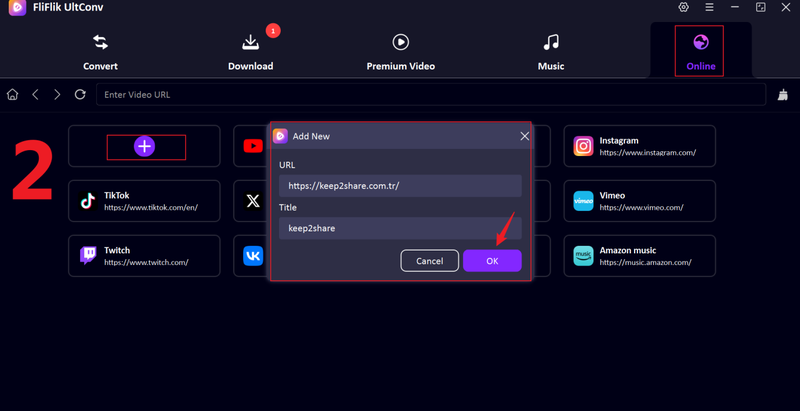
Go to the Online section, click the + tab to open a small window. Paste the Keep2Share official site URL and enter the site name, then click OK.
-
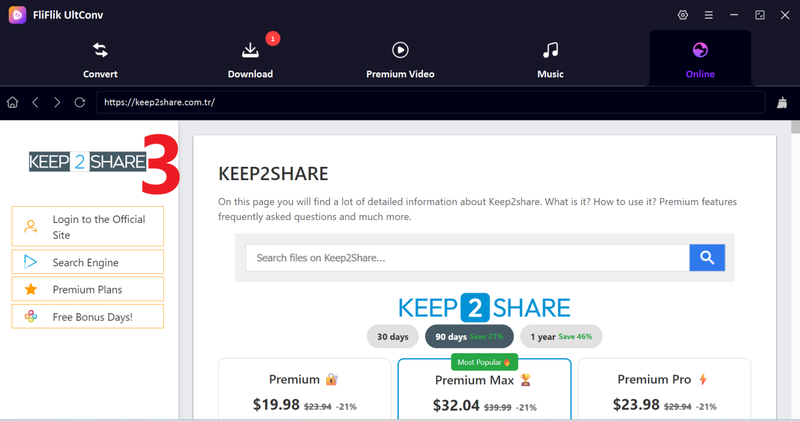
The Keep2Share interface will load inside UltConv, showing your file and its details.
-
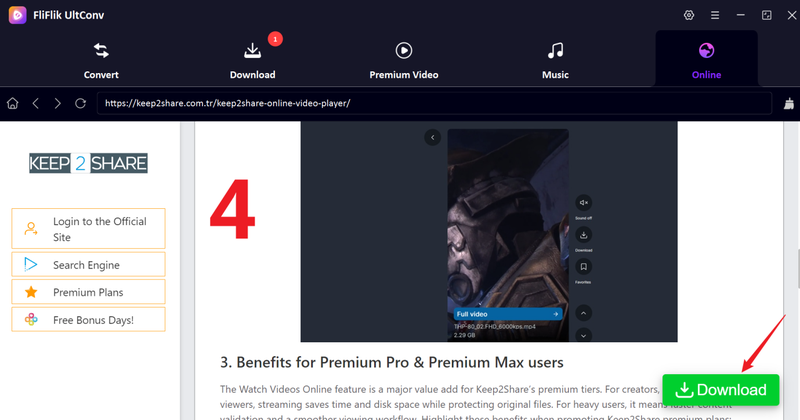
Locate the file or video you want to download. When you’re on the file page, click the Download button.
-
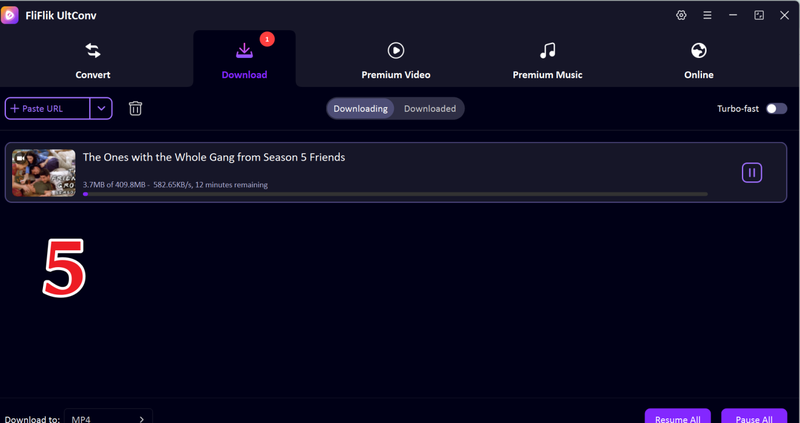
The download will start immediately. Once it finishes, the file will be saved directly to your computer, ready to access anytime without waiting for slow speeds or hitting limits.


Part 3. 2 Ways to Download from Keep2Share Free
If you don’t want to pay for a premium account, there are a few free tools that let you download from Keep2Share. Two popular options are YT1Save and K2S Downloader.
1. YT1Save

YT1Save is an easy-to-use online downloader that supports Keep2Share links. It doesn’t require registration, and you can use it directly in your browser. It’s perfect for users who just want a simple way to download files quickly.
- Simple and user-friendly interface
- No registration or login required
- Works on most web browsers
- Download speed is limited
- Large files may occasionally fail
- Some ads may appear on the site
▼ Steps to Download with YT1Save:
- Step 1: Go to YT1Save in your browser.
- Step 2: Copy the Keep2Share file link and paste it into the input box on YT1Save.
- Step 3: Click the Download button to start processing the file.
- Step 4: Once the download is ready, save the file to your device and watch it offline anytime.
2. K2S Downloader

K2S Downloader is another free tool specifically designed for Keep2Share. It’s slightly more advanced than YT1Save, offering better handling for multiple or large files. It’s ideal if you frequently download content but don’t want to upgrade to a premium plan.
- Handles larger files more reliably than some free tools
- Supports multiple downloads at once
- No need for a premium Keep2Share subscription
- Ads may appear while generating download links
- Download speeds are slower than premium
- Occasional link errors with very large files
▼ Steps to Download with K2S Downloader:
- Step 1: Open the K2S Downloader website in your browser.
- Step 2: Copy the Keep2Share file link and paste it into the provided field.
- Step 3: Click Start to generate a download link.
- Step 4: Once the link is ready, click Download to save the file to your device.
- Step 5: Check your device to ensure the download is completed successfully.
Final Words
Downloading videos from Keep2Share can be tricky if you rely on free accounts, with slow speeds and daily limits slowing you down. That’s why using reliable tools is key to downloading from Keep2Share efficiently and without frustration. Free online options like YT1Save or K2S Downloader work for occasional downloads, but for larger files or high-speed batch downloads, a professional solution makes all the difference. FliFlik UltConv Video Downloader is designed for this, letting you grab videos and files from Keep2Share and thousands of other platforms quickly, in HD, and even convert audio or remove DRM. Whether you want batch downloads, live streams, or offline access, UltConv ensures you never wait or lose quality. Take control of your downloads today, try FliFlik UltConv Video Downloader and experience the fastest, easiest way to get your Keep2Share files instantly.
 Secure Download
Secure Download
Secure Download
Hey there! I am Maxwell Clark. I'm always looking for new tech tools that make a difference, from making visuals and audio better to making workflows better. I'm going to share tips and tricks for using AI tools for videos, audio, and images. I'm excited to help you navigate the digital world more efficiently and creatively!

