

 7 minutes read


Renting movies on Amazon feels convenient, but many people ask a simple question first: Can I download rented movies on Prime? The short answer isn’t always straightforward. Amazon Prime Video lets users download some content for offline viewing, but rented movies come with stricter rules. Downloads are usually temporary and tied to your rental viewing period, not permanent storage on your device.
This means you can watch offline, but only within the allowed rental time window. Once the rental expires, the downloaded file stops working. In this article, we’ll explain how Amazon rental downloads work, what limits exist, and whether you can keep rented movies for watching anytime. Keep reading.

Part 1. How to Rent and Download Amazon Movie [Official Way]
Amazon’s rental service lets you watch movies by paying a one-time fee for a limited viewing period. This is different from regular Prime subscription streaming. When people ask, “Can I download a rented movie from Amazon?” the answer is yes, but with restrictions. Some rented titles allow downloads for offline viewing, while others only allow streaming. Rental movies are usually available for a fixed time instead of permanent ownership.
Amazon Prime Video rental service lets users watch movies that are not included in the regular Prime subscription library. You pay an extra rental fee to access these movies for a limited viewing period.
How to Rent a Movie on Amazon Prime?
- Step 1: Open Prime Video in your browser and sign in to your Amazon account. You can use both computer and mobile browsers.
- Step 2: Search for the movie you want to rent using the search bar or browse the movie library.
-
Step 3:
Click
More Purchase Options, then select
Rent. Follow the payment instructions to complete the rental.
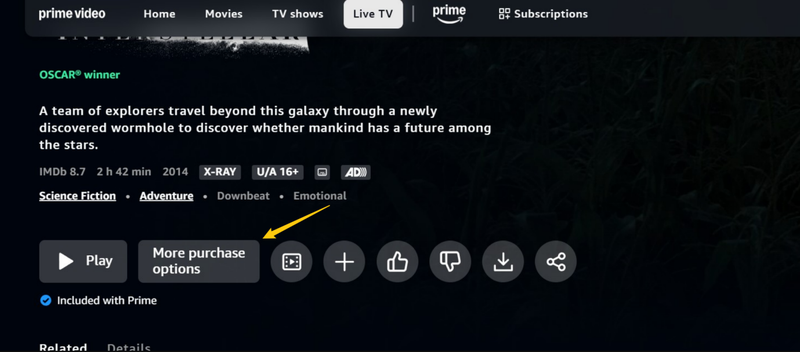

After payment, the movie will appear in My Stuff → Rental section, where you can start watching anytime within the rental period.
How to Download Rented Movies on Amazon?
Not all rented movies support downloads. Download availability depends on device compatibility and content rights. Supported devices usually include Fire tablets, Android and iOS devices, and computers running newer Windows or macOS systems.
- Step 1: Open the Prime Video app or website and sign in to your account.
-
Step 2:
Go to
My Stuff
from the top menu, click
Rental
to view your rented movies.
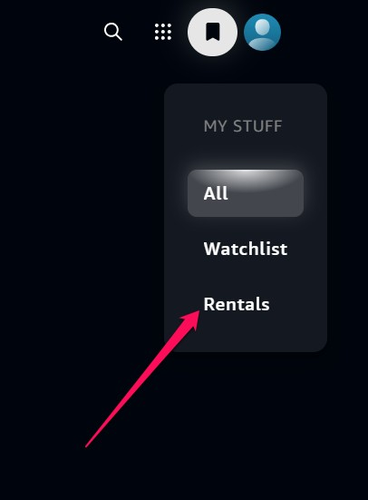
- Step 3: Select the movie and open its details page. Then click Download if the option is available. If the download button is missing, that title only supports streaming.

Part 2. Features and Limits of Renting Movies from Amazon Prime
Renting movies on Prime Video is convenient, but it is not the same as buying a movie. When people ask can you download a rented movie on Prime, the answer is yes in some cases, but downloads are limited to supported devices and only work during the rental viewing period. Rental mode is designed mainly for temporary access rather than long-term storage.
- It’s more affordable than buying them permanently
- Pay only once for a fixed viewing period
- Some titles allow offline downloads on supported devices
- Easy access through the Prime Video app or browser
- Suitable for short-term movie watching
 Limits of Renting Movies on Prime Video
- Limited Viewing Time : Rented movies are usually available for 30 days after rental.
- Time Limit to Start Watching : After you start watching, you usually have 48 hours to finish the movie.
- No Ownership : You cannot keep the movie after the rental period expires.
- Download Restrictions : Not all rented movies can be downloaded, and downloads only work inside the Prime Video app.
- Device Restrictions : Downloads are only supported on compatible devices such as smartphones, tablets, or certain computers.
Part 3. Can You Download Rented Amazon Movies Forever? [100% Working Method]
No, you cannot download rented Amazon movies forever officially. When people ask can you download movies you rent from Amazon forever, the official answer is no for permanent storage. Downloads from Amazon.com, Inc. Prime Video are protected by DRM and only work inside the app during the rental viewing window.
However, some third-party tools claim to help users save movies for long-term viewing. One of the best options is FliFlik UltConv Amazon Prime Downloader. This tool is designed to help users download Amazon Prime movies, including rented, purchased, or free streaming content, and save them as standard MP4 or MKV files for permanent offline viewing. It supports high-quality downloads up to 4K, 2K, or 1080p, so you don’t have to sacrifice clarity for convenience. The tool also lets you download multiple episodes or movies at once, watch content inside its built-in browser, and save videos with subtitles and audio tracks. It even supports other streaming services like Netflix, HBO, Hulu, and Disney+. For people who want to keep videos offline without worrying about rental or streaming limits, this is a practical option.

- Download Amazon Prime videos in MP4 or MKV format
- Support up to 4K / 2K / 1080P video quality
- Bulk download Prime series at high speed
- Built-in browser for streaming and downloading
- Remove DRM protection for permanent video archive
- Support 10,000+ streaming platforms
▼ How to Download Rented Movies from Amazon Prime Using UltConv?
-
Visit the official UltConv website, download it, and install the software on your computer.
FREE DOWNLOAD![secure download]() Secure Download
FREE DOWNLOAD
Secure Download
FREE DOWNLOAD![secure download]() Secure Download
Secure Download
-
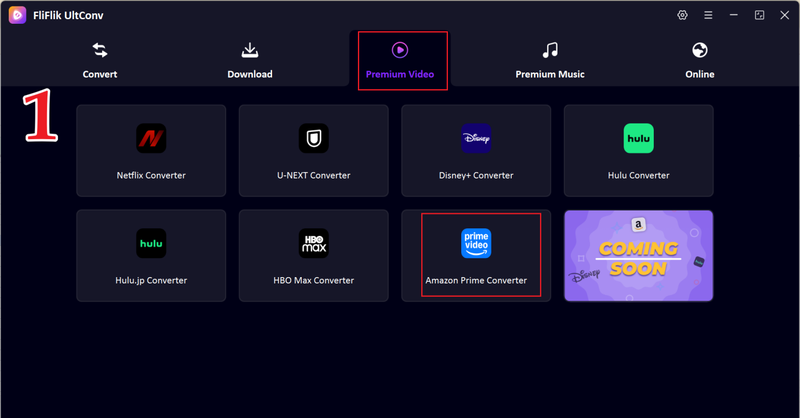
Open UltConv and go to the Premium Video section, then choose Amazon Prime Converter.
-
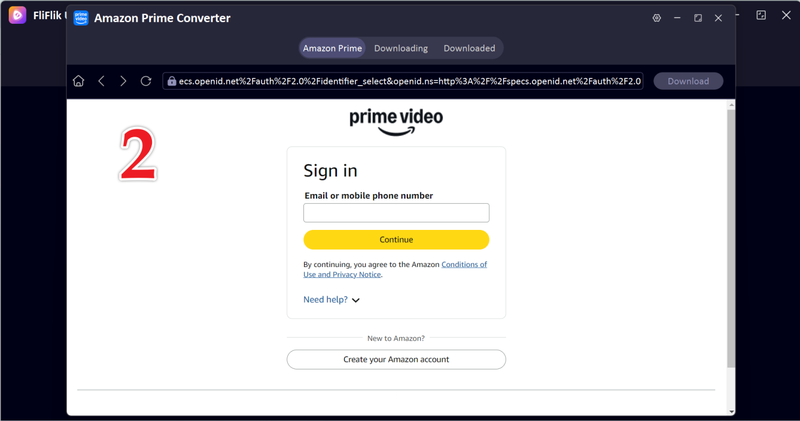
Sign in to your Amazon Prime Video account inside the UltConv interface using your login credentials.
-
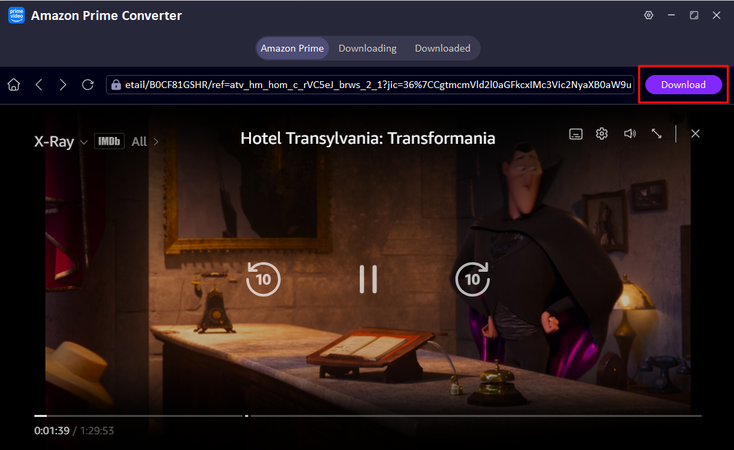
Browse the built-in Prime Video library and play the rented/purchased movie you want to download, then click the green Download button.
-
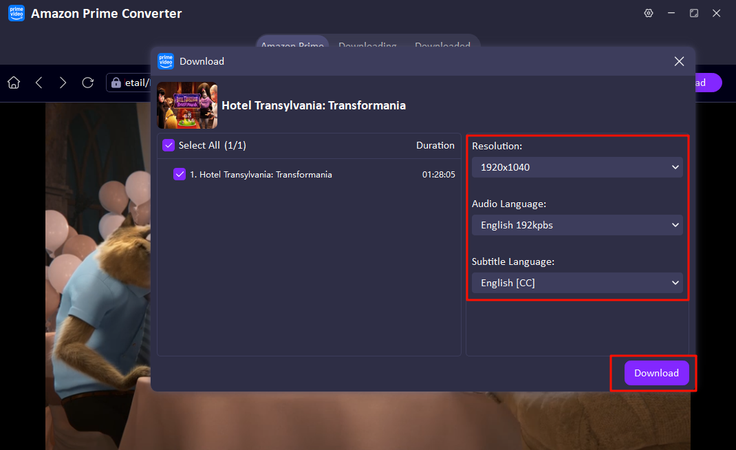
Select resolution, audio, and subtitle settings, then start downloading.
-
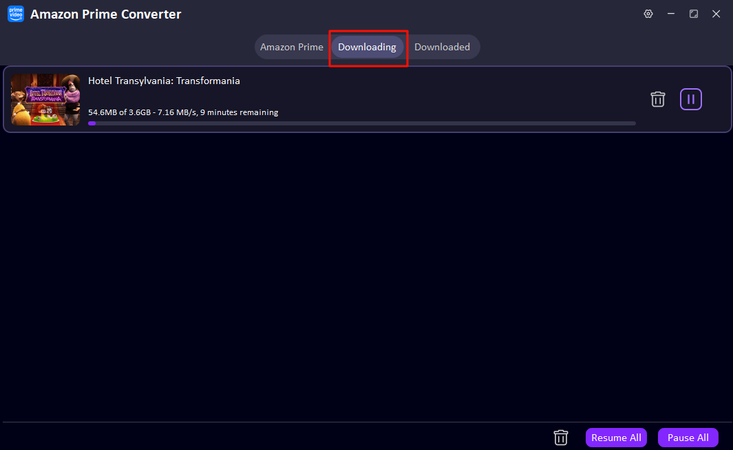
Wait for the download to finish. You can find the file in the Downloaded section for offline playback.


Final Words
So, can you download rented movies on Amazon? Officially, no. Rental movies on Amazon.com, Inc.’s Prime Video are protected by DRM and only allow temporary viewing within rental limits. If you want to keep movies longer or save them as normal video files, third-party tools like FliFlik UltConv Prime Downloader can help save movies as MP4 or MKV files with good quality and subtitle support. It’s a practical choice if you want more control over your downloaded videos instead of relying on temporary rental access. If long-term storage matters to you, UltConv Amazon Prime Downloader is worth trying.
 Secure Download
Secure Download
Secure Download
FAQs
Q1. When you rent a movie from Amazon, how long can you keep it?
You can keep a rented movie for about 30 days before starting playback. Once you press play, you must finish watching within 48 hours. After that, the rental expires, and you need to rent or buy the movie again to watch it.
Q2. Why am I not able to download movies on Amazon Prime?
Not all Prime movies support downloads due to licensing restrictions. Some content is only available for streaming. Also, certain devices or outdated app versions may block downloads. Make sure you are using the official Prime Video app and supported devices.
Q3. Can I download movies from Amazon Prime to my computer?
Yes, but only through the official Prime Video app download feature. For more freedom, you can try FliFlik UltConv Amazon Prime Downloader, which allows permanent MP4/MKV downloads for offline storage.
Hey there! I am Maxwell Clark. I'm always looking for new tech tools that make a difference, from making visuals and audio better to making workflows better. I'm going to share tips and tricks for using AI tools for videos, audio, and images. I'm excited to help you navigate the digital world more efficiently and creatively!

