

 8 minutes read


Streaming platforms love using MPD (MPEG-DASH) files for crisp, high-quality video. The catch? You can’t just click and save them like you would a regular video. If you want to keep your favorite shows or movies offline, you really need a solid MPD downloader.
So, here’s the deal: we’ve pulled together the six best DRM MPD downloaders for 2026. Each one has its own quirks, but all of them turn tricky MPD streams into good old MP4 files you can watch whenever, wherever. Whether you’re after lightning-fast downloads, top-notch quality, or easy batch processing, this list has you covered.

Part 1. Why Do We Need a DRM MPD Downloader?
DRM MPD files are video streams protected with Digital Rights Management (DRM) and delivered using the MPEG-DASH (MPD) format. Instead of a single video file, the content is split into small segments that are streamed dynamically. This setup ensures high-quality playback while preventing unauthorized copying or sharing.
We need a DRM MPD downloader because these files cannot be saved or played like normal videos. Without a downloader, you can only stream the DRM MPD content online through the platform, which limits offline access. A dedicated downloader lets you convert these protected streams into standard MP4 files, keeping the original quality intact. It also allows batch downloads, offline playback on any device, and full control over your media library, something streaming platforms don’t offer.
Part 2. Key Considerations When Picking the Best MPD Downloader
Choosing the right MPD downloader is more than just picking a tool that works. There are several key factors that determine how reliable, efficient, and useful it will be.
- DRM Removal: Most MPD files are protected with DRM, which prevents copying and offline access. A good downloader should be able to bypass or remove these restrictions legally for content you can access. Without this feature, you can stream but never truly save the video.
- Supported Formats: Look for downloaders that let you convert MPD files into standard formats like MP4, MKV, or AVI. This ensures your saved videos will play on phones, tablets, PCs, smart TVs, or media players.
- Video Quality: Maintaining the original quality is crucial. The best downloaders allow you to save videos in the highest available resolution, including Full HD and 4K. Avoid tools that compress files too much, as this reduces clarity and can ruin the viewing experience.
- Success Rate: A downloader isn’t useful if it fails often. The best downloader grabs MPD files with a 100% success rate. Reliable tools handle long videos, playlists, and segmented streams without errors or missing parts.
- Download Speed: Speed matters, especially for large files or multiple videos. Tools with accelerated download options or batch download capabilities save time and reduce frustration.
Part 3. Top 6 DRM MPD Downloaders
Here’s a quick look at the top 6 DRM MPD downloaders for 2026. Each tool offers different strengths; some focus on speed, others on quality or batch downloads. The following list highlights the features, ease of use, and reliability to help you pick the right downloader for your needs.
1. FliFlik UltConv MPD Downloader
FliFlik UltConv MPD Downloader is a professional desktop DRM MPD video downloader that makes saving DRM-protected MPD streams simple and reliable. It works with thousands of streaming platforms, letting you capture videos from over 10,000 websites, such as YouTube, Netflix, Disney+, etc. The downloader converts content into more than 100 formats, including MP4, MKV, AVI, MOV, and audio-only formats like MP3, so your files are compatible with any device. Whether it’s a single video, a full playlist, or an entire series, FliFlik UltConv MPD Downloader handles it quickly while keeping the original video and audio quality intact.
The software is designed for high-quality downloads, preserving HD and 4K resolutions when available. It also supports batch downloads and playlist saving, making it ideal for users who want multiple videos without running the process repeatedly. With an intuitive interface and support for all major streaming websites, FliFlik UltConv MPD Downloader is a complete solution for anyone looking to convert DRM-protected content for offline use.

- Convert DRM-protected content from 10,000+ websites
- Download videos in 100+ formats
- Preserve original video and audio quality, up to 4K
- One-click download for playlists and series
- Batch download multiple videos at once
- Remove DRM restrictions for offline playback
- Supports multiple streaming platforms for versatile downloads
▼ Steps to Download DRM MPD Video With FliFlik UltConv Video Downloader
FliFlik UltConv MPD Downloader is a fast and reliable tool for Mac and Windows users. It handles MPD streams from YouTube and other streaming platforms, letting you save videos in high quality. After downloading and installing the program on your computer, follow these steps to convert any YouTube video to MP4.
 Secure Download
Secure Download
Secure Download
-
Open UltConv MPD Downloader and go to the Download tab. Click the “Download to” button to set up your output folder.

-
Choose your preferred format, such as MP4, from the list of supported formats.

-
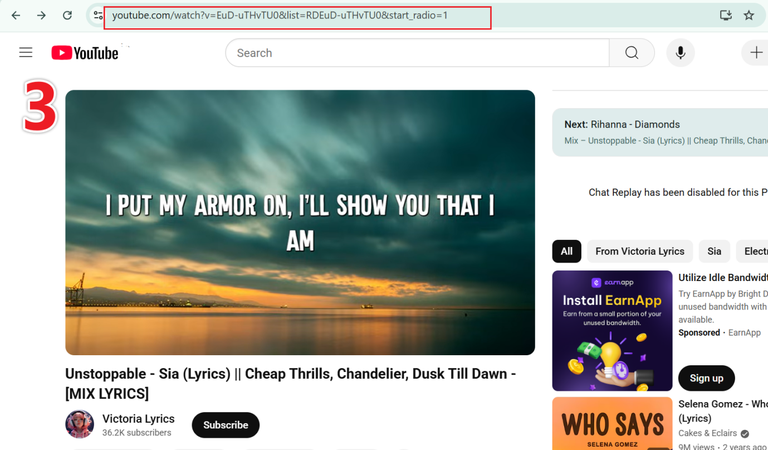
Open YouTube in your browser and copy the URL of the video you want to download.
-
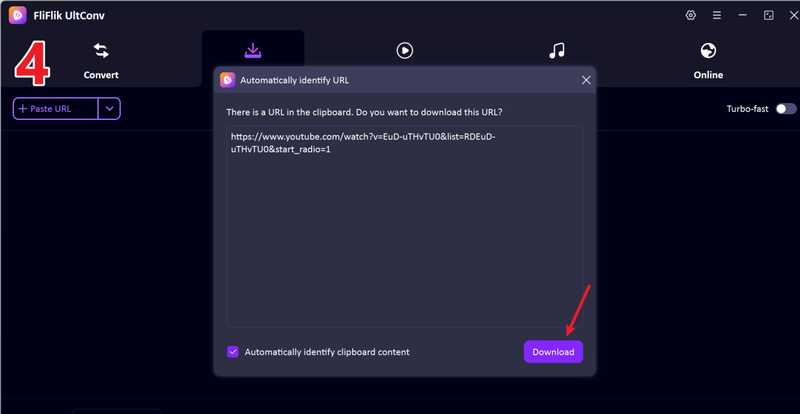
Return to UltConv. If the program detects the link automatically, click Download to start saving the video.
-
If the link isn’t detected automatically, paste it manually into the search box and press Download.
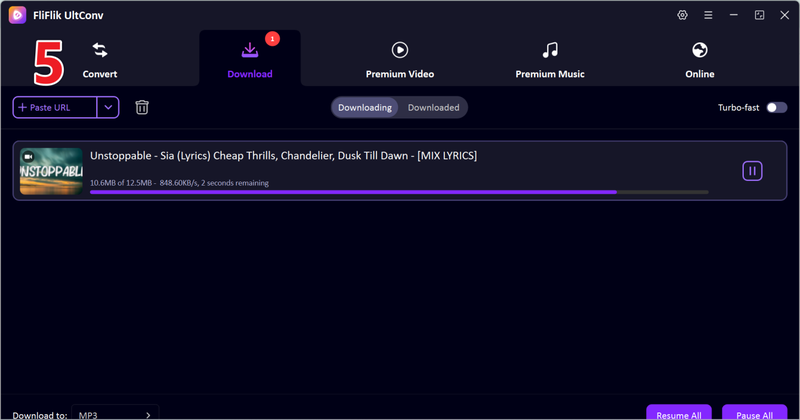


Once the download finishes, your video is saved in your chosen format. You can now watch it offline anytime, without buffering or streaming restrictions.
2. iDownerGo

iDownerGo MPD Downloader is an all-in-one solution for downloading videos, music, and playlists from more than 10,000 streaming websites. It supports live streams, private videos, and high-resolution content up to 4K. The software can save videos in multiple formats, including MP4, MKV, AVI, and audio-only formats like MP3. It is ideal for users who need flexible output options and want to preserve the original video and audio quality.
- Supports 10,000+ websites and multiple formats
- Save HD, 4K, and 8K videos without quality loss
- Extract audio to MP3 in one click
- Download private and live-stream videos
- Advanced features require purchase
- May fails to download sometimes
3. Cisdem

Cisdem MPD Downloader (formerly Cisdem VideoPaw) is a complete video solution for Windows and Mac. It handles MPD streams, DVDs, Blu-rays, and general media files. The downloader supports more than 1000 streaming websites and can process high-resolution videos, including 4K and 8K, while preserving original quality. In addition to downloads, it offers tools for batch conversion, editing, compressing, and AI-enhancing videos. Cisdem also allows recording, merging, and extracting audio tracks, making it versatile for both media archiving and offline viewing.
- Download from 1000+ websites
- Batch convert between 100+ formats
- Includes video editing and compression tools
- The interface may be overwhelming for beginners
- Some features are locked in the free version
4. StreamFab

StreamFab MPD Downloader specializes in saving DRM-protected MPD streams from major streaming platforms. It can capture on-demand movies, TV shows, and videos in 1080p quality as MP4 or MKV. The tool is useful for content that may expire due to licensing agreements, ensuring users can keep a local copy before it disappears. StreamFab offers a simple interface and quick download process, focusing on stability and reliability rather than additional media management features.
- Download DRM MPD videos from multiple streaming sites
- Save videos in 1080p MP4 or MKV
- Simple and reliable interface
- Suitable for time-limited or expiring content
- Limited to 1080p downloads
- Its MPD downloader only supports downloads from 10 sites
- The subscription fee is more costly than other similar tools
5. CleverGet MPD Downloader

CleverGet MPD Downloader allows users to save DRM-protected MPD videos from DASH streaming websites quickly and efficiently. It supports batch downloads, so entire TV series or playlists can be downloaded in one go. Videos can be saved in MP4 or MKV formats up to 1080p resolution, maintaining original quality. CleverGet also provides an internal browser for seamless playback and download of on-demand content. This makes it a convenient choice for users looking for straightforward MPD video downloads without the need for additional editing tools.
- Batch download TV series or playlists
- Save in MP4 or MKV formats
- Internal browser for easy playback and download
- Maximum resolution limited to 1080p
- Only supports 30+ websites downloads
- No monthly subscription plans available
6. KeepStreams MPD Downloader

KeepStreams MPD Downloader is designed to download MPD videos from over 900 websites, including popular streaming services. The software allows high-quality downloads in MP4 or MKV formats, supports batch downloads, and provides selectable audio tracks. KeepStreams focuses on speed and convenience, letting users save videos for offline viewing without ads. Its clean interface is easy to navigate, making it a practical option for anyone who wants quick and reliable MPD downloads without complicated settings.
- Supports high-quality MP4 and MKV downloads
- Batch download and selectable audio tracks
- Ad-free offline playback
- Windows-focused, limited Mac features
- The monthly fee is higher than similar tools
- Not an all-in-one downloader, limited to downloading from some sites
Part 4. Quick Comparison of the 6 Best DRM MPD Downloader
Here’s a side‑by‑side look at the top DRM MPD downloaders based on key factors that matter most: supported platforms, batch download, speed, video quality, DRM removal, and success rate.
| Tool | Platform | Batch Download | Download Speed | Video Quality | DRM Removal | Success Rate | Subscription Fee |
|---|---|---|---|---|---|---|---|
| FliFlik UltConv MPD Downloader | Windows, Mac | ✅ Yes | Fast (10X+) | Up to 8K+ | ✅ Yes | Very High |
|
| iDownerGo MPD Downloader | Windows, Mac | ✅ Yes | Fast | Up to 8K | ✅ Yes | High |
|
| Cisdem MPD Downloader | Windows, Mac | ✅ Yes | Medium | Up to 8K | ✅ Yes | High |
|
| StreamFab MPD Downloader | Windows, Mac | ✅ Yes | Medium | Up to 4K | ✅ Yes | Medium–High |
|
| CleverGet MPD Downloader | Windows, Mac | ✅ Yes | Medium | Up to 4K | ✅ Yes | Medium–High |
|
| KeepStreams MPD Downloader | Windows, Mac | ✅ Yes | Fast | Up to 4K | ✅ Yes | High |
|
Based on the comparison above, we can pick the best DRM MPD downloader easily and clearly: FliFlik UltConv MPD Downloader checks every box. Its DRM removal works reliably across a wide range of protected MPD streams, making it one of the most consistent solutions available. The success rate is strong across major sites, and its ability to save content in up to 8K quality gives it a clear edge over tools limited to 1080p or without robust DRM support. It is even the most affordable tool among these downloaders! If your priority is a stable, powerful, and budget-friendly DRM MPD downloader, FliFlik UltConv is the best choice in 2026.
Final Words
Finding a reliable and the best MPD downloader can be challenging, especially when dealing with DRM-protected content. Not all tools deliver consistent quality, fast downloads, or full DRM removal. Some struggle with batch downloads or high-resolution videos, making the process slow and frustrating.
After comparing the top options, FliFlik UltConv MPD Downloader stands out as the most complete solution. It supports both Windows and Mac, handles batch downloads efficiently, preserves video quality up to 8K, and reliably removes DRM from protected streams. Whether you need single videos, full playlists, or high-resolution movies, UltConv makes it simple and fast. Don’t risk losing access to your favorite content. Get FliFlik UltConv MPD Downloader today and start saving videos offline with ease.
Secure Download
Secure Download
Hey there! I am Maxwell Clark. I'm always looking for new tech tools that make a difference, from making visuals and audio better to making workflows better. I'm going to share tips and tricks for using AI tools for videos, audio, and images. I'm excited to help you navigate the digital world more efficiently and creatively!

