

 8 minutes read


Many people enjoy watching shows and movies on the Disney+ Hotstar streaming service. But sometimes an internet connection is not reliable, or viewers want to watch content offline on a computer. In these situations, a video downloader can be useful. Several tools are available for both PC and Mac that allow videos from Disney+ Hotstar to be saved for offline viewing. These tools are often used to store favorite shows, documentaries, and seasonal titles, such as Christmas movies on Disney Plus.
This article will review four Hotstar video downloaders. Their key features, ease of use, and basic differences are explained to help you determine which option best fits your needs in 2026.

Part 1. Why You Need A Great Hotstar Downloader [Official Limits]
Disney+ Hotstar is a popular streaming platform. Films, series, sports, and regional shows are offered in one place. Many people watch it on phones, tablets, and smart TVs. An offline download option is provided inside the app. But some limits are set by the platform. Because of these limitations, many users seek an alternative way to store videos on a computer. Here are a few common restrictions.
- Mobile-Only Downloads: Offline downloads are allowed inside the mobile app. The feature is not offered on PC or Mac. Videos cannot be saved directly to a computer.
- 48-Hour Viewing Limit: A time limit is placed on many downloads. After playback starts, the video often expires within 48 hours. When the time ends, the file must be downloaded again.
- DRM Protection: Disney+ Hotstar uses robust digital protection. This system controls how content is stored and played. Downloaded files are locked inside the app.
- Encrypted Video Format: Downloaded videos are saved in a protected format. Common media players cannot open the file. It cannot be moved to another device.
Because of these limits, a desktop downloader is often used. It allows videos to be saved on a PC or Mac in a standard format. Control of the file is then given to the user. We will discuss this next in detail.
Part 2. 4 Best Hotstar Video Downloader for PC & Mac
Several desktop tools have been developed to save videos from Disney+ Hotstar on a computer. Four options that are often discussed for PC and Mac are listed below.
1. FliFlik UltConv Hotstar Downloader
FliFlik UltConv Hotstar Downloader is our first recommendation for Hotstar video download on PC and Mac. The tool is designed to save videos from many streaming platforms and convert them into common formats for offline viewing. It is often used by people who want to keep streaming videos on their computer instead of watching them only through an app.
UltConv Hotstar Downloader supports downloads from more than 10,000+ websites, including Disney+, Netflix, HBO, and Hulu. Videos can be saved in formats such as MP4, while audio can be converted to formats like MP3 without quality loss. High-resolution video downloads are supported, including 720p, 1080p, 2K, and 4K. A built-in browser is also provided, so movie downloads from Hotstar can be done directly inside the program without switching to another browser. Batch download is included as well, which allows several videos, playlists, or channels to be saved in one process.

- Videos can be downloaded from 10,000+ websites, Netflix, Disney+, etc.
- Files can be saved as MP4, MP3, and 100+ formats
- Batch download is supported for playlists and channels
- Video quality up to 4K and audio up to 320 kbps is supported
- A built-in browser is included for direct downloading
- Multiple videos can be downloaded at the same time
▼ Steps to Download HotStar Videos with UltConv Hotstar Downloader
-
Install FliFlik UltConv Video Converter on your computer and complete the setup. Once the installation is finished, open the program to begin.
FREE DOWNLOAD![secure download]() Secure Download
FREE DOWNLOAD
Secure Download
FREE DOWNLOAD![secure download]() Secure Download
Secure Download
-
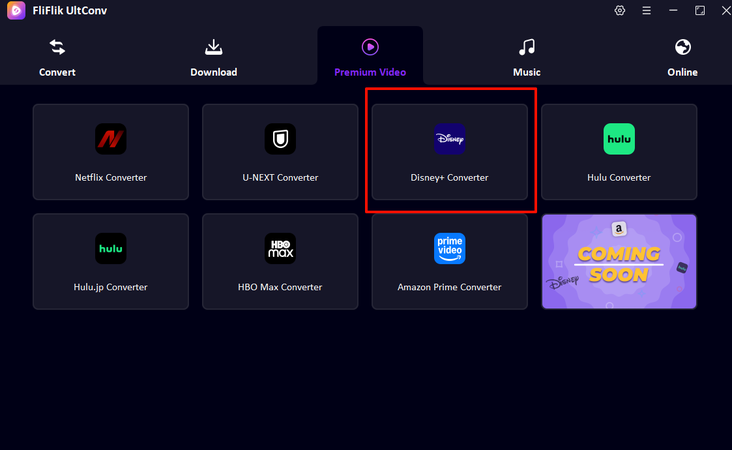
Inside the program, open the Premium Video section and choose the Disney+ Converter option for the supported streaming platform.
-
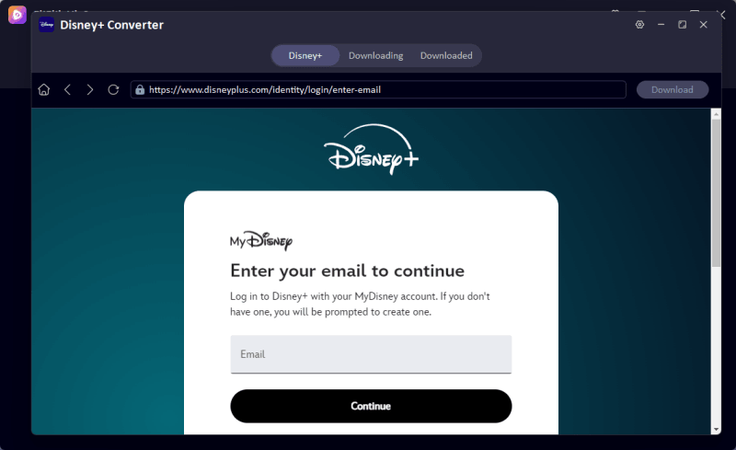
The streaming page will appear inside the built in browser. Sign in to your Disney+ Hotstar account so the content library can be accessed.
-
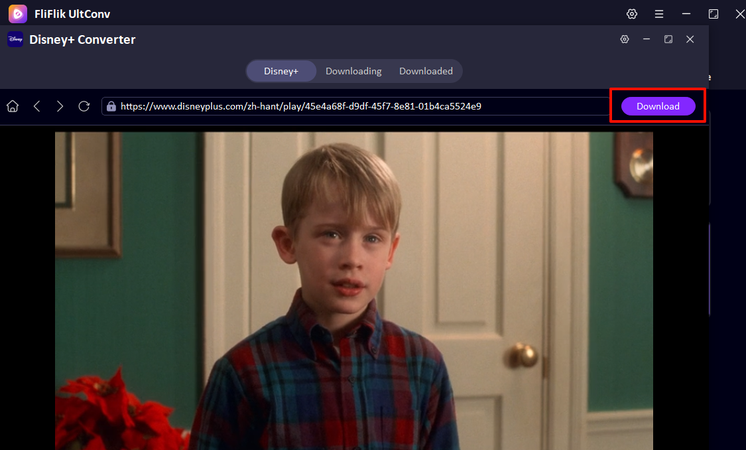
Search for the film or series you want to save. When the title page opens, select the Download option.
-
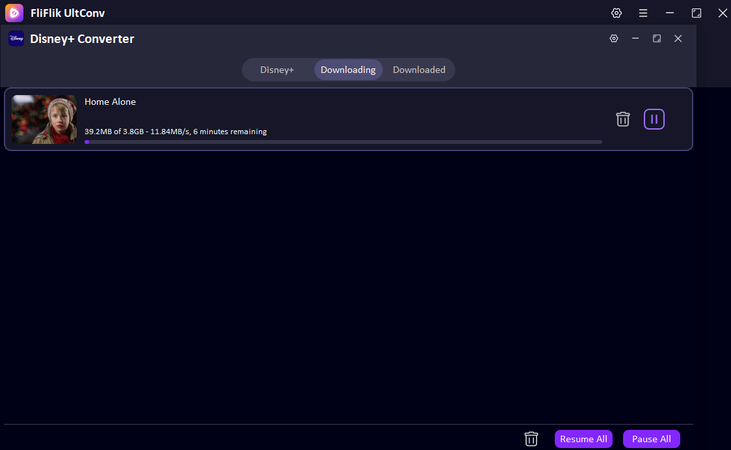
The video download will start, and the file will be saved on your computer. After the process ends, open the Download tab to watch the video offline.


2. DispCam Hotstar Downloader

DispCam is another desktop program used to save streaming videos for offline viewing. The tool is designed for platforms under Disney+ services and is often used as a download Hotstar video downloader on Windows and Mac. It allows users to store films and series locally so they can be watched without an internet connection. Videos can be saved in common formats such as MP4 or MKV, which makes playback easier on different devices. The program also supports HD downloads and batch processing, so several episodes or movies can be saved in one session.
- Supports MP4 and MKV output formats
- HD video downloads are available
- Batch downloads are supported
- Subtitles and audio tracks can be saved
- The free version has download limits
- The interface may feel basic for new users
- Updates are not frequent
- The subscription fee is expensive
3. TTOK Hotstar Downloader

TTOK Hotstar Downloader is a browser-based tool that works as a Hotstar online video downloader. It does not require software installation because the process is handled directly through the website. Users only need to paste a video link to start the download process. The tool is usually chosen for quick downloads when users want a simple method without installing a desktop program. Basic video quality options are provided, and the file can be saved for offline playback.
- No installation is required
- Simple link-based download process
- Works on most browsers
- Quick access for single downloads
- Limited format options
- Download quality may vary
- Ads may appear on the website
- May fail to detect or download sometimes
4. FetchFile

FetchFile is an online downloader that allows users to save streaming videos by pasting the video link into the website. The service works on many platforms and can also be used to download videos from Disney+ Hotstar. Because it is web-based, no installation is required. The tool offers several video resolution options, which allow users to choose the file size and quality before saving the video.
- Works directly in a web browser
- No software installation required
- Multiple resolution options are offered
- Simple link paste, and download process
- Download speed depends on the server
- Some videos may not be supported
- Website ads may interrupt the process
- The download success rate is low
Part 3. Comparison: Choose the Best Hostar Downloader Based on Your Needs
Each Hotstar video downloader app or online tool works a little differently. Some tools run on a computer and offer more control over format and quality. Others work online and are used for quick downloads without installing software.
The table below compares the main options discussed in this guide. Key factors such as tool type, supported sites, video quality, DRM handling, pricing, and success rate are included so you can quickly see which downloader may suit your needs.
| Tool | Type | Support Sites | Max Quality | DRM Removal | Price | Success Rate |
|---|---|---|---|---|---|---|
| FliFlik UltConv | Desktop Software (PC & Mac) | 10,000+ sites, including YouTube, Vimeo, Facebook | Up to 4K | Yes | Free trial + paid plan | High |
| DispCam | Desktop Software (PC & Mac) | Disney+ and Disney+ Hotstar | Up to 1080p | Yes | Paid with trial | Medium |
| TTOK Hotstar Downloader | Online Tool | Limited sites | Up to 720p–1080p | No | Free | Low |
| FetchFile | Online Tool | Multiple streaming and video sites | Up to 720p–1080p | No | Free | Low |
Final Words
Choosing the right Hotstar video downloader depends on how you plan to watch your content. Online tools can help with quick downloads, but they often come with limits on quality, format, and reliability. Desktop software usually offers more control, better video quality, and a higher success rate for saving streaming content.
Among the options discussed, FliFlik UltConv HotStar Downloader stands out as a practical choice. It supports downloads from thousands of websites, allows videos to be saved in common formats such as MP4, and supports high resolutions up to 4K. Batch downloads and the built-in browser also make the process easier. If you want a simple and reliable way to save Hotstar videos on your computer, it may be worth trying FliFlik UltConv HotStar Downloader and exploring how it fits your viewing needs.
 Secure Download
Secure Download
Secure Download
Hey there! I am Maxwell Clark. I'm always looking for new tech tools that make a difference, from making visuals and audio better to making workflows better. I'm going to share tips and tricks for using AI tools for videos, audio, and images. I'm excited to help you navigate the digital world more efficiently and creatively!

