

 6 minutes read


Watching movies and shows online is easy, but sometimes you may want to save them to watch later without the internet. That’s where many people start asking the same question: how to download on Yflix. If you enjoy streaming on Yflix, you might notice that the platform doesn’t always provide a clear download button. This can make it confusing when you want to keep a video for offline viewing.
Don’t worry, though. There are a few simple ways people use to download videos from streaming sites like Yflix. In this article, we’ll walk through the best and easiest methods step by step. By the end, you’ll clearly understand how to download on Yflix and which option works best for saving your favorite movies or shows to watch anytime.

Part 1. Can I Download Movies on Yflix Directly
The short answer is no, you cannot download movies directly from Yflix. The website mainly works as an online streaming platform, which means you can watch videos in your browser, but there is no built‑in download button for saving them to your device. Yflix is a site where people go to watch Yflix free movies and TV shows online without paying for a subscription. Many users like it because the library includes a wide range of movies, from popular releases to older titles. You simply open the site, search for a movie, and start streaming it.
However, because Yflix focuses on streaming, it does not officially support downloading content for offline viewing. That means if you want to watch a movie later without internet access, you will need to use other methods or tools to save the video. In the next sections, we’ll look at some practical ways people use to download videos from Yflix so you can watch your favorite movies even when you’re offline.
Part 2. Easiest Way to Download Movies within Yflix [Low Download Speed]
One of the simplest ways people try to save videos from Yflix is by using a browser extension like CocoCut Video Downloader. This tool works inside your browser and detects video streams playing on many websites. When a movie starts playing, the extension can often capture the video file and let you download it. This method is popular because it does not require installing heavy software. You just add the extension to your browser, open the movie you want, and start the download. Many users use this method when watching Yflix movies and want to keep a copy for offline viewing.
▼ How to Download Movies on Yflix with CocoCut Extension?
-
Step 1:
Install the CocoCut Video Downloader extension from the Chrome Web Store and add it to your browser.
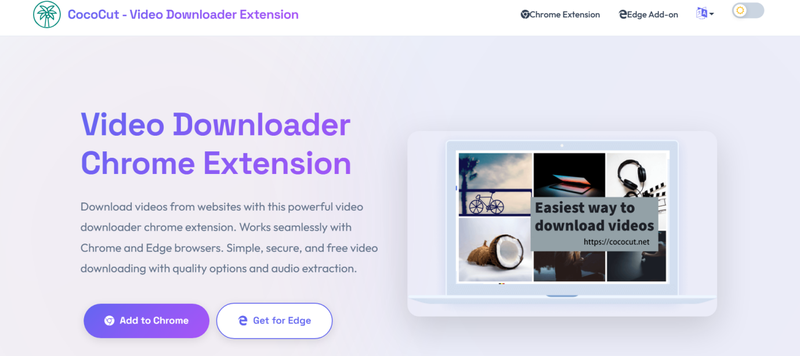
- Step 2: Open the Yflix website and play the movie you want to save.
-
Step 3:
Click the Cococut extension icon in your browser. It will detect the video streams available on the page. And choose the video quality you want and click the
Download
button. The movie will start saving to your computer.
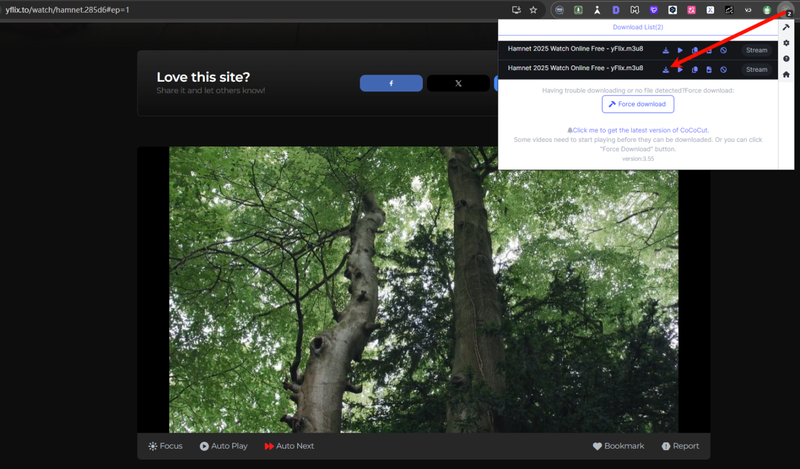
-
Step 4:
Then it will start the download process. The download speed depends on your internet, so its speed may be slow.
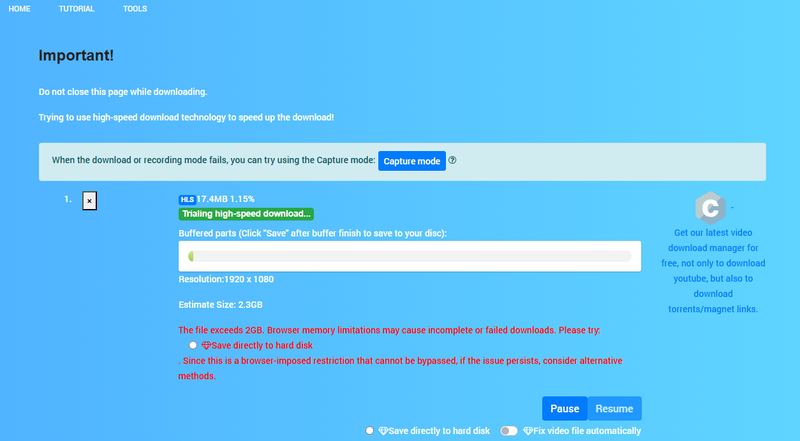


This method is quick and easy, but sometimes streaming sites change their video players. When that happens, browser extensions may stop working. That’s why many users also look for other download methods, which we’ll explore next.
Part 3. Best Way to Download Movies from YFlix [10x Download Speed]
Browser extensions can work sometimes, but they don’t always detect videos correctly. Streaming sites change their players often, and extensions may stop working without warning. Instead of relying on extensions, many users prefer a more reliable tool like FliFlik UltConv Video Downloader. This desktop software is designed to download videos from thousands of websites, making it a practical option when you want a stable way to save movies from streaming platforms.
FliFlik UltConv Video Downloader supports downloads from 10,000+ websites and allows you to save videos in formats like MP4, MP3, FLAC, WAV, and more. You can download movies in HD quality, such as 720p, 1080p, 2K, and even 4K, while music can be saved in 320kbps audio quality. The software also supports batch downloads, so you can grab multiple videos, playlists, or albums at once. With its built-in browser, you can open streaming sites directly inside the program and download videos more easily without switching tabs.

- Download videos from 10,000+ websites, YouTube, Netflix, Amazon Prime Video, etc
- Save movies in 720p, 1080p, 2K, and 4K quality
- Convert videos to MP4, MP3, FLAC, WAV, and 100+ formats
- Batch download videos, playlists, and channels
- Built‑in browser for easier video searching and downloading
- Fast download speed with stable performance
▼ Steps To Download Movies from Yflix With FliFlik UltConv Video Downloader
To download movies from Yflix with FliFlik UltConv Video Downloader, first download and install it, then follow these simple steps.
 Secure Download
Secure Download
Secure Download
-
Download and install UltConv on your computer, then open the program and go to the Download tab, and then click Download to button at the end.

-
Choose your preferred video format such as MP4.
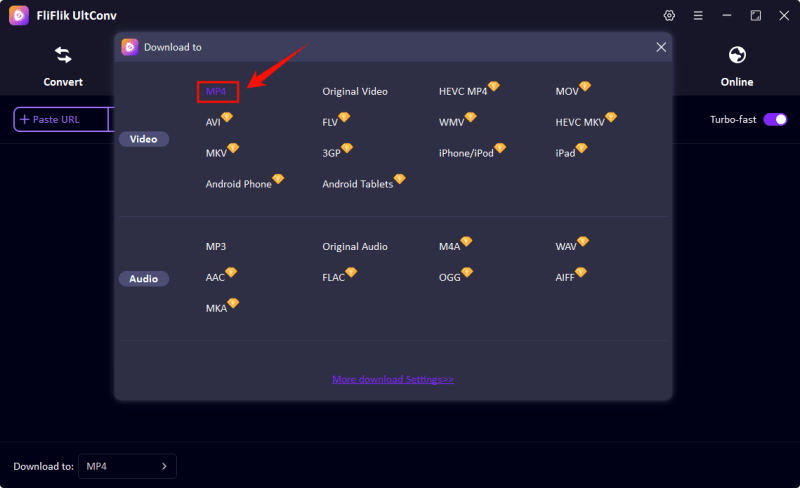
-
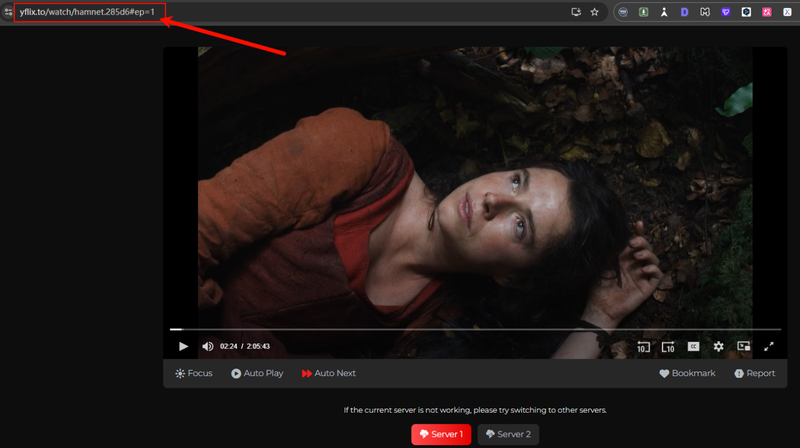
Open the Yflix website, find the movie you want, and copy the movie page URL from the browser address bar.
-
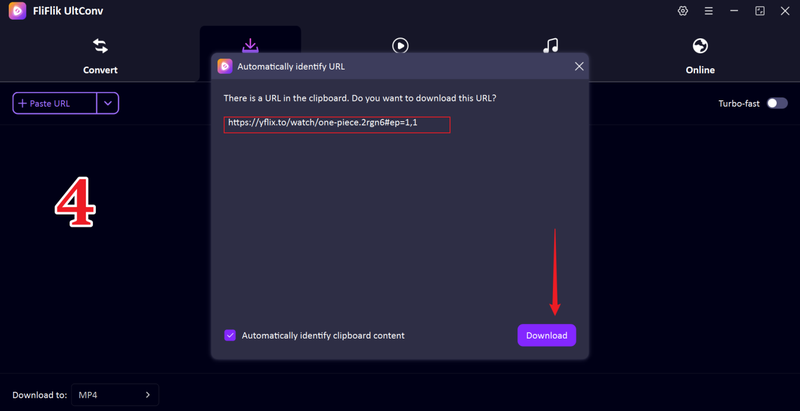
UltConv will automatically detect the link, you just need to click the Download button.
-
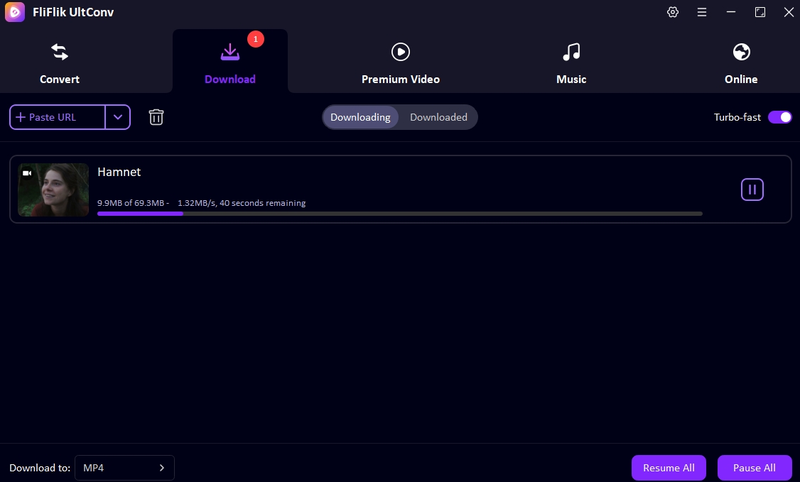
If the link is not detected then you can manually paste the link in the tool and your Yflix movie will start downloading.


Part 4. Quick Comparison between These Two Methods
Before deciding which method to use, it helps to see how both options compare. Browser extensions are simple, but dedicated download software usually provides better quality and stability.
| Tool | CocoCut Extension | FliFlik UltConv Video Downloader |
|---|---|---|
| Type | Browser extension | Desktop video downloader |
| Supported Sites | Limited streaming sites | 10,000+ video and music sites |
| Max Quality | Depends on the detected stream | Up to 4K / 8K supported |
| Download Speed | Depends on your internet | 10X faster with optimized download engine |
| DRM Removal | Not supported | Supports DRM removal for some music platforms |
| Stability | Can stop working when sites update | More stable and regularly updated |
| Rate | ⭐⭐⭐ | ⭐⭐⭐⭐⭐ |
Final Words
That’s the full guide on how to download on Yflix. While browser extensions like CocoCut can sometimes work, they are not always reliable and may fail when streaming websites change their video players. A dedicated downloader is usually a better option if you want stable downloads, higher video quality, and faster speeds. If you want a simple and dependable solution, FliFlik UltConv Movie Downloader is a great choice. It supports thousands of websites, allows high‑quality downloads, and lets you save movies quickly for offline viewing. Give it a try and keep your favorite Yflix movies ready to watch anytime.
Secure Download
Secure Download
Hey there! I am Maxwell Clark. I'm always looking for new tech tools that make a difference, from making visuals and audio better to making workflows better. I'm going to share tips and tricks for using AI tools for videos, audio, and images. I'm excited to help you navigate the digital world more efficiently and creatively!

