

 7 minutes read


Pinterest is a goldmine of inspiration – filled with everything from recipes and travel tips to home décor and marketing hacks. While its photos and short videos are incredibly useful, the lack of a native download button makes saving videos for offline viewing a challenge. This often leaves users searching for reliable ways to save content directly to their devices.
In this guide, I will walk you through several straightforward methods to download Pinterest videos on your laptop, iPhone, or via online tools. There are no technical jargon or complicated steps—just clear, simple options so you can choose the solution that best suits your needs.

Part 1. How to Download Pinterest Video on Laptop (Windows/Mac)
Our first recommendation for downloading Pinterest videos on a laptop is FliFlik UltConv Video Downloader. This desktop tool is designed for users who need a reliable way to save content without the broken links, intrusive pop-up ads, or quality restrictions typically found in online downloaders.
FliFlik UltConv supports video downloads from over 10,000 websites, including Pinterest, and allows you to save files in MP4 or 100+ other popular formats. It preserves original video quality, supporting resolutions from HD and 1080p up to 4K. With added features like batch downloading, a built-in browser, and high-speed performance, it is an ideal solution for anyone who regularly saves media across multiple platforms.

- Download videos from over 10,000 websites, including Pinterest, Instagram, TikTok, etc
- Save Pinterest videos to MP4, MP3, and 100+ formats
- Support for HD, 1080p, 2K, and 4K video quality
- Batch download multiple videos at once
- Built-in browser for easy video detection and download
▼ How to Download Pinterest Videos Using UltConv Video Downloader
-
Firstly Download and install FliFlik UltConv Video Downloader on Windows and Mac.
FREE DOWNLOAD![secure download]() Secure Download
FREE DOWNLOAD
Secure Download
FREE DOWNLOAD![secure download]() Secure Download
Secure Download
-
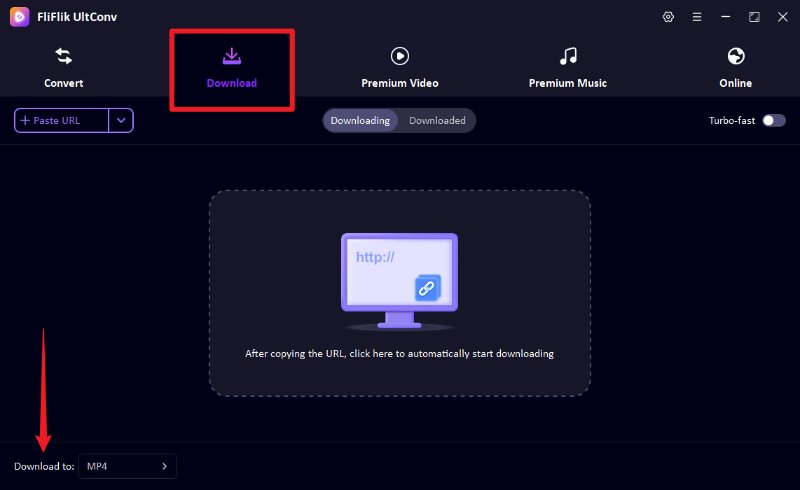
Open the program and switch to the Download section. Click the Download to option at the bottom to choose your preferred output format.
-
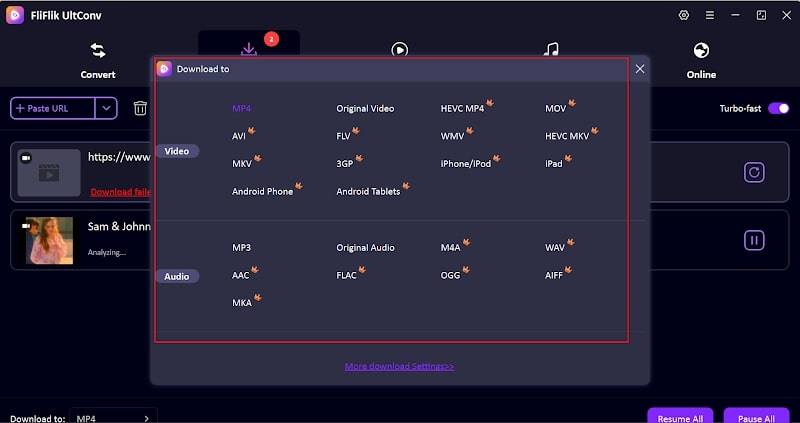
From the format list, select MP4 to ensure the video works smoothly on most devices and media players.
-
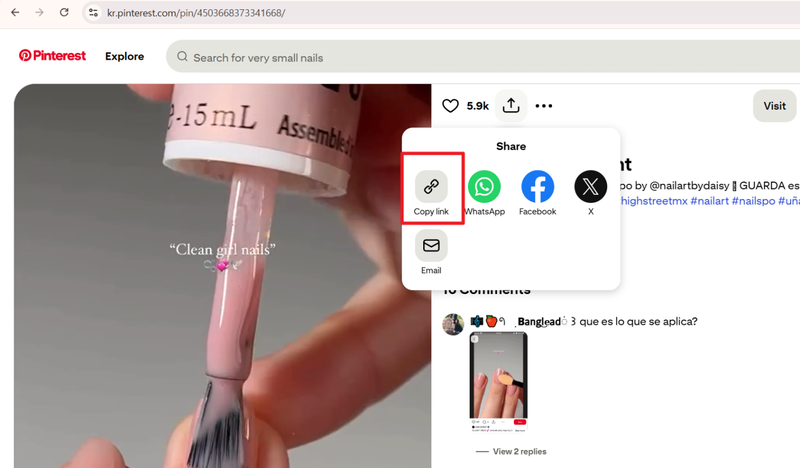
Open Pinterest in your browser, find the video you want to download, and copy its URL.
-
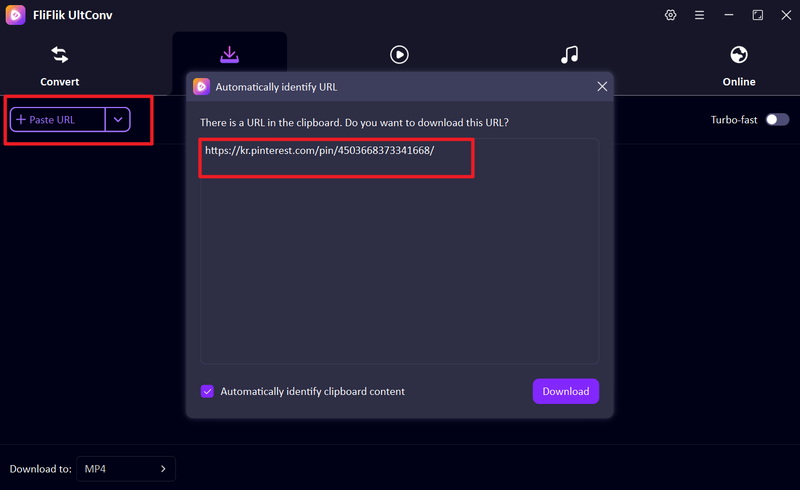
UltConv will automatically detects the copied link, then click the Download to begin saving the video. If the link isn’t detected, paste the Pinterest video URL into the input box manually, then click Download.
-
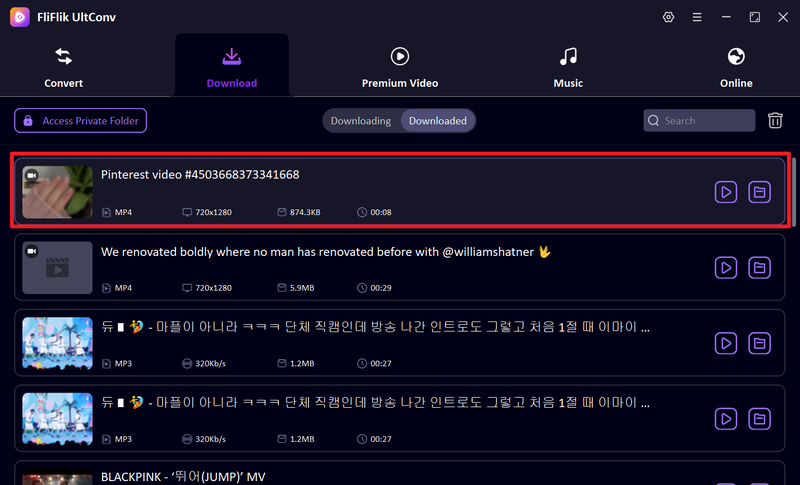
The download will begin immediately. Once finished, the Pinterest video will be saved as an MP4 file on your computer.


Part 2. How to Download Pinterest Videos Online (Quick & No Install)
Sometimes you may want to download Pinterest videos quickly without installing any software. Here are three reliable online tools to download Pinterest videos efficiently.
1. KlickPin

KlickPin is a fast and user-friendly online downloader for Pinterest videos. It works on any laptop, Windows, or Mac browser and doesn’t require registration or installation. Users simply copy the Pinterest video link and paste it into KlickPin’s input box to get an MP4 download. The interface is clean, intuitive, and designed for anyone, whether you’re tech-savvy or a beginner.
2. SavePinMedia

SavePinMedia provides a simple way to download Pinterest videos online without requiring extra software. To use it, simply copy the URL of the Pinterest video, paste it into the tool, and select your preferred download format. The tool supports MP4 and other popular formats, ensuring compatibility with almost any device. It is free to use and works seamlessly across Windows, Mac, and mobile browsers, offering fast download speeds while maintaining the video’s original quality.
3. PDownloader.com

PDownloader.com is another web-based platform that allows you to download Pinterest videos without installing any software. Compatible with all major browsers and devices, the service lets you simply paste a Pinterest link to retrieve the corresponding MP4. The platform supports high-definition downloads and is versatile enough to work with multiple video sources beyond Pinterest. It serves as a fast and practical solution for anyone looking to save content for offline viewing or personal reference.
Part 3. How to Download Video from Pinterest on iPhone and Android
Downloading Pinterest videos on mobile is easy with dedicated apps for iPhone and Android. These tools allow you to save videos directly to your device for offline viewing, sharing, or personal reference.
1. PinSaver: Save Pin Video (iPhone)

PinSaver is a user-friendly iPhone app designed specifically for downloading Pinterest videos. After installing the app, you can copy a Pinterest video link and paste it into PinSaver to save it directly to your device. The app supports high-quality downloads and allows you to organize videos within your device’s gallery. Its simple interface makes it easy for anyone to quickly save videos without technical knowledge.
2. Video Downloader for Pinterest (Android)

Video Downloader for Pinterest is a free Android app that offers a fast and convenient way to save Pinterest videos as high-quality MP4 files. By simply pasting a video link into its intuitive interface, users can quickly download content directly to their devices for offline access. Its straightforward design ensures a seamless, hassle-free experience, making it an ideal tool for any Android user looking to archive creative inspiration with ease.
FAQs
Q1. Is it legal and safe to download videos from Pinterest?
Downloading Pinterest videos for personal use, like offline viewing, is generally safe. However, it’s important to respect copyright and not redistribute or use videos for commercial purposes without permission.
Q2. How can I download Pinterest videos to MP4 on a laptop?
The easiest way is to use a desktop downloader like FliFlik UltConv Video Downloader. Simply copy the Pinterest video link, paste it into the software, select MP4 as the output format, and start the download.
Q3. Can I download Pinterest videos without an account?
Yes. Many online downloaders like KlickPin, SavePinMedia, and PDownloader.com allow you to download Pinterest videos without logging in. However, some content may require an account if it’s private or restricted.
Conclusion
Whether you are using a laptop, iPhone, or Android device, downloading Pinterest videos is a straightforward process. While online tools and mobile apps provide quick solutions, FliFlik UltConv Video Downloader stands out as the most reliable and feature-rich option.
Available for both Windows and Mac, it supports high-quality MP4 downloads from Pinterest and thousands of other platforms. With advanced features like batch downloading, FliFlik UltConv offers a seamless, professional experience for anyone looking to save videos for offline viewing.
 Secure Download
Secure Download
Secure Download
Hello, I research and introduce useful solutions for AI videos, images, and audio tips in our daily life. If you learn these things, you can easily deal with the problems of the new era.

