7 minutes read


Disney Plus keeps adding new movies and series. However, the subscription price is high. And this high price makes many people look for workarounds. But in many regions, you can’t even get a free trial on Disney plus. However, there are a few ways to watch, whether that is via limited-time offers, a bundled plan, or even a legit trial-style access. In this article, we’ll explain how to get Disney+ for free in 2026. We’ll look at what works, what is worth your time, and of course, which methods lead to a dead end and are risky!

Does Disney Plus Offer Free Trails?
For a long time, Disney Plus offered free trials as a way to let new users test the service before paying. That used to be a simple way for people to sample shows and movies without committing to a subscription right away.
Disney+ does not offer a free trial in most regions. The service officially ended its introductory 7-day free trial in 2020, shortly before the release of Hamilton. Since then, Disney has focused on paid subscriptions and bundle-based promotions instead. While you may occasionally see limited offers through mobile carriers or partner deals, these are not standard free trials and are not available everywhere.
How to Get Disney+ For Free?
If you’re asking who offers Disney Plus for free, the short answer is no one in the traditional sense. Disney doesn’t hand out free trials anymore. But there are still a few practical ways people access Disney+ without paying for it directly. Below, let’s break down what actually works.
1. Get Disney Plus via Account Sharing
Account sharing is the most common way people access Disney+ without opening their own wallet. Disney+ allows multiple profiles and simultaneous streams on one account, which makes family sharing possible. If a family member or close friend already has a subscription, they can add you as a profile. That said, Disney does limit simultaneous streams, so too many people watching at once can cause playback issues. You’ll also see shared accounts offered on social platforms, but those come with risks like sudden password changes or account lockouts. Sharing works best when it stays within trusted circles.
2. Get Disney Plus via Bundles at No Extra Cost
Bundles are where Disney+ feels “free” without technically being free. Some streaming bundles include Disney+, Hulu, and ESPN+ at a price that’s close to what Hulu alone costs. In that case, Disney+ is effectively added at no extra charge.
Publications like the New York Post have pointed out that while you’re still paying, the value shifts in your favor. If you were already planning to subscribe to Hulu, the bundle saves money overall and gives you Disney+ without increasing your monthly bill.
3. Get Disney Plus via Verizon Unlimited Plan
Verizon has offered Disney+ as a perk with certain plans. Verizon offers Disney+, Hulu, and ESPN+ (with ads) as part of its mobile perks. You can add this bundle to your myPlan for $10 per month, which saves you $9.99 compared to subscribing to each service separately. This perk gives you access to a wide range of movies, TV shows, and live sports, making it an easy and cost-effective way to enjoy these streaming services without paying full price directly to Disney.

4. Get Disney Plus via T-Mobile Magenta Plan
T-Mobile has offered Disney+ as a perk with select Magenta plans, especially Magenta and Magenta MAX. In many cases, subscribers receive Disney+ included for a limited time, such as six months or a year. While it’s not permanent, it still gives you extended access without paying Disney directly. Since you’re already paying for your mobile plan, Disney+ feels like a bonus rather than an extra expense.
5. Get Disney Plus via US Mobile Unlimited Plan
US Mobile sometimes includes streaming perks with its Unlimited plans, allowing you to access Disney+ as part of a bundle with Hulu and ESPN+. To get this perk, you need to choose a perk-based plan, such as Unlimited Premium or Unlimited Starter, add multiple lines (for example, three lines for Unlimited Premium), and activate autopay. Once set up, service credits from US Mobile can cover the Disney+ subscription cost, making it a convenient way to enjoy Disney+ without paying separately.

6. Get Disney Plus via Credit Card Rewards
Some credit cards offer streaming credits or reward points that can be redeemed for Disney+ subscriptions. Others provide cashback that effectively offsets the cost of your monthly plan. While this isn’t a direct free subscription, it allows you to pay for Disney+ using rewards you’ve already earned, which can make the service feel free as long as the credits last.
7. Get Disney Plus via Gift Cards

Disney Plus gift cards are another indirect way to watch without paying yourself. These often come as bonuses during promotions, holiday giveaways, or rewards from workplaces and surveys. If you receive a Disney gift card, you can redeem it toward a Disney+ subscription and stream until the balance runs out. It’s not something you can rely on long term, but it’s a clean and risk-free way to get temporary access.
8. Get Disney Plus via Microsoft Rewards Program
Microsoft Rewards lets users earn points by searching with Bing, completing quizzes, or using Microsoft services. Over time, these points can be redeemed for gift cards, including Microsoft or retail cards that can be used to pay for Disney+. It takes some patience, but if you’re consistent, you can cover part or all of your Disney+ subscription without spending real money.
9. Get Disney Plus via Rakuten Cashback
Rakuten offers cashback on Disney+ subscriptions during special promotions. You still pay upfront, but Rakuten returns part of the cost as cashback, which can be withdrawn or used later. While this doesn’t make Disney+ completely free, it reduces the effective cost and works well if you’re already using Rakuten for online shopping.

What NOT to Do: Dangerous Methods to Avoid
When looking for free access to Disney+, it’s easy to run into shady shortcuts. These methods might sound tempting, but they come with real risks and usually don’t work the way they promise.
1. Account Generators
Account generators are pure scams. These sites claim to create free Disney+ accounts, but in reality, they either collect your personal data, push fake surveys, or install unwanted software. No generator can magically produce valid accounts, and many are designed to steal logins or payment information.
2. Illegal Streaming Sites
Illegal streaming sites are another major risk. These platforms often host pirated content and are packed with aggressive ads, pop-ups, and hidden malware. Even if the video plays, you’re exposing your device to security threats and potential data leaks.
3. Hacked Accounts
“Hacked” accounts are not only unreliable but also illegal. Using stolen login details can lead to account bans, loss of access, or even legal consequences. Disney actively monitors suspicious activity, and accounts accessed this way are often shut down quickly. In short, if a method sounds too easy or too good to be true, it usually is.
Bonus: Download Movies and Shows from Disney+ for Offline Streaming
If you want to have offline access to your favorite Disney+ shows forever, timing matters. During a free trial or an active subscription period, you can download content for offline viewing. The catch is that Disney+ downloads stay locked inside the app and expire once your plan ends. That’s where a desktop tool makes sense. By using UltConv Disney Plus Downloader, you can download all your favorite shows and movies from Disney plus into MP4 format on your device. You can batch download the whole season or multiple movies at once in your preferred format, like MP4, AVI, MKV, and more. Video quality you can set upto 8k. Downloading speed is also very fast. In a few minutes, your favorite shows will be ready to play on your device. Once downloaded, you can access phones, tablets, laptops, and TVs, making long-term offline viewing simple.

- Supports MP4, MKV, MOV, AVI, MP3, AAC, FLAC, and other common formats
- Maintains original video quality, including HD, 1080p, and 8K, where available
- Allows batch downloading and conversion of multiple videos at once
- Keeps subtitles and multiple audio tracks intact
- Support 1000+ streaming services, including Disney+, Netflix, HBO Max, and more
▼ Steps to Download Disney Plus Movies with UltConv Video Converter
-
Download and install UltConv Video Converter on your computer. The setup is quick, and within a few minutes, the program will be ready to use.
FREE DOWNLOAD![secure download]() Secure Download
FREE DOWNLOAD
Secure Download
FREE DOWNLOAD![secure download]() Secure Download
Secure Download
-
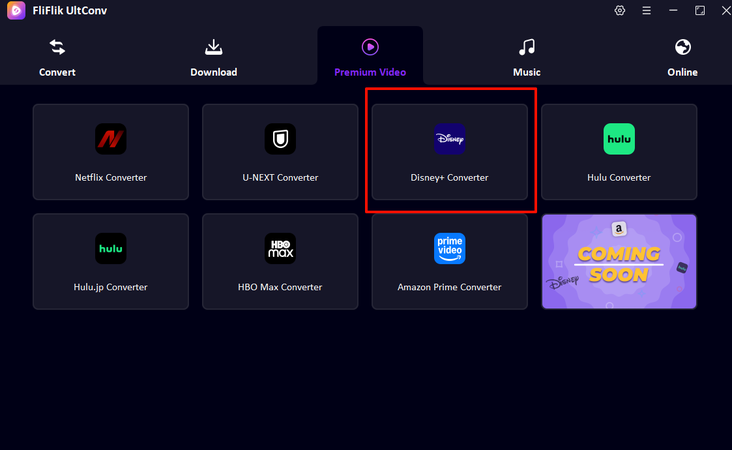
Launch the software and click the Premium Video tab, then select Disney+ Converter from the list of supported platforms.
-
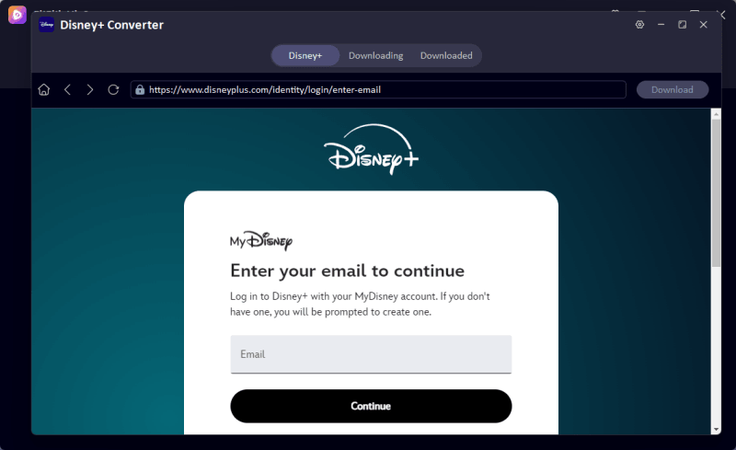
The Disney Plus interface will open inside UltConv. Sign in to your Disney Plus account directly within the program, no browser switching needed.
-
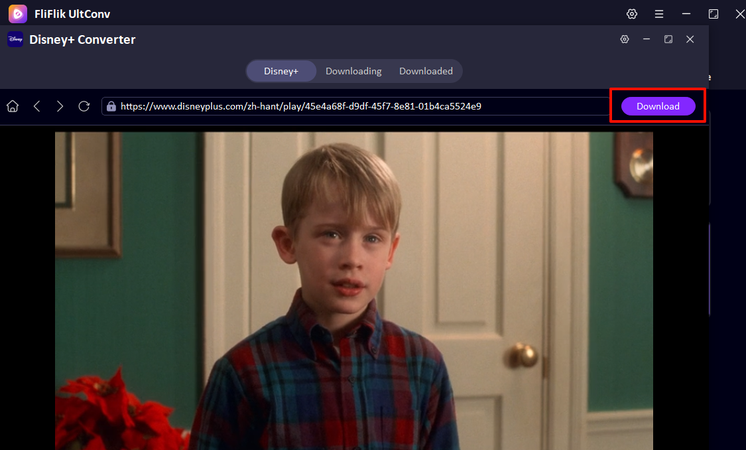
Browse or search for the Disney Plus movie or series you want to download. Once you find it, click the Download button.
-
The download will begin automatically. After it finishes, open the Download tab to access your saved movie. Your Disney+ content is now stored locally and can be watched offline anytime.



FAQs about Disney+
Q1. How long can I get Disney+ for free?
In most regions, Disney+ no longer offers a true free trial. What people usually mean by free access comes through bundles, promotions, or shared accounts. The duration depends on the provider. Some mobile carriers or bundles include Disney+ for several months, while account sharing lasts only as long as the account owner allows access.
Q2. Is Disney+ free with Amazon Prime?
No. Amazon Prime does not include Disney+ for free. You can subscribe to Disney+ through Amazon Channels in some regions, but it’s still a paid subscription. There’s no built-in Prime perk that unlocks Disney+ at no cost.
Q3. Can I use a VPN to access cheaper Disney+ plans?
Using a VPN to get lower-priced Disney+ plans may violate Disney’s terms of service. Prices vary by country, but Disney actively blocks VPNs, and accounts can face issues if unusual locations are detected. It’s not a reliable or risk-free method.
Conclusion
Finding how to get Disney Plus for free today usually comes down to smart alternatives, not official trials. Bundles, carrier perks, shared accounts, and reward programs can reduce or even eliminate the cost for a while. If you want long-term offline access without worrying about subscription limits, tools like UltConv Disney Plus Downloader offer a practical option. By downloading your favorite Disney+ movies and shows during active access, you can watch them anytime, anywhere. It’s a simple way to stay flexible while getting the most value from your Disney+ access.
 Secure Download
Secure Download
Secure Download
Hey there! I'm Clara Knight, and I'm passionate about using AI to streamline my workflow in the image watermark removal industry. So excited to empower users with clear guides and insights to conquer those pesky watermarks. Let's unleash the power of AI for watermark-free visuals!