

 8 minutes read


TikTok is built for mobile. Download the app, scroll, repeat. Easy. But what if you can’t install it? Maybe your device storage is full. Maybe it’s blocked in your region. Maybe your workplace or school network restricts app downloads. Or maybe you just don’t want another app tracking your activity.
That’s where people start searching for how to watch TikTok without the app. And honestly, it’s more common than you think. The good news is you’re not stuck. There are 5 practical ways to watch TikTok videos directly from a browser, through online viewers, or with alternative tools that don’t require installing anything. Some methods work better for casual viewing. Others are useful when access is limited. Let’s break down the easiest ways to do it in 2026.

- Quick Comparison of 5 Methods to Watch TikTok without the App
- Method 1. Watch TikTok Via the Official Website
- Method 2. Watch TikTok Via TikTok Downloader
- Method 3. Watch TikTok via TikTok Viewer
- Method 4. Watch TikTok via Chrome Extensions
- Method 5. Watch TikTok via Other Social Media
- Final Words
Content Table:
Quick Comparison of 5 Methods to Watch TikTok without the App
Before getting into detail of each tool, here’s a quick comparison of the 5 ways to watch TikTok without the app, so you can see at a glance what each method offers:
| Method | Type | Offline Access | AD-FREE | HD-Quality Viewing | Watermark-Free Download | Batch Download |
|---|---|---|---|---|---|---|
| Official Website | Web Browser | ❌ | ❌ | ✅ | ❌ | ❌ |
| FliFlik UltConv | Desktop Downloader + Viewer | ✅ | ✅ | ✅ | ✅ | ✅ |
| TikTok Viewer | Online Viewer | ❌ | ❌ | ❌ | ❌ | ❌ |
| TikClient Extension | Browser Extension | ❌ | ✅ | ❌ | ❌ | ❌ |
| Other Social Media | Social Platforms | ❌ | ❌ | ✅ | ❌ | ❌ |
Method 1. Watch TikTok Via the Official Website
Let’s start with the obvious option. TikTok has a web version, and yes, it works better than most people expect. If you’re looking for how to watch TikTok without the app, this is the simplest and safest place to begin. You don’t need to install anything. You don’t even need an account if you just want to watch. It’s clean, official, and accessible from almost any device with a browser.
▼ How to Watch TikTok on the TikTok Web Version?
- Step 1: Open your favorite browser and go to www.tiktok.com.
- Step 2: Videos will start playing automatically on the homepage. If a pop-up asks you to log in or download the app, select ” Not now ” or ” Continue as guest .”
-
Step 3: Scroll to discover new videos, or use the search bar to find creators, hashtags, or topics you want to view.
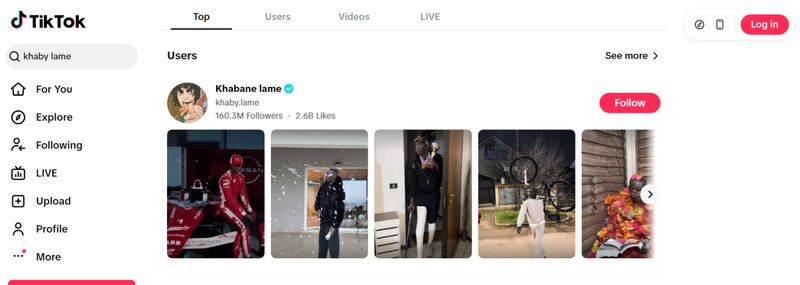
- Step 4: Click on any video to watch it in full screen. You can read comments or copy the link. Just keep in mind that liking, commenting, or following requires logging in. If videos don’t load properly, refresh the page or switch to another browser. Sometimes that’s all it takes.

- Official and secure, no malware or privacy concerns
- No installation required
- No account needed for basic viewing
- Works on major browsers
- Familiar layout similar to the mobile app
- Can’t like, comment, or follow without logging in
- Occasional prompts to download the app
- Mobile browsing may feel slower than the app
- No fully personalized For You feed without login
Method 2. Watch TikTok Via TikTok Downloader
If you want more than just browsing, a downloader with built-in viewing features makes a big difference. FliFlik UltConv TikTok Downloader isn’t only a tool for saving videos. It combines watching and downloading in one place. You can open TikTok through its built-in browser, stream videos directly, and download them in high quality at the same time. It supports resolutions up to 4K, allows batch downloads, converts videos to MP3 or 100+ other formats, and even removes watermarks. So if you’re searching for how to watch TikTok videos without the app, this tool gives you both access and ownership of the content.
Unlike the official web version, which limits interaction and offline access, UltConv TikTok Downloader lets you keep watermark-free videos permanently on your computer. You’re not tied to expiration dates or in-app restrictions. Once downloaded, you can watch them anytime on any media player, even without internet access.

- Download videos from 10,000+ websites, YouTube, TikTok, Instagram, etc.
- Save TikTok videos in up to 4K, 2K, or 1080p
- Download audio in high quality (up to 320kbps)
- Batch download multiple videos at once
- Built-in browser for direct viewing and downloading
- Convert video to MP3, MP4, and 100+ formats
- Download playlists, channels, and albums in one click
- Remove DRM from Spotify and Apple Music
- Save live streams to MP4 in real time
▼ Steps to Watch & Download TikTok Without the TikTok App
First, download and install FliFlik UltConv Video Downloader from its official website. Once downloaded, follow the simple steps below to watch and download TikTok without the TikTok app.
 Secure Download
Secure Download
Secure Download
-
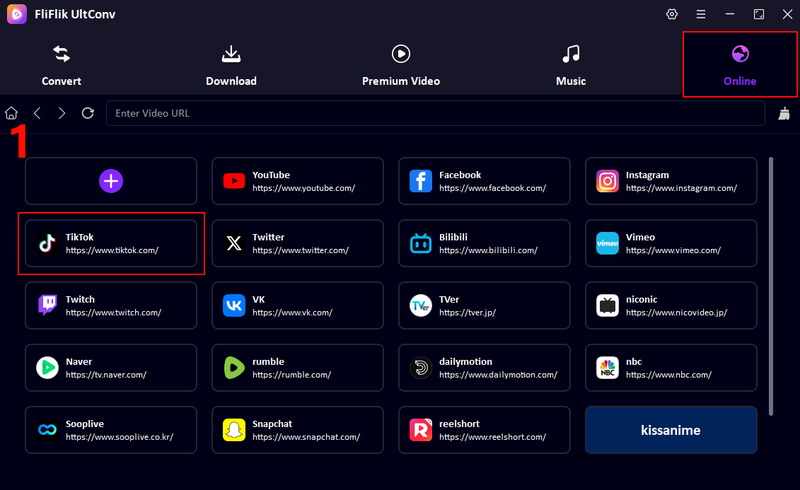
Open UltConv and click on the Online tab; you need to click on TikTok.
-
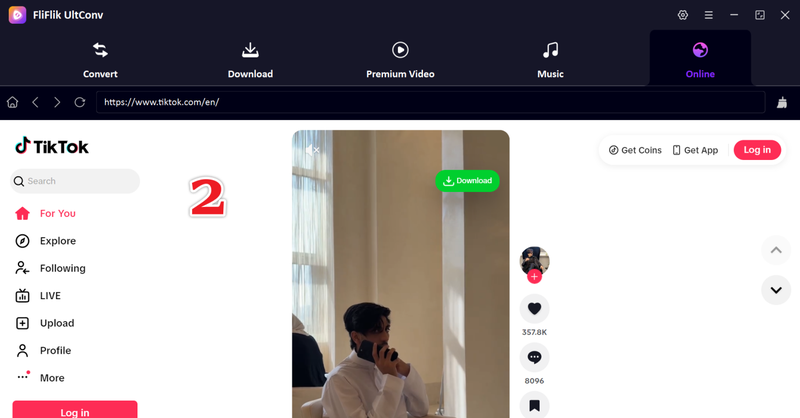
Next, you will see the interface of the tiktok inside the UltConv built-in browser.
-
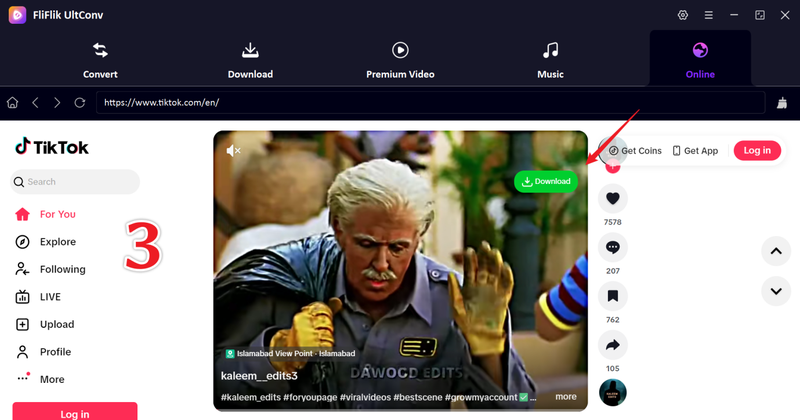
Keep scrolling; no need to install anything. And in case there is a video that you want to download, just simply click the green Download button.
-
Next, you will see your video start downloading immediately.
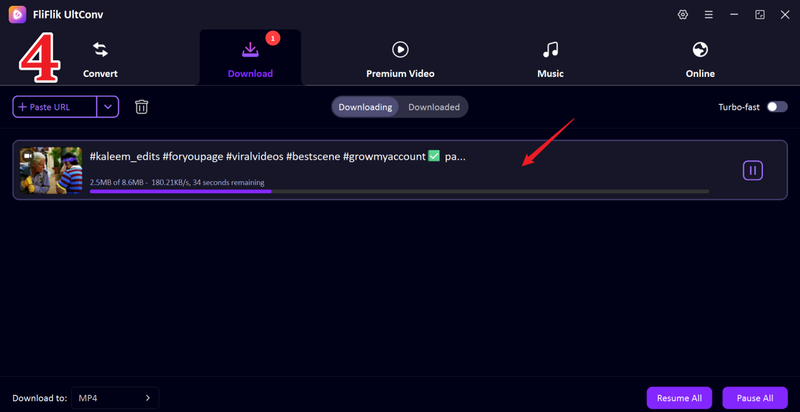


This is the most straightforward as well as convenient way to watch and download TikTok videos without an app.
- Works as both a viewer and a downloader
- Download TikTok videos without a watermark
- High-resolution downloads available
- Batch downloading saves time
- Built-in browser makes navigation simple
- Requires installation on your computer
Method 3. Watch TikTok via TikTok Viewer
Another easy way to watch TikTok without installing the app is by using a web-based viewer like TikTok Viewer. This kind of tool lets you search for public TikTok videos, profiles, and hashtags directly in your browser. It’s a simple workaround when you want to browse or watch content without an account or app. These viewers aren’t official TikTok services, but they usually load public videos fast and keep things straightforward. Just be aware that they often show ads before or during use since that’s how they stay free.
▼ How to Watch TikTok Without the App Using TikTok Viewer?
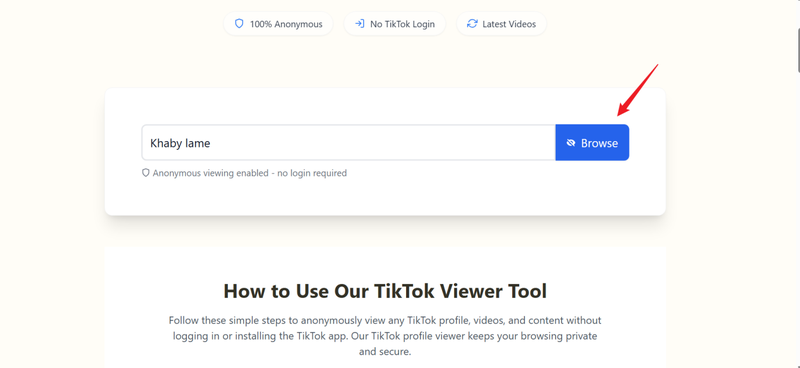
- Step 1: Open your browser and go to the TikTok Viewer official website (https://www.anonymous-viewer.com/).
-
Step 2:
In the search box, type the username, hashtag, or keyword you want to watch (for example, a creator name or #Travel). Then click the blue
Browse
button.
- Step 3: Press Enter or click Search. The viewer will show a list of matching public TikTok videos.
- Step 4: Click on any video to start watching it in your browser. No TikTok app required.
- Step 5: If your browser prompts you with ads before the content loads, watch or close them to proceed to the video.

- No app or login needed
- Works on any device with a browser
- Fast access to public TikTok videos
- Simple search by username, hashtag, or keyword
- Good option when TikTok is blocked or restricted
- Shows ads before use
- It only lets you view public videos
- No ability to like, comment, or follow
- Quality and reliability depend on the viewer’s site
Method 4. Watch TikTok via Chrome Extensions
If you’re on a desktop or laptop and want a more app-like experience in your browser, a Chrome extension like TikClient — Web Client for TikTok™ can help. It acts as a lightweight viewer that integrates directly into your browser, making it easier to browse, search, and watch TikTok without opening the official app. You’ll still be using web-based access, but it feels more organized and accessible than a standalone website. Keep in mind that extensions depend on your browser and internet speed. Some users notice longer loading times or slower interactions compared with the native app.
▼ How to Watch TikTok Videos Without the App Using TikClient?
-
Step 1:x
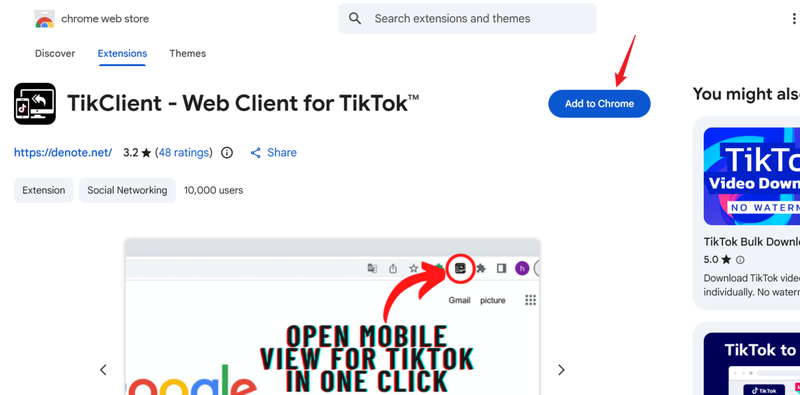
Open Google Chrome and search TikClient. Click
Add to Chrome
and allow the extension to install.
- Step 2: Once installed, open the TikClient extension icon in your browser toolbar.
- Step 4: Use the built-in search or browse interface to find creators, hashtags, or trending videos.
-
Step 5:
Click any video you want to watch. TikClient will load and play it in the extension window.
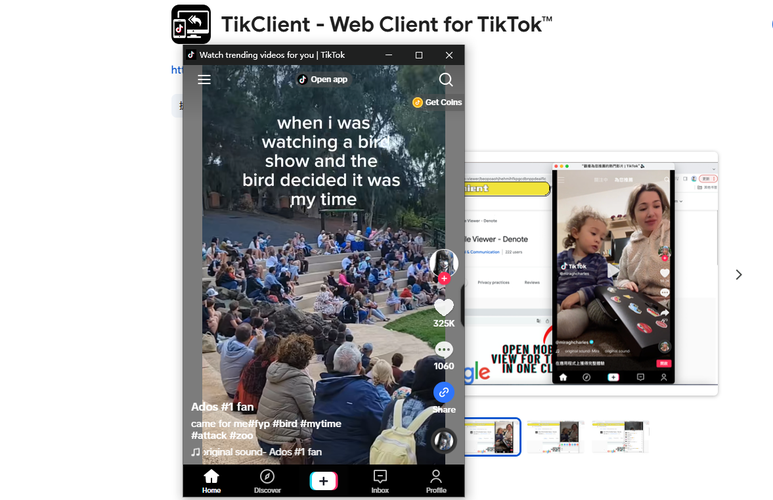


No TikTok app is needed, and you can watch directly from Chrome without hopping between tabs.
- Works inside your browser without the TikTok app
- App-like interface for easier browsing
- Quick access via browser toolbar
- Search for content by username or hashtag
- Can have long loading times
- Slower response compared with the official app
- Limited interaction (no likes, comments, or follows)
- Depends on Chrome and extension stability
Method 5. Watch TikTok via Other Social Media
Here’s something most people overlook. A lot of creators don’t just post on TikTok. They repost the same short videos on other platforms to reach a wider audience. So if you’re looking for how to watch TikToks without downloading the app, you might not need TikTok at all. Many influencers share their clips on Instagram, Facebook, YouTube Shorts, and X. Sometimes it’s slightly edited. Either way, you can scroll and watch short-form videos on platforms you may already use daily. For example, a creator might post a dance clip on TikTok and upload the same video as a Reel on Instagram or a Short on YouTube. If you follow them there, you’ll still see their content without ever touching the TikTok app.
- No need to install TikTok
- Use platforms you already have
- Easy to follow your favorite creators across apps
- Often better desktop experience on YouTube
- Fewer restrictions in some regions
- Updates can be slower than TikTok
- Not all TikTok videos get reposted
- Content may be trimmed or edited differently
- Harder to discover new creators organically
Final Words
If you’ve been wondering how to watch TikTok without the app, the good news is you’ve got options. From the official website to online viewers, Chrome extensions, and even reposted content on other platforms, there’s always a workaround. The right method really depends on what you want. Quick browsing? The web version works. Anonymous viewing? A viewer site might help. More control and offline access? That’s a different story. If you want to watch and download TikTok videos in high quality without limits, FliFlik UltConv Video Downloader is the strongest option here. It lets you stream inside the built-in browser and save videos without watermarks in just a few clicks. Ready to skip the app and keep your favorite videos forever? Try FliFlik UltConv Video Downloader and take full control of your TikTok viewing experience.
Secure Download
Secure Download
Hey there! I am Maxwell Clark. I'm always looking for new tech tools that make a difference, from making visuals and audio better to making workflows better. I'm going to share tips and tricks for using AI tools for videos, audio, and images. I'm excited to help you navigate the digital world more efficiently and creatively!

