8 minutes read


Are you looking for ways to save content from OnlyFans? Locoloader OnlyFans is a downloader tool for this purpose. It guarantees to save pictures and videos from OnlyFans with ease and allows the user to see them offline. It may seem easy, but there are limits and risks you should know about. This Locoloader OnlyFans downloader review article will focus on Locoloader OnlyFans features, how it works, and what restrictions or issues users might face while utilizing this service.

What is Locoloader OnlyFans Downloader?
Locoloader OnlyFans Downloader is a browser-based tool designed to pull media from OnlyFans pages you already have access to. At its core, it works like a web scraper, not a traditional download app. You paste links on locoloader.com, and the tool prepares the media for saving.

Here’s the key detail most people miss. The website alone isn’t enough. Locoloader relies on a companion Locoloader browser extension to do the heavy lifting. Because OnlyFans tightly controls media access, the extension runs in the background and helps retrieve the real media URLs during your active session.

One important heads up. There are many fake lookalike domains floating around using similar names. These are usually ad traps or phishing sites. Stick to the official Locoloader domain and its GitHub releases to avoid unnecessary risk.
Is Locoloader Safe to Use with Your OnlyFans Account?
Many users wonder if Locoloader OnlyFans is safe, and the answer is a mix of yes and caution. The website itself has been around for years, gets decent ratings on Scamdoc, and shows no malware issues, so the source is generally trustworthy.
The risk comes from the browser extension. To function, it requires permission to read data on onlyfans.com and other sites, which means it can access sensitive browsing information. From a privacy standpoint, giving a third-party plugin persistent access to your browsing history is not ideal. A safer approach is the “Install, Use, Uninstall” method or running it in a separate browser profile just for Locoloader.
How to Use Locoloader to Download OnlyFans Content?
Using Locoloader OnlyFans is fairly straightforward, but it’s not as simple as installing an app and clicking one button. You’re working with a browser extension, so a bit of setup is required. Here’s how the process usually looks in practice.
-
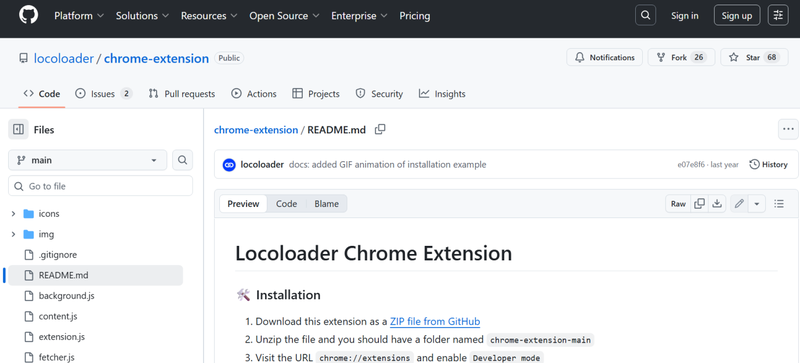
Step 1: To use the browser extension, you need to install the Locoloader OnlyFans Downloader on your PC. Make sure you’re using the official Locoloader site or its verified GitHub files to avoid fake versions.
-
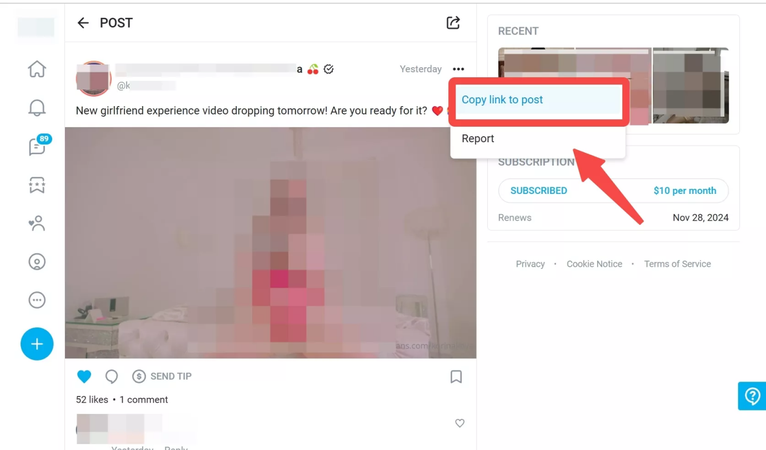
Step 2: To use the online downloader versions, simply open the OnlyFans website, log in to your account, and find the video you want to save. Right click on the video and copy its URL.
-
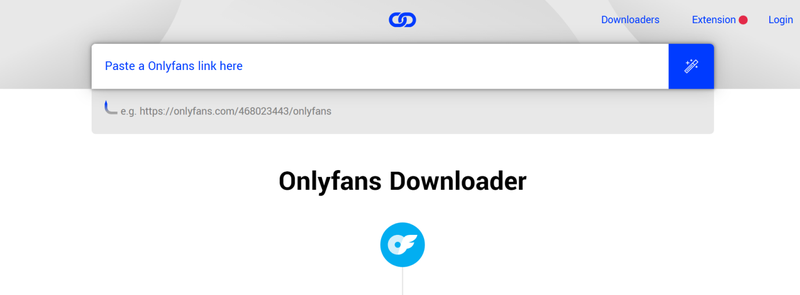
Step 3: Go back to Locoloader online downloader and paste the copied OnlyFans link into the input box. The tool will automatically detect the video.
-
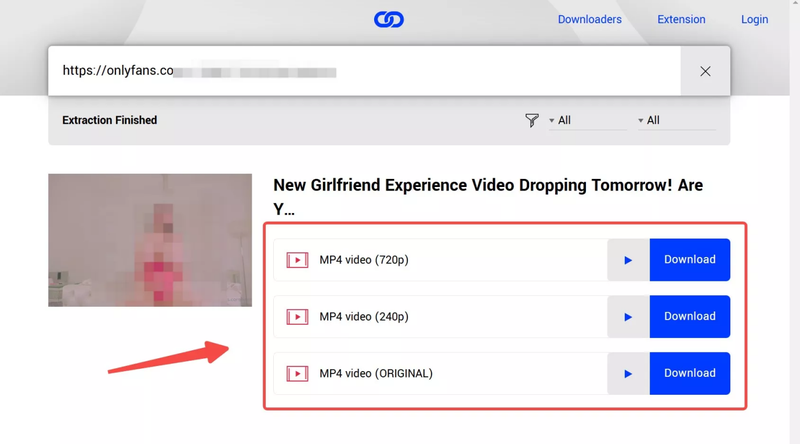
Step 4: Once you see the message “Extraction Finished,” select your preferred resolution, usually between 240p and 720p, then start the download. The video will be saved to your device shortly after.


Does Locoloader Actually Work on OnlyFans Today?
Short answer: yes, but only in very specific cases. I tested Locoloader on different types of OnlyFans content to see where it holds up and where it clearly breaks down.
For public OnlyFans clips that don’t use DRM protection, Locoloader still works. These are the short preview-style videos anyone can watch without paying. In testing, the tool was able to detect the video source and offer download options at 240p and 720p. Download speed hovered around 3 to 5 MB per second, and a 10 minute clip finished in just a few minutes. For light, casual use, it does what it claims.

Things change completely with paid or subscriber-only content . Even though the video plays normally in the browser, Locoloader fails to extract it. The tool repeatedly shows errors like “could not parse video” or flags the file as DRM protected. In simple terms, it cannot bypass encryption used on paid OnlyFans videos.

▼ Our Test summary:
- Public videos: works, limited quality, acceptable speed.
- Paid content: does not work at all due to DRM restrictions.
If your goal is downloading free preview clips, Locoloader can help. For anything beyond that, it hits a hard wall.
Limitations of Locoloader for OnlyFans Downloads
Locoloader can look useful at first, but once you spend some time with it, the limits become pretty clear. The biggest issue is DRM protection. Locoloader simply can’t handle paid or subscriber-only OnlyFans content. Even if you’ve legally paid for a subscription and can watch the video without issues, the tool usually fails to extract the file. You’ll see errors like parsing failures or DRM warnings, and there’s no real workaround.
Another limitation is video quality. When it does work, options are often capped at lower resolutions like 240p or 720p. If the original video was uploaded in higher quality, you won’t get that full version. There’s also a privacy tradeoff. The browser extension needs deep access to OnlyFans pages to function. That means it can read site data and activity, which may not sit well with users who care about account security.
Finally, Locoloader depends heavily on how OnlyFans currently delivers video files. Small platform changes can break it without warning, and updates aren’t always quick. Because of this instability, many users end up looking for more reliable alternatives for downloading OnlyFans content, which we’ll cover next.
Best Locoloader Alternative to Download OnlyFans Videos
Now let’s move on to a better option. If you want something more stable than Locoloader, UltConv Video Converter is a solid alternative worth looking at. It works as a desktop program, which means you’re not depending on browser extensions or page scripts that break every time OnlyFans updates something. For downloading, UltConv Video Converter lets you save videos in common formats like MP4 and MKV, so playback is never an issue. You can also choose the quality you want, instead of being locked into low resolutions. One of its biggest advantages is batch downloading. If a creator has a large library, you can queue multiple videos at once and let the tool handle everything in the background. It also doubles as a converter, so you can change video files to audio formats like MP3 or FLAC if needed. We highly recommend it to users who want reliable downloads, flexible formats, and less manual work.

- Download OnlyFans videos to MP4 in 1080p
- One-click download entire library of OnlyFans creators
- Save DM videos in one click
- Bulk download entire creator libraries
- Remove DRM to watch videos anywhere
- Download profile images without any limits
- Supports Fansly, JustForFans, ManyFans, Patreon, and more
▼ Steps to Download High Quality OnlyFans Videos with UltConv Video Converter:
-
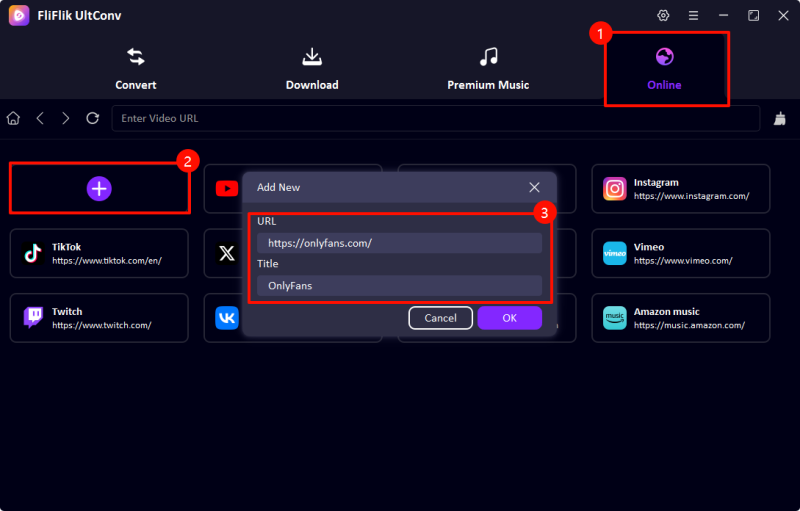
After installation, open UltConv and navigate to the Online tab. Paste the OnlyFans URL into the address bar to begin.
-
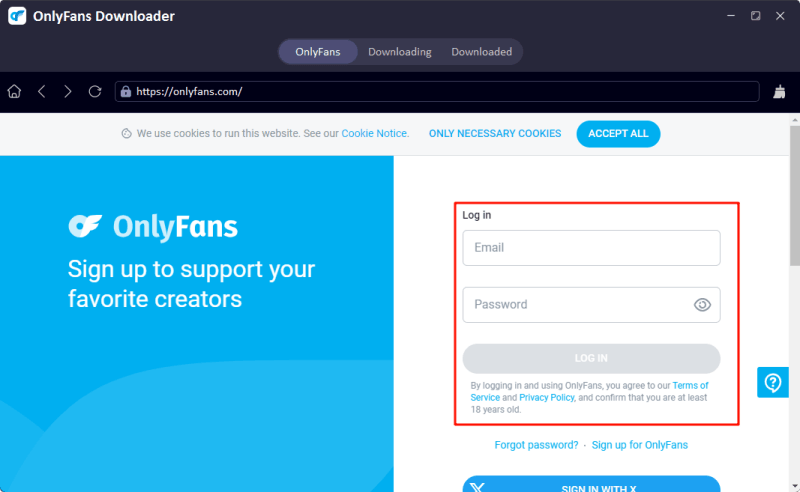
Log in to your OnlyFans account and find locate the OnlyFans videos you want.
-
Click on the Download button next to the video to select your preferred resolution and format.

-
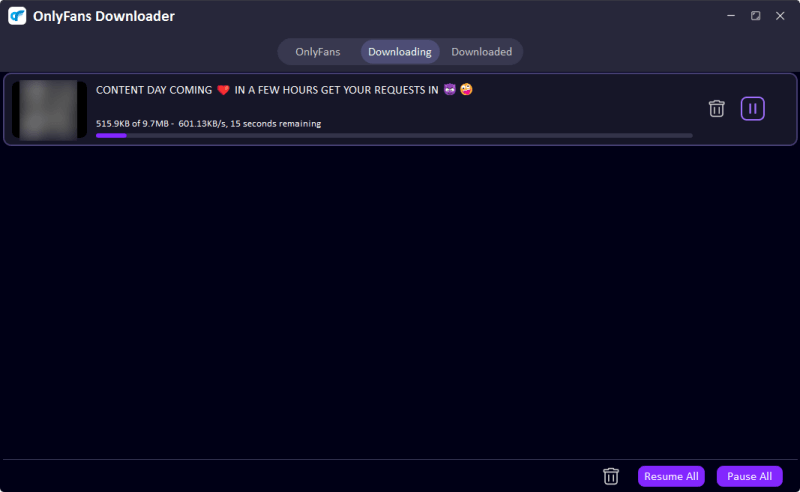
UltConv will start downloading the OnlyFans videos automatically. After the download completes, you can check all the downloaded OnlyFans content on the “Downloaded” tab.


To Wrap Up
So, if you’ve been struggling with Locoloader OnlyFans, it’s clear that while it can handle some public content, it’s unreliable for most paid or DRM-protected videos. For a smoother experience, tools like FliFlik UltConv Video Converter provide a more stable solution. With support for high-quality downloads, multiple formats, batch processing, and offline access, UltConv Video Converter makes saving your favorite OnlyFans content simple and stress-free. It’s a practical alternative to Locoloader OnlyFans for anyone looking to manage their media efficiently without constantly running into errors.
 Secure Download
Secure Download
Secure Download
Hey there! I'm Clara Knight, and I'm passionate about using AI to streamline my workflow in the image watermark removal industry. So excited to empower users with clear guides and insights to conquer those pesky watermarks. Let's unleash the power of AI for watermark-free visuals!