

 5 minutes read


Newgrounds is a famous platform where independent artists can watch videos, animations, music, and games. Many users want an easy way to save these videos for offline use, but Newgrounds does not have a built-in download button. That is why many users search for a reliable Newgrounds video downloader. This guide provides an overview of Newgrounds, its content, and how to download videos using the best tools. It also reviews key features of the trusted Newgrounds download tool that work without confusion.

Part 1: What is Newgrounds?

Newgrounds is an online entertainment platform where creators upload animated videos, games, artwork, and music. It is one of the oldest user-generated content sites and attracts millions of visitors every month. Users can watch and watch content from thousands of independent creators, comment, evaluate, and share.
- Free access to video, animation and user-generated content
- Large game collection by indie developers
- Community forums where users discuss topics
- Built-in evaluation and review system
- Audio portal for music tracks
- Support for creators through donations
- Available free of charge
- Rich creative content library
- Easy to browse categories
- Active Creator Community
- No built-in download feature
- Age-restricted content may exist
- Quality depends on individual creators
Part 2: Best Newgrounds Video Downloader
If you want to download videos, audio files and animations from Newgrounds easily and safely, FliFlik UltConv Newgrounds Downloader is one of the best tools. Since it is not an online converter, it must be downloaded and installed on your computer before use. After installation, it functions as a complete Newgrounds video download tool, video converter, and voice extraction tool. Supports many formats and high-quality settings. FliFlik UltConv Newground Downloader is designed for users who want complete control of video quality, output format, and batch download options while seeking a simple operation process.

- Download videos from more than 10,000 websites including YouTube, Vimeo, Facebook, Twitter, Instagram, Dailymotion, Newgrounds, etc
- Save videos in over 100 formats, including MP4, MP3, WAV, and OGG
- Supports batch download of multiple videos, playlists, albums and channels
- Convert video to audio with no image quality deterioration (up to 320kbps)
- Downloads videos in 4K, 2K, and 1080p
- Removes DRM from Spotify and Apple Music and saves them as MP3 files
▼ Steps to Download Newgrounds Videos with UltConv Video Downloader:
-
Go to the official FliFlik website and click the Download button to install FliFlik UltConv. Next, to download videos, follow the simple steps below.
FREE DOWNLOAD![secure download]() Secure Download
FREE DOWNLOAD
Secure Download
FREE DOWNLOAD![secure download]() Secure Download
Secure Download
-
Open UltConv Video Downloader and switch to the Download tab. Click the Download to button at the bottom to begin.

-
Pick the output format you want. You can choose from several video and audio options. I chose MP4 here.

-
Open the Newsground website in your browser and copy the link of the video you want to download.
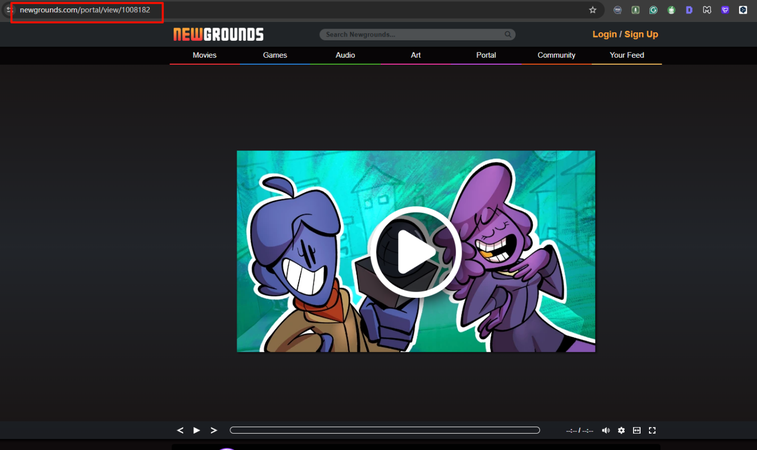
-
Go back to UltConv. If the program detects the link automatically, click Download to save the video.
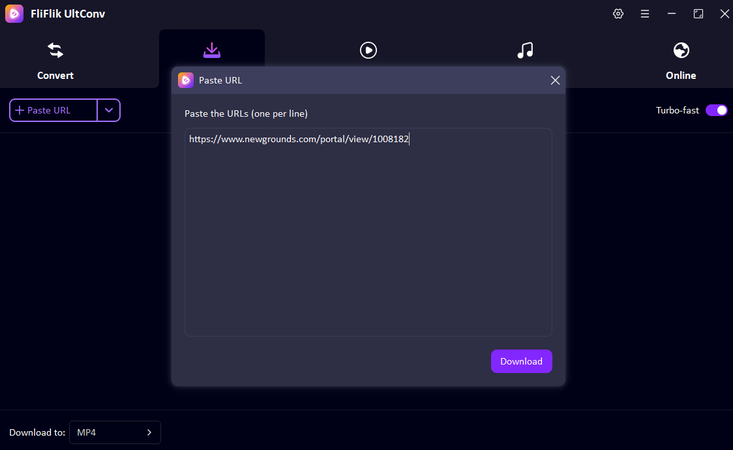
-
If the link isn’t picked up automatically, paste it into the search box and hit Download. Then you can check the downloading process of the Newgrounds video in the ‘Downloading’ section.
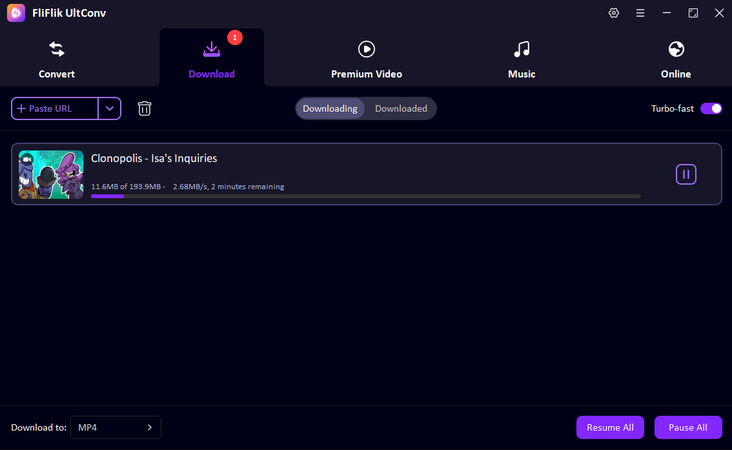


Once the download is complete, your Newsground video will be ready to watch offline in the format you chose, with no buffering or interruptions.
Final Words
Newgrounds is a place to enjoy animation, video, and indie art, but it is not allowed to download directly. That is why having a reliable Newgrounds video downloader is helpful when you want to save something offline. FliFlik UltConv Video Downloader is easy to operate, supports many formats, and works on thousands of websites. Provides high-quality downloads, batch processing, and audio options such as MP3, WAV, OGG, etc. If you’re looking for a safe and easy way to download from Newgrounds, try FliFlik UltConv now.
 Secure Download
Secure Download
Secure Download
FAQs about Newsgrounds
Q1. Does Newgrounds have a built-in download feature?
No, Newgrounds does not provide built-in download buttons for video or audio files. If you want to save content for offline use, you need to use another tool that supports many formats like FliFlik UltConv.
Q2. How do I download a video from Newgrounds?
To download Newgrounds videos, copy the video link and paste it into FliFlik UltConv. This software acts as a reliable Newgrounds downloader and supports MP4, MP3, WAV, OGG, etc. Both single and bulk downloads are available.
Q3. How can I download a video that is not downloadable?
If a Newgrounds video does not have a direct download option, you can save it with FliFlik UltConv. This tool can download videos from thousands of websites and works smoothly as a Newgrounds video downloader for any content.
Hey there! I am Maxwell Clark. I'm always looking for new tech tools that make a difference, from making visuals and audio better to making workflows better. I'm going to share tips and tricks for using AI tools for videos, audio, and images. I'm excited to help you navigate the digital world more efficiently and creatively!

