

 8 minutes read


Some people subscribe to creators on OnlyFans but quickly realize one small problem. Watching content online is easy. Saving it for offline viewing on your phone? Not always so simple. That’s where an OnlyFans downloader Android tool starts to make sense.
Think about it. Maybe you’re traveling, your internet drops, or you just want a smoother way to organize the content you’ve already paid for. Instead of opening the site every time, a downloader app can save videos or images directly to your device. But here’s the tricky part. Not every app that claims to do this actually works well. Some are slow, some are full of ads, and a few simply fail when it comes to protected media. So the real question becomes: which apps actually work in 2026? Let’s look at a few Android options that people are currently using.

Top 6 OnlyFans Downloader Android Apps to Save OnlyFans Videos
Below we have listed 6 best OnlyFans downloader Android apps that work perfectly to save OnlyFans videos.
Top 1: FliFlik UltConv OnlyFans Downloader for Android
If you want the most reliable onlyfans downloader Android users can depend on in 2026, this is the first tool worth looking at. FliFlik UltConv OnlyFans Downloader stands out because it focuses on what people actually care about: stable downloads, high video quality, and broad platform support. The tool is designed to download content from OnlyFans while keeping the original quality and format intact. Videos can be saved in MP4 format, which means they play smoothly on almost any device, including Android phones, tablets, and PCs. Quality options go up to 4K, 1080p, and 720p, so you can keep the same resolution as the original upload.
Another strong point is website compatibility. Besides OnlyFans, the downloader also supports platforms like Fansly, JustForFans, Patreon, and other creator platforms. That means one tool can handle downloads across multiple sites without switching apps. On top of that, UltConv is a bulk OnlyFans downloader on Android; its video batch saving and fast link detection features, making the whole process quick and simple.

- Download OnlyFans videos to MP4 in 4K, 1080p, or 720p
- Save OnlyFans DM videos with one click
- Bulk download multiple OnlyFans videos at once
- Remove DRM protection for offline playback
- Download creator profile images without limits
- Supports Fansly, JustforFans, Patreon, ManyFans, and 10,000+ sites
▼ Steps to Download OnlyFans Videos with UltConv OnlyFans Downloader
Downloading OnlyFans videos with FliFlik UltConv OnlyFans Downloader is pretty simple once everything is set up. The software includes a built-in browser, so you can log in and download content without switching between different apps.
-
Download and install FliFlik UltConv OnlyFans Downloader from its official site. After the installation completes, open the program to begin.
FREE DOWNLOAD![secure download]() Secure Download
FREE DOWNLOAD
Secure Download
FREE DOWNLOAD![secure download]() Secure Download
Secure Download
-
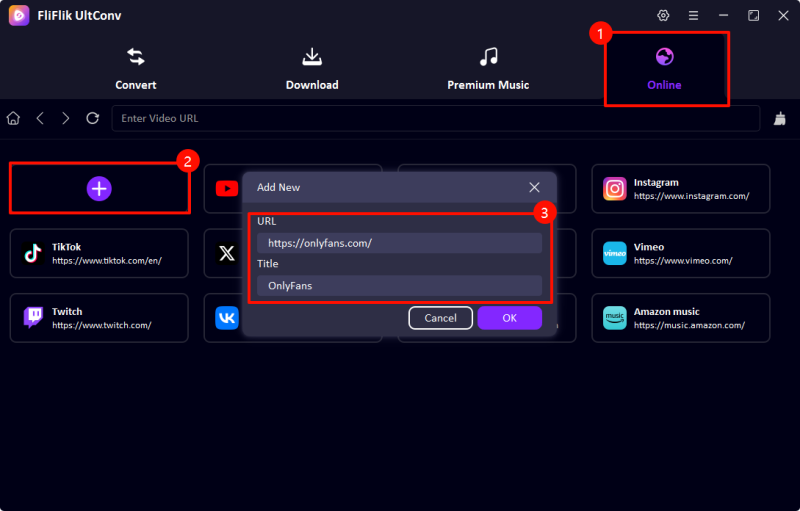
Inside the software, switch to the Online section. When the Add New window appears, paste the OnlyFans website link so it loads inside UltConv’s built-in browser.
-
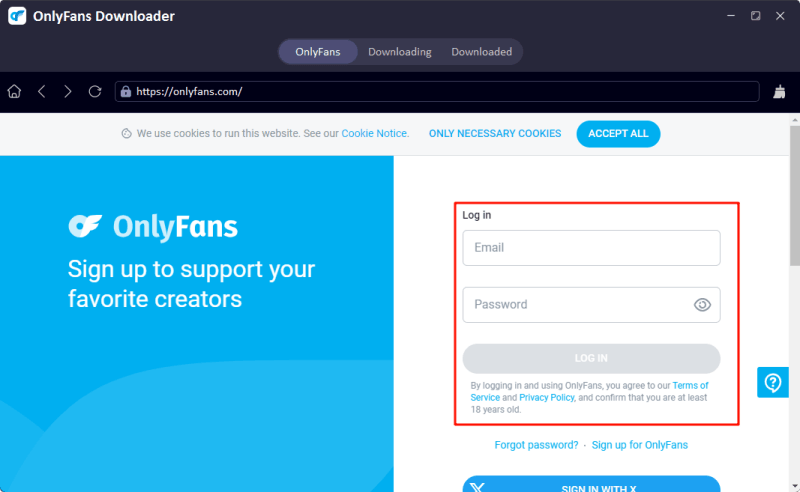
Log in to your OnlyFans account through the browser in the program. Once signed in, the tool can access videos from creators you follow or any content you’ve purchased.
-
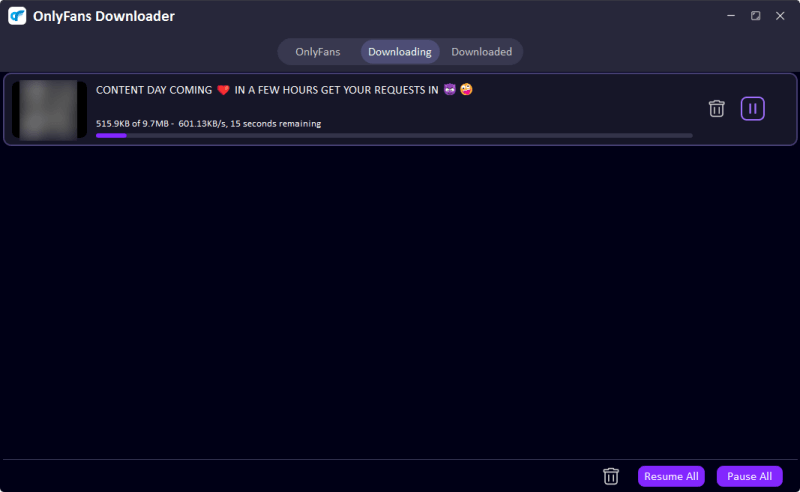
Browse the page just like you normally would and find the video you want. Click the Download button, then choose the format and resolution you prefer before starting the download.

-
The software will start processing the video and save it to your computer. After it finishes, head to the Downloaded section to locate the file and watch it offline whenever you want.


Top 2: Video Downloader
If you prefer downloading content directly on your phone, Video Downloader is another Android app option available on the Google Play Store. The app includes a built-in browser that lets users visit sites, detect media files, and download them without needing extra extensions. For people looking for an OnlyFans downloader Android solution, the idea is simple. Instead of switching between apps, you open the website inside the downloader, play the video, and the app detects the file automatically. Once detected, you can save it straight to your phone storage.
- Direct video downloads on Android devices
- Built-in browser for easier video detection
- Supports HD and Full HD video downloads
- Simple interface that works well on touch screens
- Compatible with many video websites
- Contains ads in the free version
- Some sites may block downloads depending on the protection
- Download speed can vary depending on the connection
- May fail to download sometimes
▼ Steps to Download OnlyFans Videos with Video Downloader
-
Step 1:
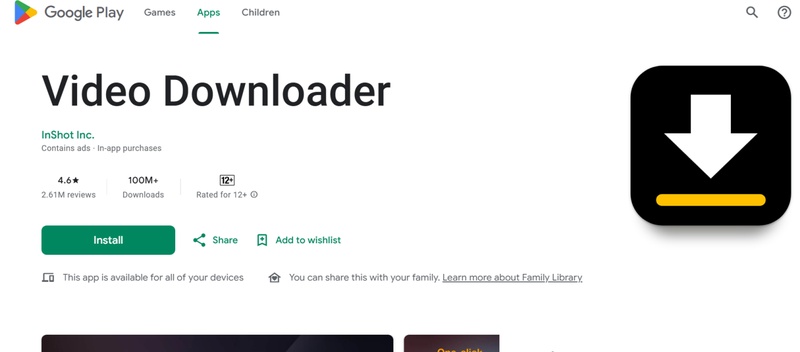
Open the Google Play Store and install Video Downloader on your Android phone. Once installed, launch the app and allow the required storage permissions.
-
Step 2:
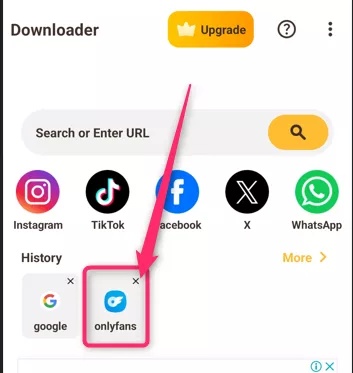
Inside the app, use the built-in browser to visit the OnlyFans website.
-
Step 3:
Sign in to your OnlyFans account so you can access the creators you follow or the content you have purchased.
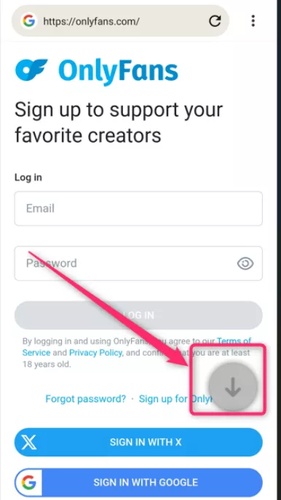
- Step 4: Browse the page and open the video you want to save. Start playing the video so the downloader can detect the media file.
- Step 5: When the app detects the video, a download icon will appear. Tap it, choose the quality you prefer, and the video will start downloading to your phone.


Top 3: YTSaver
Another tool worth mentioning is YT Saver Downloader. While it’s mainly a desktop program, many users still rely on it as an OnlyFans video downloader for Android by downloading the content on a computer first and then transferring the files to their phone. The reason people use it is simple. The software supports downloads from multiple websites, including OnlyFans. It also gives flexible format and quality options, letting you save videos as MP4, MP3, and other formats. On top of that, it supports resolutions from 720p and 1080p all the way up to 4K, depending on the original video. Another helpful feature is the built-in browser, which allows you to log into websites and download videos without switching between tabs or copying links manually.
- Supports downloads from multiple websites
- Multiple output formats like MP4 and MP3
- Supports HD, 4K, and even 8K video downloads
- Built-in browser for easier video detection
- Full features need to be unlock by subscribing
- Limited features on Android version
▼ Steps to Download OnlyFans Videos with YT Saver
-
Step 1:
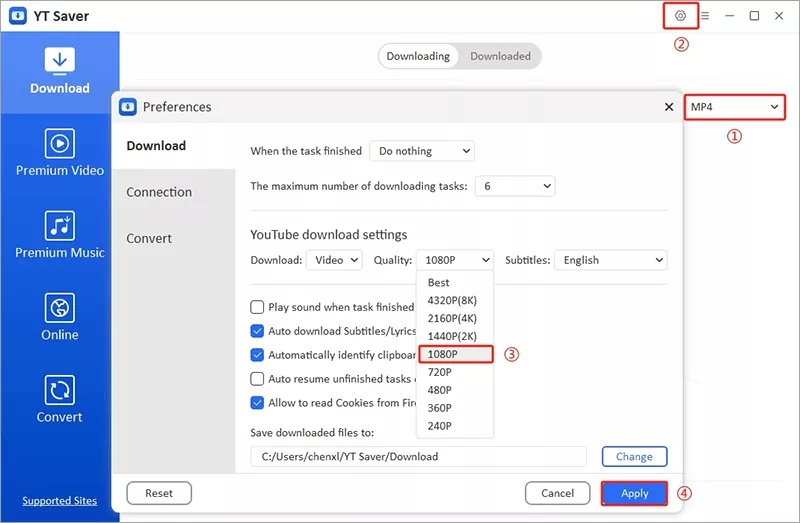
Open
YT Saver Downloader, then go to the
Preferences
section. Choose the format you want, such as MP4, and select the video quality you prefer.
-
Step 2:
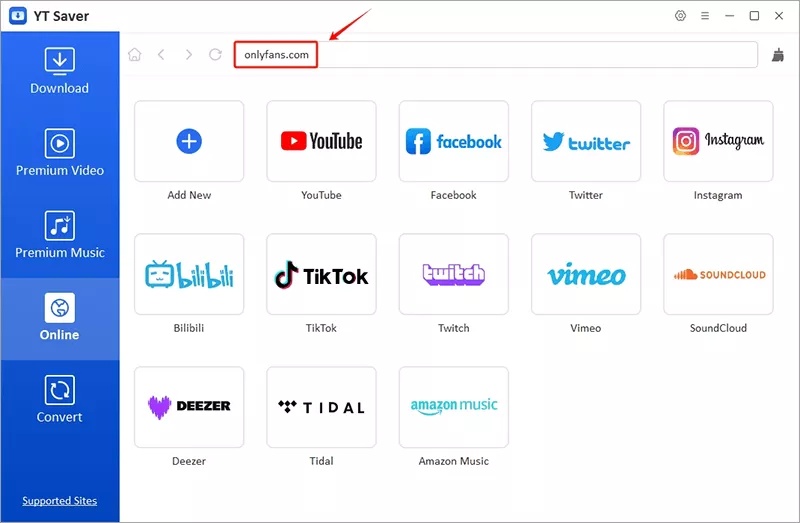
Click the
Online
tab inside the program and visit the OnlyFans website using the built in browser.
-
Step 3:
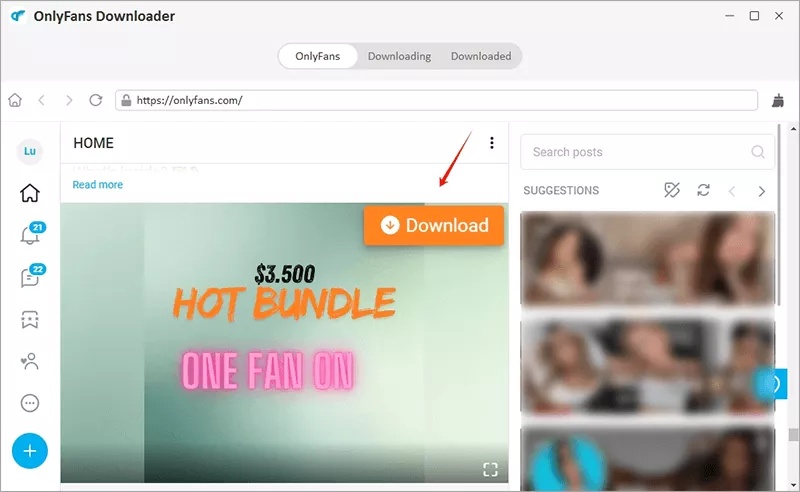
Sign in to your OnlyFans account, open the video you want to save, and click the
Download
button to begin downloading.
-
Step 4:
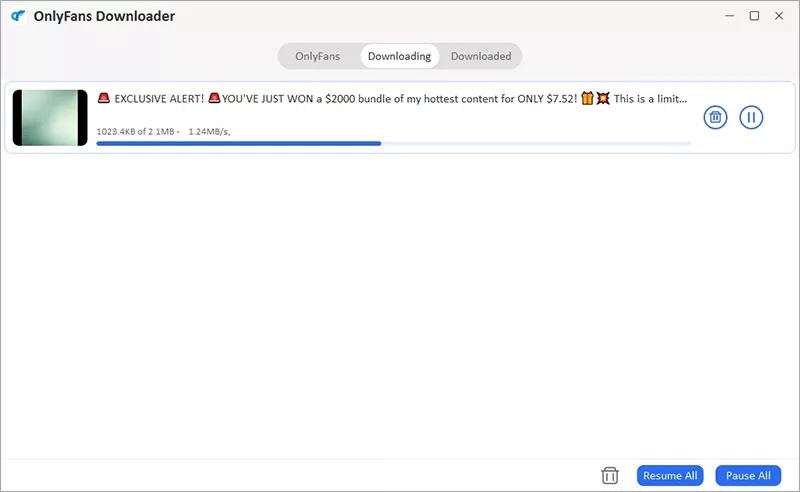
Once the download finishes, go to the
Downloaded
tab to find the saved video file.
- Step 5: Finally, connect your Android phone to your computer using a USB cable and transfer the downloaded video to your device for offline viewing.


Top 4: Quetta
If you prefer a lightweight solution, Quetta Browser is another option to consider. Unlike most downloader apps, Quetta works primarily as a browser, but it includes a built-in media detection and video download feature. This means you can browse websites and download videos directly from the same interface. For users looking for an OnlyFans video downloader for Android, Quetta is a great choice.
- Free and safe to use
- Built-in download engine for quick video detection
- Simple interface similar to a regular browser
- Supports 720p and 1080p downloads on Android
- Independent file storage for downloaded videos
- No bulk download feature
- Limited compatibility with DRM-protected content
- Fewer advanced features compared with dedicated downloaders
▼ Steps to Download OnlyFans Videos with Quetta
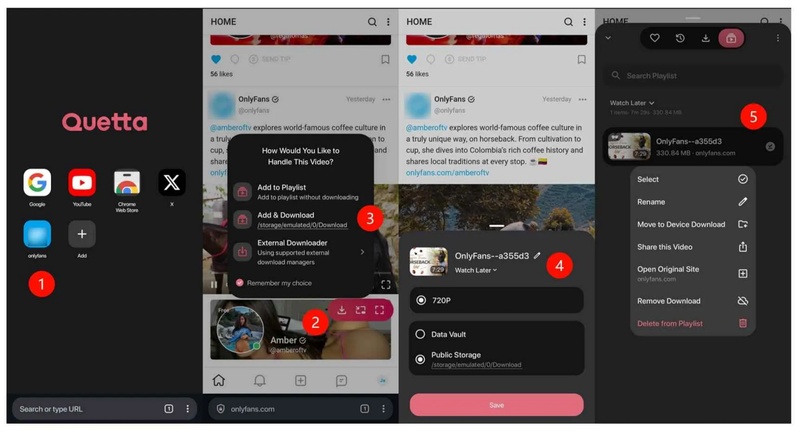
- Step 1: Download and install Quetta Browser from the Google Play Store. After installation, open the browser and visit the OnlyFans website.
- Step 2: Sign in to your OnlyFans account and open the video you want to save. Start playing the video, and a floating download panel will appear on the screen.
- Step 3: Tap the download arrow from the floating panel. Then choose the file name, storage folder, and save location for the video.
-
Step 4:
After setting your preferences, tap Save to begin downloading the video. Once finished, the file will be stored on your Android device and can be watched offline anytime.

Top 5: Ahasave All Video Downloader
Another popular option for Android users is AhaSave All Video Downloader. Many people try screen recording first, but that approach often fails when platforms use DRM protection. Instead of recording the screen, AhaSave uses a built-in browser that detects the video stream while it plays. For users searching for an OnlyFans video downloader for Android, this method works much better. You simply open OnlyFans inside the app, log into your account, and play the video. The downloader then identifies the media file automatically and offers a direct download option.
- Built in browser for direct website access
- Automatically detects streaming videos
- Supports HD and Full HD (1080p) downloads
- Saves videos directly to the phone gallery
- Includes download manager and privacy options
- Free version contains ads
- Some sites with strict DRM may not be fully supported
- Requires login inside the app for certain websites
▼ Steps to Download OnlyFans Videos with AhaSave
- Step 1: Download and install AhaSave All Video Downloader on your Android device.
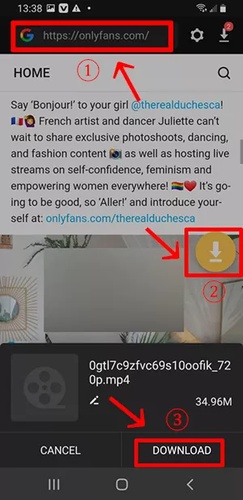
- Step 2: Launch the app and use the built-in browser to visit the OnlyFans website. Log in using your account credentials.
- Step 3: Browse the site and open the video you want to download. Tap the Play button so the app can detect the media stream.
- Step 4: Once the video is detected, tap the download icon that appears on the screen. Select your preferred resolution, such as SD, HD, or 1080p.
-
Step 5:
Tap Download, and the app will begin saving the video to your device. The file will appear in your phone’s gallery once completed.
- Step 6: You can manage files inside the Download Manager. From there, you can play videos, rename them, protect them with a password, or share them if needed.

Top 6: StreamFork
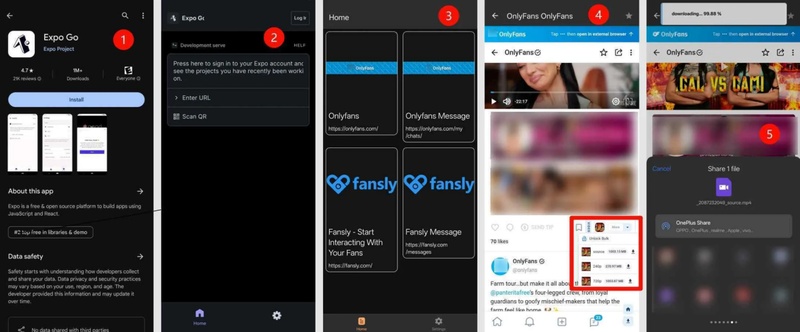
StreamFork is a slightly different option compared with most tools on this list. It originally started as a browser extension, but on mobile devices it works through another platform called Expo Go. That means you need to install Expo Go first before you can run StreamFork on Android. For users searching for an OnlyFans video downloader for Android, StreamFork can still be a useful tool. It allows you to download videos that you already have legitimate access to on OnlyFans. The tool can also handle several types of OnlyFans content, including videos from posts and direct messages.
- Supports downloading videos you can legally access
- Works with OnlyFans and Fansly content
- Can download direct message videos
- Handles multiple types of OnlyFans video content
- Requires installing Expo Go first
- Bulk download features require a paid plan
- Account registration can take time
- Support response may be slow
▼ Steps to Download OnlyFans Videos with StreamFork
- Step 1: Install Expo Go on your Android phone from the Google Play Store. After installing, open the app and scan the QR code provided by StreamFork to load the tool.
- Step 2: Launch StreamFork inside Expo Go, log in to your OnlyFans account, and browse the page to find the video you want to download. A Download button should appear near the video.
-
Step 3:
Tap the
Download
button and confirm the action. The video will be saved to your Android device gallery for offline viewing.

Quick Comparison of the 6 Best OnlyFans Downloader Android Apps
If you are trying to choose the right downloader for OnlyFans Android, comparing the key features side by side makes things much easier. Some tools focus on mobile convenience, while others provide stronger features like DRM removal, higher resolutions, or batch downloads.
| Tool | Supported Sites | DRM Removal | Resolution Support | Speed | Batch Download | Stability |
|---|---|---|---|---|---|---|
| FliFlik UltConv OnlyFans Downloader | 10,000+ OnlyFans, Fansly, Patreon, more | Yes | 720p, 1080p, 4K | 10x Faster | Yes | Very High |
| Video Downloader | Multiple sites | No | Up to 1080p | Medium | No | Medium |
| YT Saver Downloader | 10,000+ sites | Yes | Up to 1080p | Fast | Yes | Medium |
| Quetta Browser | Multiple sites | No | 720p–1080p | Medium | No | Medium |
| AhaSave All Video Downloader | Many websites | No | Up to 1080p | Medium | No | Medium |
| StreamFork | OnlyFans, Fansly | Partial | Up to 720p | Medium | Paid Feature | Low–Medium |
Conclusion
Finding a reliable OnlyFans downloader Android app can be tricky because many mobile apps struggle with DRM protection, batch downloads, or high-resolution videos. Some tools work well for quick saves, but they often come with limitations like ads, slower speeds, or lower stability. If you want a more powerful solution, a desktop tool like FliFlik UltConv OnlyFans Downloader offers a much smoother experience. It supports higher resolutions, faster downloads, and bulk-saving features that most mobile apps simply cannot handle. If you want the easiest way to download OnlyFans videos in HD or 4K and watch them on your Android device anytime, give FliFlik UltConv OnlyFans Downloader a try and see the difference for yourself.
 Secure Download
Secure Download
Secure Download
Hey there! I am Maxwell Clark. I'm always looking for new tech tools that make a difference, from making visuals and audio better to making workflows better. I'm going to share tips and tricks for using AI tools for videos, audio, and images. I'm excited to help you navigate the digital world more efficiently and creatively!

