

 7 minutes read


Struggling with Poop Downloader again? You are not the only one. Many users become annoyed when a download fails or the app behaves incorrectly. After hours of waiting, an error message appears and drains patience. You do not have to stay with a tool that disappoints you most of the time.
This article presents six dependable alternatives that deliver what they promise. If you need speed, reliability, or a simpler method to obtain content, you will find a suitable option here. Let us set aside frustration and turn to solutions that work.

Part 1. Why Poop Downloader Always Fails to Download Video
If you’ve spent time trying to download videos with Poop Downloader, either the online tool here or the app from Google Play, you might have noticed something annoying: it doesn’t work at all. It can’t detect the video resource when you paste the video URL into the bar. Other times, you see an error message, and you’re left wondering what went wrong. It’s frustrating, especially when all you wanted was a simple offline copy of a video
So, what’s going on behind the scenes? Why does a tool that promises easy downloads often struggle with basic tasks? There isn’t just one reason. Several factors can get in the way, from how videos are protected to temporary glitches with Poop Downloader. Knowing these issues can help you avoid wasting time and feeling confused. Here are the main reasons why downloads fail:
- DRM Protection: Most streaming platforms encrypt their videos to prevent unauthorized copying. Poop Downloader often hits a wall here, failing to decrypt the video. This is the main reason downloads fail.
- Maintenance Lag: Like any online service, Poop Downloader occasionally undergoes updates or server maintenance. During these times, downloads may stall or fail.
- Connection Interruption: Even a brief hiccup in your internet connection can cause a download to stop, leaving you with an incomplete file.
We personally checked it ourselves, and the issues are real. As you’ll see in the screenshot below, even a simple YouTube video download is failing. For all these reasons and issues, it’s good to look for some better alternative Poop Downloader options.

Part 2. 6 Reliable Poop Video Downloader Alternatives
Since Poop Downloader keeps letting us down, it’s time to look for better options. Luckily, several tools out there are faster, more reliable, and actually get the job done without the constant errors. In this section, we’ll walk through six alternatives you can trust for downloading videos easily.
1. FliFlik UltConv YouTube Downloader
The first tool we recommend is FliFlik UltConv YouTube Downloader. If the Poop HD Downloader keeps failing or leaving you frustrated, this is a solid replacement. It’s fast, reliable, and works across thousands of websites, letting you download videos, playlists, and even live streams without interruptions. Whether you’re saving YouTube clips, TikTok videos, or Spotify tracks, UltConv handles it smoothly.
What makes it stand out are features like batch downloads, high-resolution video support up to 8K, audio conversion without quality loss, and the ability to remove DRM from music services. It even has a built-in browser and a private folder to keep your files secure. For anyone tired of Poop HD Downloader failing, FliFlik UltConv is the first go-to tool.

- Download videos from 10,000+ websites TikTok, YouTube, Instagram, Vimeo, etc.
- Batch download multiple videos or audio files at once
- Save videos in 720p, 1080p, 2K, 4K, and 8K
- Convert music to 100+ formats, MP3, WAV, AAC, and more, without losing quality
- Download live streams from YouTube, Twitch, and TikTok directly
- Built-in browser and private folder to explore and store files securely
▼ How to Convert YouTube to MP4 with FliFlik UltConv YouTube Downloader?
FliFlik UltConv Video Downloader is fast, reliable, and works on both Mac and Windows. It makes saving high-quality YouTube videos easy. Once the program is installed, follow these simple steps to convert any YouTube video to MP4:
-
Open UltConv Video Downloader and go to the Download tab. Click the “Download to” button at the bottom to start.
FREE DOWNLOAD![secure download]() Secure Download
FREE DOWNLOAD
Secure Download
FREE DOWNLOAD![secure download]() Secure Download
Secure Download

-
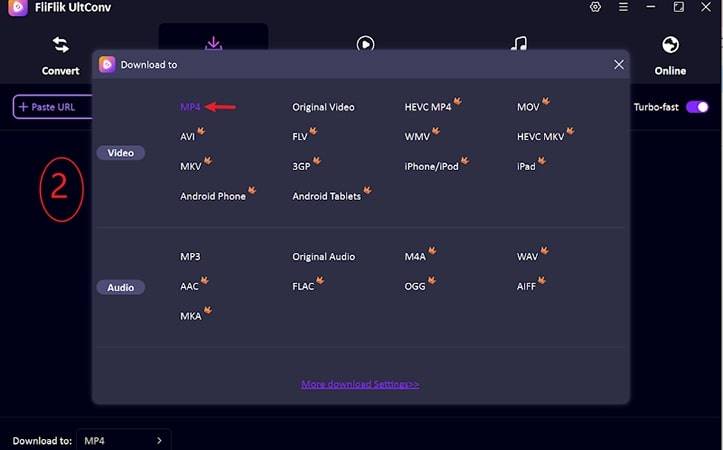
Select your preferred output format. UltConv offers multiple options for both video and audio downloads.
-
Open YouTube in your browser and copy the URL of the video you want to download.

-
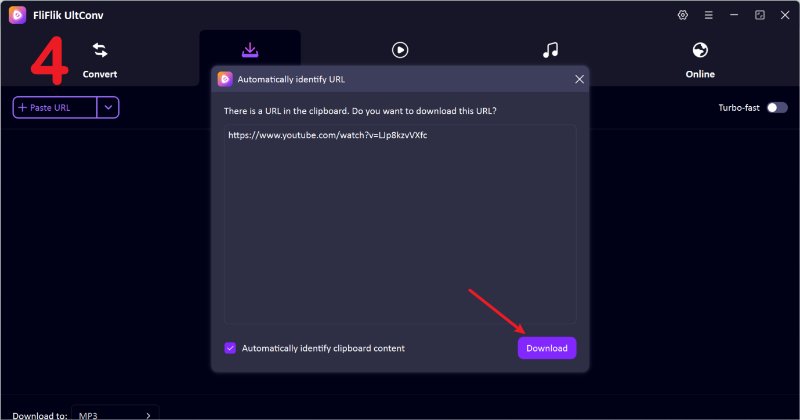
Go back to UltConv. If the program detects the link automatically, just click Download to save the video.
-
If the video link isn’t detected automatically, paste it manually into the search box and click Download.


Once the download is complete, your video will be ready to watch offline in the chosen format with no buffering, no interruptions.
2. TurboScribe

If you’re looking for a simple way to download videos, TurboScribe is another handy option. It’s an online tool, so there’s no software to install, and it works directly in your browser. While it doesn’t have all the bells and whistles of desktop apps like FliFlik UltConv YouTube Downloader, it’s quick for grabbing single videos from multiple sites. For anyone who just wants a straightforward download without extra steps, TurboScribe can be a useful alternative.
- No installation required, works in any browser
- Fast downloads for single videos
- Supports multiple video formats
- Free to use without sign-up
- Limited batch download options
- May struggle with DRM-protected videos
- Fewer advanced features compared to desktop apps
3. YT1S

Another option to consider is YT1S, a popular online YouTube downloader. It focuses on simplicity and speed, letting you convert YouTube videos to MP4 or MP3 quickly. While it’s not as versatile as some desktop programs, it’s perfect for casual users who just need a fast way to save videos for offline viewing. If Poop Downloader isn’t working, tools like YT1S offer a reliable alternative for quick downloads.
- Extremely simple interface, very beginner-friendly
- Converts YouTube videos to both MP4 and MP3
- Works on any device with a browser
- Free to use with no registration
- Limited to YouTube only
- No batch download support
- Ads can be intrusive on the website
4. FliFlik UltConv for Android

If the Poop Downloader app keeps failing, FliFlik UltConv for Android is one of the best alternatives for Android users. This app lets you download YouTube videos and music directly to your phone with lossless quality. You can save videos in 1080p or 4K, convert YouTube to MP3 at 320kbps, and even download entire playlists in one tap. Beyond YouTube, it supports over 10,000 sites like Twitter, Facebook, and Instagram.
- Download YouTube videos in 1080p/4K and audio in 320kbps
- One-click download for playlists and channels
- Batch download multiple videos at the same time
- Convert YouTube to MP3 without losing quality
- Built-in browser for direct downloads from supported sites
- Auto-resume unfinished downloads and background mode support
▼ How to Download YouTube Videos with UltConv for Android :
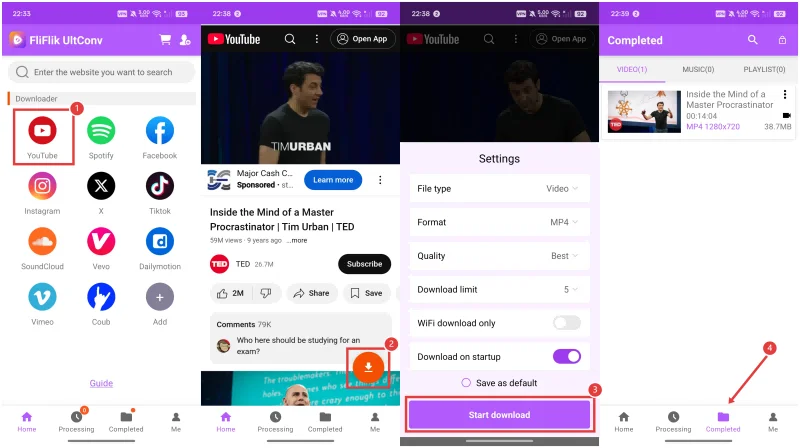
- Step 1: Open UltConv and go to the built-in browser.
- Step 2: Visit a supported video or music site (YouTube, X, Vimeo, SoundCloud, etc.).
- Step 3: Play the video or audio you want. When detected, a Download button will appear.
-
Step 4:
Tap it, choose your format (MP4 or MP3) and quality, then confirm to start downloading.

5. Savefrom.net

Savefrom.net is another reliable online alternative worth considering. It’s been around for years and has built a reputation for being fast, simple, and accessible from any browser. You don’t need to install any software, which makes it perfect for users who just want to quickly grab videos without extra hassle.
- Works directly in a browser, no software needed
- Fast downloads for single videos
- Supports multiple formats like MP4 and MP3
- Free to use without registration
- Limited batch download options
- Ads can be distracting
- Some DRM-protected videos cannot be downloaded
- Geo-blocked, USA region users can’t use it
6. VidsSave

VidsSave is another solid option if Poop Downloader isn’t working. It’s an online video downloader designed for speed and ease of use. While it doesn’t offer all the advanced features of a full desktop app, it covers the essentials: fast downloads, support for multiple sites, and a clean interface that’s easy to navigate.
- No installation required; works on any device.
- Supports multiple video formats and resolutions.
- Free and straightforward to use.
- Works on mobile and desktop browsers.
- No advanced features like playlist downloads.
- Some websites with DRM protection may not work.
- Limited support for batch downloads.
Part 4: Comparison of 6 Best Poop Downloader Alternatives
We’ve covered six solid alternatives to Poop Downloader, each with its own strengths and features. To make it easier to choose the right one for your needs, here’s a quick comparison based on type, supported formats, supported sites, batch download, high-quality support, DRM content handling, and overall stability.
| Tool | Type | Supported Formats | Supported Sites | Batch Download | High Quality | DRM Content | Stability |
|---|---|---|---|---|---|---|---|
| FliFlik UltConv (Desktop) | Desktop App | 100+ formats, MP4, MP3, WAV, AAC, FLAC, AIFF | 10,000+ sites | Yes | Up to 8K video, 320kbps audio | Yes | Very High |
| TurboScribe | Online | MP4, MP3 | Multiple sites | No | Up to 1080p | No | Medium |
| YT1S | Online | MP4, MP3 | YouTube | No | Up to 1080p | No | Medium |
| FliFlik UltConv (Android) | Mobile App | MP4, MP3, AAC, M4A | 10,000+ sites | Yes | Up to 4K video, 320kbps audio | Yes | High |
| Savefrom.net | Online | MP4, MP3 | YouTube, Facebook, TikTok, Vimeo | No | Up to 1080p | No | Medium |
| VidsSave | Online | MP4, MP3 | Multiple sites | No | Up to 1080p | No | Medium |
| Poop Downloader | Online/App | MP4, MP3 | Limited sites | No | Up to 1080p | Limited | Low |
As you can see, while online tools like TurboScribe, YT1S, Savefrom.net, and VidsSave are convenient for quick downloads, they lack advanced features like batch downloading, DRM handling, and high-resolution support. Desktop and mobile apps like FliFlik UltConv offer more flexibility, higher stability, and support for thousands of sites.
If you’ve been struggling with Poop Downloader failing repeatedly, these alternatives provide better reliability and more features. Among them, FliFlik UltConv YouTube Downloader stands out as the most complete solution, whether you’re using a desktop or Android device. It handles playlists, live streams, DRM-protected content, and high-resolution videos effortlessly.
Final Words
Poop Downloader may work occasionally, but its failures are frustrating and time-consuming. For a smooth, reliable experience, FliFlik UltConv YouTube Downloader is your best choice. It lets you download videos and music from thousands of sites in high quality, handle playlists in bulk, and convert content without losing quality. Stop struggling with failed downloads. Switch to FliFlik UltConv today and enjoy offline content effortlessly.
 Secure Download
Secure Download
Secure Download
Hey there! I am Maxwell Clark. I'm always looking for new tech tools that make a difference, from making visuals and audio better to making workflows better. I'm going to share tips and tricks for using AI tools for videos, audio, and images. I'm excited to help you navigate the digital world more efficiently and creatively!

