

 6 minutes read


Streaming on SfFix is easy. Keeping your favorite movies and shows for offline viewing? Not so much. That’s where a reliable SFflix downloader comes in. Whether you’re dealing with slow internet, travel plans, or just want permanent access to HD content, a good downloader lets you save Sflix videos directly to your device and watch anytime without buffering or ads. But not all tools work the same. Some struggle with quality, others fail on newer SFlix links. In this article, we will share the 3 best SFlix downloaders in 2026 that actually deliver results and simple workflows. Let’s get straight to it.

Part 1. Why Do We Need SFlix Downloader?
SFlix is a popular free streaming site where you can watch movies and TV shows without signing up. It’s convenient, constantly updated, and packed with HD content. But it also comes with downsides. If you’ve ever tried using it regularly, you already know the struggle. While there are plenty of Sflix alternatives, many users still stick with SFlix for its massive library. That’s exactly why an SFlix to video downloader makes sense. Below are some main reasons why we need an SFlix downloader.
- Intrusive pop-up ads that interrupt playback
- Long loading times, especially during peak hours
- Limited resolution options depending on the server
- No offline viewing feature
- Links that randomly stop working
A dedicated SFlix downloader solves all of this by letting you save videos locally, choose HD quality, skip ads entirely, and watch anytime, even without internet. Simple, practical, and way less frustrating.
Part 2. Best Professional SFlix Downloader [Editor’s Choice]
If you’re serious about saving movies from SFlix in HD without broken links or sketchy pop-ups, FliFlik UltConv Video Downloader is hands down the most reliable option. It works as a powerful SFlix movie downloader while also doubling as a full-featured video and music converter. What makes UltConv Video Downloader stand out is how much it packs into one simple desktop app. You can grab SFlix movies in 1080p, 2K, or even 4K, extract audio in high-quality MP3, and download the entire seasons in one click. No browser extensions. No complicated setups. Just a few clicks. Beyond SFlix, UltConv supports over 10,000 websites, including YouTube, TikTok, Facebook, Instagram, Vimeo, and more. It also removes DRM from Spotify and Apple Music, letting you save tracks as MP3s with full ID3 tags. Whether you’re building an offline movie library or collecting music, UltConv handles everything smoothly.

- Download SFlix movies in 4K, 2K, and 1080p quality
- Batch download videos and audio in MP4, MP3, and 100+ formats
- One-click downloads for playlists, channels, and albums
- Convert video to audio with zero quality loss
- Remove DRM from Spotify and Apple Music to MP3
▼ How to Download Movies from SFlix with UltConv Video Downloader?
-
Download and install UltConv on your Windows or Mac computer. Launch the program once setup is complete.
FREE DOWNLOAD![secure download]() Secure Download
FREE DOWNLOAD
Secure Download
FREE DOWNLOAD![secure download]() Secure Download
Secure Download
-
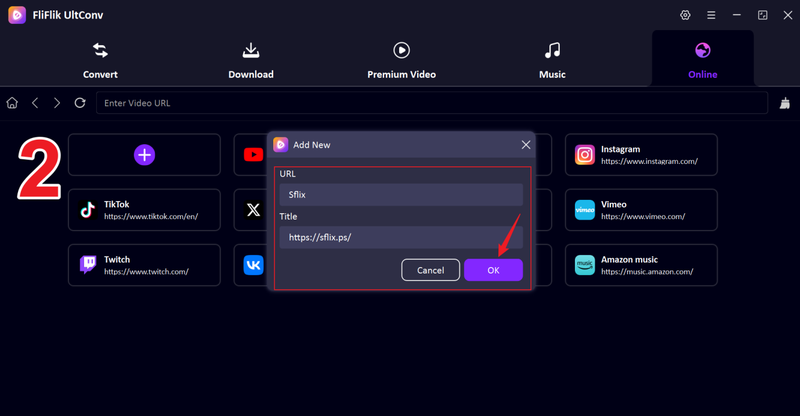
Open UltConv, click the + tab, then paste the SFlix website link into the pop-up window. Enter SFlix as the site name and click OK.
-
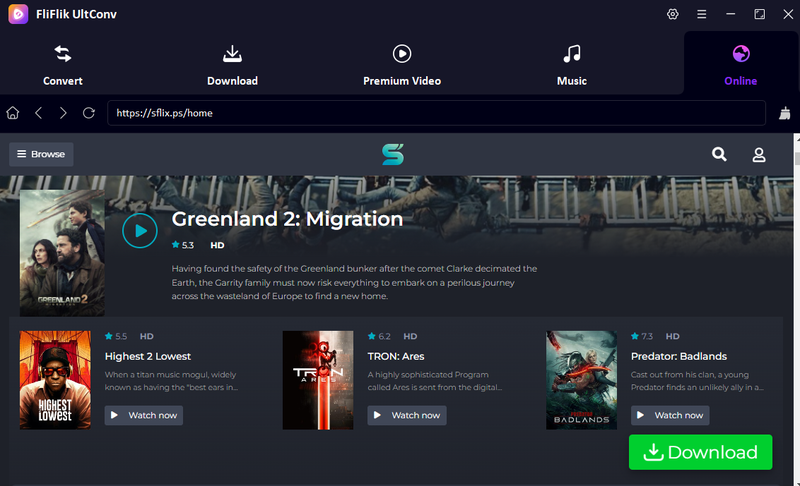
You’ll now see the SFlix website loaded directly inside UltConv’s built-in browser.
-
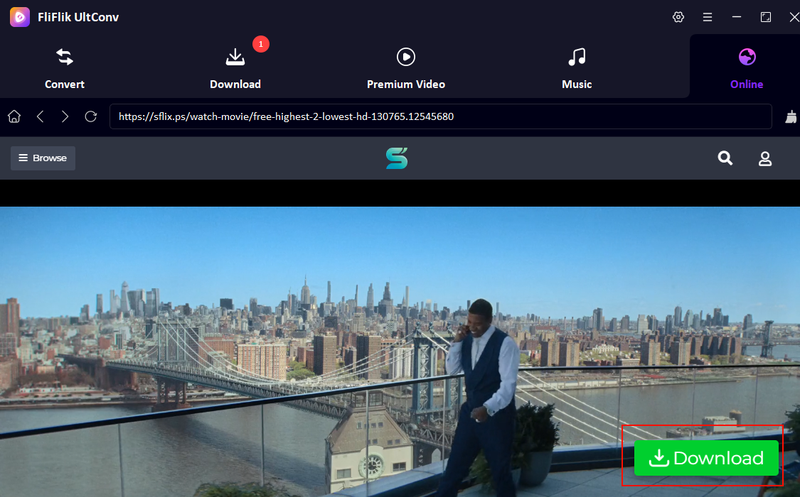
Play the movie you want to download, and click the green Download button.
-
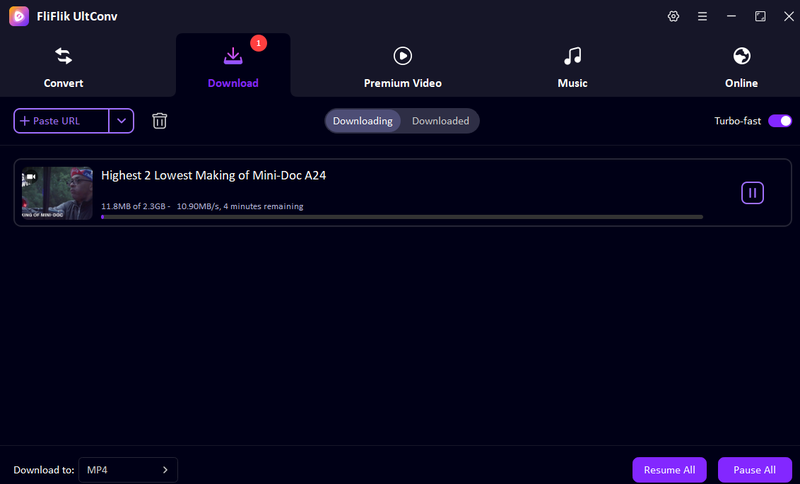
UltConv will begin downloading immediately. Once finished, head to the Downloaded section to watch your movie offline anytime.


Part 3. 2 SFlix Downloaders Online \Free but Not Reliable
Looking for a Sflix downloader video online free usually leads to web tools and browser extensions. They sound easy. Paste a link, click download, done. But in reality, most online Sflix downloaders struggle with pop-ups, broken parsing, limited quality options, and frequent failures. Two tools come up a lot: DDownr and CocoCut. Here’s how they work and where they fall short.
1. ddownr
ddownr is a browser-based SFlix downloader that supports many streaming sites, including SFlix. No installation is required. You just paste your SFlix movie link and try to grab the video. That said, DDownr often fails to recognize SFlix URLs and is packed with intrusive ads.
- No software installation
- Simple paste-link workflow
- Works on most browsers
- Supports basic MP4 downloads
- Unstable with SFlix links
- Heavy pop-up ads
- Limited resolution choices
- Downloads frequently fail
- No batch downloading
▼ How to Download from Sflix Using DDownr?
- Step 1: Open Sflix, find your movie, and copy its URL.
-
Step 2:
Visit DDownr in your browser and paste the SFlix link into the input box.
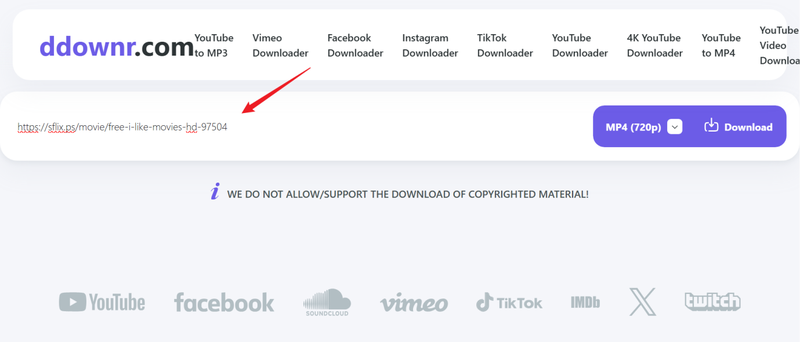
- Step 3: Click the Download button and wait for ddownr to process the video.

This is the typical SFlix downloader video online flow, but results vary a lot.
2. CocoCut
CocoCut is a Chrome/Edge extension that detects streaming videos while they’re playing. Once installed, it attempts to capture SFlix videos directly from your browser. It sometimes works, but many SFlix streams aren’t detected.
- Browser-based extension
- Automatically scans playing videos
- No desktop software needed
- Simple interface
- Requires extension installation
- Frequently misses SFlix streams
- No batch downloads
- Limited quality control
- Doesn’t handle protected videos well
▼ How to Download from SFlix Using CocoCut?
-
Step 1:
Install CocoCut from your browser’s extension store.
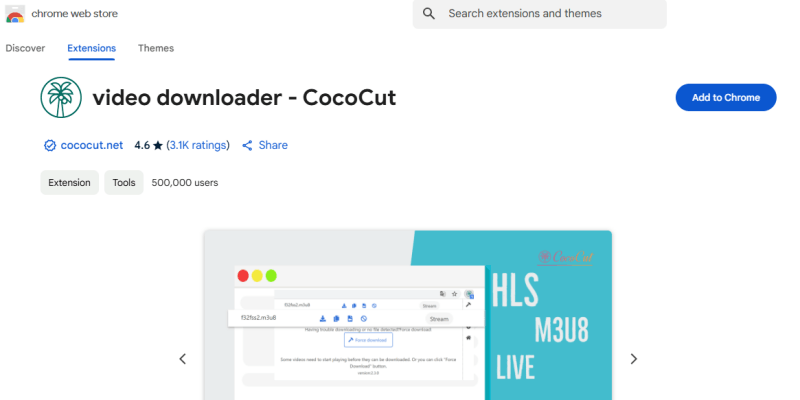
- Step 2: Open SFlix and start playing the movie you want to download.
-
Step 3:
Click the CocoCut icon in your toolbar to scan for video streams, then select the detected file and click Download.
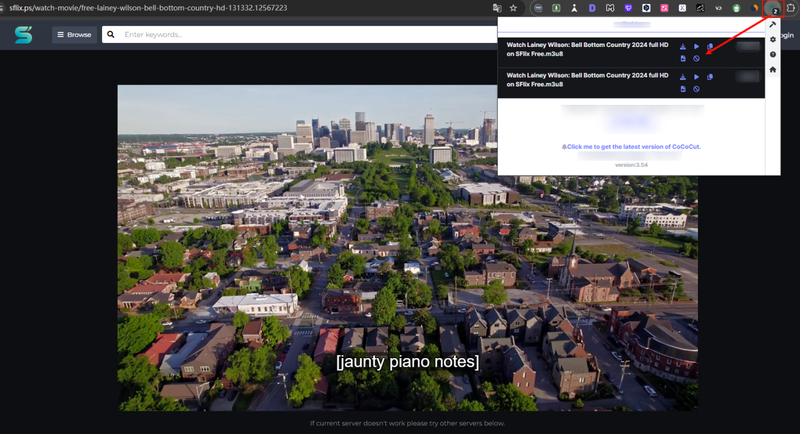


Part 4. Quick Comparison of the 3 Best SFlix Downloaders
So, can you download from SFlix? Yes, but the tool you pick makes a huge difference. Some downloaders are built for serious offline viewing. Others are only good for quick, one-off grabs (and often fail halfway through). To make things simple, here’s how FliFlik UltConv, DDownr, and CocoCut compare side by side:
| Feature | FliFlik UltConv | DDownr | CocoCut |
|---|---|---|---|
| Supported Platforms | Windows, Mac | Browser only | Browser extension |
| Batch Download | Yes | No | No |
| Download Speed | Fast (10x accel.) | Slow/variable | Moderate |
| Video Quality | Up to 4K (HD) | Limited/Variable | Usually standard |
| DRM Removal | Yes (audio/music DRM) | No | No |
| Best For | Reliable HD downloads, batch jobs, and offline libraries | Quick try-outs, simple links | Occasional stream captures, no install apps |
Final Words
Finding a reliable SFlix downloader doesn’t have to be complicated. While online tools can work for quick saves, they often struggle with slow speeds, failed links, or low-quality videos. If you want smooth downloads, HD movies, and zero guesswork, a desktop solution makes all the difference. That’s where FliFlik UltConv Video Downloader stands out. With fast batch downloads, 4K support, and built-in browsing, it’s built for real offline viewing, not trial-and-error clicks. Ready to start saving your favorite SFlix movies the easy way? Download FliFlik UltConv today and enjoy your films anytime, anywhere.
 Secure Download
Secure Download
Secure Download
Hey there! I am Maxwell Clark. I'm always looking for new tech tools that make a difference, from making visuals and audio better to making workflows better. I'm going to share tips and tricks for using AI tools for videos, audio, and images. I'm excited to help you navigate the digital world more efficiently and creatively!

