

 8 minutes read


You can not officially download VOE videos. And if you want to download, you need a good VOE downloader. All you need is an appropriate and reliable tool that you can use to capture videos fast, watch them whenever you want, and save your favorite videos without any inconvenience.
In 2026, there are several options that can be used both on a PC or Phone to make this process free, simple, and fast. In this article, we will review 6 of the most popular VOE downloaders in the market and see how each of them stands out and how they can assist you in getting your videos without any hassle.

Part 1. Why You Might Need VOE Downloader
VOE has all kinds of videos, fun clips, tutorials, and random finds that catch your eye. Watching them online is easy enough, but there are times when streaming just isn’t convenient. Maybe your internet connection is slow, or you’re traveling and don’t want to rely on data. Sometimes, you just want to have your favorite videos ready whenever you feel like watching them, without opening the app each time. That’s where a VOE downloader comes in. Here are some reasons why it can be useful:
- Offline access: Saving VOE videos lets you watch them anytime, even when the internet is slow, unavailable, or when you want to save mobile data.
- Ease of use: Once a video is downloaded, it’s always there. No loading pages, no searching the VOE site again, just click and play.
- Personal collection: Some people like to keep videos they find useful, interesting, or entertaining so they can revisit them later.
- Easy sharing: Downloaded videos can be shared directly with friends or family, especially when they don’t use VOE or don’t have reliable internet access.
- Creative use: Having the video file makes it possible to edit clips, remix scenes, or use parts of the video in personal creative projects.
- Safety copy: Keeping your own copy helps protect against videos being deleted, restricted, or removed from the platform without notice.
Part 2. Best Recommend VOE.sx Video Downloader
If you’re looking for a tool that can handle just about any video or music download, FliFlik UltConv VOE Downloader is a solid choice. It doesn’t just grab videos from VOE; it works with thousands of websites, letting you save clips, playlists, or even entire channels in just a few clicks. You can download videos from VOE, YouTube, Instagram, Netflix, Prime Video etc. Whether it’s HD video, music tracks, or live streams, this tool makes downloading fast and simple.
One of the best things about UltConv VOE Downloader is how it keeps quality intact. You can get videos in 4K or 8K, convert them to MP3, MP4, MKV or other 100+ video and audio formats. You can batch download multiple videos at once. Also, it can even remove DRM from music services like Spotify and Apple Music. Plus, features like a built-in browser make the whole process smoother, saving time while keeping your files organized and secure.

- Ultimate video downloader from 10,000+ sites, YouTube, Netflix, TikTok, Spotify, etc.
- Batch download videos and music in MP4, MP3, and 100+ formats
- Download playlists, channels, and albums in one click
- Convert video to audio without losing quality
- Download videos in 4K, 2K, 1080p; audio in 320kbps
- Remove DRM from Spotify and Apple Music
▼ Steps to Download Videos from VOE with UltConv VOE Downloader
FliFlik UltConv VOE Downloader makes it easy to save full clips or episodes from VOE and other supported sites. Just download and install UltConv VOE Downloader, follow these simple steps:
 Secure Download
Secure Download
Secure Download
-
Open FliFlik UltConv VOE Downloader and go to the Download tab. Click the Download to button to select your preferred format.

-
Choose the format you want for your video, like MP4, MP3, or any other supported option.
-
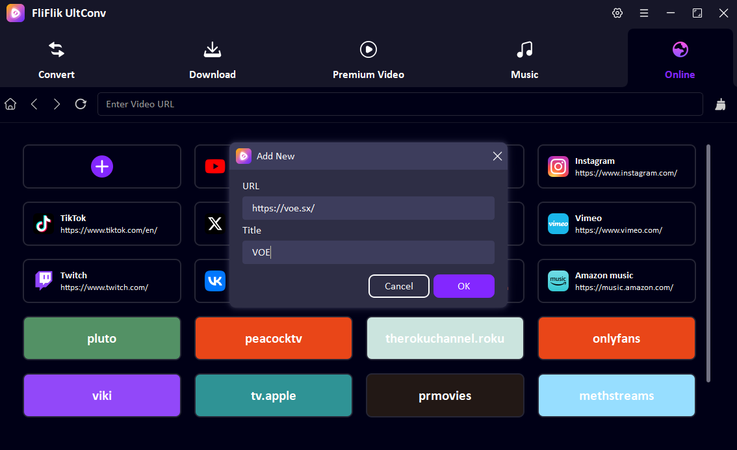
Add voe.sx URL to the Online section in UltConv, and click it to VOE official website.
-
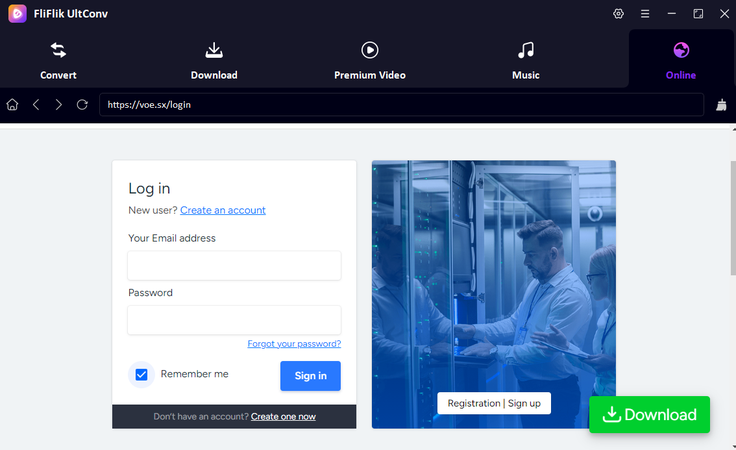
Log in to your VOE account, which can make sure you can find the video you want to download easily.
-
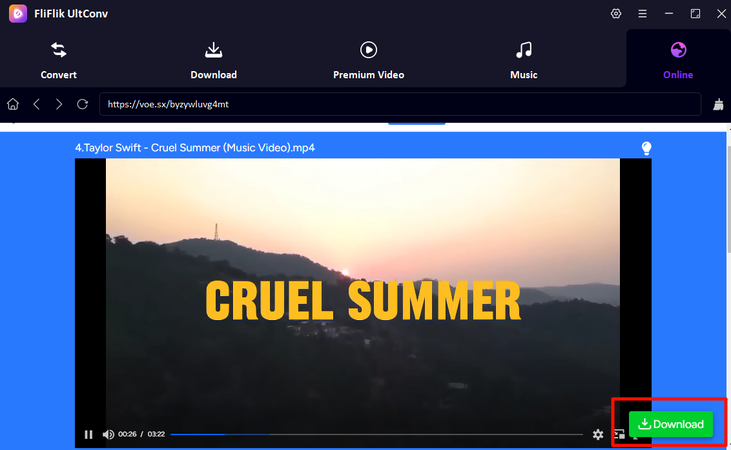
Find the video you want to download, play it, then click the Download button at the bottom.
-
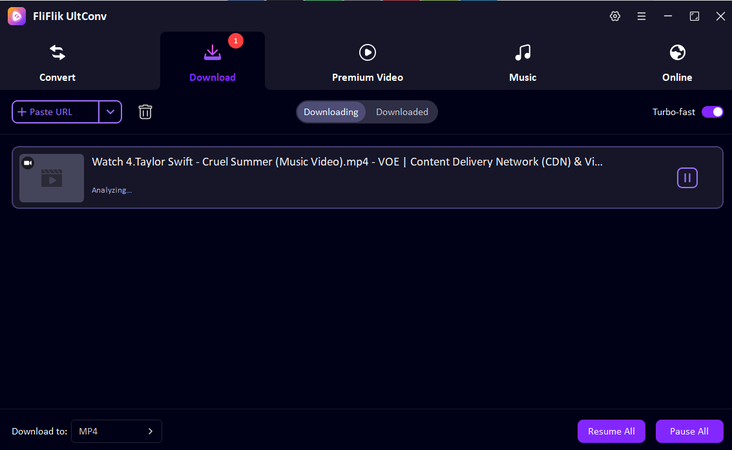
Now you can track the download process of your video in the Downloading tab. Once it finishes, your video will appear as an MP4 file, and you can play it anytime, anywhere.


And that’s it! Your favorite VOE videos are now ready to enjoy offline, hassle-free, and in high quality.
Part 3. 5 Free VOE Video Downloaders
If you’re looking for alternatives to FliFlik UltConv VOE Downloader, there are several free tools that can help you download VOE videos. Here’s a quick look at five options, along with their pros and cons.
1. YT1Save

YT1Save is an easy-to-use online downloader that works with VOE and many other video platforms. You don’t need to install software or create an account, just paste the video link and choose the format you want. It’s perfect if you just need a quick download for personal use. While it doesn’t have advanced features like batch downloading or playlist support, it gets the job done for single videos in a simple, fast way.
- Free and online, no installation needed
- Supports multiple formats
- Very quick for single videos
- Limited to one video at a time
- Ads can be distracting
2. TubeOffline

TubeOffline is another online tool that can act as a basic VOE SX downloader. It supports many streaming websites and allows you to convert videos into different formats. The interface is simple, and you don’t need technical skills to use it. It’s convenient for occasional downloads but doesn’t offer advanced features like batch downloads or high-quality settings. Speed can vary depending on your internet connection, and some video formats may not be available.
- Supports multiple platforms
- Free and fast for casual use
- No registration required
- Limited format options
- Download speed depends on your internet
- fail to download sometimes
3. FlyDownloader

FlyDownloader is a lightweight tool for downloading VOE videos. Its interface is basic, but it’s very fast and easy to use. You just paste the video link and select your desired format. It works well for those who want a simple, no-frills downloader for occasional use. It doesn’t have advanced features like batch downloads or playlist saving, and the format options are limited. However, its simplicity and speed make it a solid choice for users who don’t need extra bells and whistles.
- Fast and lightweight
- Simple to use
- No technical skills required
- Limited format options
- No batch download support
4. voe-dl

voe-dl is an open-source VOE SX video downloader available on GitHub. It works across multiple platforms and can even handle batch downloads, making it great for users who want more control. Being open-source, it’s free and regularly updated by contributors. The downside is that it requires some technical knowledge to install and use, and it doesn’t have official customer support. If you’re comfortable with basic command-line operations, this tool offers flexibility and power that many online downloaders don’t.
- Free and open-source
- Supports batch downloads
- Works on multiple platforms
- Requires technical knowledge
- No official support
- difficult to use for new users
5. Video Downloader VeeVee

Video Downloader VeeVee is a Chrome extension that lets you save VOE videos directly from your browser. It’s very convenient since you don’t need to open a separate program; you just click the extension while watching a video. It supports quick downloads and works well for casual users.
- Works directly in Chrome
- Quick and easy downloads
- No extra software needed
- Only works in Chrome
- Some videos may not be detected
Part 4. Best 6 VOE.sx Video Downloaders Comparison
Confused between all the above options? Here’s a clear comparison of the top VOE.sx downloader tools we recommended above so you can quickly see how they stack up on key points like format support, quality, batch downloads, security, platform support, and what they’re best for.
| Tool | Type | Output Formats | Max Quality | Batch Download | Security | Supported Platforms | Best For |
|---|---|---|---|---|---|---|---|
| FliFlik UltConv VOE Downloader | Desktop App | MP4, MP3, 100+ formats | Up to 8K | Yes | High (private folder) | 10,000+ platforms | Heavy users, high-quality downloads |
| YT1Save | Web downloader | MP4, MP3 | 1080p | No | Medium | Only streaming sites | Quick, one-off downloads |
| TubeOffline | Web downloader | MP4, others | 1080p | No | Medium | Only streaming sites | Simple, no install needed |
| FlyDownloader | Desktop/Web | MP4, MP3 | 1080p | No | Medium | Only streaming sites | Lightweight, basic use |
| voe-dl | Open-source tool | MP4, MP3 | Depends on the source | Yes | Medium-High | VOE only | Tech users, batch tasks |
| Video Downloader VeeVee | Browser Extension | MP4 | 1080p | No | Medium | Only streaming sites | Users who prefer easy&quick solutions |
Final Thought
Finding the right VOE downloader really comes down to how often you download and how much control you want. Free online tools are fine for quick, one-off videos, but they usually come with limits on quality, speed, or features. If you want a smoother experience, better formats, and reliable results, a dedicated tool makes a big difference. That’s where FliFlik UltConv Voe Downloader stands out. It handles VOE videos easily, supports high-quality downloads, batch tasks, and gives you more flexibility without the usual headaches. If you download VOE content regularly and want something stable and simple to use, it’s worth trying.
Secure Download
Secure Download
Hey there! I am Maxwell Clark. I'm always looking for new tech tools that make a difference, from making visuals and audio better to making workflows better. I'm going to share tips and tricks for using AI tools for videos, audio, and images. I'm excited to help you navigate the digital world more efficiently and creatively!

