

 8 minutes read


Direct Messages on X (what used to be Twitter) aren’t just for casual chats. Sometimes, people send you videos you actually want to keep, maybe for work, maybe as evidence, or just because. The thing is, X doesn’t let you download those DM videos straight from the app, which can be annoying when you need an offline copy or a backup. That’s where X/Twitter DM Downloaders tools come in handy. They make saving those videos way easier.
No matter if you want offline access, a backup, or easy reference, picking the right method makes all the difference. In this article, we’ll cover 7 practical X/Twitter DM downloaders for Windows, Mac, iPhone, and Android, including their features, pros, cons, and which is best for your needs, without any technical hassle.

Part 1. Best X/Twitter DM Downloader on Windows and Mac
If you’re on Windows or Mac and want a reliable way to save Twitter DM videos, FliFlik UltConv Video Downloader is a top choice. UltConv Video Downloader supports over 10,000 websites, including X (formerly Twitter), YouTube, Facebook, Instagram, and many more, so you’re not limited to just one platform. It allows you to save videos in a wide range of resolutions, from HD to 2K, 4K, and even 8K, ensuring you maintain the highest quality possible.
Additionally, you can batch download multiple DM videos at the same time, saving you valuable time if you have several clips to store. For privacy-conscious users, UltConv also features a secure private folder where downloads can be password-protected and hidden, making it ideal for preserving personal or sensitive content shared through DMs. This combination of speed, quality, and security makes it a go-to tool for anyone looking to keep their Twitter DM videos safe and accessible offline.

- Supports 10,000+ sites to download Twitter, YouTube, Facebook, and more in HD/2K/4K/8K
- Batch download videos and music to MP4, MP3, and over 100+ formats
- Fast speeds to grab multiple videos at once with up to 10× faster downloads
- Built-in browser to download directly inside the app, including X/Twitter DM
- Private folder to keep your downloads hidden and password-protected
▼ Steps to Download a Twitter DM Video with FliFlik UltConv Video Downloader:
-
Open FliFlik UltConv Video Downloader and go to the Download tab. Click the “Download to” button to choose the format.
FREE DOWNLOAD![secure download]() Secure Download
FREE DOWNLOAD
Secure Download
FREE DOWNLOAD![secure download]() Secure Download
Secure Download

-
Select the output format for your video, typically MP4.

-
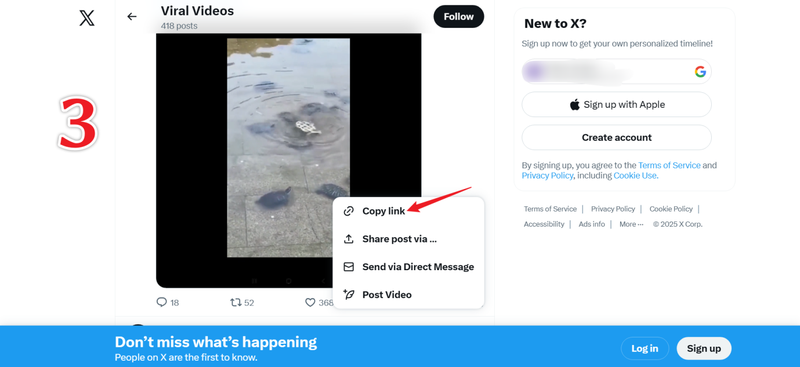
Open Twitter in your browser, locate the DM video you want to save, and copy its URL.
-
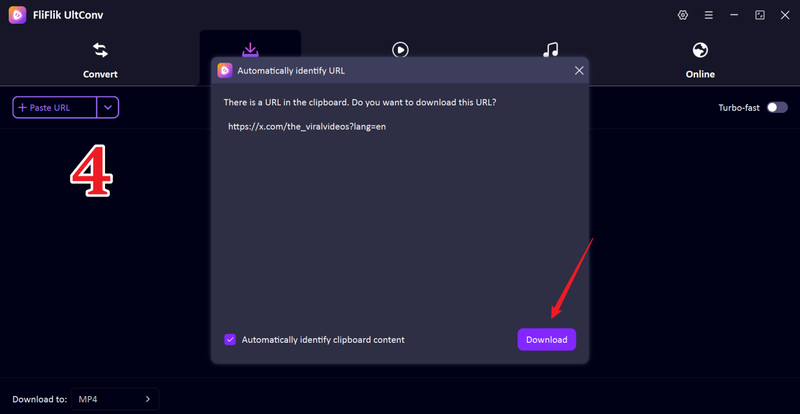
Return to UltConv. If the software detects the video automatically, click Download to start saving the clip.
-
If the video isn’t detected automatically, paste the link manually into the search box and press Download.
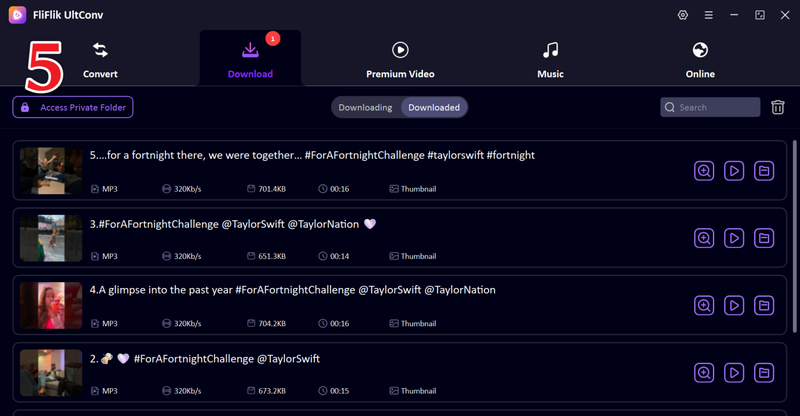


Once the download finishes, your Twitter DM video will be in the folder you selected, ready to watch offline or transfer to your phone’s camera roll via USB. This ensures your videos stay organized and maintain high quality.
Part 2. How to Download Twitter DM Videos on Google Chrome
If you spend most of your time in Chrome, you don’t need extra software to save Twitter DM videos. Browser extensions can do the job directly. Two standout options are Video DownloadHelper and Video Downloader Plus. Let’s break them down so you know which one works best for you.
1. Video DownloadHelper

Video DownloadHelper is one of the easiest ways to grab videos from Twitter DMs directly in your browser. Instead of jumping between apps or copying links into external software, this Chrome extension detects videos on the page and lets you download them in just a few clicks. It works not only with Twitter but also with hundreds of other websites, making it a versatile tool for anyone who frequently saves online videos. Whether it’s a funny clip, an important work video, or a memory you want to keep, Video DownloadHelper makes the process quick, simple, and reliable without leaving your browser.
- Works on 1,000+ sites, including Twitter
- High-quality downloads: save HD videos or extract MP3 audio
- Free, easy to use, and open-source. No tracking or hidden charges
- Can’t download YouTube videos due to Google policies
- Maximum resolution is 1080p; no 4K support
- Limited advanced settings compared to dedicated software
2. Video Downloader Plus

Video Downloader Plus is a handy Chrome extension that makes saving Twitter DM videos quick and effortless. Once installed, it detects videos on any tweet and adds a simple download button right in your toolbar. You can pick from multiple resolutions, including HD, 2K, and even 4K when available, so you always get the quality you want. It’s designed for speed and ease, letting you grab videos without switching apps or using complicated software. Beyond Twitter, it works on many other sites too, making it a versatile tool for anyone who wants fast, reliable video downloads directly in their browser.
- Supports high resolutions, including 2K and 4K
- Multiple format and resolution options with file size info
- Extra features like “save for later,” casting to TV, and an integrated player
- No YouTube downloads because of Chrome restrictions
- Contains some ads and requests permissions; it may collect usage data
Part 3. How to Download Twitter DM Videos with Online Tools
Sometimes you don’t want to install anything, especially if you’re on a phone or a shared computer. That’s where online Twitter DM video downloaders shine. Two popular and reliable options are SSSTwitter and Twitter Video Downloader, both simple yet effective.
1. SSSTwitter

SSSTwitter is a free web-based tool that makes saving Twitter videos straightforward. Just open the site, paste your tweet URL, and hit download. It fetches the video directly from Twitter servers and lets you pick HD quality. The interface works on desktop and mobile, including iPhones and Android devices, so you can grab your videos anywhere, anytime.
- Completely free with no download limits
- Mobile-friendly: works on iOS and Android browsers
- High-quality downloads support full HD, sometimes 4K
- Only works for public tweets, not private DMs
- Ads and countdowns can slow the process
- Stay on the official site to avoid malware from clones
2. Twitter Video Downloader

Twitter Video Downloader is another free, browser-based tool that focuses on simplicity. It extracts videos and GIFs from tweets, so you can quickly save them to your PC or phone. The tool works on any device with a browser, and no registration is required. While it relies on an internet connection, its fast interface makes it convenient for one-off downloads.
- Fast and easy: copy-paste, then download
- Supports GIFs as MP4 files
- Mobile-friendly, works on all browsers
- Only public tweets can be downloaded
- Contains ads and pop-ups; stick to the main download button
These two online tools are perfect if you need a quick, no-install solution for saving Twitter DM videos on any device.
Part 4. How to Download Twitter DM Videos on iPhone and Android
Downloading Twitter DM videos on mobile can be tricky since Twitter doesn’t provide a direct download button. Luckily, you have two main options that make it easy.
1. Built-in Screen Recording

Most smartphones today have a native screen recording feature. On iPhones, it’s accessible through the Control Center, while Android phones typically include it in Quick Settings. This method lets you record any DM video as it plays, including private messages that online tools can’t reach. You can also capture audio from the video or your microphone, making it a flexible option.
- No extra apps needed
- Works for all content, including private DMs
- Capture system audio or microphone sound
- Quality depends on your screen resolution
- Manual start/stop process
2. Download Twitter Videos — GIF (Android Only)

For Android users, the “Download Twitter Videos — GIF” app makes saving tweets’ videos and GIFs quick and easy. You can either share directly from the Twitter app or paste a tweet link into the app. It also lets you choose the resolution before downloading and keeps all videos organized in its built-in manager.
- Integrates with Android share menu
- Choose resolution and see file size before downloading
- Built-in video player and download manager
- Handles GIFs by converting them to MP4
- Contains ads and some in-app purchases
- Android only; no iOS version
- Requests storage/network permissions
Conclusion
Whether you’re on a desktop, using a browser, or working from a mobile device, there are plenty of options to make sure you can keep the videos that matter. Some X/Twitter DM Downloaders are quick and simple, like online tools or screen recording, while others, like extensions and dedicated desktop apps, give you more control and higher quality.
Among all these options, FliFlik UltConv Video Downloader stands out as the easiest and most reliable choice. It supports fast downloads, works across multiple devices, and maintains video quality without hassle. If you want a single tool that covers all your Twitter DM video needs efficiently, FliFlik UltConv Video Downloader is the one to try.
 Secure Download
Secure Download
Secure Download
FAQs
Q1. What is the best Twitter DM video downloader online?
For a reliable, all-in-one solution, FliFlik UltConv Video Downloader is the top choice. It supports high-quality downloads, multiple formats, batch saving, and organizes videos into folders, making it easy to save Twitter DM videos quickly and safely.
Q2. How do I download Twitter DM videos on my iPhone?
You can use a web downloader like SSSTwitter.com in Safari or record the video using your iPhone’s built-in Screen Recording feature. Open Control Center, start recording, play the DM video, then stop recording. The captured video is saved directly to your Photos app.
Q3. Is downloading Twitter DM videos legal?
Downloading videos without permission may violate Twitter’s terms of service and copyright laws. Personal use, such as saving a friend’s video for private viewing, is generally safe, but redistributing or monetizing content without consent can cause legal issues. Always respect the original creator’s rights.
Hello, I research and introduce useful solutions for AI videos, images, and audio tips in our daily life. If you learn these things, you can easily deal with the problems of the new era.

