

 8 minutes read


Downloading videos on YouTube one after the other can soon get boring. More so, if you want an entire playlist or channel downloaded, then you can use YouTube Multi Downloader. These tools allow you to batch download multiple videos at once, saving hours of effort. In this article, we review six of the best YouTube multi-downloaders available in 2026, comparing their types, maximum video quality, output formats, download speed, batch support, and site compatibility. Whether you prefer a desktop solution or an online service, this article will help you pick the right tool for efficiently archiving your favorite content.

Quick Glimpse of 6 Best YouTube Multi Downloaders
Before looking into detailed reviews, here’s a quick overview of the top tools for batch-downloading YouTube playlists and channels. Compare their type, maximum quality, supported formats, download speed, and platform compatibility at a glance.
| Downloader | Type | Max Quality | Output Formats | Download Speed | Batch Support | Supported Sites |
|---|---|---|---|---|---|---|
| FliFlik UltConv YouTube Multi Downloader | Desktop (Win/Mac) | Up to 8K | MP4, MP3, 100+ | 10× faster than normal speed | Yes | 10,000+ (YouTube, Facebook, TikTok, etc.) |
| YouTube MultiDownloader | Web/PHP Script | 720p | MP4 (video/audio) | Depends on the server | Yes | YouTube only |
| YT Multi Downloader | Web tool | HD (~1080p) | MP4, MP3 | Fast | Yes (one at a time) | YouTube only |
| YouTubePlaylist.cc | Web (login required) | Up to 4K | MP4, MP3 (with subtitles) | Medium-fast | Yes | YouTube only |
| Loader.to | Web tool | 1080p | MP4, MP3, WebM, WAV | Medium-fast | Unlimited (one by one) | YouTube, Vimeo, and some mainstream |
| YouTube Mass Downloader | Desktop (Win) | Up to 4k | MP4, MP3, M4A, WAV, AAC, FLAC, OPUS | Medium | Yes | YouTube only |
Each tool has its strengths and weaknesses. In the following sections, we will explore them in detail, helping you find the best fit for your needs.
Part 2. 6 Best YouTube Multi Downloaders
1. FliFlik UltConv YouTube Multi Downloader
Our first option is FliFlik UltConv YouTube Multi Downloader. It is a powerhouse desktop tool for Windows and Mac that goes far beyond downloading single YouTube videos. It’s perfect for saving entire playlists or channels in one click, ideal for educators, content creators, or binge-watchers. Beyond YouTube, UltConv YouTube Multi Downloader supports 10,000+ platforms like TikTok, Netflix, and Facebook. It allows video downloads up to 8K, and audio can be converted to MP3 or over 100 formats without losing quality. Batch downloads are fast, metadata and ID3 tags are preserved, and the built-in browser ensures smooth and secure downloads. This makes UltConv the ultimate youtube multi download solution.

- Download entire YouTube playlists or channels at once
- Supports 10,000+ streaming sites, YouTube, TikTok, Instagram, Etc
- Save videos in HD, 2K, 4K, 8K; audio in 320kbps
- Batch download multiple playlists simultaneously
- Convert videos to MP4, MP3, and 100+ formats
- Built-in browser and private folder with 10× faster downloads
▼ How to Download an Entire Playlist with UltConv YouTube Downloader?
To download a YouTube playlist with UltConv, first visit the FliFlik UltConv YouTube Multi Downloader website, download it, and install it on your computer. Once it’s ready, follow these quick steps:
 Secure Download
Secure Download
Secure Download
-
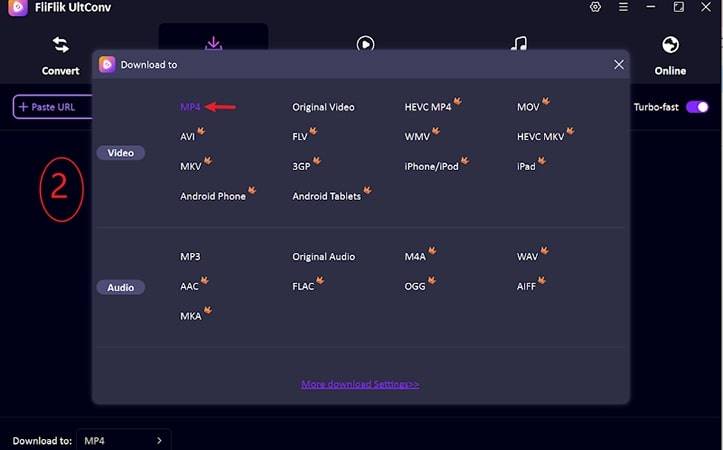
Launch UltConv and go to the “Download to” option.

-
Choose your preferred output format, such as MP4.
-
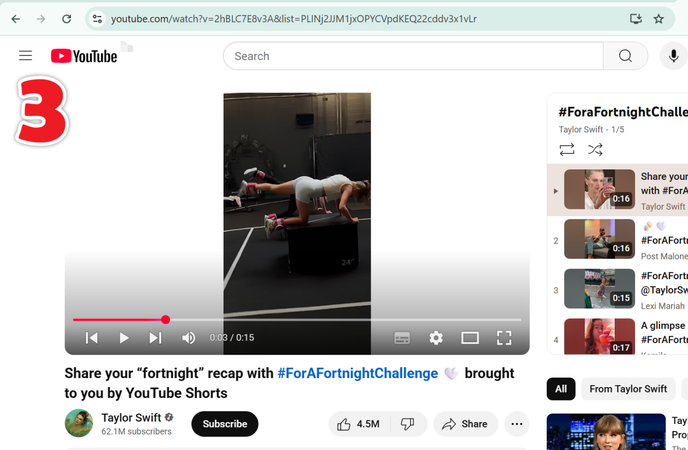
Open the YouTube playlist you want to download and copy its URL.
-
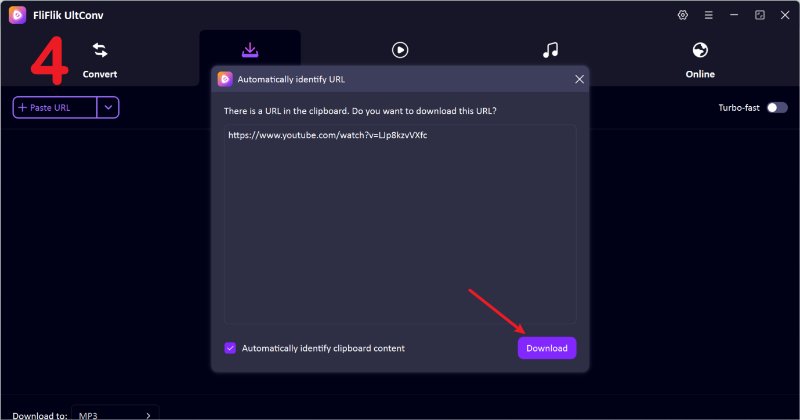
Paste the playlist link in UltConv; it will automatically detect all videos. Click Download Playlist.
-
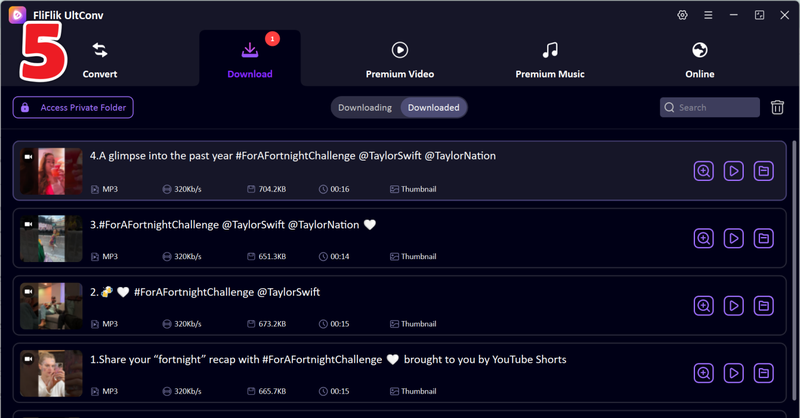
UltConv will save the entire playlist to your default folder for offline viewing.


2. YouTube MultiDownloader (YMD)

YouTube MultiDownloader (YMD) is an open-source PHP script for self-hosting on your own server. It fetches video URLs via YouTube API calls and supports downloading entire channels or playlists. YMD is lightweight and free, perfect for users comfortable with a PHP/web server setup. While it only supports YouTube and the max resolution is limited to 720p, it’s reliable for basic batch downloads. There’s no GUI, but it can be customized for advanced users. For tech-savvy individuals who prefer a simple, code-based solution, YMD is an efficient youtube multi downloader.
- Free and open-source
- Can download entire playlists and channels
- Customizable if self-hosted
- Lightweight, minimal setup
- Max resolution limited to 720p
- No graphical interface
- Requires PHP/web server
- Supports YouTube only
3. YT Multi Downloader (Online)

YT Multi Downloader is a simple web-based tool and a convenient youtube multi downloader online. Just paste a playlist URL, choose MP4 or MP3, and download. It works on mobile and desktop browsers without installation. The tool allows sequential playlist downloads, but only one video can be downloaded at a time per browser tab. Options for resolution or formats are limited. Despite this, it’s perfect for users who want a fast, lightweight online solution to save YouTube playlists without desktop software.
- Free, web-based, no installation
- Supports playlists and channel
- Mobile and desktop friendly
- Lightweight and fast
- One download at a time per browser tab
- Limited formats and resolutions
- Requires an internet connection
4. YouTubePlaylist.cc

YouTubePlaylist.cc is an online multi-YouTube downloader designed for bulk downloads. It lets users save playlists or entire channels and export downloads as ZIP files. The tool supports high-resolution videos up to 8K and multiple platforms, including Facebook and Vimeo. Full access requires a login, and free usage is limited. While ads and the interface can be tricky for beginners, it’s a reliable choice for anyone looking to download large playlists or multiple videos efficiently.
- Supports playlists/channels in bulk
- Up to 8K video quality
- Works with multiple sites
- Export downloads as ZIP
- Login required for full access
- Free usage is limited
- Interface can be confusing
- Contains ads
5. Loader. To

Loader. to is a free, web-based multi-video downloader YouTube tool that doesn’t require registration. It handles playlists and supports numerous formats, including MP4, WebM, MP3, WAV, and more. It also works with other platforms like Vimeo and SoundCloud. Playlist downloads often require manually starting each video, and ads can be a minor nuisance. However, its broad format support, speed, and accessibility make it a strong online option for multi-video downloads.\
- Free, no registration
- Supports multiple formats and sites
- Can handle entire playlists
- Fast and accessible
- Ads on website
- Playlist downloads may need manual handling
- Basic interface, occasional lag
6. YouTube Mass Downloader

YouTube Mass Downloader is also a open source tool built for heavy users who need to save entire playlists, channels, or Shorts. It supports video up to 4K and multiple audio formats, including MP3, WAV, FLAC, and more. Advanced features like pause/resume, queuing, and scheduling make it ideal for managing large downloads efficiently. Files are automatically organized by playlist or channel. While desktop-only and a bit technical for beginners, it’s a powerhouse multi youtube downloader for users with extensive offline libraries.
- Feature-rich: pause/resume, queue, schedule downloads
- Supports HD/4K video and multiple audio formats
- Automatically organizes downloads by playlist/channel
- Handles all YouTube content types
- Desktop-only (Windows)
- The interface may intimidate beginners
- Requires installation
Final Words
Whether you need a Youtube multi downloader for quick playlists or full channel backups, there’s a tool for every user. Desktop solutions like FliFlik UltConv Youtube multi downloader offer batch support, ultra-high resolutions, and 100+ formats, making it the easiest and fastest way to download entire channels. Web tools like YT Multi Downloader and YouTubePlaylist.cc are great for casual users or mobile access, while Loader.to and YouTube Mass Downloader cater to power users with multi-site or advanced queueing needs. For the most reliable, versatile, and user-friendly experience, try FliFlik UltConv YouTube multi downloader and enjoy effortless YouTube multi downloads every time.
Secure Download
Secure Download
Hey there! I am Maxwell Clark. I'm always looking for new tech tools that make a difference, from making visuals and audio better to making workflows better. I'm going to share tips and tricks for using AI tools for videos, audio, and images. I'm excited to help you navigate the digital world more efficiently and creatively!

