

 7 minutes read


Are you searching for a dedicated tool to download YouTube videos? For this, you need a good YouTube ripper. YouTube rippers lets you download a video file from YouTube or rip audio from a video. No matter you are using Windows or Mac, Android or iOS, it is a win-win solution that can meet your needs. In this article, we will show you the 12 top YouTube rippers in 2025, which can help you save your favorite YouTube files with high quality, speed, and safety.

Part 1: Quick Overview of 12 Best YouTube Rippers
Here’s a quick look at the 12 best YouTube rippers. You can see their features, what devices they work on, and how fast they are. Later, we’ll go into more detail about each one, so you can find the best tool for downloading videos or audio easily.
| Tool / Ripper | Type | Supported Platform(s) | Max Output Quality | Batch Download Supported | Download Speed (Approx.) | Best For |
|---|---|---|---|---|---|---|
| FliFlik UltConv | Desktop App | Windows, Mac | Video up to 4K; Audio up to 320 kbps | Yes | Fast (multi‑thread, 10× speed) | Heavy users, full playlists, high‑quality music & video, bulk jobs |
| YTD Video Downloader | Desktop App | Windows, Mac | Video up to 1080p; Audio up to 128kbps | Limited | Moderate (4× speed) | Simple downloads of individual YouTube videos |
| ClipGrab | Desktop App | Windows, Mac, Linux | Video up to 1080p; Audio up to 128kbps | Limited | Moderate | Users wanting quick MP3s or MP4s without heavy features |
| NoteBurner YouTube Audio Ripper | Desktop App | Windows, Mac | Audio up to 320 kbps | Yes | Moderate (10× speed) | Music lovers who want clean, high‑quality audio extractions |
| NewPipe | Mobile App | Android | Video up to 1080p; Audio 128–320 kbps | Limited | Moderate | Android users wanting open‑source and no‑Google‑account downloads |
| UltConv (Android version) | Mobile App | Android (Android 7.0+) | Video up to 4K; Audio 320 kbps | Yes | Fast (10× speed) | Anyone using Android who wants flexibility: playlists, conversions, offline media |
| iXplorer | Mobile App / iOS | iPhone, iPad | Video up to 1080p; Audio MP3/AAC | Limited | Slow (1×) | iOS users needing an easy, all‑in‑one downloader/file manager |
| Documents by Readdle | Mobile App / iOS | iPhone, iPad | Video up to 1080p; Audio MP3/AAC | Limited | Slow (1×) | iOS users who want a file manager + downloader combo |
| TubeRipper | Web / Online | Any (Browser-based) | Audio MP3, Video MP4 up to 720–1080p | Limited | Slow (1×) | Quick one-off downloads without installing software |
| YT1S | Web / Online | Any (Browser-based) | Audio MP3 or Video MP4 (720–1080p) | Limited | Slow (1×) | Users needing a quick “YouTube video ripper” for occasional downloads |
| Socialplug | Web / Online | Any (Browser-based) | Audio MP3, Video MP4 (up to 1080p) | Limited | Slow (1×) | Simple, no‑installation downloads from YouTube or other supported sites |
| RipYouTube | Web / Online | Any (Browser-based) | Audio MP3, Video MP4 (up to 1080p) | Limited | Slow (1×) | Users wanting a quick, device‑agnostic ripper for video or audio |
Part 2: 4 Best YouTube Rippers for Windows and Mac
If you’re looking for tools that can save YouTube videos without any problem, the options below are perfect for you. This quick list will help you pick the one that fits your needs best.
1. FliFlik UltConv Video Downloader
FliFlik UltConv Video Downloader is one of the best YouTube ripper for Windows and Mac. With UltConv Video Downloader, downloading videos and music from YouTube platforms is super easy and super fast. It lets you save entire playlists, individual videos, convert music to audio, and more. The quality is never compromised. Also, the interface is simple, and you can start ripping right away, no technical skills necessary.
UltConv Video Downloader isn’t just for YouTube. The software works with over 10,000+ other platforms, from Twitch to TikTok to Vimeo and beyond, so you’ve got access to tons of content. But UltConv is more than just a ripping tool. It has many powerful features for advanced users, like DRM removal, batch downloading, and saving live streams. You can convert videos and audio into 100+ different formats.

- Download videos from 10,000+ websites, YouTube, TikTok, Instagram, etc.
- Convert videos to audio to 100+ formats
- Batch download playlists, channels, or albums in one click
- Support for 4K, 2K, 1080p video, and 320kbps audio
- Remove DRM protection from Spotify, Apple Music, and YouTube Music
- Save live streams directly from YouTube, Twitch, or TikTok
▼ How to Convert YouTube to MP4 with UltConv Video Downloader?
FliFlik UltConv Video Downloader is a reliable YouTube ripper for Mac and Windows users that can also be used to download videos quickly and in high quality. After downloading and installing the program on your computer, follow these steps to save any YouTube video as an MP4 file.
 Secure Download
Secure Download
Secure Download
-
Open UltConv Video Downloader and go to the Download tab. Click the “Download to” button at the bottom to get started.

-
Choose your preferred output format.

-
Open YouTube in your browser and copy the URL of the video you want to download.

-
Return to UltConv. If the program detects the link automatically, click Download to save the video.

-
If the link isn’t detected, paste it manually into the search box and press Download.



Once the download is complete, your video will be saved in your format. You can now watch it offline anytime, without buffering or streaming interruptions.
2. YTD Video Downloader

YTD Video Downloader is another simple tool for downloading YouTube videos to your computer. It works on Windows and Mac, allowing you to save videos in multiple formats and resolutions. With a clean interface, it’s a great choice for anyone looking for a straightforward YouTube video ripper without complicated features.
- Easy to use for beginners.
- Supports multiple formats like MP4, AVI, and MOV.
- Can convert downloaded videos to audio files.
- Limited batch downloading features.
- Free version has occasional ads.
- Updated interface
▼ How to use YTD Video Downloader:
- Step 1: Download and install YTD Video Downloader on your computer.
- Step 2: Copy the YouTube video link you want to save.
-
Step 3:
Open YTD, paste the URL into the input field.
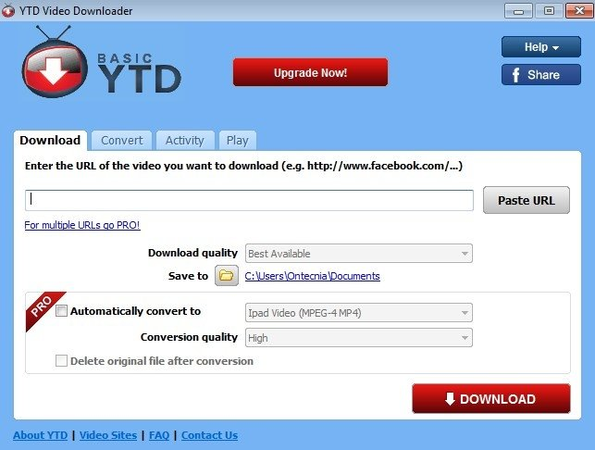
- Step 4: Select the output format and quality.
- Step 5: Click Download to start saving the video.

3. ClipGrab

ClipGrab is a popular tool that makes it easy to download and convert YouTube videos into multiple formats. It’s particularly favored as a YouTube MP3 ripper for quickly extracting audio tracks from videos. ClipGrab supports Windows, Mac, and Linux, making it a versatile choice for anyone wanting fast downloads.
- Free and open-source software.
- Converts YouTube videos directly into MP3, MP4, and other formats.
- Simple and intuitive interface.
- Some users may find the advanced settings limited.
- Occasional prompts for bundled software during installation.
- Limited support platforms, just YouTube and a few other platforms
4. NoteBurner YouTube Audio Ripper

NoteBurner YouTube Audio Ripper is designed to extract high-quality audio from YouTube videos. It’s perfect for music lovers who want to save songs from YouTube without losing sound quality. This tool works on both Windows and Mac, supporting multiple formats like MP3, AAC, and WAV.
- High-quality audio extraction.
- Supports multiple formats and bitrate settings.
- Simple and fast conversion process.
- Subscription price is too expensive
- Free version has some limitations on batch conversions.
Part 3: 4 Best YouTube Rippers on Android and iOS
If you want to save YouTube videos right on your phone or tablet, these apps make it super easy. They work on both Android and iOS, and let you grab videos in high quality.
1. UltConv YouTube Ripper (Android)
UltConv YouTube Ripper for Android is a powerful YouTube downloader app designed to save both videos and audio directly to your mobile. It allows you to download YouTube videos in high quality, convert them into MP3 at 320kbps, and even grab entire playlists or channels in a few taps. Whether you want offline access to music, movies, or tutorials, this app makes it fast and simple without compromising quality.
- Download YouTube videos in 1080p or 4K resolution
- Convert YouTube videos to MP3 at 320kbps
- Batch download multiple videos or entire playlists
- Support for over 10,000 websites, including Facebook, Instagram, and TikTok
- Download in multiple formats: MP4, MP3, AAC, M4A
- Built-in file manager to organize all media
- One-click download for playlists and channels
▼ How to Download YouTube Videos with UltConv for Android?
- Step 1: Download and install UltConv for Android on your mobile device. Open the app once installation is complete.
- Step 2: Open UltConv and go to YouTube. Find the video or playlist you want to save for offline viewing.
- Step 3: Tap the Download button. Choose your preferred format, such as MP4 for video or MP3 for audio, and select the quality.
- Step 4: Press Start Download. The video will be saved directly to your device, ready to watch offline anytime.

2. NewPipe (Android)

NewPipe is a lightweight and open-source YouTube downloader for Android. It allows users to download videos and audio without needing a Google account. It’s perfect for those who want a simple, ad-free experience while saving YouTube videos or converting them to MP3.
- Open-source and free to use
- No Google services required
- Download videos in MP4 or audio in MP3 easily
- Limited to Android devices
- Some advanced features require manual setup
▼ Steps to Use NewPipe to Download YouTube Videos:
- Step 1: Download and install the NewPipe APK on your Android device.
- Step 2: Open NewPipe and search for the YouTube video you want.
- Step 3: Tap the download icon next to the video.
- Step 4: Choose your preferred format and quality.
- Step 5: The file will be saved to your device for offline viewing.
3. iXpr (iOS)

iXpr is simple tool for iOS users to download YouTube videos, music, and other media directly to iPhones and iPads. It also helps manage files and transfer content between devices.
- Supports iOS devices seamlessly
- Easy video and audio download from multiple sites
- Built-in file management
- Free version has limited features
- Intrusive ads pop up frequently
▼ Steps to Use iXpr to Download YouTube Videos:
- Step 1: Install iXplorer on your iPhone or iPad.
- Step 2: Open the app and access YouTube via the built-in browser.
- Step 3: Find the video you want and tap the download button.
- Step 4: Select the output format (MP4 or MP3) and quality.
- Step 5: The file will save locally for offline access.
4. Documents by Readdle (iOS)

Documents by Readdle is another powerful iOS file manager that also lets you download YouTube videos, PDFs, music, and more directly to your iPhone or iPad.
- Free and feature-rich
- Built-in browser for direct downloads
- Easy file organization
- Slight learning curve for first-time users
- Some websites may require extra steps to download
- Advanced features are limited
▼ Steps to Use Documents by Readdle to Download YouTube Videos:
- Step 1: Download and install Documents by Readdle on your iOS device.
- Step 2: Open the app and use the built-in browser to visit YouTube.
- Step 3: Find the video you want to download. Or paste the video links
- Step 4: Tap the download icon and select your preferred format (MP4 or MP3).
- Step 5: The file will be saved in the app’s local storage for offline playback.
Part 4: 4 Best YouTube Rippers Online
If you don’t want to install anything, online YouTube rippers are the way to go. They work directly in your browser, let you download videos quickly, and are perfect for grabbing content on the fly.
1. TubeRipper

TubeRipper is an easy-to-use online tool designed to quickly convert YouTube videos into audio or video files. It works directly in your browser, so there’s no need to install software. Users can save videos in MP4 or audio in MP3 formats with just a few clicks. It’s perfect for anyone looking for a fast YouTube audio ripper to grab music or lectures on the go.
- No installation required, works online
- Supports MP3 and MP4 formats
- Fast and simple interface
- Limited features compared to desktop software
- Ads on the site can be distracting
▼ Steps to Use TubeRipper to Download YouTube Videos:
- Step 1: Go to the TubeRipper website in your browser.
- Step 2: Copy the URL of the YouTube video you want to convert.
- Step 3: Paste the link into TubeRipper’s search box.
- Step 4: Choose MP3 as the output format to extract audio.
- Step 5: Click the Download button. The audio file will be saved to your device.
2. YT1S

YT1S is a versatile online YouTube ripper that lets you quickly convert videos into MP3 or MP4 formats. It supports high-quality downloads and is compatible with almost all devices, including smartphones, tablets, and PCs. The platform is free to use and doesn’t require registration, making it a convenient option for those who need a simple YouTube video ripper without extra software.
- Free and easy to use
- No account registration needed
- Compatible with multiple devices
- Pop-up ads may appear
- Limited format options for advanced users
- Excessive parsing time during download
3. Socialplug

Socialplug is an online platform that allows users to download YouTube videos as MP4 or MP3 files instantly. It also supports other popular streaming platforms. Its interface is clean and intuitive, allowing even beginners to extract audio or video in a few clicks. SocialPlug is ideal for users who want a quick, browser-based YouTube audio ripper without installing apps.
- Simple and intuitive interface
- Works with multiple streaming platforms
- No installation required
- Some videos may fail to download
- Ads can disrupt the experience
4. RipYouTube

RipYouTube is an online service focused on fast YouTube downloads, letting users save videos in HD or convert them to MP3 audio files. It works on any device with a browser, including smartphones, tablets, and desktops. The platform is user-friendly, making it easy to extract audio quickly, serving as a reliable YouTube audio ripper for music lovers, students, and content creators.
- Quick conversion and download
- No software installation needed
- Works on all devices
- Occasional ads may appear
- Limited advanced settings for format customization
Final Words
If you want to save your favorite videos or music from YouTube, having a good YouTube ripper makes all the difference. Online tools are handy, but desktop apps like FliFlik UltConv Video Downloader give you more control, faster downloads, and better quality. Forget dealing with slow, ad-filled sites. FliFlik UltConv Video Downloader makes grabbing videos and audio quick and easy. Your favorite YouTube content is just a click away, ready to watch anytime you want.
Secure Download
Secure Download
FAQs
Q1. Are YouTube rippers legal?
Using YouTube rippers to download videos for personal use, like offline viewing, usually falls into a gray area. You should never download copyrighted content for redistribution or commercial purposes. Stick to videos with open licenses or your own uploads to stay on the safe side.
Q2. Can I rip audio from YouTube?
Yes, plenty of YouTube rippers, including FliFlik UltConv Video Downloader, let you pull audio from videos in MP3, WAV, or other formats. It’s great for music, podcasts, or lectures you want to listen to offline. Just make sure to respect copyright and avoid sharing anything protected.
Hey there! I am Maxwell Clark. I'm always looking for new tech tools that make a difference, from making visuals and audio better to making workflows better. I'm going to share tips and tricks for using AI tools for videos, audio, and images. I'm excited to help you navigate the digital world more efficiently and creatively!

