

 8 minutes read


YouTube’s a tough place these days, and a lot of creators want a shortcut to get more eyes on their videos. That’s why some people turn to YouTube view bots. These bots can quickly boost your view numbers, making your videos appear more popular. Sounds like a quick fix, right? But you really need to know what you’re getting into, how these bots work, and the risks that come with them. In this article, we will explain it all.
Heads Up: Please note that this article does not endorse using YouTube view bots. They can violate YouTube’s terms of service, and misuse may result in account penalties or bans. The information here is for educational purposes only. Use it at your own risk.

Part 1. How Does the YouTube View Bot Work?
A YouTube view bot is a tool designed to generate artificial views on a video by simulating human behavior. Instead of real people clicking play, the bot uses automated scripts, servers, or proxy networks to load a video repeatedly. From the outside, it can look like genuine traffic, at least for a short time.
Here’s the basic idea behind how to bot YouTube views. The software sends multiple requests to YouTube using different IP addresses, devices, and locations. Some tools also add watch time, pauses, or refresh delays to appear more natural. More advanced bots rotate proxies and user agents to avoid quick detection.
What this really means is simple. The views aren’t organic. YouTube’s system is built to spot patterns like repeated plays, unusual traffic spikes, or fake engagement. That’s why these tools come with real risks, which we’ll get into later.
Part 2. Is YouTube Views Bot Safe
Short answer: not really. Using a views YouTube bot always comes with risks, even if the tool claims to be safe or undetectable. Here’s why:
- Violates YouTube rules: View bots break YouTube’s terms of service, which can lead to video removal or channel strikes.
- Risk of bans: YouTube can freeze views, limit reach, or even terminate your channel.
- Fake engagement: Bot views don’t bring real likes, comments, or subscribers.
- Easy detection: Sudden view spikes and unnatural watch patterns are easy for YouTube to flag.
- Security concerns: Some bots require logins or downloads that can expose your account or device.
What this really means is simple. Any shortcut comes with a trade-off, and in this case, the risk often outweighs the reward.
Part 3. 6 Best Efficient YouTube Views Bots
These tools all promise the same outcome: more views, more reach, faster growth. What separates them is how they claim to do it.
1. YTMonster

YTMonster positions itself as a traffic exchange platform rather than a classic automation tool. Users earn credits by watching other videos, then spend those credits to boost their own content. It’s often mentioned when people search for a view bot YouTube solution that doesn’t rely entirely on software installs.
- Credit-based system instead of direct automation
- View exchanges from real user sessions
- Supports views, likes, and subscribers
- Web-based, no heavy setup required
2. UltraBot

UltraBot markets itself aggressively as a premium automation solution. It focuses on scale, control, and behavior simulation, aiming to replicate how real users interact with YouTube. If someone is looking for high-volume bot views on YouTube, this is usually the type of tool they’re referring to.
- 24/7 automated video and channel boosting
- Human-like behavior emulation (mouse, keyboard, Chrome profiles)
- Multi-threading with up to 100 simultaneous sessions
- Custom watch time and full-retention views
- Ads control, likes, subscribers, livestream views
- Auto-updates and large fingerprint database
3. Awesome YouTube Bot

Awesome YouTube Bot is positioned as an all-in-one desktop assistant for ranking and engagement automation. It emphasizes IP rotation and configurable behavior to reduce obvious patterns.
- Advanced IP-changing and proxy support
- Automated views, likes, and engagement actions
- Configurable behavior profiles
- Subscription-based licensing (monthly or annual)
- Designed for long-term automation rather than quick spikes
4. Somiibo

Somiibo takes a broader approach. Instead of focusing only on YouTube, it presents itself as a cross-platform social automation suite. YouTube views are just one part of its ecosystem.
- Free social media automation platform
- Automated engagement to encourage follow-backs
- Supports YouTube, Instagram, TikTok, Twitter, Spotify, and more
- Unlimited YouTube views through automation
- Built-in proxy browser and user-agent control
5. SocialBoosting

SocialBoosting is not a traditional bot you install and run. It’s a service-based platform where users purchase engagement packages. The emphasis is on simplicity and speed rather than manual configuration.
- Ready-made YouTube view packages
- Fast delivery without setup
- Focus on “safe and secure” growth
- Customer support and money-back guarantee
- Entry-level pricing for small boosts
6. YouTube Viewbot (Open-Source Script)

This option is very different from the others. It’s an open-source script hosted on Replit, typically used by developers or experimenters. People exploring how to bot youtube views often start here to understand the mechanics rather than to scale safely.
- Simple script-based view automation
- Customizable logic for learning or testing
- No built-in safety or anti-detection layers
- Requires technical knowledge to run and modify
- More educational than production-ready
Beyond the Bot: Download YT Viral Content to Study Sustainable Growth
Here’s the truth most creators eventually learn. Bots might inflate numbers, but they don’t teach you why a video works. Real, repeatable growth comes from studying winning content closely. Frame by frame. Cut by cut. Hook by hook. That’s where downloading viral YouTube videos becomes a creator advantage. When you have the actual video file on your system, you’re no longer fighting buffering, compression, or playback limits. You can drop the file straight into Premiere Pro, Final Cut, DaVinci Resolve, or CapCut and dissect everything. The opening three seconds. The pacing. The micro transitions. The exact moment the call to action lands. This is how you reverse-engineer success instead of guessing. This is exactly why many creators turn to FliFlik UltConv Video Downloader.
FliFlik UltConv Video Downloader isn’t built for vanity metrics. It’s built for creators who want to learn, adapt, and scale smarter. Instead of screen recording or unreliable online tools, UltConv lets you download 4K/8K YouTube videos directly as clean files. No lag. No quality loss. No interruptions. Once downloaded, you can scrub through every frame without buffering and analyze viral content like a professional editor. And it doesn’t stop at video. Music is half the emotional pull on YouTube. UltConv also supports unlimited music downloads, including Spotify and Apple Music tracks converted to MP3. That means you can study trending audio, remix legally owned tracks for editing workflows, and test how music choices affect retention.

- Download YouTube videos in original quality for offline editing
- Save videos from 10,000+ websites, YouTube, TikTok, Instagram, etc
- Save videos in 4K, 2K, 1080p, or audio up to 320kbps
- Convert video to audio without quality loss in 100+ formats
- Remove DRM of Spotify and Apple Music in one click
- Batch download multiple videos or tracks at once
- Import files directly into any video editor for analysis
▼ How to Convert YouTube to MP4 with UltConv Video Downloader?
FliFlik UltConv Video Downloader works on both Windows and Mac and makes saving YouTube videos simple and fast. It lets you download videos in high quality and convert them directly to MP4 without extra steps. Once the software is installed, here’s how the process works.
 Secure Download
Secure Download
Secure Download
-
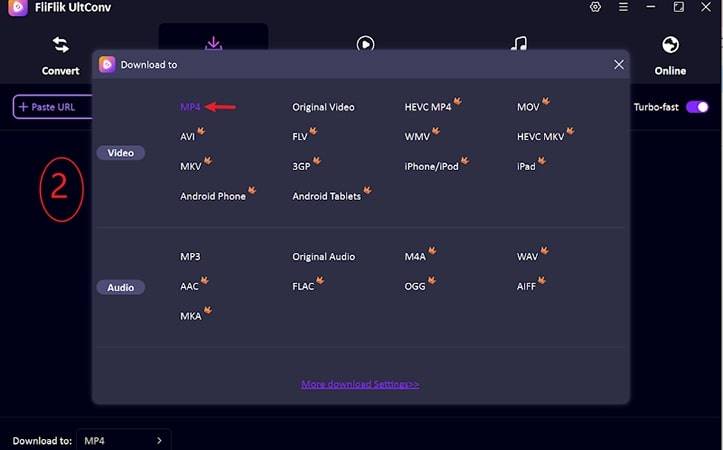
Open UltConv Video Downloader and open the Download section. At the bottom, click the Download to option to begin.

-
Choose your output format. Select MP4 from the available options.
-
Go to YouTube in your web browser and copy the link of the video you want to save.

-
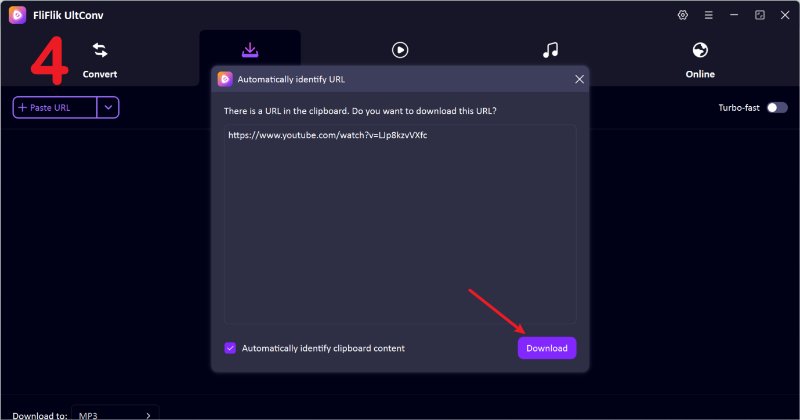
Switch back to UltConv. If the app picks up the copied link automatically, just click Download.
-
If the link isn’t detected, paste it into the search bar manually and hit Download.


Once the download finishes, the video is stored on your device in MP4 format. You can play it anytime without buffering, ads, or an internet connection.
Final Words
A YouTube view bot might look like a quick win, but it’s not a growth strategy. Bots can inflate numbers, not trust, watch time, or real engagement. If you actually want to understand why certain videos explode, and others don’t, studying real viral content is the smarter move.
That’s where FliFlik UltConv Video Downloader earns its place. It lets you download trending YouTube videos in full quality, bring them into your editor, and break them down frame by frame. Hooks, pacing, transitions, calls to action. No buffering. No guesswork. Just real insights you can apply to your own channel. If you’re serious about long-term growth, this is the tool to use.
Secure Download
Secure Download
FAQs
Q1. Can YouTube Detect Bot Views?
Yes. YouTube actively monitors viewing behavior and can detect abnormal traffic patterns, including bot-driven views.
Q2. Is the YouTube views bot legal?
Using bots violates YouTube’s terms of service. It’s not illegal in most regions, but it can lead to strikes, demonetization, or channel removal.
Hey there! I am Maxwell Clark. I'm always looking for new tech tools that make a difference, from making visuals and audio better to making workflows better. I'm going to share tips and tricks for using AI tools for videos, audio, and images. I'm excited to help you navigate the digital world more efficiently and creatively!

