

 8 minutes read


YT5s can be pretty hit or miss. Sometimes the links break, downloads cut out halfway, or the format you need just vanishes. Next thing you know, you’re back to square one, hunting for something that actually works.
If you’re trying to use YT5s to grab YouTube videos, but find that it is not working, it sounds awful, right? Don’t worry, there are a lot of YouTube Downloader are way better than YT5s when it comes to speed, quality, and just not letting you down. So, let’s get into it. Here are the 12 best YT5s alternatives that actually do what they promise. Just clear choices so you can pick the right tool and move on with your day.

Part 1. What is YT5s?

YT5s is a free online YouTube downloader. It lets you turn a YouTube video into a downloadable file without installing anything. You open the site, paste the video link, choose a format, and download. That’s it. It works on most devices because everything runs inside the browser. Many users end up searching YT5s alternative Reddit because while YT5s looks simple, the experience isn’t always smooth or consistent.
- Converts YouTube videos to MP4 and MP3 formats
- Supports multiple quality options, including HD when available
- No account, signup, or software installation required
- Works on mobile, desktop, and tablets
 Limits
- Heavy ads and pop-ups can interrupt the process
- Redirects may raise safety concerns
- Download success is inconsistent for longer videos
- Some formats or qualities fail without warning
Part 2. 3 Best YT5s Alternatives for Windows and Mac
If you’re downloading videos often, browser tools can feel unreliable. Desktop software is usually faster, cleaner, and more stable. Below are three solid YT5s alternatives that work smoothly on both Windows and Mac without the usual headaches.
Top 1: FliFlik UltConv YouTube Downloader
The first tool that we recommend you can use as a YT55s io alternative is FliFlik UltConv YouTube Downloader. This tool is built for users who want reliable downloads without pop-ups, broken links, or quality loss. It supports downloads from over 10,000 websites, including YouTube, TikTok, Facebook, Instagram, Twitter, and many major streaming and music platforms. You can save videos in multiple formats like MP4, MKV, and WEBM, or extract audio in MP3, WAV, FLAC, and other high-quality formats. UltConv also supports a wide range of resolutions, from 720p and 1080p all the way up to 2K, 4K, and even 8K when available. On top of that, it allows batch downloads for playlists, channels, and albums, making it a strong choice if you download content regularly and want a cleaner, more powerful alternative to YT5s.

- Download videos from 10,000+ sites, YouTube, Twitter, Netflix, TikTok etc
- Save videos in 720p, 1080p, 2K, 4K, and even 8K
- Convert videos to MP3, WAV, FLAC, and 100+ formats
- Batch download series, playlists, channels, and albums
- Remove DRM from Spotify and Apple Music
- Download audio in up to 320kbps without quality loss
▼ How to Download YouTube Video with UltConv YouTube Downloader?
FliFlik UltConv YouTube Downloader is a reliable downloader for users to download videos quickly and in high quality. After downloading and installing the program on your computer, follow these steps to save any YouTube video as an MP4 file.
 Secure Download
Secure Download
Secure Download
-
Open UltConv YouTube Downloader and go to the Download tab. Click the “Download to” button at the bottom to start.

-
Choose your preferred output format. I chose MP4 as the output format here.

-
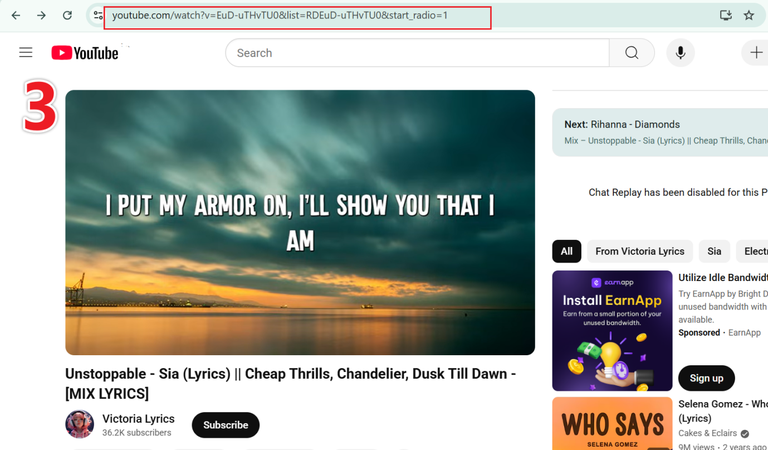
Open YouTube in your browser and copy the URL of the video you want to download.
-
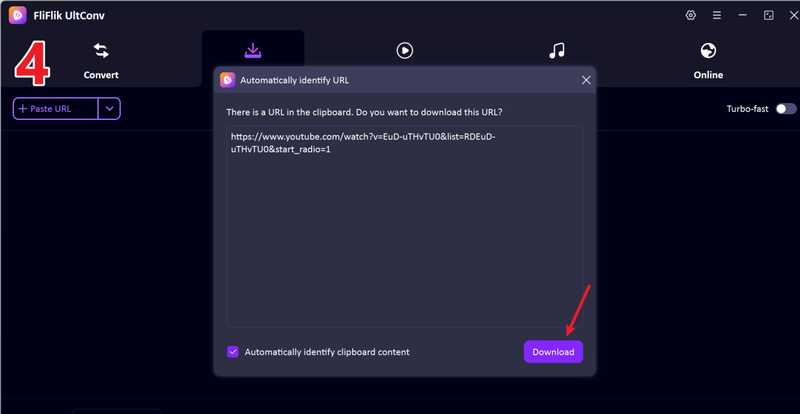
Return to UltConv. If the program detects the link automatically, click Download to save the video.
-
If the link isn’t detected, paste it manually into the search box and press Download.
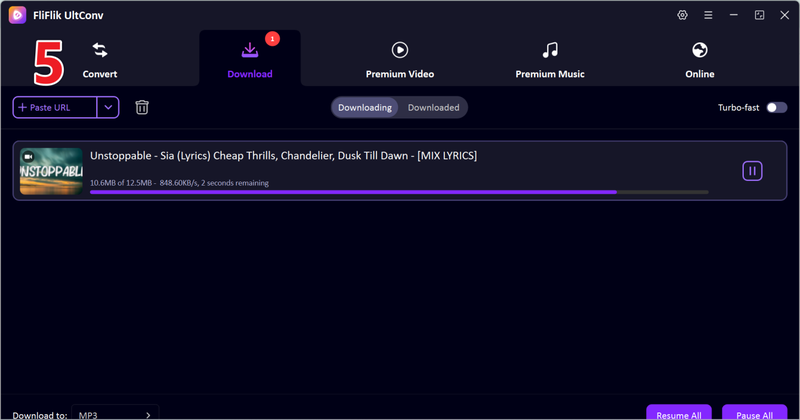


Once the download finishes, your video will be saved in the chosen format. You can watch it offline anytime, without buffering or streaming interruptions.
Top 2: YTSaver

The second tool you can try is YTSaver Video Downloader. It’s a simple program for Windows and Mac that helps you download videos from YouTube. You can save videos in MP4 or MP3 and keep them in high quality. It also lets you download multiple videos at once, which is handy if you want playlists. The interface is clean and easy to use, so you don’t need any technical skills to get started.
- Download videos in MP4, MP3, and other common formats
- Supports HD, Full HD, and 4K resolutions
- Easy-to-use interface
- Batch download multiple videos or playlists
- Fewer advanced features than some other tools
- Large playlists may download slowly
- No live stream downloader
Top 3: KeepStreams

The third tool we recommend is KeepStreams. It works on both Windows and Mac and can download videos from YouTube and many other sites. You can save videos in different formats and high quality, including 4K. KeepStreams also supports playlists, channels, and albums, making it easy to get multiple videos at once. The interface is straightforward, so anyone can use it without confusion.
- Download videos from YouTube, TikTok, Vimeo, and more
- Supports multiple formats and high-quality videos
- Batch download playlists, channels, and albums
- Simple and easy interface
- Free version has fewer features
- Ads or pop-ups may appear
- Some advanced options require the paid version
Part 3. 4 Best YT5s Alternatives for Android and iOS
If you want to download YouTube videos directly to your phone or tablet, browser tools often don’t cut it. Mobile apps make the process faster and more convenient. Here are four solid YT5s alternatives that work smoothly on both Android and iOS.
Top 1: FliFlik UltConv for Android
The first mobile tool we recommend as a YT5s new alternative is FliFlik UltConv for Android. This app makes it easy to download high-quality videos and music directly to your phone or tablet. You can save content from YouTube, Facebook, Instagram, and over 10,000 other sites. It supports multiple resolutions, from 360p up to 4K, and lets you convert videos to MP3 at 320kbps. The interface is simple, so even beginners can download playlists, single videos, or audio tracks in just a few taps.
- Download YouTube videos in MP4 and audio in MP3 320kbps
- One-click download for playlists and channels
- Batch download multiple videos at the same time
- Save videos in 1080p, 4K, or flexible resolutions
- Supports over 10,000 websites, including social media platforms
- Download in the background and auto-resume unfinished tasks
▼ Steps to Download YouTube Videos with UltConv Video Converter
-
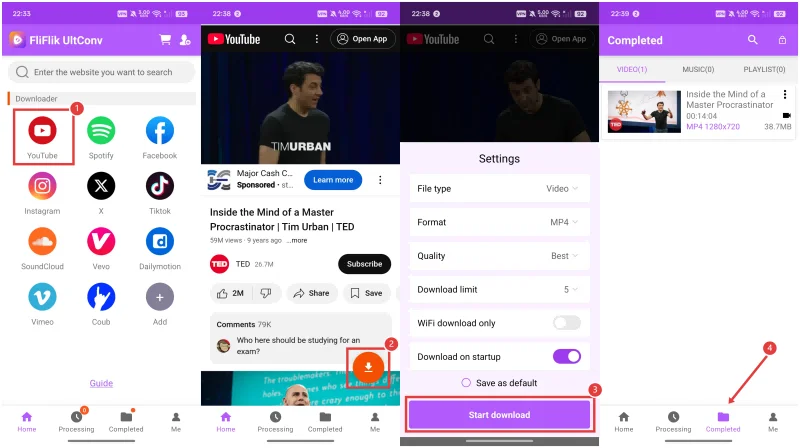
Step 1: Download and install UltConv Video Converter for Android on your device. Once installed, open the app.
-
Step 2: Use UltConv’s built-in browser to go to YouTube. Find the video or playlist you want to save for offline viewing.
-
Step 3: Tap the Download button, choose your format (MP4 for video or MP3 for audio), and pick the quality.
-
Step 4: Press Start Download, and the video will be saved directly to your device for offline viewing.

Top 2: TubeMate

The second mobile tool we recommend for downloading YouTube videos is TubeMate, a widely known app for Android users. If you want to save videos to watch offline, TubeMate makes it simple and fast. It allows you to choose different video resolutions, from standard quality up to HD, and also supports audio-only downloads in MP3 format. You can save single videos or entire playlists in just a few taps. Its interface is clean and straightforward, so beginners can navigate it easily, while experienced users still have control over formats and quality. Overall, it’s a solid choice if you want a reliable YT5s alternative for Android.
- Download videos in different resolutions
- Save videos as MP4 or MP3
- Simple and easy-to-use interface
- Can download multiple videos at once
- Only available for Android
- Ads can be intrusive
- Occasional issues with some video links
Top 3: Video Downloader from YouTube

For iOS users, a good YT5s alternative is Video Downloader from YouTube. This app makes it easy to save videos directly to your iPhone or iPad for offline viewing. You can select video quality before downloading and choose between video or audio-only formats. The app also lets you organize your downloads neatly within the interface, so you can quickly find and watch your saved content. With its simple and intuitive design, beginners can start using it immediately, while more advanced users can still take advantage of its features. It’s a practical solution for anyone looking for a reliable YT5s alternative on iOS.
- Download videos directly to iOS devices
- Supports MP4 and audio formats
- Organize downloads in the app
- Simple interface suitable for beginners
- Some features are limited to the paid version
- Download speed can vary depending on video size
- Only works on iOS devices
Top 4: Documents by Readdle

Documents by Readdle is a reliable file manager app for iOS that also works as a YouTube video downloader. While it’s primarily used for managing files, it has a built-in browser that lets you download videos directly to your device. You can save videos in different formats and organize them within the app, making it a handy tool for offline viewing. Its clean interface and additional features, like reading PDFs or playing media, make it more than just a downloader.
- Download videos directly to iPhone or iPad
- Built-in browser for easy video saving
- Organize and manage downloads within the app
- Supports multiple file formats, including MP4 and audio
- Not solely designed as a video downloader
- Some advanced features require in-app purchases
- Download process is slightly less straightforward than dedicated apps
Part 4. 5 Best YT5s Alternatives Still Working Online
If you don’t want to install any software, there are still online tools that let you download YouTube videos directly from your browser. Here are five of the best YT5s.io alternative options that are still working online.
Top 1: Ddownr

Ddownr is a simple online YT5s.io alternative tool that allows you to download YouTube videos in just a few clicks. It supports multiple formats and resolutions, making it a convenient choice for users who don’t want to install apps. Its clean interface makes the process quick and straightforward.
- Works directly in the browser with no installation
- Supports MP4 and MP3 formats
- Allows multiple resolution options, including HD
- Simple and easy-to-use interface
- Limited advanced features
- May not support very long playlists
- Depends on a stable internet connection
Top 2: Savefrom.net

Savefrom.net is another popular online downloader that allows users to save videos from YouTube and other sites. It’s fast and easy to use, but it is geo-blocked in some regions, including the USA, which limits accessibility for some users.
- Supports multiple video and audio formats
- Simple interface, good for quick downloads
- Works on both desktop and mobile browsers
- Geo-blocked in some countries, including the USA
- Ads can be intrusive
- Limited batch download options
Top 3: YT1s

YT1s is an online YouTube downloader that lets you convert videos to MP4 or MP3 quickly. It supports high-quality downloads and works on any device with a browser, making it a convenient choice for people who need a fast, no-install solution.
- Fast downloads in multiple formats
- Supports HD and Full HD resolutions
- No software installation required
- Ads can be distracting
- Batch downloads are limited
- May not handle very long videos or playlists
Top 4: SnapVee

SnapVee is a browser-based tool for downloading YouTube videos and converting them into audio or video files. It’s easy to use, supports multiple resolutions, and doesn’t require any registration.
- No registration or software needed
- Supports MP4 and MP3 formats
- Works on both mobile and desktop browsers
- Ads on the website can be annoying
- Batch download options are limited
- Some videos may fail to download
Top 5: Y2Mate

Y2Mate is one of the most well-known online YouTube downloaders. It allows users to save videos in various formats and resolutions quickly. Its simple interface makes it accessible for beginners, while still offering enough options for users who want more control.
- Supports multiple formats, including MP4 and MP3
- Allows high-resolution downloads, up to 1080p
- Works on any device with a browser
- Fast and straightforward download process
- Ads can be intrusive
- Some videos may fail to download
- Limited batch download capabilities
Final Words
Looking for a solid YT5s alternative doesn’t have to be complicated. There are plenty of options out there, from apps on your phone to online tools in your browser, but not all of them work smoothly or safely. That’s why FliFlik UltConv YouTube Downloader really stands out; it’s fast, easy to use, and works on almost any device. You can grab videos, playlists, or even just audio in high quality without any hassle. If you’re tired of tools that fail or flood you with ads, give FliFlik UltConv Video Downloader a try and see how simple downloading can be.
Secure Download
Secure Download
FAQs
Q1. Is YT5s legal?
YT5s itself is a free online tool, but downloading copyrighted content without permission may violate YouTube’s terms of service. Always make sure to download videos legally.
Q2. What are the best YT5s alternatives?
If you’re looking for a reliable and all-in-one solution, FliFlik UltConv Video Downloader is a good choice. It works on multiple devices, supports thousands of sites, and lets you download videos, playlists, and audio in high quality easily.
Hey there! I am Maxwell Clark. I'm always looking for new tech tools that make a difference, from making visuals and audio better to making workflows better. I'm going to share tips and tricks for using AI tools for videos, audio, and images. I'm excited to help you navigate the digital world more efficiently and creatively!

